


 Video Converter Ultimate
 Screen Recorder
 Riparazione video
 Download sicuro
Come combinare file video MPEG in uno – 2 metodi finali che dovresti conoscere
Come unire file MPEG? Hai appena scaricato una vecchia serie TV in formato MPEG, ad esempio 8 brevi episodi, e ognuno di essi ha una sigla iniziale e finale ridondante. Come unire questi file MPEG in un unico video come se fosse un film? Che tu debba semplicemente combinare i video in uno solo, oppure unire i file MPEG con funzionalità più avanzate, ecco 2 metodi efficienti che non dovresti perderti.

Parte 1: Come combinare file MPEG online gratuitamente
FVC Free Online Video Merger è un unificatore MPEG online gratuito che ti consente di unire file MPEG, MP4, AVI e molti altri formati video senza limiti di dimensione. Ti permette di combinare più file MPEG in video di grande effetto senza aggiungere alcuna filigrana. Inoltre, i file caricati verranno eliminati entro 24 ore per proteggere la tua privacy.
Passaggio 1: Vai a FVC Free Online Video Merger con qualsiasi browser web. Fai clic sul pulsante Upload Videos to Merge al centro della pagina per scaricare il programma di installazione. Dopodiché, puoi fare nuovamente clic sul pulsante per caricare i file MPEG che vuoi unire nel programma online.

Passaggio 2: Una volta entrato nell’interfaccia Merging videos, puoi organizzare la sequenza dei video MPEG che desideri unire. Ti consente di gestire la posizione del video, eliminare file o aggiungere altri file MPEG facendo clic sul pulsante insert new nel punto desiderato.
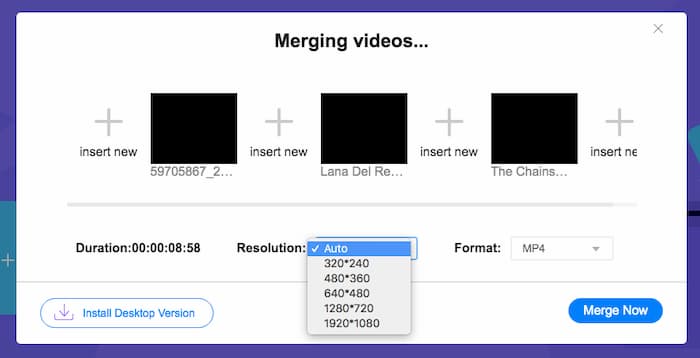
Passaggio 3: Successivamente, puoi scegliere la risoluzione e il formato del video di output. Puoi combinare i file MPEG in un file MP4 prima di fare clic sul pulsante Merge now per avviare il processo. Ti permette di ottenere il video desiderato in breve tempo.

Il combinatore video online è facile da usare. Tuttavia, se vuoi tagliare le aperture e i finali ridondanti degli episodi, non può aiutarti ulteriormente. È necessario utilizzare una fusione MPEG più potente.
Approfondimenti:
Parte 2: il metodo versatile per unire video MPEG
Aiseesoft Video Converter Ultimate è un unificatore MPEG professionale che ti permette di combinare le parti desiderate dei file MPEG in un unico film. Ti consente di tagliare la parte desiderata dei file MPEG, regolare la qualità video, personalizzare la filigrana o persino creare un film con temi diversi.
- 1. Combina i file MPEG in MPEG, MP4 e più di 300 formati video.
- 2. Modifica la risoluzione del video o addirittura migliora la qualità del video per l'unione dei file.
- 3. Taglia le parti desiderate dei file MPEG e combinale in un video.
- 4. Aggiungi effetti e filtri e personalizza le filigrane nei video MPEG.
Download gratuitoPer Windows 7 o versioni successiveDownload sicuro
Download gratuitoPer MacOS 10.7 o versioni successiveDownload sicuro
Passaggio 1: Avvia Aiseesoft Video Converter Ultimate sul tuo computer. Vai al menu Converter e fai clic sul grande pulsante “+” al centro dell’interfaccia principale per aggiungere i file MPEG che vuoi unire. Fai clic sul pulsante Add Files per importare tutti i file che desideri combinare.
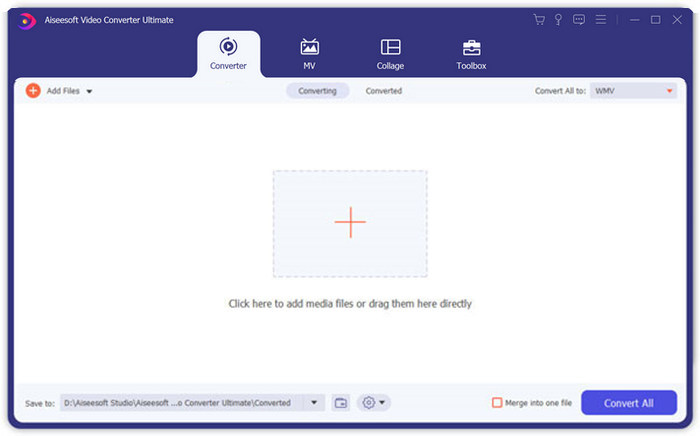
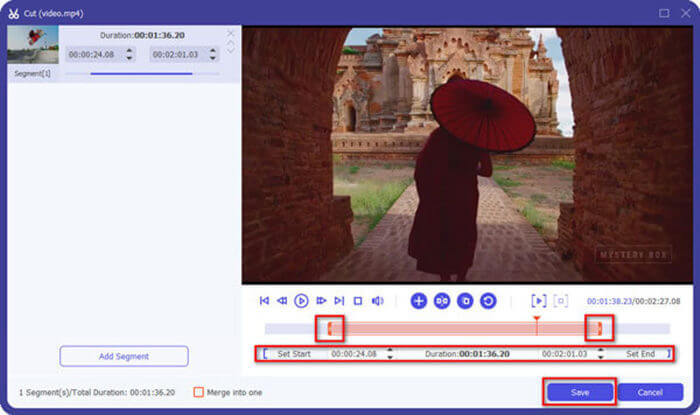
Passaggio 2: Per le clip MPEG che devono essere tagliate, fai clic sul pulsante Cut accanto al video. Puoi impostare i punti di inizio e fine per eliminare le sigle iniziali e finali dei tuoi video MPEG. Dopodiché, puoi fare clic sul pulsante Save in basso per salvare il file.
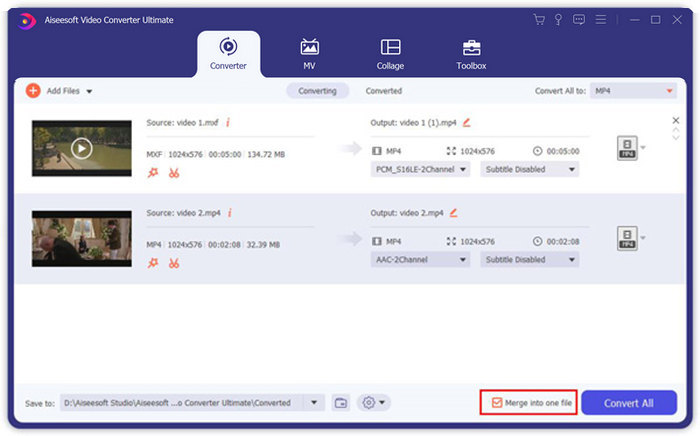
Passaggio 3: Successivamente, puoi trascinare il video tagliato nel programma. Regola la sequenza dei video MPEG. Quando tutto è pronto, devi selezionare la casella Merge into one file accanto a Convert All. Fai clic sul pulsante Convert All per iniziare a unire i file MPEG.
Parte 3: Domande frequenti sull'unione di file MPEG
Come unire file MPEG con la migliore qualità?
Quando vuoi unire file MPEG con una qualità simile, puoi scegliere i parametri come i video originali. Ma se i file MPEG hanno una qualità video diversa, devi prima eseguire l'upscaling di alcuni file MPEG con bassa qualità con il combinatore video professionale.
Posso combinare file MPEG con un iPhone o un telefono Android?
Sì. Prima di scaricare app di combinazione video per unire file MPEG, assicurati che l'app sia compatibile con MPEG o altri video che desideri combinare. Adobe Premiere Clip, Viva Video e Splice Video sono quelli consigliati che puoi prendere in considerazione.
Qual è il formato del file MPEG?
MPEG è un formato di file video che utilizza la compressione di file MPEG-1 o MPEG-2. È un formato popolare per i film distribuiti su Internet che rende lo streaming e il download molto più veloce rispetto ad altri formati video popolari.
Conclusione
Questo articolo introduce 2 modi efficienti per unire file video MPEG, specialmente quando è necessario tagliare parti extra. FVC Free Online Video Merger è un metodo semplice per unire i file MPEG online, ma non è possibile modificare i clip video. Quindi, se vuoi tagliare e modificare i video MPEG, Aiseesoft Video Converter Ultimate dovrebbe essere la soluzione definitiva.
-
 I migliori 6 migliori video joiners MP4 per combinare video MP4 gratuitamente
 Sono disponibili molti joiners MP4 per collegare diversi clip MP4. In questo articolo, abbiamo selezionato alcuni joiners MP4 gratuiti per Windows 10/8/7 e Mac.
-
 Come unire file M4V? Ecco le 2 soluzioni più veloci
 Se stai cercando una soluzione per combinare file video M4V in uno, non perdere mai questo passaggio. Qui parleremo dei due metodi migliori per combinare file video M4V.
-
 Come unire video 3GP dal telefono cellulare in un unico file
 Quando vuoi combinare alcuni video 3GP dal tuo BlackBerry in un video, puoi imparare di più su 2 metodi efficienti per unire file 3GP dall'articolo.
