


 Video Converter Ultimate
 Screen Recorder
 Riparazione video
Il miglior editor di metadati MKV per aggiungere/cambiare/rimuovere metadati su MKV
There isn't a wide variety of MKV metadata editors on the market because the MKV isn't much supported. But it doesn't mean that we can't edit the tags on our MKV files, so don't look gloomy. So for you to find out what is the best metadata editor that supports MKV, you can read the full scope of this article as we review different tools. What are you waiting for? Keep the ball on a roll because this won't last more than 7 minutes to have a tag editor.

Parte 1. Il miglior editor di tag MKV consigliato per Windows e Mac: FVC Video Converter Ultimate
FVC Video Converter Ultimate is the most popular MKV metadata editor on Windows and Mac. This tool lives up to its name and expectation, so downloading the software to edit the metadata is the best choice you will make. Its powerful features and functions will easily handle the job as if it is a piece of cake. Furthermore, this tool supports other formats to upload, such as MP4, AVI, MOV, FLV, WMV, and the 1000+ media formats without re-encoding the file for a less hassle experience.
Cosa c'è di più? Supponiamo di scaricare lo strumento. Avrai lo strumento più veloce per aggiungere i metadati su MKV e la più bella GUI dell'editor di metadati che l'altro strumento non può offrire. Se sei interessato a utilizzare l'editor, continua a leggere la parte 2 mentre spieghiamo come modificare i dati dei file MKV.
Parte 2. Come modificare i metadati MKV con l'editor di metadati MKV consigliato
Segui i passaggi di conseguenza, a partire dal download dello strumento e così via. Quindi iniziamo a utilizzare il miglior editor di metadati MKV che puoi scaricare su Windows o macOS.
Step 1. Tick the download button we present below; select which operating systems you are currently using. Install it immediately after you've downloaded the file, follow the installation process, and we promise that you wouldn't get wrong, then open it to proceed. Before we start, you'll need to get familiarized with the tool to have a smooth sailing process using the MKV tag editor.
Download gratuitoPer Windows 7 o versioni successiveDownload sicuro
Download gratuitoPer MacOS 10.7 o versioni successiveDownload sicuro
Step 2. Open the Toolbox, look for the Media Metadata Editor, and tap it to open.
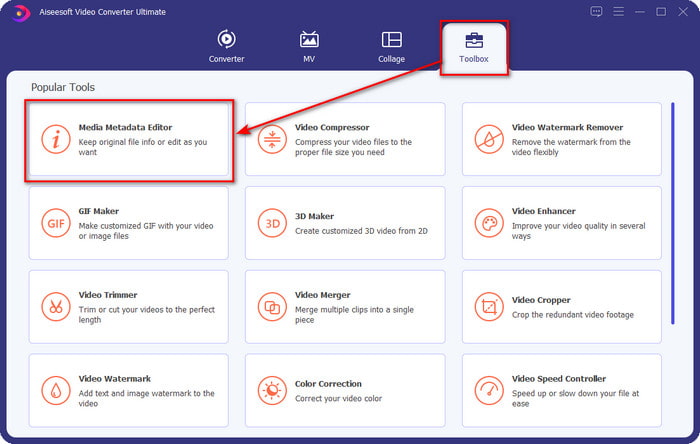
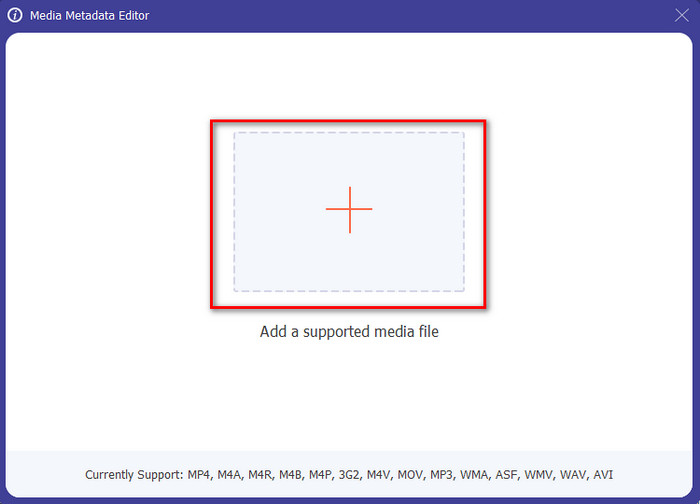
Step 3. Upload your MKV file by clicking the + icon, and a file folder will show, select the MKV file and press Open.
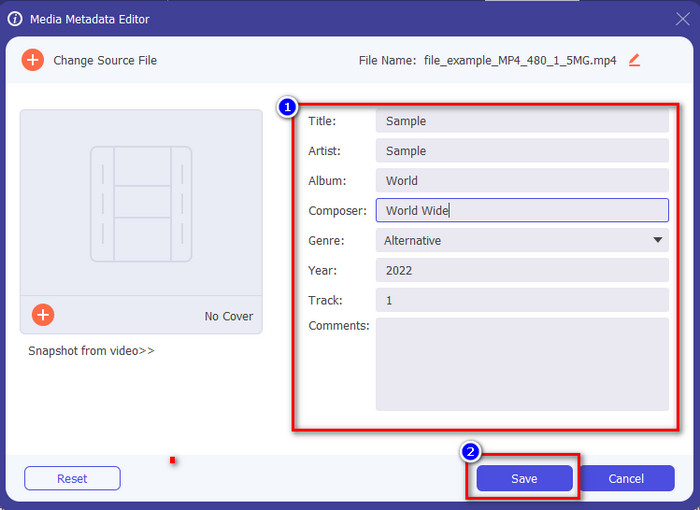
Step 4. Edit the metadata textbox; you can either fill them or remove them, do what you want to do with the metadata. After all of that, click Save to apply the change you've made earlier. With that, you have now edited the MKV tags.
Parte 3. 3 Editor di tag MKV gratuiti che dovresti conoscere disponibili su Windows, Mac e online
GROUPDOCS.Metadata [Gratuito sul Web]
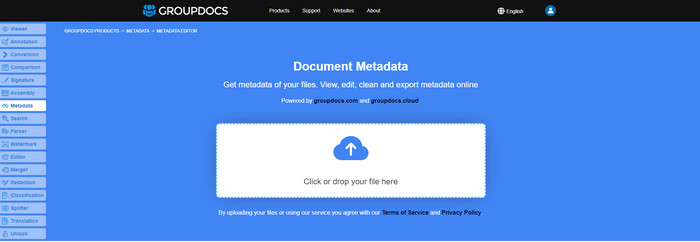
If you want to use an MKV metadata editor for free on the web, we highly suggest you try the GROUPDOCS.Metadata. It is the best choice to view and edit the metadata on your MKV as it works on all platforms, which means it is flexible and adaptable in any case. Moreover, it can easily manipulate the search and update of the tag according to the properties you will need, and if it needs to be removed, it will automatically do it. However, the tool can be challenging to handle on specific tasks, like updating the file's tags. So to get the hang of using the web tool, you will need to use it most of the time to improve your knowledge about the website functions and make it easier to handle.
Proprietà su Windows [Editor integrato su Windows]
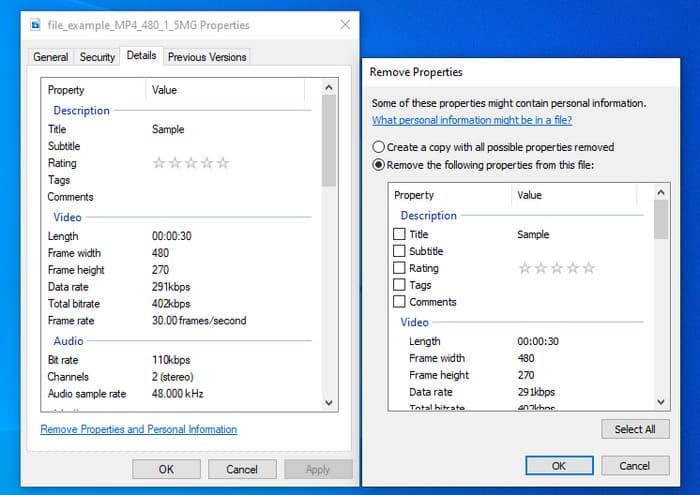
Non vuoi scaricare uno strumento per modificare i metadati MKV e desideri utilizzare la funzione integrata in Windows per modificare i metadati? Quindi sarebbe meglio se utilizzassi le Proprietà su Windows. Questa funzione è disponibile su tutti i PC Windows e non sarà necessario scaricare alcuno strumento o Internet per utilizzarla. Puoi visualizzare rapidamente i metadati e modificarli correttamente con questa funzione gratuita. Tuttavia, ci sono alcuni rapporti sui tag mancanti dopo aver provato a utilizzare questa funzione. Secondo gli utenti, può rimuovere automaticamente i tag sul tuo file. Invece di utilizzare questa funzione, intendono scaricare lo strumento giusto per sprecare sforzi sui tag che includono nel loro MKV o file multimediale. Ma se vuoi vedere dove si trova questa funzione, premi semplicemente il tasto destro del mouse sul file, principalmente nella parte inferiore.
iFlicks [per Mac]
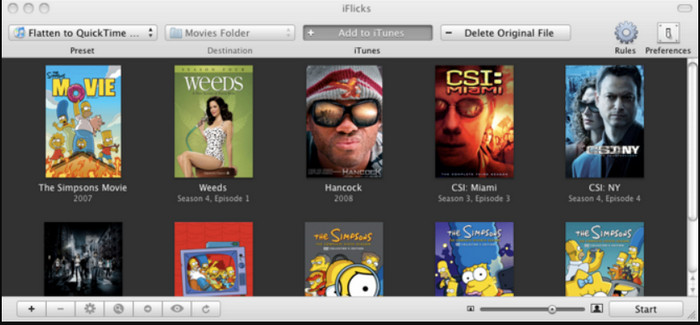
iFlicks può aiutarti a convertire l'MKV in un formato riproducibile o insegnarti come modificare i metadati MKV su Mac. Questo strumento interagisce bene con iTunes in quanto fornisce metadati dettagliati su ogni file multimediale. Con questo software, puoi aggiungere diverse informazioni sul tuo file, come slogan, genere, data. valutazioni, risoluzioni e altro vengono recuperati nei database online. Inoltre, questo software compila metadati su cui è possibile scaricarli e applicarli automaticamente ai file. Tuttavia, le prove gratuite possono durare solo sette giorni, quindi se desideri utilizzare di nuovo lo strumento, dovrai pagare la quota di abbonamento.
Parte 4. Domande frequenti sull'editor di metadati MKV
MKV è riproducibile su Mac?
MKV is playable on Mac if you use a third-party tool, such as the Blu-ray Player. But if you intentionally play the video on Quicktime, it won't work because it is unsupported. So, if you want to watch your MKV files on Mac, we highly recommend that you use a third-party Blu-ray Player, or you can convert the MKV format into MOV with the help of FVC Video Converter Ultimate.
Devo convertire MKV prima di modificare i metadati?
Se lo strumento che desideri utilizzare non supporta il caricamento in formato MKV, ti consigliamo di convertire prima il formato in un formato compatibile. Ma con il pedaggio che abbiamo menzionato in cima, non avresti bisogno di convertire il file in un formato supportato. Tuttavia, non ci sono molte opzioni o strumenti per modificare i tag MKV perché il formato è sconosciuto. Sebbene sia difficile da cercare, abbiamo fatto del nostro meglio per cercare tutti gli editor che puoi utilizzare per aggiornare o modificare i metadati che supportano il formato MKV.
Perché i file MKV hanno dimensioni troppo grandi?
The main reason why MKV files are big is that they can contain multiple contents of a video, audio, and subtitle with different codecs and elements. And you've added metadata on that file, and the file size will become even enormous. So, the best way to save space while having an MKV file on your drive is to compress it without destroying the quality or losing the information on the file. Click this link to learn more about compressing video files.
Conclusione
Even though there is a limited MKV metadata editor on the market, there are still powerful tools you can depend on available on different platforms. As we reviewed different software you can use, it is always still on your hands; which do you prefer to use on changing the metadata of your MKV file. Indeed, it is a tough decision because all of the tools are awesome to use. If you haven't decided which you prefer, we suggest you use the FVC Video Converter Ultimate because it is the most flexible software and has more advanced features that anyone can use. By pressing the download button, you will attain the best tag editor you can have on Windows and Mac!
-
 5 modi più semplici per rimuovere i metadati in qualsiasi file multimediale
 Come rimuovere i metadati? È difficile farlo? Devo acquistare o utilizzare uno strumento gratuito per rimuovere i tag? Tutte queste domande hanno risposte in questo articolo.
-
 5 migliori editor di metadati MP4 [Aggiornato 2022]
 Come posso modificare i miei metadati MP4? Il modo migliore per modificare i metadati del tuo MP4 è utilizzare un editor di tag che supporti il formato MP4 come l'esempio che elenchiamo di seguito.
-
 I 5 migliori editor di tag video AVI scelti dagli utenti per il 2022
 Qual è il miglior editor di tag AVI che posso usare? Il mercato degli editor di tag per i file AVI è troppo ampio. Quindi oggi presenteremo i cinque editori più selezionati nell'anno 2022.
