


 Video Converter Ultimate
 Screen Recorder
 Riparazione video
Come modificare i tag MP3 con il miglior editor di tag MP3 [Facile ed efficace]
Quando ti trovi di fronte a un’attività come la modifica dei tag MP3, puoi facilmente modificare le informazioni del brano con l’editor di tag musicali integrato, ma questi strumenti hanno comunque dei limiti. Allo stesso modo, quando devi gestire più file MP3 o audio, affidarti allo strumento integrato potrebbe non essere la scelta migliore. In casi come questo, è necessario usare un editor di tag audio dedicato che puoi scaricare o utilizzare online per risolvere il problema. Per evitarti di perdere tempo a cercare sul web e rendere la tua giornata più produttiva, qui sotto trovi le migliori soluzioni su cui puoi davvero fare affidamento: sono le principali opzioni di editor di tag MP3 oggi disponibili sul mercato.

Parte 1. Il miglior editor di tag MP3 per modificare i tag MP3 in modo semplice e senza sforzo [Altamente consigliato]
Video Converter Ultimate è un editor di metadati MP3 multifunzionale che puoi scaricare su Windows o Mac. Questo strumento può risolvere il problema senza richiedere troppo impegno da parte dell’utente. Efficiente, vero? È proprio ciò che otterrai se utilizzi il miglior editor di tag sul mercato. Con questo strumento puoi caricare diversi formati audio e video e poi modificarne i metadati in base alle tue esigenze.
A differenza degli altri editor di tag che puoi scaricare o utilizzare sul Web, questo strumento può trattare diversi problemi con il tuo video e audio. Hai problemi perché l'audio suona un po' basso, si sincronizza con il video, audio e video di bassa qualità o formati non riproducibili? Sorprendentemente, tutti i problemi vengono risolti con l'aiuto di questo strumento all-in-one. Vuoi sapere come utilizzare il miglior editor di tag MP3? In tal caso, segui i passaggi seguenti per raggiungere il successo in pochi minuti.
- 1. È l'editor di metadati più affidabile che puoi utilizzare che ha dimostrato il suo valore con i suoi milioni di utenti in tutto il mondo.
- 2. Dispone di numerose funzionalità avanzate che puoi trovare su Toolbox, come accelerazione video, inversione, miglioramento, correzione del colore e molte altre.
- 3. È una scelta perfetta per principianti ed esperti per quanto riguarda il suddetto compito.
- 4. Funziona su entrambi i sistemi operativi, Windows e Mac, con le stesse funzioni e caratteristiche avanzate.
Passaggio 1. Puoi scaricare il software facendo clic sul pulsante di download appropriato. Segui la procedura di installazione e fai clic su Avvia ora per modificare i tag MP3.
Download gratuitoPer Windows 7 o versioni successiveDownload sicuro
Download gratuitoPer MacOS 10.7 o versioni successiveDownload sicuro
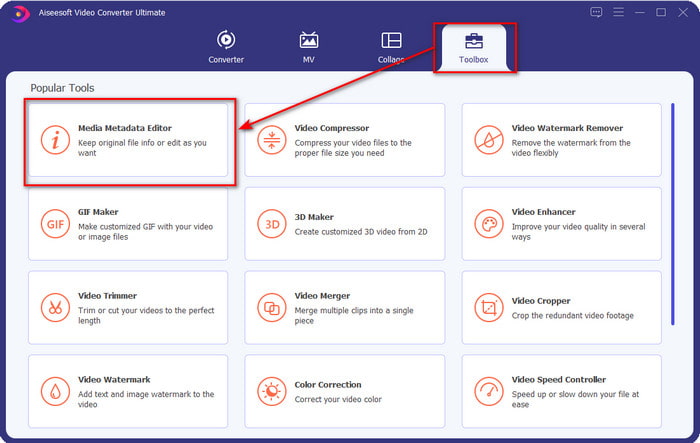
Passaggio 2. Apri la Casella degli strumenti e individua il Media Metadata Editor nell’elenco delle funzioni di modifica disponibili. Non c’è bisogno di preoccuparsi, perché questa funzione è già installata nello strumento, quindi non servono risorse aggiuntive.
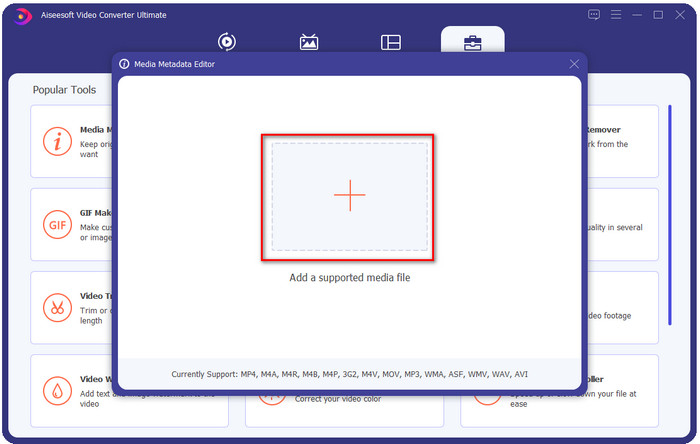
Passaggio 3. Fai clic su +, trova il file audio MP3 nella cartella che verrà mostrata sullo schermo, seleziona il file e fai clic su Apri per procedere.
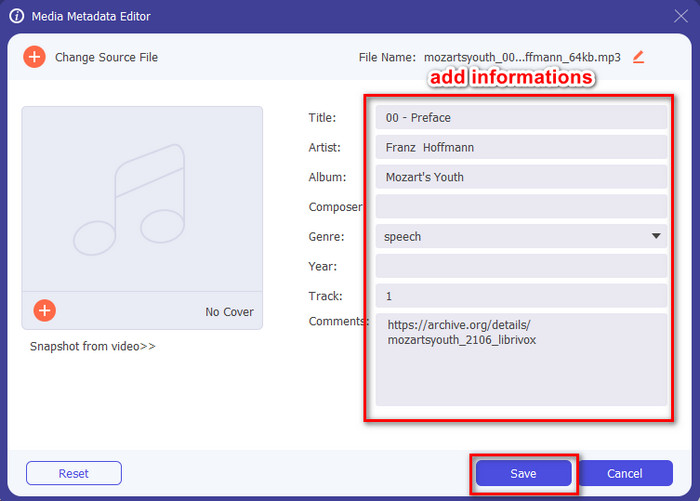
Passaggio 4. Successivamente, modifica o rimuovi i tag del file nelle caselle di testo. Se sei soddisfatto dei tag, fai infine clic su Salva. Questo strumento non creerà un duplicato del tuo file MP3 con i metadati: applicherà invece i metadati direttamente al file originale.
Correlato:
Parte 2. 4 Editor di tag MP3 opzionali che dovresti conoscere disponibili su Windows, Mac e online
TagMP3

TagMP3 è un noto editor di tag MP3 online a cui puoi accedere liberamente dal web in qualsiasi momento. Con questo strumento online non devi scaricare risorse aggiuntive, perché è basato sul web. Inoltre, può rilevare gli id3v1 e id3v2 dei tuoi MP3 e aggiornarli poi in id3v2 anche se l’id3v1 è obsoleto. Sebbene offra funzioni notevoli, alcuni utenti lo ritengono poco affidabile perché, secondo alcune voci, aggiungerebbe informazioni non correlate al file audio. Tuttavia, la maggior parte degli utenti è soddisfatta di ciò che lo strumento è in grado di fare, ed è sicuro e semplice da usare.
Passaggio 1. Cerca TagMP3 nel tuo browser e aprilo.
Passaggio 2. Carica il file MP# facendo clic su Choose Now!
Passaggio 3. Aggiungi le informazioni necessarie e fai clic su Done! Generate New Files.
MetaBliss
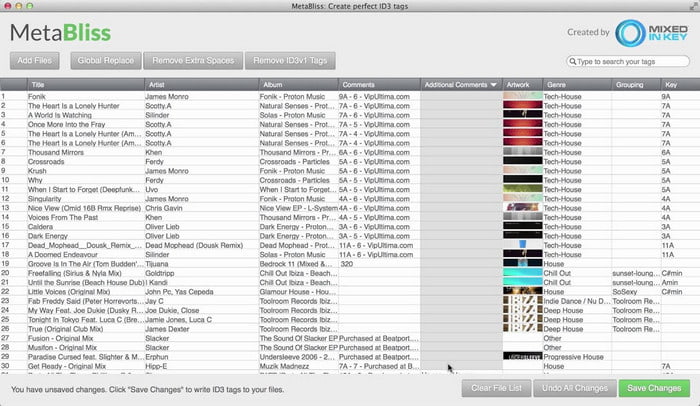
MetaBliss è un editor di tag MP3 in stile foglio di calcolo disponibile su Mac. Questo strumento può svolgere il compito in qualsiasi momento; indipendentemente da quanti file carichi, li gestirà senza difficoltà. Usandolo puoi rimuovere o modificare i tag dei tuoi file MP3 selezionandoli tutti insieme e risparmiando così molto tempo. Sebbene lo strumento supporti la modifica in blocco, la sua interfaccia è un po’ datata, il che significa che la GUI non è così moderna come potresti aspettarti. Ma, tralasciando questo aspetto, rimane comunque utilizzabile se non ti dispiace lavorare con un’interfaccia simile a un foglio di calcolo.
Passaggio 1. Scarica l’editor di tag su Mac e aprilo.
Passaggio 2. Fai clic su Add Files e cerca il file MP3.
Passaggio 3. Sostituisci le informazioni in ciascuna colonna e fai clic su Save Changes per salvare i tag.
MetaTOGGer
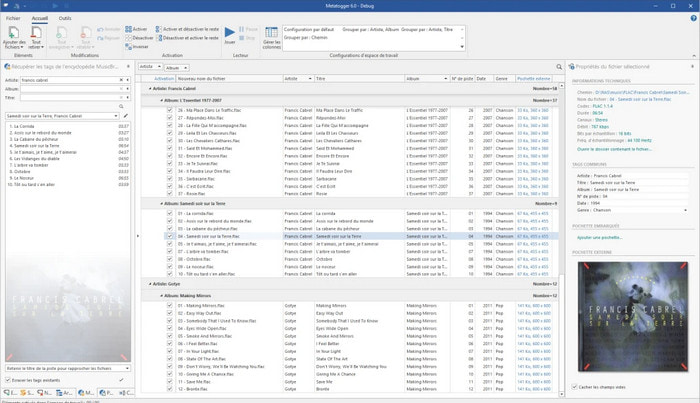
MetaTOGGer è un editor di tag per Speex, OGG, FLAC e MP3 su Windows 10. Con l’aiuto di questo strumento puoi aggiungere automaticamente i metadati in base ai database online disponibili, ma se vuoi puoi anche inserirli manualmente. Se decidi di usarlo, aspettati un’interfaccia grafica simile a quella di Microsoft Office. Anche se la GUI ricorda quella di Office, imparare a utilizzarlo richiede un po’ di tempo e dovrai scaricare risorse aggiuntive, in particolare il framework Microsoft .Net 3.5.
Passaggio 1. Dopo aver installato il framework, il passo successivo è scaricare lo strumento.
Passaggio 2. Trascina e rilascia i file nello strumento, quindi modifica i tag disponibili nell’elenco.
Passaggio 3. Vai su File e fai clic su Save.
Kid3
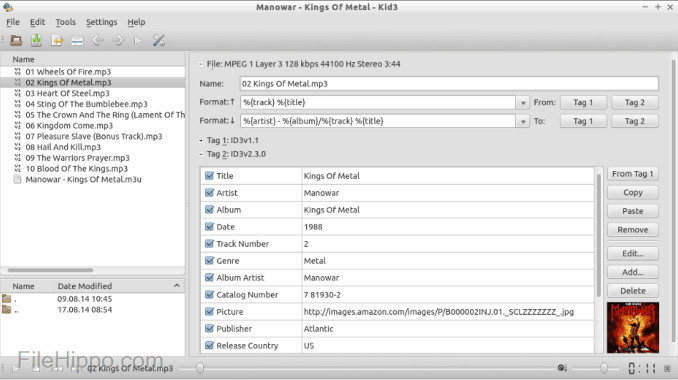
L’ultimo della nostra lista, per aiutarti a modificare i metadati MP3 su Linux e altri dispositivi, è Kid3. Con questo strumento puoi manipolare facilmente i tag dei tuoi diversi file multimediali. Come Metabliss, anche questo programma supporta il mass tagging, il che significa che puoi inserire più file contemporaneamente e modificarli. Sebbene lo strumento svolga bene questo compito, dà il meglio di sé su Linux rispetto agli altri dispositivi supportati. Inoltre, dovrai passare attraverso diverse funzioni prima di poter modificare o gestire i metadati del file.
Passaggio 1. Scarica il software sul tuo desktop e fai clic su Add Files.
Passaggio 2. Fai clic sul file MP3 che hai aggiunto e poi su Edit per cambiare i metadati del file audio.
Passaggio 3. Premi Save per scaricare il file con i metadati.
Parte 3. Domande frequenti sugli editor di metadati MP3
È sicuro scaricare un editor di metadati MP3?
Assicurarsi che l'accesso al sito Web da cui proviene il software sia sicuro. È possibile controllare le informazioni su quel sito Web facendo clic sull'icona del lucchetto sul browser Web. In questo modo puoi verificare se la tua rete è sicura e se i dati sono lontani dagli hacker. Se non sei sicuro del software, devi uscire immediatamente ed evitare di fare clic su qualsiasi cosa su quel sito Web per evitare danni inimmaginabili al tuo dispositivo.
Qual è lo scopo della modifica dei tag su MP3?
Mettila così; se hai un tag corretto, non dovrai preoccuparti di organizzare il file nella libreria in base ai tag associati ai tuoi file MP3. Avere una libreria organizzata è uno dei motivi per cui è necessario modificare i tag; l'altro potrebbe essere che le informazioni sull'audio hanno ricevuto un aggiornamento, quindi dovrai aggiornarlo e molti altri.
Perché il mio MP3 non ha i tag?
Ci sono molte ragioni per cui il tuo file audio non ha tag. Se viene scaricato sul Web, aspettarsi che l'autore lo rimuova per motivi di privacy. Con i metadati, puoi sfruttare le informazioni su di te se sei l'autore, quindi rimuoverle è un'ottima opzione. Sebbene ci siano ancora molte ragioni, abbiamo bisogno dei tag per organizzare il nostro MP3.
Conclusione
In effetti, con questi migliori editor di tag MP3, puoi facilmente regolare i tag sui tuoi file MP3 in modo semplice ed efficace che l'altro editor sul mercato non può offrire. Inoltre, i passaggi per ciascuno strumento possono garantire il successo nell'esecuzione dell'attività il più rapidamente possibile. Tuttavia, se confrontiamo ciascuno di essi, possiamo vedere che lo strumento definitivo è molto più affidabile e migliore degli strumenti dell'elenco. Non è altamente suggerito senza motivo. Quindi, se si desidera utilizzare lo strumento, è necessario seguire i passaggi di conseguenza, leggerlo con cautela e completare l'attività in un batter d'occhio.
-
 I 5 migliori estrattori di metadati disponibili online e offline [2022]
 Puoi trovare più estrattori di metadati sul mercato, ma oggi scegliamo solo i cinque estrattori di tag più selezionati in base al pubblico.
-
 I 5 migliori editor di metadati video per il 2022 [recensione imparziale]
 Vuoi visualizzare i metadati del tuo video? In tal caso, leggi i dettagli di seguito per comprendere appieno l'argomento e sapere quale strumento si adatta meglio a te.
-
 7 Editor di tag musicali popolari su dispositivi Windows, Mac e mobili
 I tag musicali sono comuni da utilizzare per l'arrangiamento della musica nella tua libreria in base ai dati all'interno. E se volessi cambiarlo? Leggi i dettagli di seguito per saperne di più.
