


 Video Converter Ultimate
 Screen Recorder
 Riparazione video
 Download sicuro
Recensione su Pitch Changer su Windows, Mac, online e telefoni
Spesso, con un cambia‑intonazione, possiamo aumentare o diminuire rapidamente l’intonazione originale. La maggior parte dei produttori usa un pitch shifter per aggiungere effetti melodici e rendere il brano ancora migliore rispetto alla versione grezza. D’altra parte, acquistare un set di strumenti per cambiare l’intonazione ti costerà molti soldi e richiederà del tempo per imparare a usarlo. Costoso e difficile da capire. Invece di spendere i tuoi soldi per set che userai poco, perché non provi a utilizzare software che possa aiutarti a cambiare l’intonazione del video o dell’audio che hai?.
Con questa recensione, abbiamo raccolto quattro delle migliori app e programmi che puoi utilizzare per cambiare il tono dell'audio senza spendere enormi soldi. Continua a leggere questo articolo per sapere di cosa stiamo parlando.

Parte 1. I 4 migliori pitch changer disponibili su dispositivi desktop, online e mobili
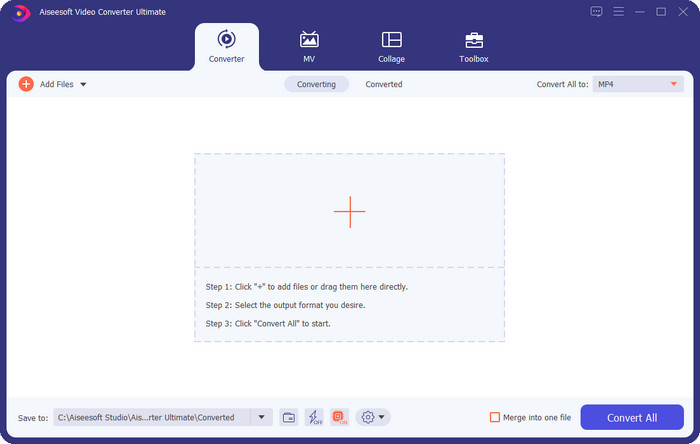
Video Converter Ultimate – Miglior Pitch Changer video su Windows e Mac
Download gratuitoPer Windows 7 o versioni successiveDownload sicuro
Download gratuitoPer MacOS 10.7 o versioni successiveDownload sicuro
Programma disponibile: Windows e Mac
Per primo nella nostra lista c’è il miglior cambia‑intonazione video per i sistemi operativi Windows e Mac. Video Converter Ultimate è un potente strumento che puoi usare per manipolare l’intonazione dell’audio aumentando o diminuendo la velocità del video che possiedi. A differenza di altri software che puoi scaricare sul desktop e che fanno la stessa cosa, questo strumento non ti farà perdere molto tempo per imparare a usarlo, perché è davvero intuitivo. Puoi migliorare l’intonazione dell’audio in meno di un minuto e farlo suonare meglio della versione originale che hai registrato.
Oltre alla possibilità di modificare l'intonazione, puoi anche estendere il volume dell'audio fino al suo massimo potenziale utilizzando il Volume Booster nella casella degli strumenti. In questa funzione, puoi aumentare o diminuire rapidamente l'ampiezza o il guadagno dell'audio nel tuo video utilizzando i cursori. Anche se non sei un produttore a cui piacerebbe fare questo tipo di cose, è comunque divertente e fatto rapidamente con l'aiuto di questo strumento definitivo disponibile su Windows e macOS. Quindi, se desideri utilizzare questo strumento definitivo, nella seconda parte mostriamo come utilizzare questo strumento con i passaggi dettagliati che puoi seguire per completarlo in meno di un minuto.
Vocal Remover.org
Programma disponibile: Online
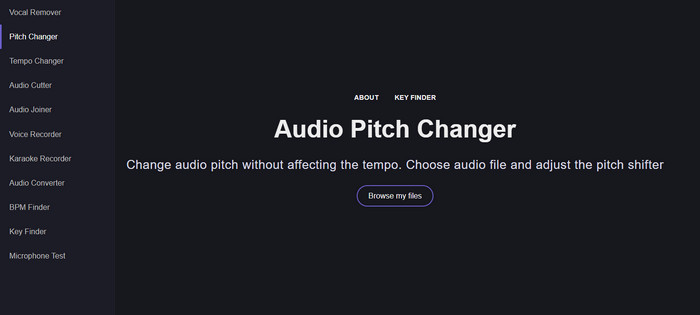
Se ti serve un cambia‑intonazione online, allora, senza dubbio, Vocal Remover.org è lo strumento perfetto per portare a termine questo compito. Diversamente dal primo strumento, questo funziona al meglio per il miglioramento dell’audio. Con questo tool puoi modificare facilmente l’intonazione dell’audio e individuare in quale tonalità è il brano. È presente anche un indicatore che ti aiuta a scegliere il semitono dell’audio. Puoi decidere se regolarlo manualmente o procedere a step muovendo il cursore. La maggior parte degli utenti che lo ha già provato lo apprezza ed è soddisfatta del risultato dell’effetto di cambio di intonazione ottenuto.
Lo strumento funziona bene su questo, ma puoi caricare solo un file in formato audio limitato qui e il formato video non è supportato. Il caricamento del file potrebbe essere un po' complicato per lo strumento, poiché supporta solo pochi formati audio. Anche se questo potrebbe essere un problema per tutti, lo consideriamo comunque uno dei migliori strumenti online a cui puoi accedere sul web. Ma assicurati di accedere al sito Web corretto per evitare complicazioni e altri problemi. Inoltre, ricorda di avere una connessione Internet stabile perché lo strumento funziona meglio se la tua connessione Internet è forte.
Aumento del tempo: altezza, cambio di velocità
Programma disponibile: Android
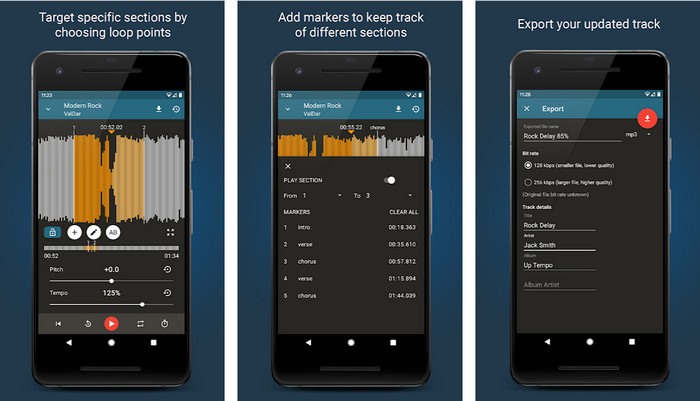
Puoi scaricare questo cambia‑intonazione audio per utenti Android per svolgere il compito anche se non hai un desktop a portata di mano. Con Up Tempo: Pitch, Speed Changer, cambiare la velocità di riproduzione e l’intonazione è diventato rapido e alla portata di tutti. La sua interfaccia grafica supporta la visualizzazione dell’onda, che può aiutarti a individuare quale parte desideri migliorare o modificare. Proprio come lo strumento online, questa app può gestire la musica, ma può rivelarsi molto utile quando ne hai bisogno.
Sebbene l'app sia scaricabile gratuitamente, ci sono cose che devi considerare se desideri utilizzare questa app. La maggior parte degli utenti sperimenta che l'app non è in grado di rilevare i nuovi file audio scaricati sul telefono. Se riscontri questo problema, potrebbe non supportare il file audio in questa app o potrebbe verificarsi un bug. Tuttavia, se hai un telefono Android a portata di mano, scarica questa app per provare a vedere se è l'app per risolvere il problema.
TimePitch-Pitch, Speed Changer 4+
Programma disponibile: iOS
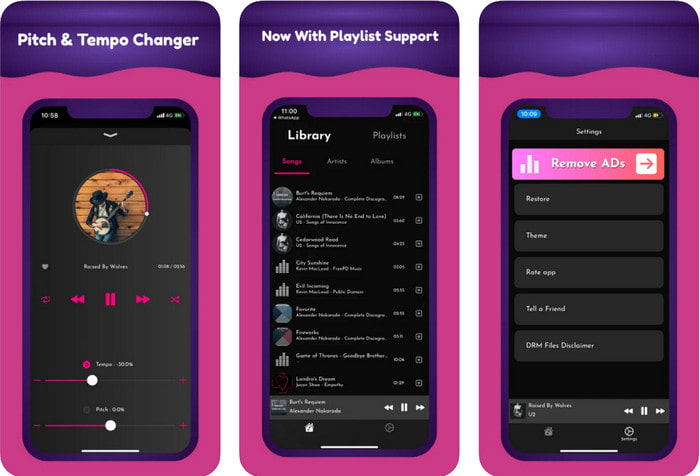
Se sei un utente iOS, allora devi sapere che questa app cambia‑intonazione può offrirti una soluzione a questo problema. TimePitch‑Pitch, Speed Changer 4+ è un lettore musicale, una libreria e un cambia‑intonazione che puoi usare sul tuo dispositivo iOS quando ti serve. Questa app funziona in modo diverso dalle altre perché puoi cambiare in tempo reale l’intonazione dell’audio che stai ascoltando, il che significa che quando la regoli, la modifica non viene salvata. Ma questo può essere un punto di forza dell’app, perché non devi aspettare che elabori il file: regolando i controlli puoi cambiare facilmente l’intonazione come preferisci.
Tuttavia, questa potrebbe essere anche la sua debolezza; se trasferisci il file su altri dispositivi, l'intonazione che hai modificato utilizzando questa app non verrà applicata al ricevitore. Inoltre, dovrai ricordare che se acquisti la musica su iTunes o Apple Music, non puoi utilizzare questa app per cambiare il tono. Come mai? Perché i file protetti non consentiranno a nessuna app di terze parti come questa di accedere al file. Indipendentemente dal caricamento del file musicale, in questo articolo includiamo comunque questa app perché funziona meglio su tutti i dispositivi iOS.
Parte 2. Come modificare l'intonazione di un video utilizzando il software Ultimate Pitch Changer
Segui i passaggi seguenti per sapere come utilizzare questo tono musicale e cambia velocità che puoi avere sul tuo desktop. Quindi, continua a leggere i seguenti dettagli se hai bisogno di un tutorial semplice ma efficace sull'utilizzo del software definitivo.
Passaggio 1. Premi il pulsante di download per avere sul tuo desktop questo software definitivo, scegliendo se stai usando un programma Windows o Mac. Attendi il completamento del download, fai clic sul file scaricato e poi installalo. Dopo tutta la procedura di configurazione e installazione, avvia il software per iniziare a usare questo straordinario strumento.
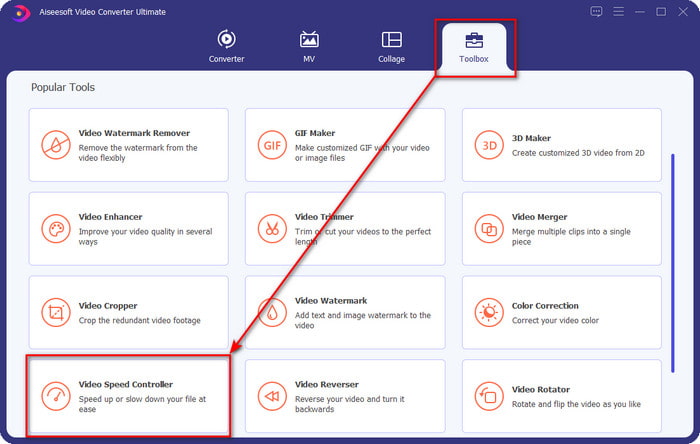
Passaggio 2. Apri il menu Toolbox e, al suo interno, trova Video Speed Controller; fai clic per aprirlo. Scorri verso il basso fino alle funzioni che si trovano nella parte inferiore.
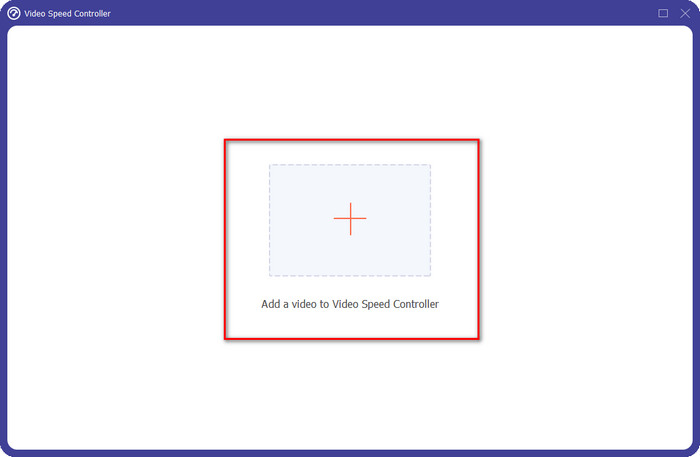
Passaggio 3. Apparirà una nuova mini‑finestra sullo schermo: fai clic sul pulsante +, individua il file video di cui vuoi cambiare l’intonazione e poi fai clic su Open per caricare il file video.
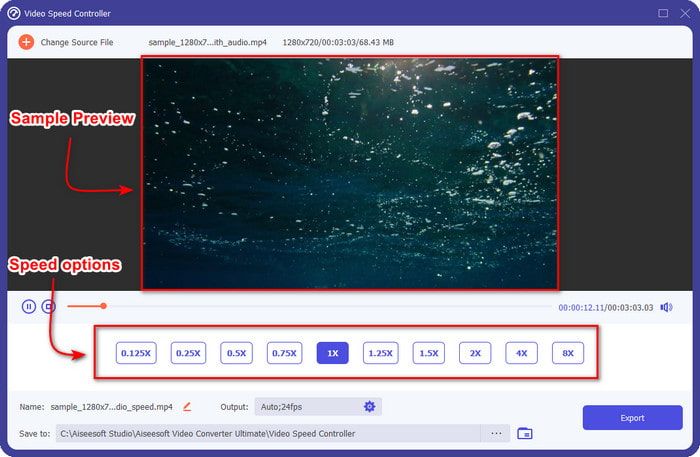
Passaggio 4. In questa parte puoi ora modificare la velocità dell’audio. Noterai che anche l’intonazione varierà cambiandola. Puoi ascoltare e vedere l’anteprima automaticamente nella schermata di anteprima.
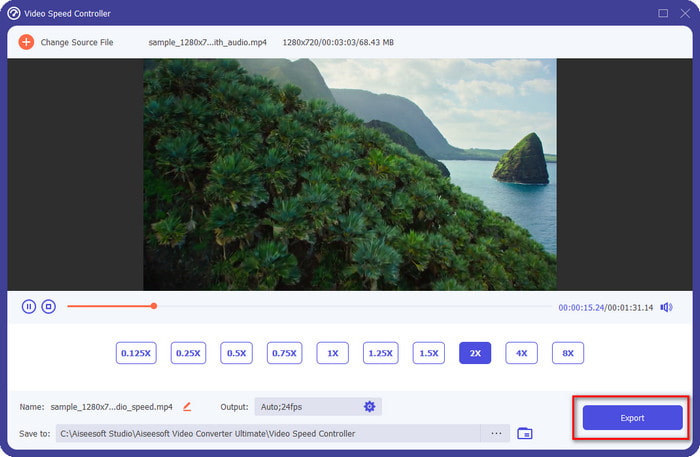
Puoi riprodurre l'anteprima del video solo a velocità 2x; noterai che 4x e 8x non ti permetteranno di visualizzare in anteprima il video per evitare conflitti, ma non degraderanno la qualità del video e dell'audio.
Passaggio 5. Se sei soddisfatto dell’intonazione ottenuta, fai clic sul pulsante Export. Facile, vero? Con l’aiuto di un software come questo, puoi gestire facilmente vari problemi di video e audio in pochi minuti.
Correlato:
Come velocizzare un video online
Parte 3. Domande frequenti su Pitch Changer
Cos'è il passo?
Valuta la qualità che risuona con il tuo suono misurandoli nella gamma, siano essi più alti o più bassi. È un'onda sonora simile alla frequenza, ma non sono la stessa cosa.
Quanto può sentire un tono umano?
Più bassi sono gli Hz, puoi ancora ascoltarli consapevolmente, ma alcune persone lo sentono solo quando gli Hz diventano alti. Secondo i ricercatori, tutti possono ascoltare un 8000 Hz, e se riesci a sentire 12.000 Hz, le tue orecchie sono buone come le persone sotto i 50 anni. E sotto i 40 anni puoi ancora sentire 15.000 Hz, ma per meno di 30 anni anni, 16.000 Hz, puoi ancora ascoltarlo. Per ogni 25 anni e meno, puoi ancora sentire 17.000 Hz, e per meno di 20 anni, puoi sentire 20.000 Hz. Più invecchiamo, il tono che sentiamo diventa meno efficace di volta in volta. Quindi, se non riesci a sentire la frequenza menzionata, devi consultare un medico per verificare se c'è un problema.
Come possiamo calcolare l'intervallo del passo?
L'intervallo di altezza utilizza le ottave per calcolare, il che consente al cantante e allo strumentale di determinare se quella è l'altezza giusta per la canzone. Con la vibrazione, puoi notare l'alta e la bassa frequenza che un'onda sonora accumula.
Conclusione
Con i cambia‑intonazione per video e voce descritti sopra possiamo ora regolare facilmente l’intonazione del suono che abbiamo tra le mani. Invece di acquistare una tecnologia specifica per svolgere il compito, puoi usare i software indicati sopra. Anche se differiscono per funzioni e caratteristiche, possiamo comunque vedere cosa li rende validi ciascuno a modo suo. Ma se stai usando un computer, devi scaricare Video Converter Ultimate sul tuo desktop, perché questo strumento ti aiuta a cambiare l’intonazione e a fare altre magie per migliorare ancora di più i tuoi video e i tuoi audio. Vuoi sapere quali sono le funzioni “magiche” che questo strumento può offrirti? Allora scaricalo subito facendo clic sul pulsante di download qui sopra.
-
 3 modi per velocizzare i video su iPhone [Dimostrato]
 Hai problemi a regolare la velocità di riproduzione del tuo video perché stai usando un iPhone? Questo è un ottimo articolo per aiutarti con il tuo problema.
-
 Windows Media Player | Scopri come velocizzare i video [Comprovato]
 Vuoi rallentare il tuo video clip usando Windows Media Player, ma hai problemi con come farlo? Questo articolo è ideale per la lettura e può illuminare il tuo punto di vista su come velocizzare i video utilizzando Windows Media Player.
-
 Come cambiare il video al rallentatore a velocità normale [semplici passaggi]
 Vuoi sapere come ripristinare un video al rallentatore scaricato da Internet o registrato accidentalmente al rallentatore? Scopri come convertire video al rallentatore a velocità normale su Mac, Windows, iOS e Android.
