


 Video Converter Ultimate
 Screen Recorder
 Riparazione video
 Download sicuro
Metodi incontrastati su come rimuovere il logo iSkysoft dal video
iSkysoft è un’ottima applicazione con molte funzioni eccellenti, che la fanno spiccare rispetto ad altre soluzioni. È un programma semplice che ti permette di convertire i video da un formato a un altro e di effettuare alcune modifiche video di base. Tuttavia, la parte più deludente di questo software è che, dopo averlo utilizzato, sui tuoi video compare un grande watermark iSkysoft. Avere un grande watermark/logo sul video rende la visione davvero poco gradevole. Per fortuna esistono applicazioni affidabili che puoi usare per rimuovere elementi fastidiosi come il logo/watermark di iSkysoft. Se desideri scoprire i metodi migliori per rimuovere il logo iSkysoft dal tuo video, devi assolutamente leggere questo articolo.

Parte 1: rimuovere il logo iSkysoft dai video sul desktop
Il logo iSkysoft sullo schermo è davvero irritante, soprattutto quando guardi i tuoi video preferiti. Ma non devi più preoccuparti. Puoi eliminare quel logo usando Video Converter Ultimate. Questo software affidabile può aiutarti a rimuovere il logo iSkysoft dai tuoi video in due modi semplici: con lo strumento Rimozione Watermark Video e con lo strumento Ritaglio Video. Con questi strumenti puoi rimuovere facilmente il logo iSkysoft dal tuo video. Se il logo iSkysoft si trova in un angolo del video, si consiglia di usare lo strumento Ritaglio Video. Ma se il logo è posizionato al centro, puoi usare lo strumento Rimozione Watermark Video. In questo modo potrai guardare i tuoi film o video preferiti senza essere infastidito dal logo.
Inoltre, oltre a rimuovere le filigrane dai tuoi video, Video Converter Ultimate ha più funzionalità. Ha un potenziatore video, fusione video, cropper, trimmer, rotatore, convertitore e altro. Inoltre, una delle funzioni principali di questa applicazione è convertire vari formati di file video. Anche gli utenti non professionisti possono utilizzare questa applicazione perché ha un'interfaccia semplice. Se desideri imparare a rimuovere il logo iSkysoft dal tuo video, ti mostreremo i due semplici modi forniti da questa applicazione.
Utilizzo della rimozione di filigrane video
Step 1: per usare questo eccellente software, devi prima scaricare Video Converter Ultimate sul tuo computer. Dopo il download, segui la procedura di installazione e avvia l’applicazione.
Download gratuitoPer Windows 7 o versioni successiveDownload sicuro
Download gratuitoPer MacOS 10.7 o versioni successiveDownload sicuro
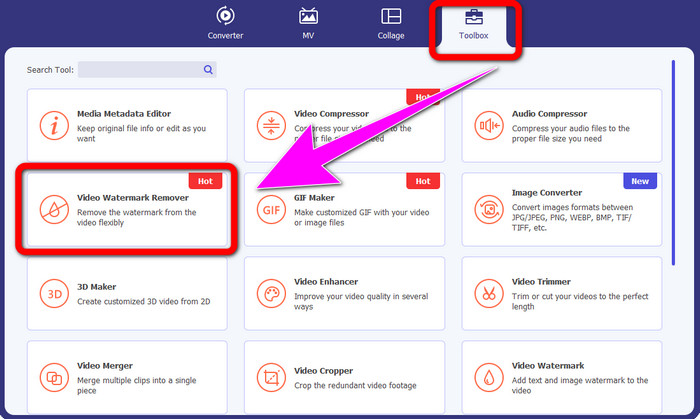
Step 2: una volta avviato il software, vai al pannello Strumenti e seleziona lo strumento Rimozione Watermark Video. Comparirà un’altra interfaccia sullo schermo.
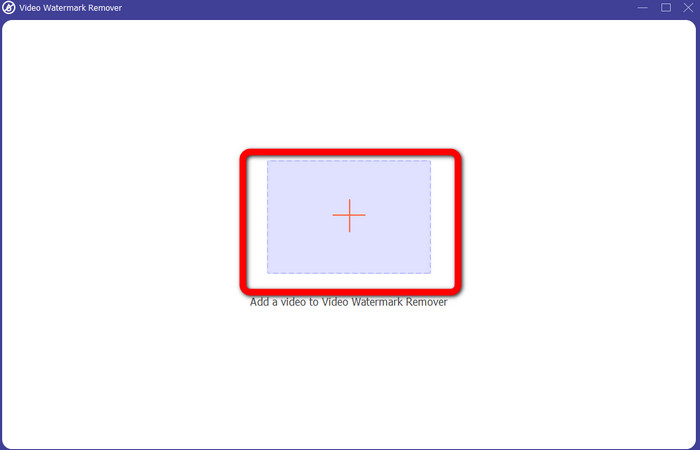
Step 3: quando vedi la nuova interfaccia, fai clic sull’icona con il segno più e aggiungi il video con il logo iSkysoft che desideri rimuovere.
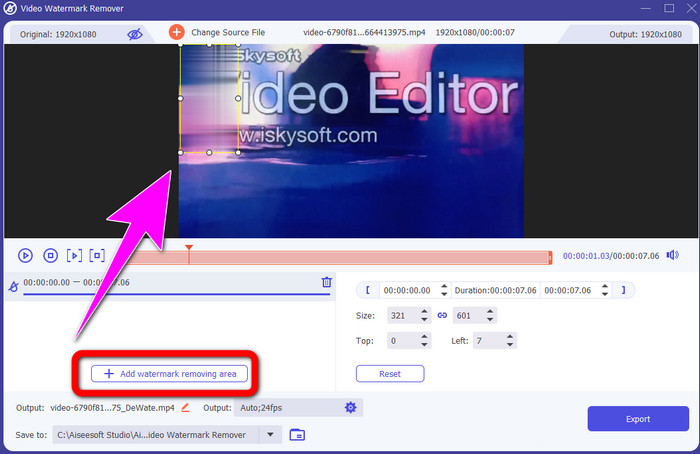
Step 4: quindi fai clic sul pulsante Aggiungi Area di Rimozione Watermark. Sposta il riquadro sul video e copri il logo iSkysoft.
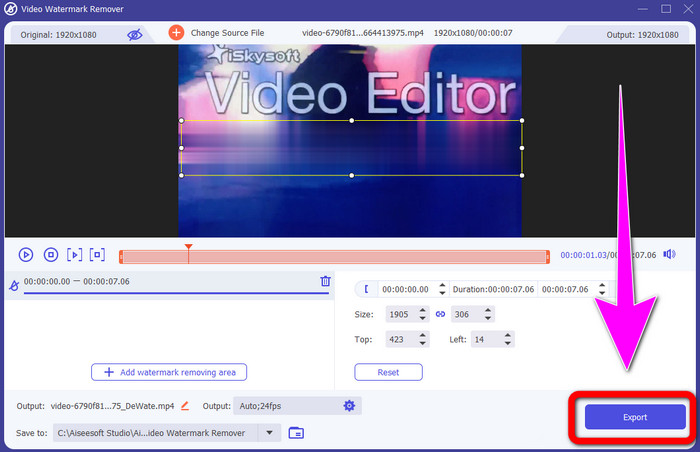
Step 5: infine, fai clic sul pulsante Esporta per salvare il video finale.
Utilizzo di Video Cropper
In questa parte, ti mostreremo come rimuovere il logo iSkysoft dal tuo video usando lo strumento Video Cropper.
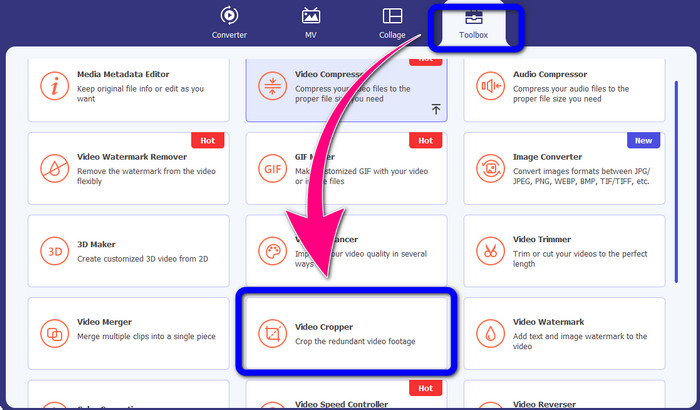
Step 1: avvia l’applicazione sul tuo computer. Nel pannello Strumenti, fai clic sullo strumento Ritaglio Video. Come per l’altro strumento sopra, comparirà una nuova interfaccia sullo schermo.
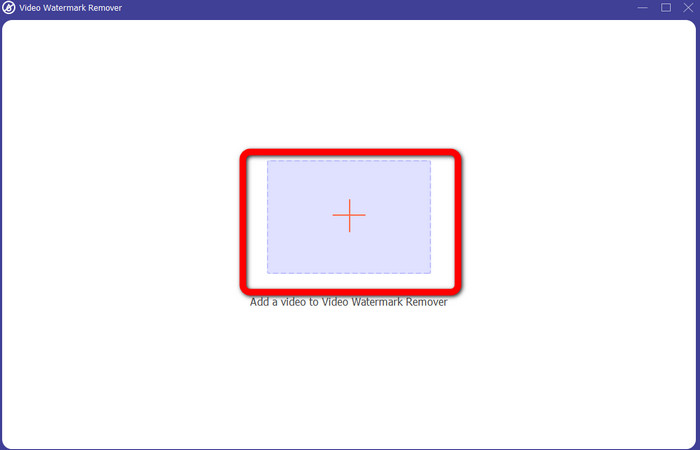
Step 2: fai clic sul pulsante con il segno Più per importare il video con il logo iSkysoft.
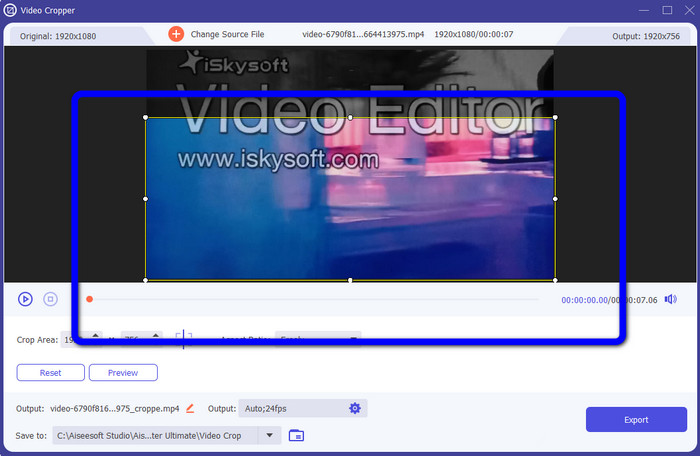
Step 3: a questo punto puoi ritagliare il video per rimuovere il logo iSkysoft dal tuo filmato. Usa il mouse per spostare i bordi dell’area del video.
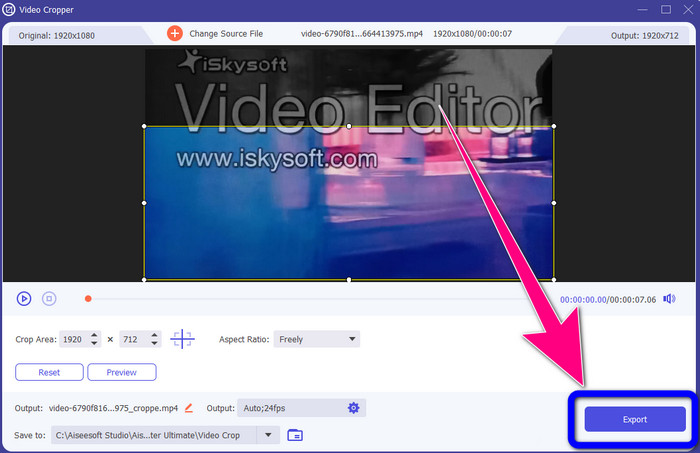
Step 4: per concludere, fai clic sul pulsante Esporta e salva il risultato sul tuo computer.
Parte 2: Come rimuovere il logo iSkysoft dai video online
Utilizzando HitPaw
Puoi anche rimuovere il logo iSkysoft online. Uno dei migliori strumenti che puoi usare è HitPaw. Questa applicazione online può rimuovere facilmente il logo dal tuo video. Puoi usarla sia da desktop che online, il che è comodo per chiunque. Inoltre, HitPaw è sicuro da usare: garantisce che i video possano essere modificati e visualizzati solo da te. In più, non devi preoccuparti dei limiti del software: non ha restrizioni per quanto riguarda la rimozione dei loghi dai video. Non è necessario acquistare l’applicazione perché è gratuita. Tuttavia, se rimuovi il logo o qualsiasi
elementi non necessari dal tuo video, devi aspettare ancora un po'. Questa applicazione ha una procedura di rimozione lenta, che richiede molto tempo per gli utenti. Inoltre, dipende dalla tua connessione Internet. Funzionerà bene se si dispone di una connessione veloce. Ma se hai una connessione lenta, aspettati un po' di ritardo. Segui i semplici passaggi seguenti per eliminare il logo iSkysoft dai tuoi video.
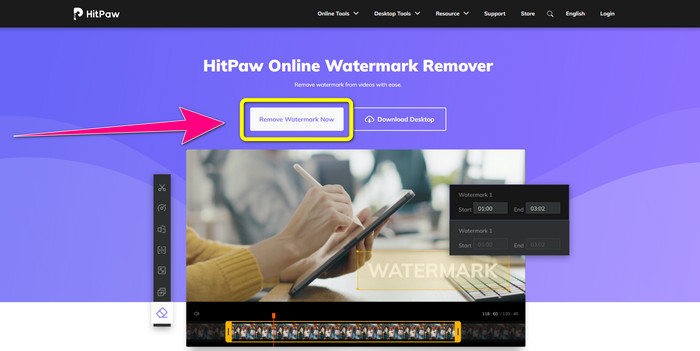
Step 1: visita il sito web di HitPaw. Fai clic sul pulsante Remove Watermark Now - Choose File per inserire il video con il logo iSkysoft che desideri eliminare.
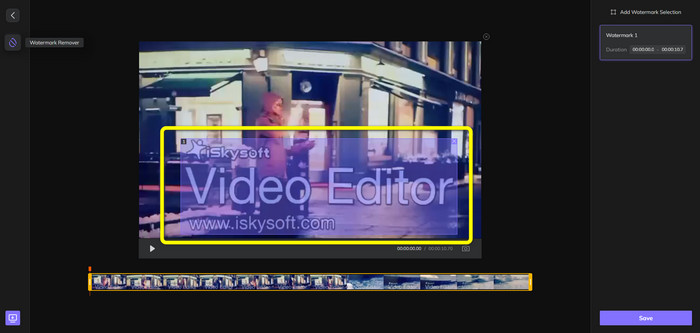
Step 2: dopo aver caricato il file video, sullo schermo comparirà un riquadro blu. Usa questo riquadro per coprire il logo iSkysoft. Puoi ridimensionare il riquadro.
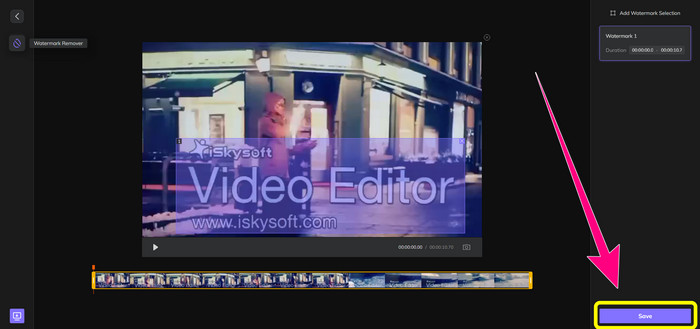
Step 3: quando hai finito di coprire il logo iSkysoft nel video, fai clic sul pulsante Save. Attendi il completamento della rimozione e salva il video.
Utilizzo di Rimozione filigrana video online
Un altro strumento online che puoi usare è Video Watermark Remover Online. Con questa applicazione puoi rimuovere il logo iSkysoft dai tuoi video. È anche un software facile da usare, adatto agli utenti non professionisti. Puoi rimuovere qualsiasi elemento fastidioso dai video senza perdere qualità. Tuttavia, con la versione gratuita c’è un limite alla rimozione dei loghi: puoi eliminare loghi o watermark solo da 5 video. Devi acquistare un abbonamento se vuoi elaborare più video con Video Watermark Remover Online. Inoltre, non puoi salvare il risultato in un altro formato: puoi salvarlo solo nello stesso formato originale, il che non è l’ideale. Infine, l’elaborazione dei file è lenta. Segui le semplici istruzioni qui sotto per rimuovere il logo iSkysoft dai tuoi video.
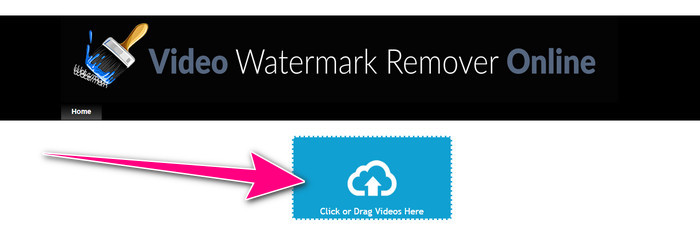
Step 1: vai al sito web di Video Watermark Remover Online. Seleziona il pulsante Click or Drag Videos Here per importare il file video con il logo iSkysoft che vuoi eliminare.
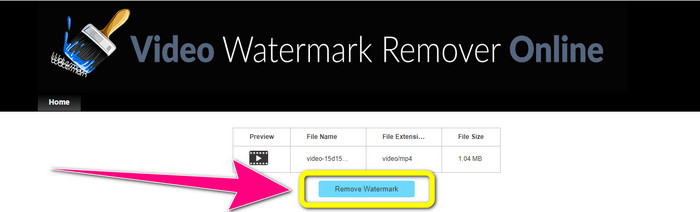
Step 2: poi fai clic sul pulsante Remove Watermark e attendi il completamento del processo di rimozione.
Correlato a:
Modo più veloce per rimuovere il logo da un video in Adobe Premiere Pro
Come rimuovere il logo da un video usando Windows Movie Maker
Parte 3: Domande frequenti sulla rimozione del logo iSkysoft
Puoi rimuovere un logo da un'immagine?
Sì, puoi usare FVC Free Watermark Remover per cancellare facilmente e rapidamente il logo dalla tua immagine.
La rimozione della filigrana è illegale?
Secondo l'US Copyright Act, sezione 1202, la rimozione di filigrane senza il permesso del proprietario è illegale.
Come faccio a rimuovere il logo gratuitamente?
Puoi utilizzare la versione di prova gratuita di Video Converter Ultimate per rimuovere gratuitamente un logo dal tuo video.
Conclusione
Questo articolo ha presentato ottimi metodi per rimuovere il logo iSkysoft dal tuo video utilizzando strumenti per desktop e online. Ma se vuoi un eccellente strumento per rimuovere i loghi, puoi scaricare Video Converter Ultimate. Questa applicazione offre un processo di rimozione rapido ed è accessibile a tutti gli utenti.
-
 8 eccezionali strumenti per la rimozione di filigrane video online e offline
 Se stai cercando il miglior software gratuito per la rimozione della filigrana video che puoi utilizzare sui tuoi telefoni Windows, Mac, iPhone e Android, questo articolo è per te
-
 I migliori metodi su come rimuovere la filigrana mordabile dal video
 Questo articolo ti mostrerà un dispositivo di rimozione della filigrana mordibile più affidabile e fantastico. Queste meravigliose applicazioni ti aiuteranno a risolvere questo tipo di problema
-
 Procedure facili da imparare per rimuovere il logo dal video
 Stai cercando il miglior e facile rimozione del logo video? Allora questo articolo fa al caso tuo. Cogli l'occasione per scoprire come rimuovere un logo da un video.
