


 Video Converter Ultimate
 Screen Recorder
 Riparazione video
 Download sicuro
Come rimuovere la filigrana video Viva sui video in modo semplice ed efficace
Viva Video è un'app di editing video e creazione video che puoi scaricare sui tuoi dispositivi mobili per creare un video eccezionale che non puoi ottenere con l'altro editor video. Con questo, puoi utilizzare la sua versione gratuita o l'editing video premium a tuo vantaggio. Pertanto, gli utenti riscontrano problemi nell'utilizzo della versione gratuita perché lascia una filigrana e altre funzionalità di modifica non sono le stesse della versione pro. La filigrana incorporata nel video potrebbe ostacolare la visualizzazione e rimuoverla è meglio.
Tuttavia, puoi usare alcuni strumenti per rimuovere la filigrana che puoi trovare sul Play Store e sull’App Store, ma qual è il migliore? Continua a leggere questo articolo, perché ti presentiamo lo strumento che puoi usare per rimuovere la filigrana con una guida su come rimuovere la filigrana di Viva Video dal tuo video.

Parte 1. Come rimuovere la filigrana video Viva utilizzando le migliori app per la rimozione di filigrane
Gomma video - Rimuovi filigrana/logo dal video [Android]
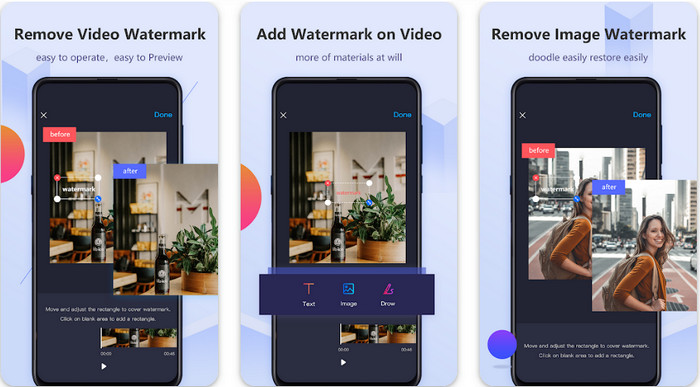
Video Eraser - Remove Watermark/Logo from Video è un potente rimuovi‑filigrane che puoi scaricare sul tuo dispositivo Android per eliminare la filigrana incorporata nel tuo video. Questa app può aiutarti a rimuovere qualsiasi tipo di filigrana nel video, come loghi, testo, timbri, ecc. Puoi anche sfruttarla se vuoi aggiungere una filigrana personalizzata, ritagliare, tagliare, invertire, comprimere e cambiare la velocità del video. Nonostante le sue numerose funzioni, puoi scaricare questo strumento gratuitamente. Quindi, per rimuovere la filigrana di Viva Video sul tuo Android, segui i passaggi indicati qui sotto.
Passaggio 1. Per prima cosa, scarica l’app sul tuo dispositivo Android andando sul Play Store, quindi fai clic su Download.
Passaggio 2. Apri il rimuovi‑filigrane, fai clic su Remove Watermark from Video, consenti allo strumento di accedere ai tuoi video, quindi carica il video con la filigrana.
Passaggio 3. Posiziona il rettangolo sulla filigrana per coprirla.
Passaggio 4. Premi Done per salvare il video senza la filigrana.
Correlato:
Gomma video - Rimozione ritocco [iOS]
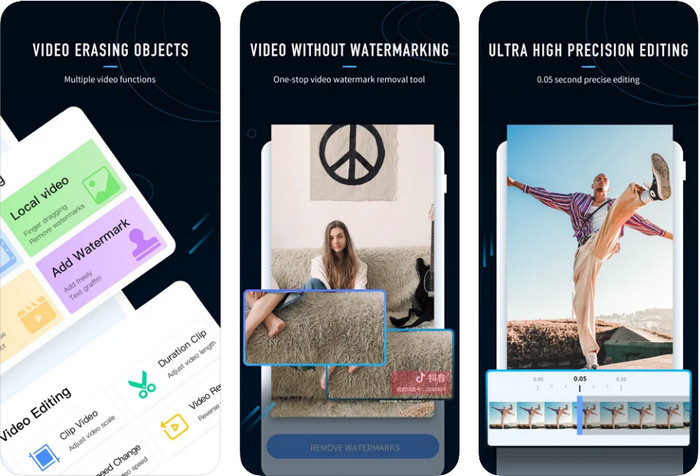
Per iOS, puoi scaricare dall’App Store Video Eraser- Retouch Removal. È uno dei remover di filigrane per Viva Video che puoi scaricare gratuitamente e che ti permette di eliminare in modo efficace il segno dal tuo video. Come il rimuovi‑filigrane per Android presentato qui, supporta anche altre funzioni di editing che puoi usare, come migliorare la qualità del video, aggiungere una filigrana, tagliare, rifilare, comprimere e capovolgere. Tutto questo è incluso. Anche se ha funzioni simili all’app Android, le loro modalità di funzionamento sono diverse e, prima di poter usare questo strumento per rimuovere la filigrana, dovrai acquistarlo. Puoi seguire i passaggi qui sotto che ti mostrano come rimuovere la filigrana dai video esportati con Viva Video; segui i passaggi indicati di seguito.
Passaggio 1. Scarica l’app dall’App Store, quindi aprila dopo che il download è stato completato.
Passaggio 2. Dopo aver aperto il software, fai clic su Local Video/GIF per caricare il video con la filigrana. Assicurati di consentire all’app l’accesso alle tue Foto.
Passaggio 3. Tocca la parte del video in cui è presente la filigrana; quindi apparirà una forma rettangolare sullo schermo.
Passaggio 4. Tocca Eliminate Watermark per esportare il video e salvarlo senza l’ostacolo della filigrana.
Parte 2. Come rimuovere la filigrana Viva Video su Windows e Mac [Software definitivo]
Come utente Windows e Mac, avrai bisogno di un software efficace per rimuovere la filigrana dal video in modo efficiente, senza lasciare alcuna traccia. FVC Video Converter Ultimate può insegnarti come rimuovere gratuitamente la filigrana di Viva Video offrendo un risultato finale professionale. Come le app rimuovi‑filigrane che puoi scaricare su Android e iOS, anche questo strumento supporta molte altre funzioni e caratteristiche di cui puoi approfittare. Questo strumento offre di più rispetto alle due app rimuovi‑filigrane che abbiamo menzionato.
Cosa rende questo strumento impressionante? Le funzionalità di rimozione supportate da questo strumento sono migliori di altri strumenti di rimozione di filigrane che puoi utilizzare sul tuo video. Quindi, se lo usi, puoi divertirti a guardare il video senza la filigrana dopo averlo rimosso qui. Hai bisogno di un tutorial su come usarlo? I prossimi dettagli ti permetteranno di sapere come utilizzare questo strumento facilmente come 1-2-3.
Passaggio 1. Per scaricare il software ultimate, puoi fare clic sul pulsante di download qui sotto, quindi installare il programma sul tuo dispositivo. Segui la procedura di installazione WinRAR, quindi fai clic su Start Now.
Download gratuitoPer Windows 7 o versioni successiveDownload sicuro
Download gratuitoPer MacOS 10.7 o versioni successiveDownload sicuro
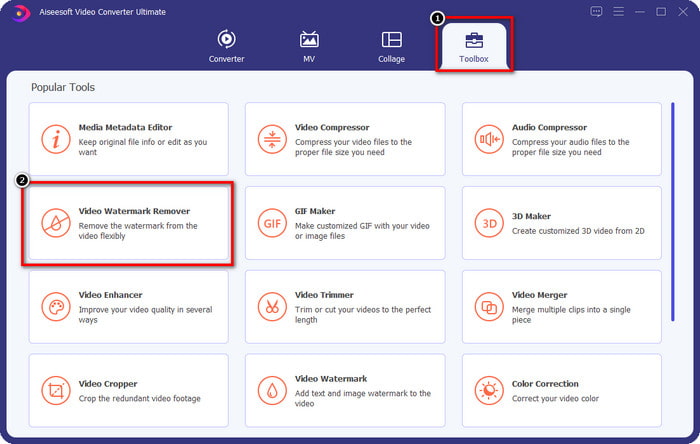
Passaggio 2. Vai alla sezione Toolbox, quindi fai clic su Video Watermark Remover per iniziare a usare l’efficace rimuovi‑filigrane di questo strumento.
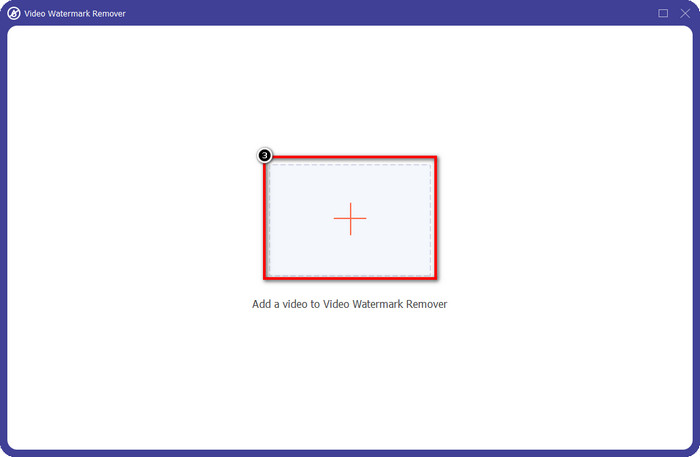
Passaggio 3. Puoi caricare il video di Viva Video con la filigrana salvato sul desktop facendo clic sull’icona +. Individua il file video nella cartella che apparirà sullo schermo e fai clic su Open per caricarlo correttamente.
Passaggio 4. Fai clic su Add Watermark Removing Area per iniziare a usare la funzione di rimozione della filigrana.
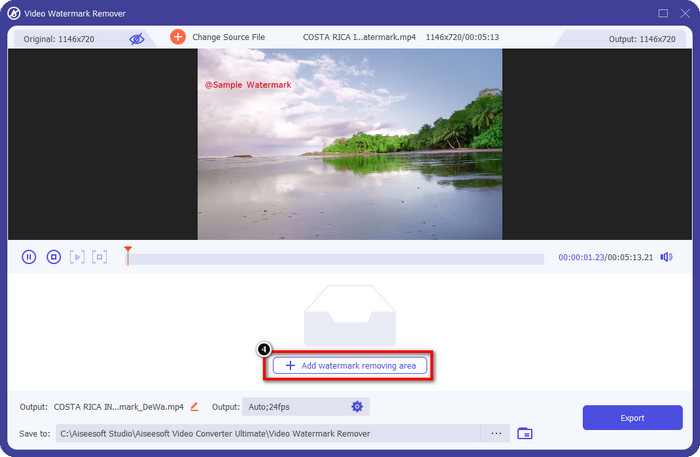
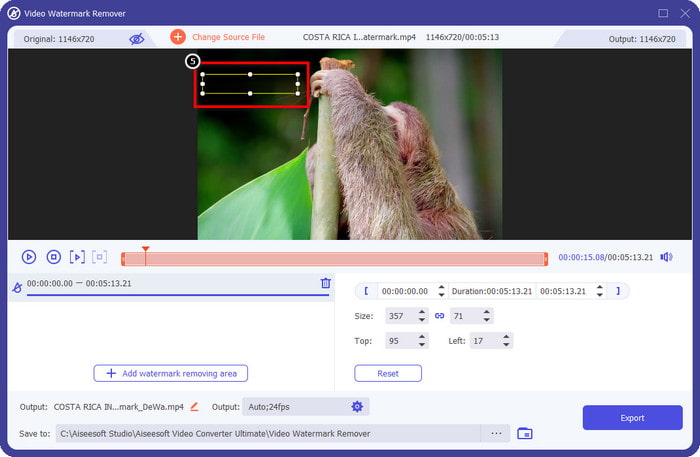
Passaggio 5. Trascina e posiziona la forma rettangolare sulla filigrana nel video e coprila completamente. È importante coprirla del tutto perché, se non lo fai, rimarrà una traccia della filigrana; puoi ridimensionare la forma in base alle tue esigenze.
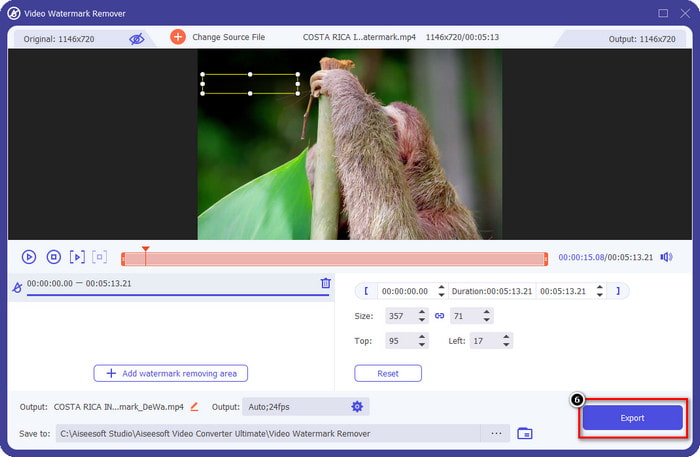
Passaggio 6. Successivamente, fai clic su Export per salvare il video senza la filigrana. Semplice, vero? Ecco a cosa serve lo strumento ultimate: semplice ma efficace in tutto.
Parte 3. Domande frequenti su come rimuovere la filigrana video Viva
Posso scaricare Viva Video senza filigrana?
Sì, puoi acquistare la versione pro di questo strumento in modo che quando esporti il video che modifichi qui non lasci una filigrana sul video. Inoltre, dopo aver acquistato la versione pro di questo strumento, utilizzerai l'altra funzionalità premium di questo strumento che non è disponibile gratuitamente.
Viva Video ha una versione desktop?
Puoi scaricare la versione Viva Video solo su Android e iOS. Quindi, se vuoi scaricare la versione desktop, non ne troverai nessuna, ma puoi cercare le migliori alternative per l'editing video come quelle offerte da Viva Video.
Viva Video ha spyware?
Nel 2017, i rapporti su questa app hanno successivamente confermato la presenza di malware. Quindi, le persone che hanno scaricato questo software hanno eliminato forzatamente questa app sui propri dispositivi per evitare ulteriori conseguenze.
Conclusione
Con il dispositivo di rimozione della filigrana Viva Video di questo articolo, puoi eliminare la filigrana incorporata da Viva Video nel video esportato. Puoi provare a utilizzare le app sopra menzionate e seguire le istruzioni che includiamo su come rimuovere la filigrana. Ma per gli utenti Windows e Mac con una filigrana Viva Video, è meglio utilizzare il software definitivo per rimuovere la filigrana in modo rapido ed efficace e ottenere un risultato professionale. Che cosa state aspettando? Fai clic sul pulsante di download per rimuovere subito la filigrana definitiva dal tuo dispositivo e utilizzala seguendo i passaggi precedenti.
-
 Come rimuovere la filigrana Lomotif usando questi fantastici strumenti
 Vuoi imparare come rimuovere la filigrana Lomotif dal tuo video? Leggi questo articolo per conoscere i metodi più eccezionali per rimuoverlo online e offline.
-
 Come rimuovere i turisti dalle foto usando i dispositivi di rimozione della filigrana
 Come rimuovere i turisti dalle foto? Se desideri imparare come rimuovere le cose indesiderate dalla tua foto, questi strumenti ti aiuteranno. Leggi questo articolo per saperne di più.
-
 Rimozione di filigrane 123rf - Revisione approfondita degli strumenti definitivi
 Se vuoi sapere quali sono i più eccezionali dispositivi di rimozione di filigrane 123rf, leggi attentamente questo articolo. Questo articolo fornisce una revisione approfondita degli strumenti.
