


 Video Converter Ultimate
 Screen Recorder
 Riparazione video
 Download sicuro
Tutorial completo su come rimuovere la filigrana Weibo che dovrai conoscere
Weibo è una nota piattaforma di social media utilizzata per condividere, diffondere e ottenere informazioni come Twitter che puoi utilizzare spesso in Cina. Puoi anche pubblicare e scaricare miniature, foto e video qui. Tuttavia, ci sarà una filigrana una volta esportata. Molti utenti vogliono rimuoverlo perché disturba la grafica del contenuto.
Nonostante esistano migliaia di strumenti per rimuovere watermark, pochi riescono davvero a eliminarli in modo efficace. Quindi, se non ti piace il watermark sui contenuti visivi che scarichi, questo articolo raccoglie i migliori strumenti da usare. Li abbiamo testati per dimostrare che sono funzionali e pratici nella rimozione del watermark. Per spiegarti come rimuovere il watermark di Weibo, continua a leggere questo articolo senza perdere il filo.

Parte 1. Come rimuovere la filigrana dal video Weibo utilizzando l'ultimo strumento di rimozione della filigrana
Il watermark di Weibo può essere un problema su altri strumenti perché la maggior parte lascia un alone al posto del watermark. Tuttavia, se usi FVC Video Converter Ultimate, non rimarrà alcuna sbavatura. A prescindere dalle dimensioni del watermark, questo strumento può eliminarlo in modo efficace senza lasciare tracce. In questo modo potrai goderti il video che esporti da Weibo. In altre parole, rimuovere il watermark con l’aiuto di questo strumento è un gioco da ragazzi.
Inoltre, puoi anche utilizzare questo strumento per altre cose, come tagliare, unire, comprimere, ritagliare, creare GIF e altro ancora. E se vuoi aggiungere una filigrana al tuo video in modo che nessuno possa rubartelo, puoi usare questo software per farlo. È il software all-in-one necessario sul desktop. Vuoi sapere come rimuovere la filigrana dal video Weibo? Puoi seguire i passaggi successivi mentre spieghiamo come farlo passo dopo passo.
Download gratuitoPer Windows 7 o versioni successiveDownload sicuro
Download gratuitoPer MacOS 10.7 o versioni successiveDownload sicuro
': Prima di seguire i passaggi successivi, assicurati di aver esportato il video Weibo su cui desideri rimuovere la filigrana in modo da poterlo trovare facilmente nella cartella.
Passaggio 1. Prima di tutto, devi scaricare il software sul desktop e scegliere la versione in base al sistema operativo. Dopo aver installato il software, segui la procedura di configurazione WinRAR che apparirà sullo schermo, fai clic su Start Now per avviarlo e procedi.
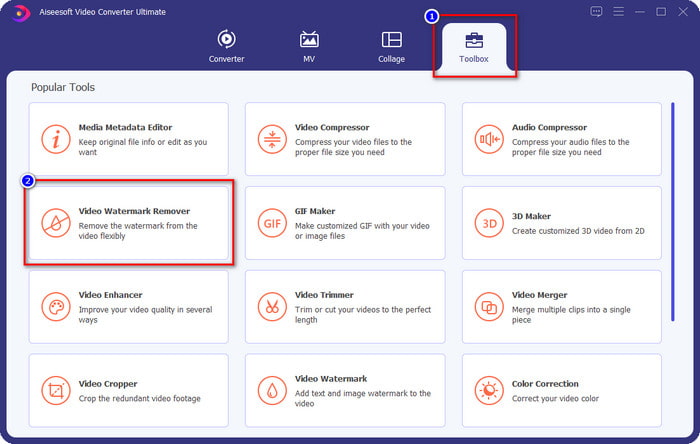
Passaggio 2. Vai alla sezione Toolbox e cerca Video Watermark Remover; fai clic su di essa.
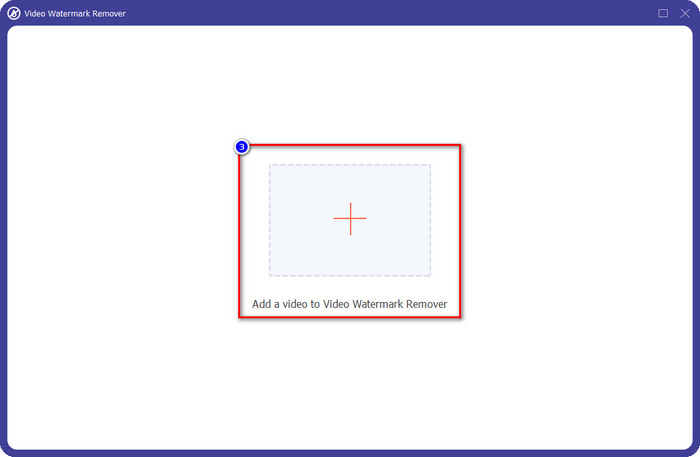
Passaggio 3. Fai clic sul pulsante +, individua nella cartella il video di Weibo con watermark che hai scaricato in precedenza, fai clic sul file e premi Open per caricarlo.
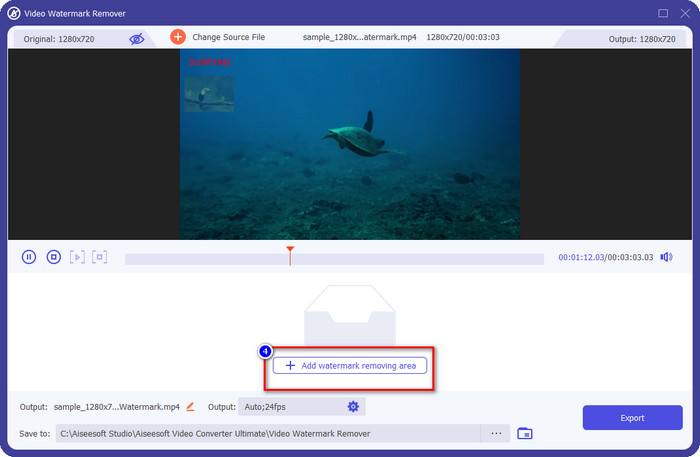
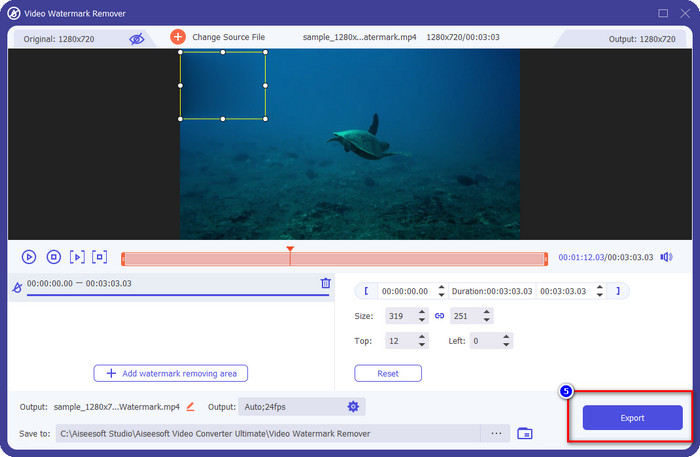
Passaggio 4. Nella nuova finestra che apparirà, fai clic su Add Watermark Removing Area per procedere con la rimozione del watermark.
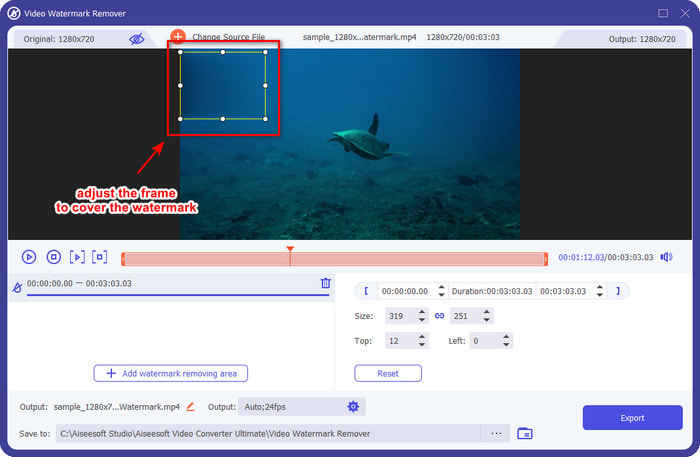
Passaggio 5. Trascina e tieni premuto il riquadro di selezione per coprire il watermark; puoi anche ingrandirlo o ridurlo secondo le tue esigenze e coprirlo completamente prima di esportare.
Passaggio 6. Dopo aver posizionato il riquadro di selezione sul watermark, fai clic su Export per rimuovere il watermark dal video che hai caricato. Non è necessario attendere a lungo perché supporta un processo ultra-rapido; in pochi secondi avrai il video di Weibo senza watermark.
Parte 2. Come rimuovere la filigrana dalla foto di Weibo utilizzando la versione gratuita sul Web
Come salvare le foto di Weibo senza watermark? Non puoi salvare un’immagine senza watermark se viene esportata da Weibo. Tuttavia puoi usare FVC Free Watermark Remover per eliminare il watermark dalle immagini. È un programma completo per rimuovere i watermark dalle immagini. Dal punto di vista delle funzionalità, possiamo dire che questo strumento è molto migliore rispetto ad altri remover disponibili sul web. Quindi, se vuoi rimuovere il watermark da un’immagine, questa è la prima scelta che potresti voler provare. Sebbene possa rimuovere il watermark dalle immagini, non è in grado di eliminarlo dai video, come invece può fare lo strumento Ultimate.
Tuttavia, è gratuito e la sua interfaccia web è pulita, quindi non vedrai nemmeno annunci che potrebbero infastidirti. Vuoi sapere come utilizzare questo strumento web? Quindi segui i passaggi indicati di seguito per provarlo tu stesso.
Nota: come per il video, assicurati di scaricare l'immagine Weibo che desideri avere e assicurati di posizionarla su una cartella visibile e di facile accesso.
Passaggio 1. Per accedere al remover di watermark sul web, fai clic su questo link per aprirlo.
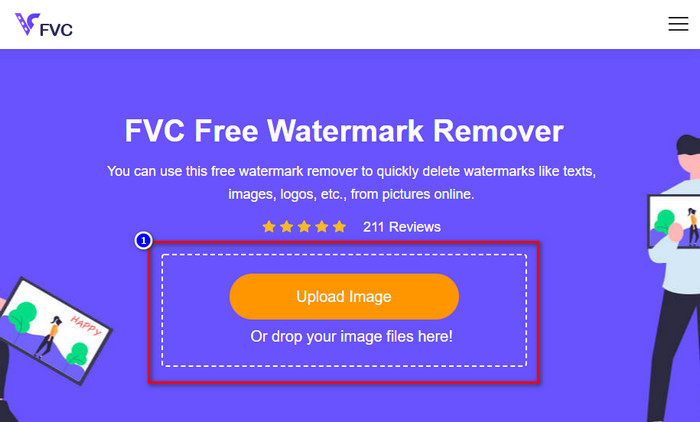
Passaggio 2. Nell’interfaccia web, fai clic su Upload Image, quindi si aprirà una cartella sullo schermo, trova l’immagine e premi Open per caricarla.
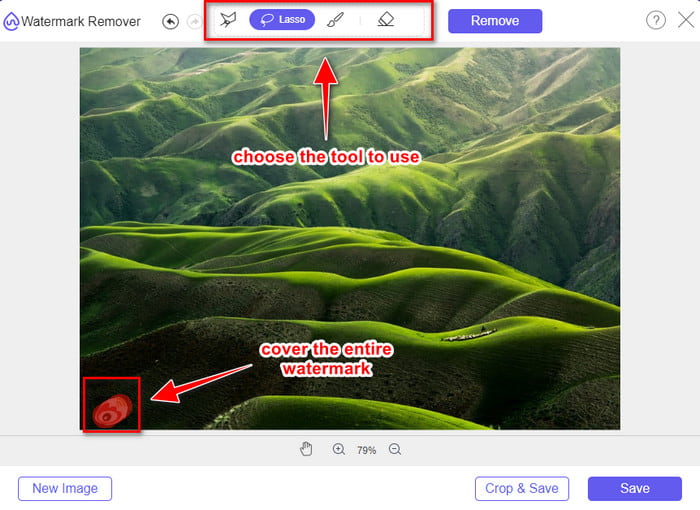
Passaggio 3. Qui puoi tracciare il watermark per rimuoverlo e assicurarti che ogni millimetro del watermark sia compreso all’interno dell’area che hai tracciato.
Passaggio 4. Premi Remove per cancellare il watermark presente sull’immagine.
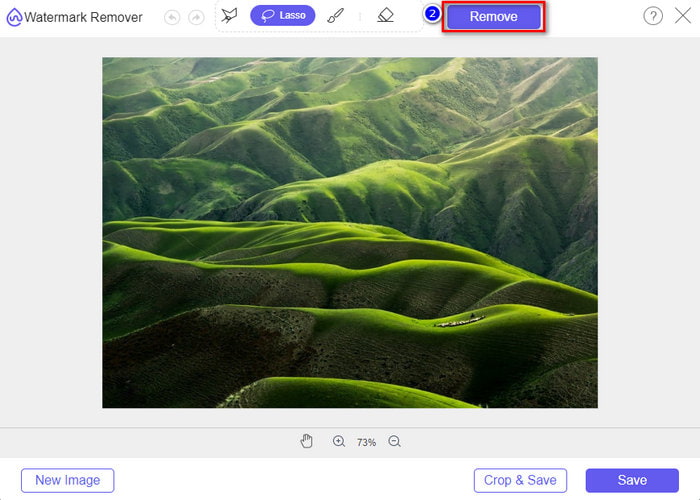
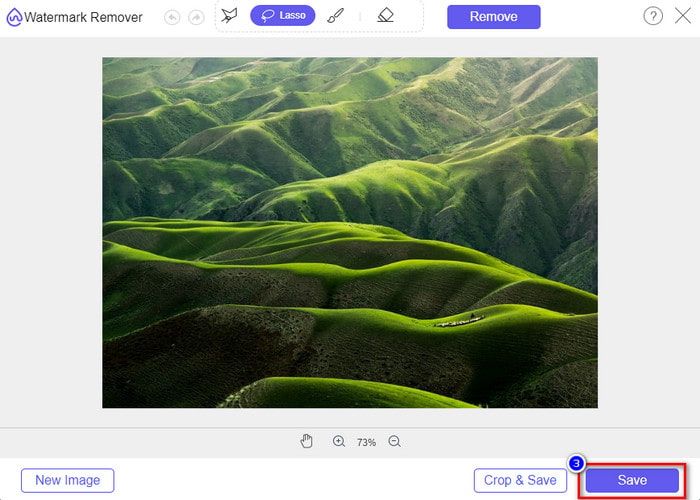
Passaggio 5. Dopo aver rimosso il watermark dall’immagine di Weibo, fai clic su Save per scaricare l’immagine di Weibo senza watermark.
Correlato:
Come rimuovere il watermark di TikTok
Come aggiungere un watermark a un video
Parte 3. Domande frequenti su come rimuovere la filigrana Weibo
Perché la filigrana Weibo è diventata sfocata dopo l'esportazione?
Alcuni strumenti sfocano la filigrana in modo che non possa essere vista sui media visivi che hanno esportato su Weibo. Ma non tutti gli strumenti sfocano le filigrane; alcuni rimuovono la filigrana sul supporto visivo senza lasciare traccia. Quindi, se vuoi rimuovere la filigrana su Weibo senza sfocarla, devi conoscere lo strumento che menzioniamo sopra per aiutarti a rimuoverlo.
Posso coprire il logo Weibo sul file esportato?
Si, puoi. In questo modo, non vedrai la filigrana di Weibo sul file. Tuttavia, manometterlo coprirebbe alcune parti del file, quindi invece di aiutarti, potrebbe peggiorare il file. Quindi, è necessario un dispositivo di rimozione della filigrana per cancellare la filigrana del file.
Tutti i file esportati su Weibo hanno una filigrana?
L'esportazione di qualsiasi tipo di file su questa piattaforma di microblogging lascerà un segno. Non importa cosa sia, le filigrane vengono aggiunte al file. Tuttavia, puoi rimuoverlo con lo strumento menzionato in precedenza in questo articolo.
Conclusione
Incredibile, vero? FVC offre gli strumenti di cui hai bisogno per rimuovere istantaneamente il watermark di Weibo da video e immagini. Anche se non hai esperienza o non sei un professionista in questo tipo di editing, con gli strumenti sopra menzionati l’operazione è alla portata di tutti. Quindi, se vuoi rimuovere un watermark da un’immagine, che provenga da Weibo o meno, FVC Free Watermark Remover è lo strumento di cui avrai bisogno. Ma per video e GIF devi usare un software professionale, facile da usare e conveniente, come FVC Video Converter Ultimate. Che cosa aspetti? Rimuovi il watermark dai tuoi contenuti visivi per poterli guardare senza alcuna traccia del marchio.
-
 Il modo migliore per aggiungere filigrana a un video in Photoshop su Windows e Mac
 Vuoi sapere come aggiungere una filigrana a un video su Photoshop? In tal caso, questo articolo ti fornirà le cose che devi sapere.
-
 3 migliori soluzioni su come rimuovere facilmente la filigrana dai video
 Vuoi rimuovere la fastidiosa filigrana sul video? Con questo blog, puoi imparare le diverse idee sulla rimozione della filigrana su un video.
-
 4 modi migliori per rimuovere la filigrana dalla GIF [Online & Offline]
 Hai bisogno di rimuovere la filigrana dalla GIF? Con lo strumento in questo articolo, imparerai i diversi stili con il diverso dispositivo di rimozione della filigrana disponibile sulla tua piattaforma.
