


 Video Converter Ultimate
 Screen Recorder
 Riparazione video
Scelte immense sulla fotocamera al rallentatore che dovresti considerare
Esistono diversi tipi di applicazioni, software e strumenti online per creare video in slow motion. Ma cosa succede se puoi registrare un video in slow motion direttamente con la tua videocamera? Ti presentiamo la Slow Motion Camera, un tipo di videocamera in grado di registrare video in slow motion senza l’aiuto di un editor. Se non riesci a decidere qual è la migliore videocamera da acquistare, continua a leggere questo articolo per conoscere nel dettaglio gli aspetti da considerare.

Parte 1. Che cos'è una videocamera al rallentatore?
Slow Motion Camera è fondamentalmente una fotocamera che scatta foto a una velocità molto più veloce di quella a cui verranno riprodotte alla fine. Il tempo sembra muoversi lentamente perché è necessario acquisire molti fotogrammi al secondo. Quando parliamo di slow motion, ci riferiamo a un effetto cinematografico frequente in cui il video si muove più lentamente del solito. In precedenza era stato utilizzato solo in film, pubblicità e televisione. Tuttavia, grazie agli enormi sviluppi nella tecnologia degli smartphone, anche uno smartphone ora può filmare al rallentatore.
Considera la fotocamera ad alta velocità Phantom HD come illustrazione. Questa fotocamera ha una frequenza fotogrammi massima di 1.455 fotogrammi al secondo quando si scatta in alta definizione (mentre la normale pellicola viene solitamente mostrata a 24 fotogrammi al secondo). Un movimento normale può essere visto scattando foto a 24 fotogrammi al secondo e riproducendole a 24 fotogrammi al secondo. Noterai un rallentamento in azione se scatti a una frequenza fotogrammi superiore a quella, diciamo 1.455 fotogrammi al secondo, e poi li riproduci a 24 fotogrammi al secondo (l'effetto al rallentatore).
Parte 2. 3 La migliore fotocamera al rallentatore
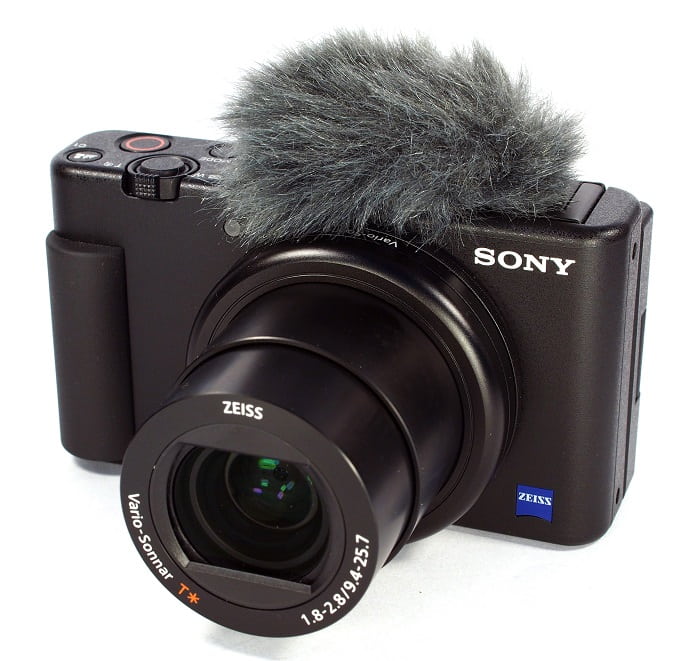
1. Fotocamera Sony ZV-1
Una delle fotocamere più straordinarie per video al rallentatore 4K è la Sony ZV-1. Questo dispositivo Sony è ideale per il vlogging perché può spostarsi tra le modalità senza perdere la concentrazione. Consideralo di nuovo se lo vedi come un ottimo soggetto per la fotografia. La Sony ZV-1 può fare molte cose, ma il vlogging è dove brilla. La messa a fuoco e la sfocatura sono gestite dal sistema. Questa è la strategia principale che impiega. Usarlo al buio potrebbe portare a errori nel tuo lavoro. L'autofocus e la stabilizzazione dell'immagine della Sony ZV-1 sono superiori a quelli delle videocamere concorrenti. Per gli YouTuber, questa è la fotocamera. Ma le cose non sono perfette. Il prezzo di questo dispositivo è proibitivo. Poiché costa $700, potresti chiederti se ne vale davvero la pena. La Sony ZV-1 ha dimensioni di 4,15 x 2,36 x 1,7 pollici, cattura immagini a 21 MP e registra video a 2160p. Uno dei motivi per avere una fotocamera come la Sony ZV-1 è per tutti i motivi di cui sopra.
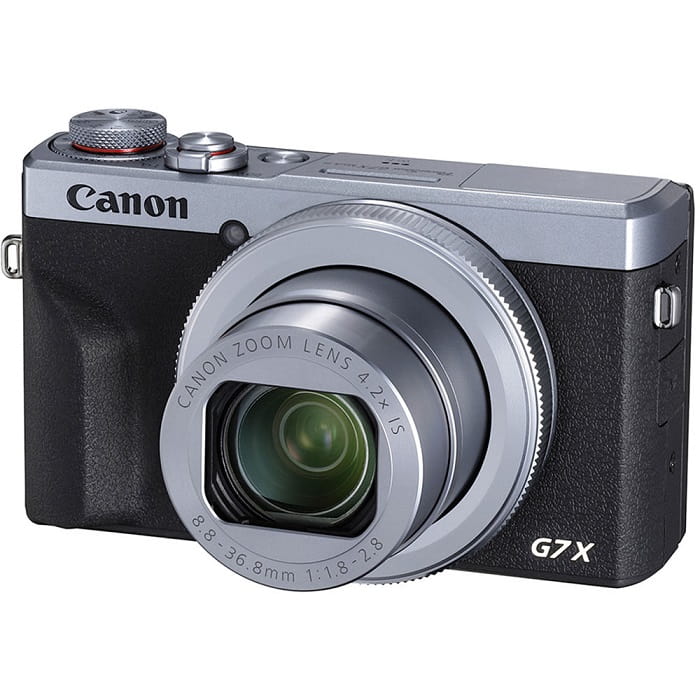
2. Canon PowerShot G7 X Mark III
La Canon PowerShot G7 X Mark III, a differenza della Sony ZV-1, è una scelta eccellente per lo streaming live. È utile per le persone che realizzano video in ambienti chiusi, come quelli su YouTube. Come risultato della sua qualità video 4K non tagliata e dell'eccellente LCD per scattare selfie artistici, è incluso in questa carrellata. Canon PowerShot G7 X Mark III ha una risoluzione massima di 20,1 megapixel per foto e video 4K 30p, ma nessuna opzione 4K 60p. Questo deve essere preso in considerazione. La fotocamera selfie ha un campo visivo di 180 gradi, una gamma di velocità dell'otturatore da 1/25600 a 30 secondi e un sistema di stabilizzazione ottica dell'immagine. Più probabilmente, questa Canon PowerShot G7 X Mark III costa circa $750.
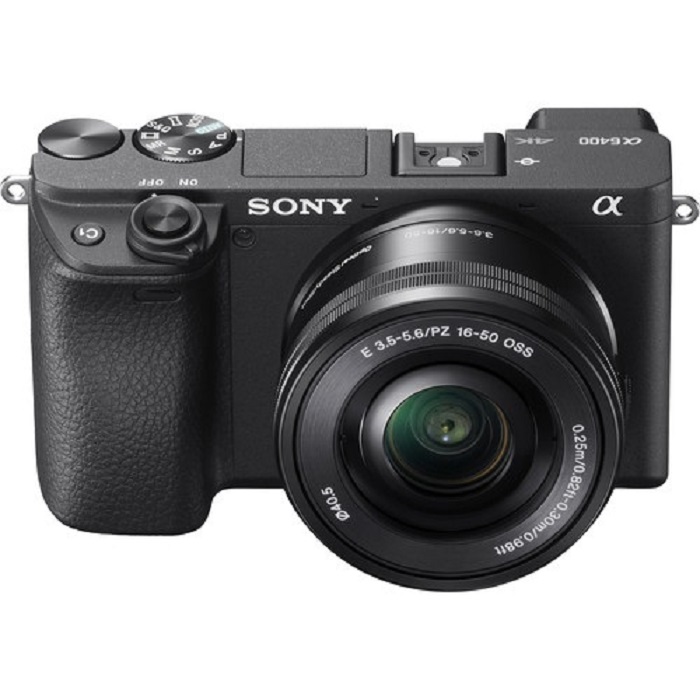
3. Sony A6400
Il Sony A6400, invece, è più funzionale dei modelli precedenti. Il fascino del dispositivo risiede nella sua notevole versatilità, che può essere utilizzata per videografia professionale, vlogging personale e fotografia. Inoltre, la Sony A6400 può registrare al rallentatore e al rallentatore, dandoti la possibilità di utilizzare quegli effetti nei tuoi film. La qualità dell'immagine è eccellente, con foto nitide, chiare e prive di sbavature di colore grazie alla risoluzione di 24 MP della fotocamera. Tuttavia, questa fotocamera è così costosa tra le tre che può costare circa $1299.
Parte 3. Cosa succede se non ho una videocamera al rallentatore?
Tutte le videocamere elencate sopra offrono risultati eccezionali e di altissima qualità per i video in slow motion, perché questa funzione è già integrata ed è stata progettata appositamente per catturare video al rallentatore. L’unico svantaggio è che la slow-motion camera è costosa e abbastanza complessa da usare per ottenere un video in slow motion. Se non possiedi una slow-motion camera, ti consigliamo di usare Video Converter Ultimate come migliore alternativa. A differenza della slow-motion camera, questo software è gratuito da scaricare ed è accessibile a tutti gli utenti.
Una delle sue funzioni principali, Video Speed Controller, permette di trasformare un video a velocità normale nel miglior video in slow motion che desideri. Con un solo clic per ogni passaggio, puoi goderti il tuo video al rallentatore senza usare costose videocamere. Per saperne di più sui dettagli del software, segui le procedure riportate di seguito:
Passaggio 1: Il software deve prima essere scaricato prima di poter essere utilizzato. Per farlo, fai clic sul link Download gratuito che si trova sotto il pulsante di inclusione. Installarlo è semplice quanto scaricarlo sul desktop e fare clic sul pulsante Avvia ora per iniziare l’installazione.
Download gratuitoPer Windows 7 o versioni successiveDownload sicuro
Download gratuitoPer MacOS 10.7 o versioni successiveDownload sicuro
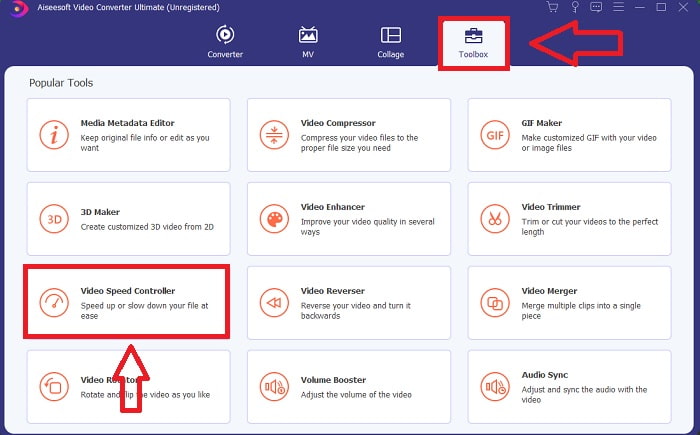
Passaggio 2: Una volta completata l’installazione del programma, potrai vedere il processo di conversione sull’interfaccia principale del software. Poi, utilizzando la funzione Toolbox, potrai trovare esattamente ciò di cui hai bisogno per creare video in slow motion. Quando visualizzi l’elenco degli strumenti disponibili, seleziona Video Speed Controller se desideri modificare la velocità del tuo video o semplicemente renderlo in slow motion.
Passaggio 3: Se decidi di procedere, sullo schermo del tuo computer verrà visualizzata un’altra finestra. Facendo clic sul simbolo più +, potrai iniziare a modificare.
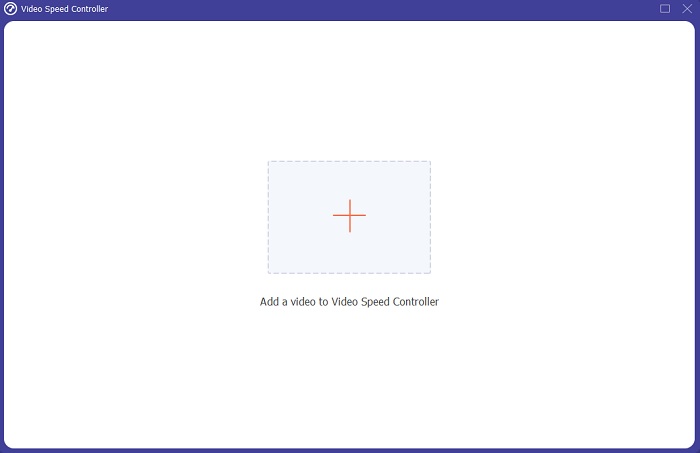
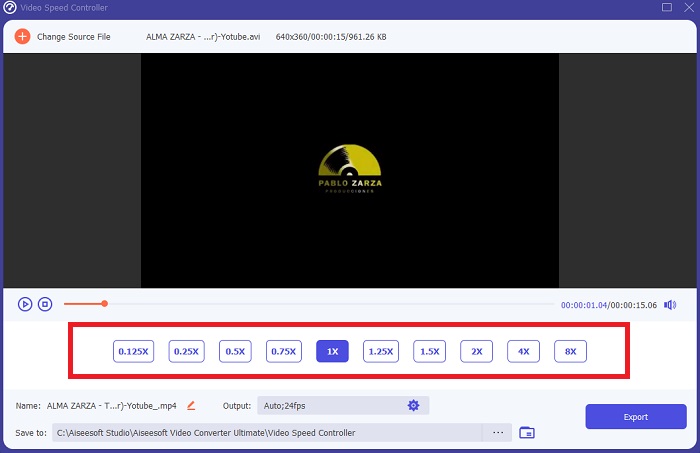
Passaggio 4: A partire dal frame rate del video, seleziona di quante volte deve essere aumentato o diminuito durante la riproduzione per determinare quanto sarà veloce o lento il video; questo stabilirà l’intensità dell’effetto slow motion che applicherai al tuo video. Poiché stai creando un’alternativa a una slow-motion camera, ridurrai la velocità selezionando una velocità video inferiore a quella normale; in questo modo l’effetto slow motion verrà applicato al tuo video.
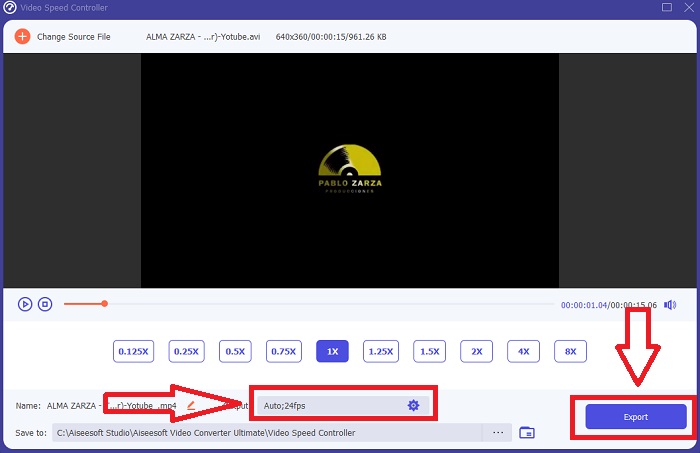
Passaggio 5: Se sei soddisfatto della velocità del tuo video, puoi ottimizzarne ulteriormente la qualità modificando formato, risoluzione, frame rate e altri parametri. Avrai anche la possibilità di rinominare il file video in uscita. Per salvare il tuo lavoro, fai clic su Esporta e scegli una posizione nel file system del tuo computer.
Correlato
Come velocizzare i video in Windows Media Player
Come riportare i video in slow motion alla velocità normale
Parte 4. Domande frequenti su Slow Motion Camera
Quanto costa una fotocamera al rallentatore?
Scegli una fotocamera con un frame rate elevato se desideri un effetto al rallentatore di alta qualità. Ci dà l'impressione che nessun video sarebbe a scatti o balbettante se la fotocamera avesse un frame rate alto o medio. Un'altra cosa a cui pensare è il tuo budget. Le riprese al rallentatore non richiedono l'acquisto di attrezzature costose. Tali telecamere partono da circa $350 e possono arrivare fino a $4.000. È possibile acquisire incredibili filmati a fotogramma libero solo con una fotocamera dotata di queste due caratteristiche.
Che cos'è un frame rate?
Tipicamente definita in fotogrammi al secondo, la frequenza fotogrammi si riferisce alla frequenza con cui le immagini successive vengono visualizzate sullo schermo (fps). La frase frame rate si riferisce alla stessa cosa indipendentemente dal fatto che venga utilizzata per descrivere film o videocamere, computer grafica o sistemi di motion capture. SMPTE (Society of Motion Picture and Television Editors) stabilisce gli standard del settore per i frame rate cinematografici e televisivi (SMPTE).
Esiste un'app per la fotocamera al rallentatore?
Sì, ci sono molte applicazioni al rallentatore disponibili nei sistemi operativi Android e iOS. Per iOS, ci sono iMotion, SloPro, SlowCam, ecc. E per Android, Slow Motion Video FX, Efectum, Coach's Eye, ecc.
Conclusione
In sintesi, una slow-motion camera è piuttosto tecnica e pensata per un uso professionale, semplicemente perché è costosa e richiede molta esperienza per essere utilizzata correttamente. Grazie al nostro nuovo software, Video Converter Ultimate può replicare lo scopo di una slow-motion camera, poiché uno dei suoi strumenti può convertire gratuitamente un video a velocità normale in un video in slow motion.
-
 [Facile] Come risolvere audio e video non sincronizzati
 Supponiamo che tu'pianifichi il tuo streaming per domani, ma quando controlli la tua configurazione, l'audio e il video non sono sincronizzati. Leggi questo articolo per saperne di più su questa preoccupazione.
-
 7 semplici passaggi su come risolvere i problemi di ritardo audio di OBS [Risolto]
 Fai fatica a guardare il tuo video clip dopo la registrazione a causa del ritardo audio quando usi OBS Studio? Leggi l'articolo di seguito per sapere come correggere efficacemente l'audio non sincronizzato.
-
 Modi eccellenti possibili | Come risolvere il ritardo audio VLC [2021]
 Hai difficoltà a guardare il tuo film preferito sul tuo lettore multimediale VLC a causa dell'incertezza audio? Continua a leggere questo articolo per conoscere tutti i modi possibili per correggere il ritardo audio di VLC.
