


 Video Converter Ultimate
 Screen Recorder
 Riparazione video
Come velocizzare i video di TikTok su Tiktok o utilizzare l'altro software alternativo
Una delle applicazioni di intrattenimento video in più rapida crescita che puoi usare sul tuo telefono cellulare è TikTok. Sebbene TikTok sia stato rilasciato nel 2016, è diventato immediatamente molto popolare nei pochi mesi successivi alla data di lancio. Inoltre, un tipo di modifica molto usata qui è l’accelerazione del video per creare un effetto visivo. Quindi, se sei uno di loro e vuoi sapere come si fa, sei nel posto giusto. Vedremo infatti diversi strumenti che ti aiuteranno a imparare come velocizzare un video su TikTok.

Parte 1. Come velocizzare un video su TikTok
Come già detto, TikTok è diventata una delle piattaforme di clip video brevi più famose, quindi modificare un video qui è piuttosto semplice. Tieni presente che puoi velocizzare il video già durante le riprese e non solo a registrazione terminata. Inoltre, se provi a velocizzare un video su TikTok, dovrai stimare la velocità complessiva senza sapere in anticipo se è davvero quella che vuoi ottenere. Tuttavia, se non vuoi scaricare uno strumento di terze parti per accelerare un video, allora TikTok farà al caso tuo. Ora segui i passaggi qui sotto per velocizzare un video su TikTok.
Passaggi per Registrare un Video Accelerato su TikTok:
Passaggio 1. Per prima cosa scarica TikTok sul tuo telefono cellulare e avvialo una volta completato il download.
Passaggio 2. Tocca il simbolo + per iniziare a registrare. Poi fai clic su Aggiungi suono per inserire musica di sottofondo e, se vuoi, un filtro. Ora, per velocizzare il video, fai clic su Velocità e scegli una delle opzioni disponibili. Per iniziare la registrazione tocca il pulsante rotondo e toccalo di nuovo se vuoi fermarla.
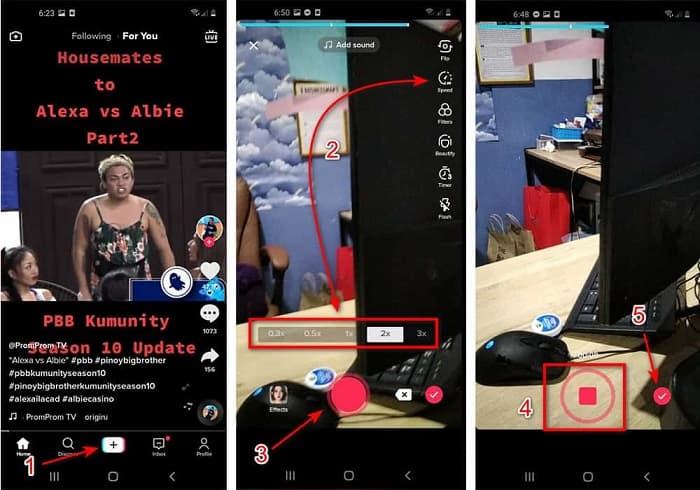
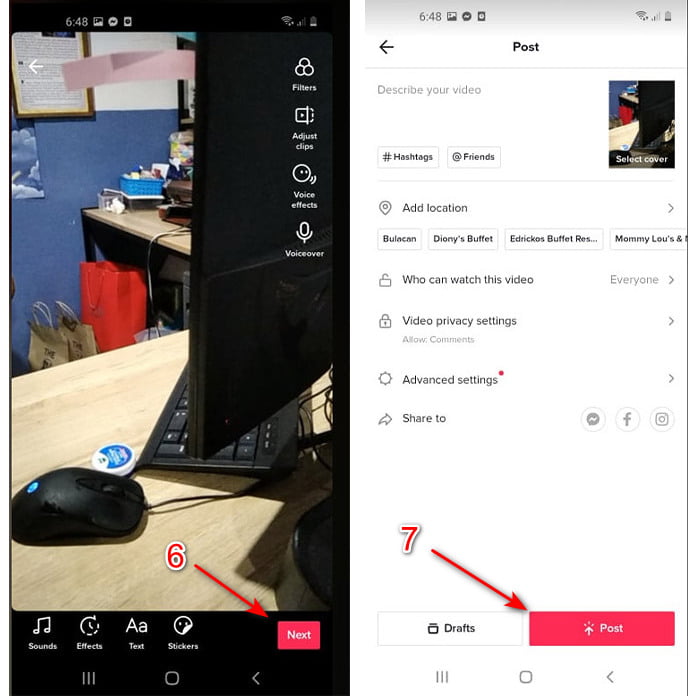
Passaggio 3. Per controllare il video, premi il pulsante di verifica e fai clic su Avanti. Quindi fai clic su Pubblica per caricarlo su TikTok.
Parte 2. Come velocizzare qualsiasi video TikTok su Video Converter Ultimate
A differenza della funzione di montaggio integrata che TikTok ti mette a disposizione, Video Converter Ultimate ti permette di aumentare la velocità manualmente ma in modo più semplice. Inoltre, mentre acceleri il video avrai un’anteprima, così potrai capire se la velocità scelta corrisponde ai tuoi gusti. Questo straordinario software consente già ai suoi utenti di sperimentare funzioni di montaggio di livello professionale avanzato, ma con passaggi semplificati. A causa delle funzioni avanzate che offre, lo strumento è a pagamento. Ma non preoccuparti: non ti costerà certo mille o nemmeno cento dollari. Se vuoi sapere quali vantaggi o funzioni chiave otterrai con questo strumento, dai un’occhiata all’elenco.
Migliori Funzioni Chiave che Troverai in Video Converter Ultimate:
◆ Questo è un software indipendente dalla piattaforma, il che significa che puoi scaricarlo sul tuo PC, Mac o Linux.
◆ Tutto l'editing avanzato, il convertitore, la creazione di GIF e altro ancora sono disponibili in questo strumento.
◆ L'usabilità dello strumento è molto utile per chiunque, anche per i professionisti o per i neofiti dell'editing.
◆ Consente agli utenti di esprimere il proprio lato creativo attraverso varie funzionalità di modifica disponibili qui.
◆ Sebbene lo strumento sia comunque a pagamento, è meno costoso e molto conveniente per chiunque voglia provarlo.
Ora, se vuoi sapere come velocizzare i video di TikTok con questo straordinario editor alternativo, leggi e segui le istruzioni qui sotto per ottenere un successo garantito.
Passaggi per Velocizzare i Video di TikTok con Video Converter Ultimate:
Passaggio 1. Per usare il software, devi prima scaricarlo sul tuo PC o Mac. Poi installalo, esegui la semplice configurazione guidata e fai clic su Fine per procedere.
Download gratuitoPer Windows 7 o versioni successiveDownload sicuro
Download gratuitoPer MacOS 10.7 o versioni successiveDownload sicuro
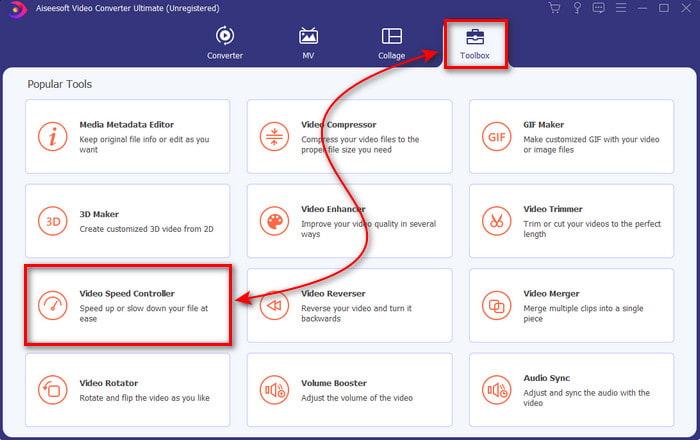
Passaggio 2. Premi Toolbox e seleziona Video Speed Controller al suo interno.
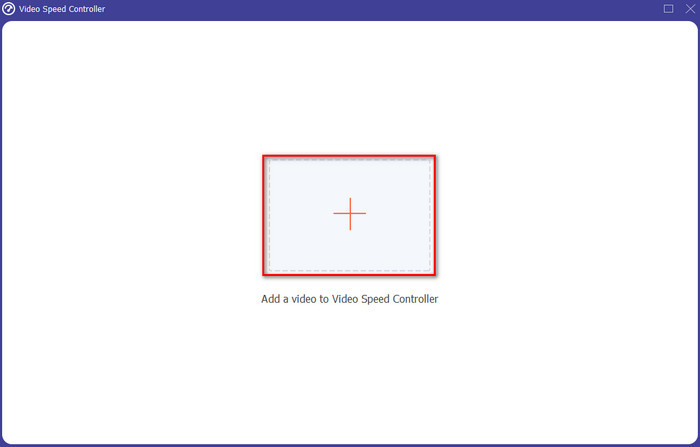
Passaggio 3. Per aggiungere il file che vuoi velocizzare, fai clic sul pulsante +. Poi scegli il file nella cartella che apparirà in seguito e fai clic su Apri per procedere.
Passaggio 4. Per regolare la velocità del video scegli l’opzione di velocità in basso. E per scaricare il file fai clic su Esporta per avviare il processo di esportazione.
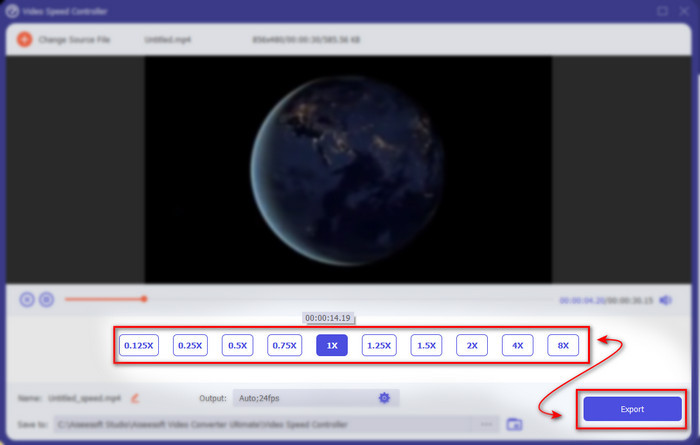
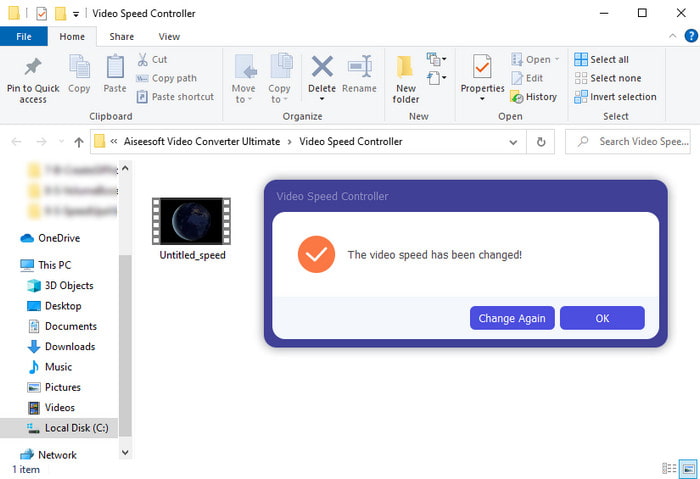
Passaggio 5. Non dovrai aspettare un minuto intero perché il file sarà pronto dopo pochi secondi. Quindi, se sullo schermo si apre una cartella, significa che il file è già stato esportato. Fai clic sul file per guardare il video che hai velocizzato.
Correlato:
Parte 3. Domande frequenti sull'accelerazione di un video su Tiktok
Come velocizzare un video TikTok che non è tuo?
Se vuoi velocizzare un video che non è tuo, devi prima scaricare il video da TikTok. Tocca il pulsante + e poi Carica, quindi scegli il video dalla galleria. Seleziona l’opzione di velocità e fai clic su Avanti per caricarlo. In alternativa, usa Video Converter Ultimate per accelerarlo seguendo i passaggi indicati sopra.
Posso registrare un video di 3 minuti su Tiktok?
Assolutamente Sì, è possibile se sono registrati separatamente, tuttavia non è possibile registrare un video diretto di 3 minuti. Perché la durata della registrazione con questo supporto per app è compresa tra 15 e 60 secondi interi. Quindi, se la durata del video che desideri registrare è superiore a un minuto, è meglio registrarlo separatamente. Tuttavia, se sei uno degli utenti che sono stati selezionati da Tiktok per provare la registrazione di 3 minuti, allora sei fortunato perché questo è stato testato solo per un piccolo gruppo di persone.
Posso aggiungere MP3 ai miei video su Tiktok?
Quando TikTok è stato rilasciato per la prima volta, gli utenti potevano aggiungere musica ai loro video, ma ora hanno rimosso questa funzione. A causa del problema di copyright che è stato presentato a TikTok. Quindi, per evitare il problema, lo rimuovono e aggiungono una musica di esempio disponibile oppure puoi utilizzare un'altra app per farlo per te.
Tiktok ha un limite di età?
Secondo i termini e le condizioni di TikTok, 13 anni o più devono essere l'età dell'utente che utilizzerà questa app. Inoltre, Tiktok non ha la verifica dell'età quando ti iscrivi, quindi aspettati che sul tuo feed vengano visualizzati circa 16+ contenuti.
Conclusione
Ora che sai come velocizzare un video su TikTok, è il momento di divertirti. Inoltre, scegli la soluzione che ritieni più adatta a te. Se pensi che le funzioni di velocizzazione integrate in TikTok siano sufficienti, usa quelle. Ma se vuoi un controllo migliore sulla velocità, con anteprime dedicate, allora usa Video Converter Ultimate. Indipendentemente dall’opzione che sceglierai, puoi aspettarti un ottimo risultato grazie alle loro funzioni e alle prestazioni complessive.
-
 7 semplici passaggi su come risolvere i problemi di ritardo audio di OBS [Risolto]
 Fai fatica a guardare il tuo video clip dopo la registrazione a causa del ritardo audio quando usi OBS Studio? Leggi l'articolo di seguito per sapere come correggere efficacemente l'audio non sincronizzato.
-
 Modi eccellenti possibili | Come risolvere il ritardo audio VLC [2021]
 Hai difficoltà a guardare il tuo film preferito sul tuo lettore multimediale VLC a causa dell'incertezza audio? Continua a leggere questo articolo per conoscere tutti i modi possibili per correggere il ritardo audio di VLC.
-
 Modi migliori per aumentare il volume MP4 online e offline
 Fai fatica a sentire i suoni del tuo videoclip? Leggi l'articolo qui sotto per sapere come aumentare il volume mp4 in diversi modi.
