


 Video Converter Ultimate
 Screen Recorder
 Riparazione video
 Download sicuro
Utilizza i video rotatori online e dì addio ai video capovolti
Nell'era digitale, i contenuti video sono parte integrante della nostra vita. I video sono un ottimo modo per trasmettere il tuo messaggio, sia che tu voglia ricordare un momento speciale o creare contenuti entusiasmanti per i social media o per la tua attività. Ma potresti scoprire che i tuoi video devono essere nella posizione giusta perché sono stati registrati nel posto sbagliato o perché devono essere capovolti orizzontalmente o verticalmente.
Questo post ti insegnerà quali sono i migliori rotatori di video online disponibili per aiutarti a trasformare i tuoi video nell’orientamento che desideri. Scoprili meglio continuando a leggere questo articolo.

Parte 1. I migliori video rotatori online
1. Ruota il mio video
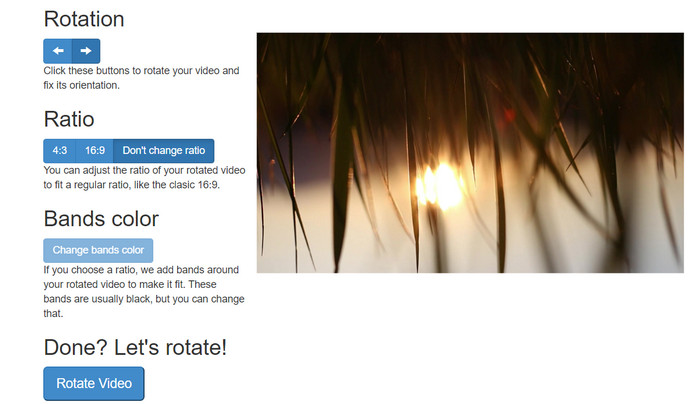
RotateMyVideo è uno strumento online semplice e gratuito che ti consente di ruotare e capovolgere i tuoi video in qualsiasi direzione senza bisogno di software speciali. Lo strumento ti consente di ruotare i tuoi video di 90 gradi alla volta e ha un'interfaccia semplice che rende il processo semplice e veloce. RotateMyVideo è una buona scelta se devi ruotare un video per motivi personali o di lavoro. Può farti risparmiare tempo e fatica.
Professionisti
- Ruota i video online gratuitamente senza costi nascosti.
- Supporta la rotazione con incrementi di 90 gradi.
- Capovolgi i video orizzontalmente o verticalmente.
Contro
- Può ruotare solo video di dimensioni inferiori a 500 MB.
- Il processo di conversione video può richiedere del tempo.
- L'interfaccia utente potrebbe non essere accattivante.
Passaggi per ruotare i video online con RotateMyVideo:
Passaggio 1. Apri un browser web e vai al sito RotateMyVideo.
Passaggio 2. Fai clic sul pulsante Pick Video per caricare il video che desideri ruotare.
Passaggio 3. Ora seleziona l’orientamento del video che desideri facendo clic sull’apposito pulsante. Puoi ruotare il video a sinistra o a destra, capovolgerlo orizzontalmente o verticalmente, oppure mantenerlo nel suo orientamento originale.
Passaggio 4. Se sei soddisfatto del video ruotato, fai clic sul pulsante Rotate video per salvare le modifiche.
2. Clideo
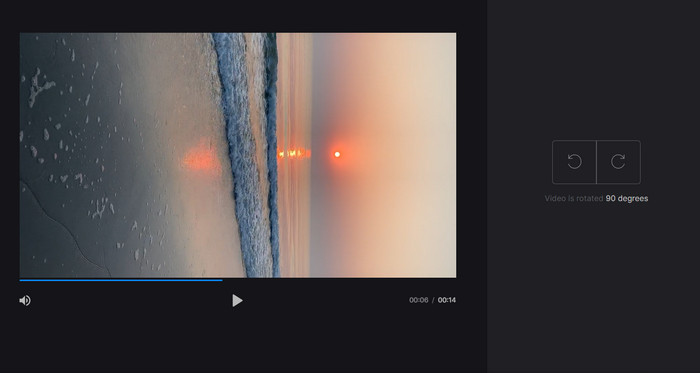
Clideo è una piattaforma di montaggio video online intuitiva e versatile che offre una serie di strumenti potenti per l’editing dei video, inclusa la rotazione. Inoltre, Clideo mette a disposizione funzioni come il taglio, l’unione, l’aggiunta dell’audio e molte altre, rendendolo uno strumento di montaggio video completo. A differenza di altri software di editing video, Clideo è completamente basato sul web, quindi non è necessario scaricare o installare nulla.
Professionisti
- Carica video da varie fonti.
- Compatibile con più formati video.
- Interfaccia user-friendly.
Contro
- Non adatto per esigenze avanzate di editing video.
- La versione gratuita ha limitazioni.
Passaggi per il convertitore video da verticale a orizzontale online:
Passaggio 1. Utilizza un browser web per accedere al sito di Clideo. Quindi mostra tutti gli strumenti dalla pagina principale.
Passaggio 2. Ora seleziona l’opzione Rotate Video dal menu e scegli Choose file per caricare il video che desideri ruotare. Puoi anche trascinare e rilasciare il file video sul sito.
Passaggio 3. Fai clic sul pulsante Rotate sul lato destro del lettore video. Scegli l’orientamento di rotazione desiderato per il video facendo clic sul pulsante corrispondente. Il video può essere ruotato in senso orario o antiorario, orizzontalmente o verticalmente.
3. Clip flessibile
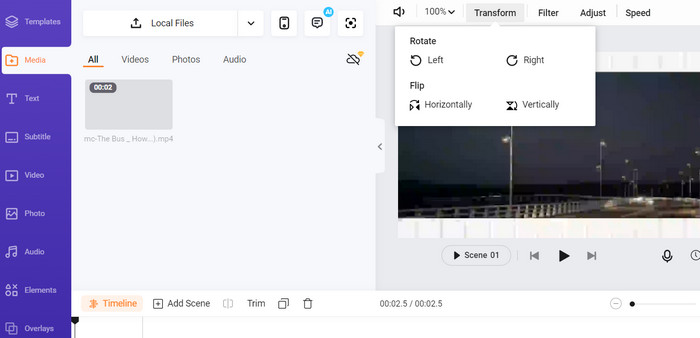
Flexclip è un impressionante strumento di editing video online che ti consente di creare video dall'aspetto professionale senza problemi. Una cosa migliore di Flexclip è la sua vasta libreria di modelli che puoi utilizzare per avviare il tuo processo di editing video. Offre anche una versione gratuita che ti consente di creare video della durata massima di un minuto senza filigrane.
Professionisti
- Ampia libreria di modelli.
- Offre una gamma di opzioni di personalizzazione.
Contro
- I prezzi possono essere alti per alcuni utenti
- Controllo limitato sulla qualità video
Passaggi su come ruotare i video online senza filigrana utilizzando Flexclip:
Passaggio 1. Vai al sito FlexClip, registrati per un account gratuito o accedi se ne hai già uno. Una volta effettuato l’accesso, fai clic sul pulsante Start from Scratch.
Passaggio 2. Fai clic sul pulsante Upload per caricare il video che vuoi ruotare. In alternativa, puoi trascinare e rilasciare il file video nell’editor.
Passaggio 3. Una volta caricato il video, fai clic sul pulsante Transform situato nel menu superiore dell’anteprima. Usa i pulsanti per ruotare il video in senso orario o antiorario finché non raggiunge l’orientamento desiderato.
4. Kapwing
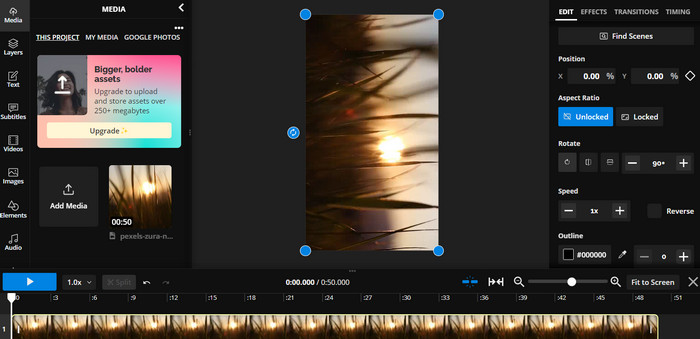
Questo è un altro strumento online gratuito che ti permette di ruotare i tuoi video. Allo stesso modo, supporta la rotazione a incrementi di 90 gradi e consente anche di capovolgere i video. Sebbene le sue funzioni avanzate, come aggiungere testo, musica ed effetti speciali, lo rendano uno strumento di editing video completo, la sua interfaccia intuitiva e l’ampia libreria di strumenti e template lo rendono un’ottima opzione per i principianti.
Professionisti
- Editing video versatile.
- Online e basato su cloud.
Contro
- Lunghezza video limitata.
- Dimensione del file limitata.
Passaggi per far ruotare i video online usando Kapwing:
Passaggio 1. Vai al sito di Kapwing e registrati per un account gratuito oppure accedi se ne hai già uno. Fai clic sul pulsante Start Editing per avviare un nuovo progetto.
Passaggio 2. Clicca sul pulsante Upload per caricare il video che desideri ruotare.
Passaggio 3. Successivamente, seleziona il file multimediale dalla timeline e le opzioni di modifica appariranno nel menu sulla destra.
Passaggio 4. Scegli l’opzione Rotate e seleziona la direzione in cui desideri ruotare il video. Inserisci il numero di gradi per specificare l’angolo di rotazione. Fatto questo, hai terminato.
5. Taglierina video online
Questo è uno strumento online gratuito che ti consente di ruotare i tuoi video in qualsiasi direzione. Puoi caricare il tuo video e quindi utilizzare lo strumento di rotazione per regolare l'orientamento del video.
Professionisti
- Veloce ed efficiente.
- Gratuito da usare.
Contro
- È necessaria una connessione a Internet.
- Perdita di qualità video.
Passaggi per ruotare i video online con Online Video Cutter:
Passaggio 1. Visita il sito ufficiale di Online Video Cutter.
Passaggio 2. Fai clic sul pulsante Open file per caricare il video che desideri modificare.
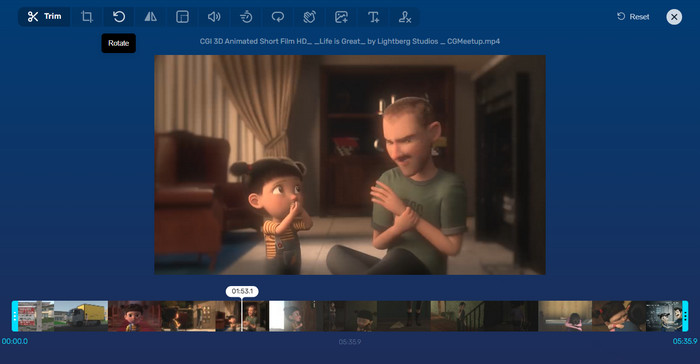
Passaggio 3. Quando il video è stato importato, verrai reindirizzato all’interfaccia di modifica del programma. Questa volta, premi il pulsante Rotate dal menu.
Passaggio 4. Se sei soddisfatto del modo in cui il tuo video è stato ruotato, premi il pulsante Save nell’angolo in basso a destra.
Parte 2. Strumento alternativo: Video Rotator Offline
FVC Video Converter Ultimate è un’app desktop compatibile con Windows e Mac. Consente agli utenti di convertire e ruotare i video offline. Inoltre, gli utenti possono ruotare i video in senso orario o antiorario di 90, 180 o 270 gradi. Con una serie di strumenti di editing video, puoi anche tagliare, unire, regolare le impostazioni video e molto altro. Scopri come funziona questo rotatore di video.
Passaggio 1. Scarica e installa lo strumento
Prima di tutto, scarica il programma scaricandolo e installandolo sul tuo computer. Subito dopo, avvialo immediatamente.
Download gratuitoPer Windows 7 o versioni successiveDownload sicuro
Download gratuitoPer MacOS 10.7 o versioni successiveDownload sicuro
Passaggio 2. Carica un video da ruotare
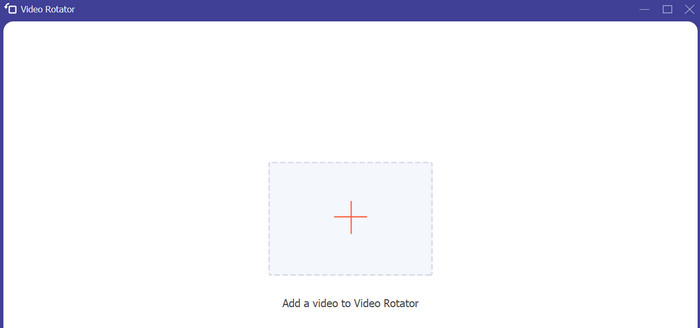
Poi vai alla scheda Toolbox e accedi all’opzione Video Rotator del programma. Dopo aver fatto clic su questa opzione, ti verrà richiesto di caricare il tuo video. Ora fai clic sul pulsante con il segno Plus per inserire il video desiderato.
Passaggio 3. Ruota il video
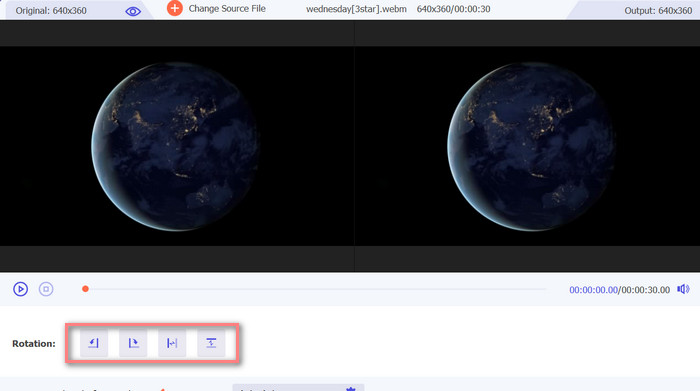
A questo punto, spunta l'apposito pulsante di rotazione per ottenere l'orientamento del video desiderato. L'anteprima è in tempo reale, quindi puoi adattarti rapidamente.
Passaggio 4. Ottieni una copia del video ruotato
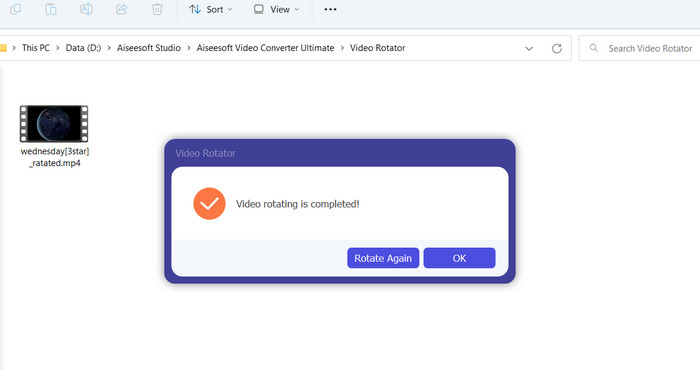
Infine, fai clic sul pulsante Export per ottenere una copia del video modificato. Subito dopo apparirà una notifica e si aprirà la cartella in cui si trova il video.
Parte 3. Domande frequenti sui video rotatori online
I video rotatori online sono sicuri da usare?
La maggior parte dei rotatori di video su Internet è sicura da usare. Per garantire che i tuoi dati e la tua privacy siano salvaguardati, è essenziale selezionare uno strumento rinomato e affidabile.
Posso ruotare i video sul mio smartphone?
Sì, molti rotatori di video online sono ottimizzati per i dispositivi mobili e sono accessibili dal browser web del tuo smartphone.
Ci sono limitazioni all'utilizzo di un video rotatore online?
Sì, alcuni video rotatori online potrebbero avere limitazioni come restrizioni sulla dimensione dei file, capacità di modifica limitate o qualità video ridotta.
Conclusione
I rotatori di video online offrono un modo pratico e intuitivo per ruotare i video senza scaricare o installare alcun software. Sono accessibili da qualsiasi dispositivo con connessione a Internet e possono essere utilizzati anche in mobilità. Tuttavia, possono presentare alcune limitazioni, come restrizioni sulla dimensione dei file e una qualità video ridotta. Per questo motivo abbiamo fornito un’alternativa offline che offre soluzioni a queste limitazioni.
-
 [4 modi] Come velocizzare facilmente i tuoi video online
 Vuoi velocizzare un video online? Leggi questo articolo per saperne di più sull'accelerazione di un video in diversi modi possibili.
-
 Modi eccellenti su come tagliare video online in modo conveniente
 Tagliare un video è il modo migliore per creare momenti salienti del video. Quindi, questo post ti fornirà i metodi per tagliare facilmente i video online. Leggi per saperne di più.
-
 Crea la tua migliore GIF animata tramite GIF Maker online [2023]
 Una recensione informativa su come creare una GIF utilizzando questi semplici creatori di GIF online che già incontri o meno sul web.
