


 Video Converter Ultimate
 Perakam Skrin
 Pembaikan Video
4 Pembuat Animasi Foto Terbaik yang Boleh Anda Gunakan untuk Membuat Imej Animasi
Pada masa kini kebanyakan laman media sosial sudah pun menggunakan GIF menggantikan imej pegun lama. Ini kerana GIF lebih menarik pada pandangan pengguna dan dapat menyampaikan mesej yang jauh lebih baik berbanding imej biasa. Jadi, jika anda ingin tahu apakah pembuat animasi foto yang mudah diakses dan boleh anda gunakan, teruskan membaca senarai di bawah. Kami telah mencari pembuat animasi terbaik yang boleh anda gunakan untuk menambah pergerakan animasi pada imej anda.

Bahagian 1. Perisian Pembuat Animasi Foto Terbaik
Dalam senarai ini kami letakkan yang satu ini di tempat pertama kerana ia merupakan penyunting yang luar biasa untuk anda gunakan, iaitu Video Converter Ultimate. Jadi, jika anda mahu membuat animasi daripada foto, anda boleh melakukannya dengan mudah di sini. Selain itu, perisian desktop ini boleh menghidupkan apa jua imej dengan ciri-ciri canggih yang boleh anda gunakan sama ada anda profesional atau tidak. Pengalaman keseluruhan kami ketika mencuba perisian ini setakat ini adalah yang terbaik berbanding yang lain sama ada dalam talian atau luar talian. Jadi kini, jika anda ingin tahu bagaimana untuk menghidupkan imej ringkas anda, ikuti langkah-langkah di bawah dan teruskan.
5 Langkah Mudah untuk Menghidupkan Imej dengan Video Converter Ultimate:
Langkah 1. Mula-mula, klik butang muat turun di bawah dan pilih sistem operasi (OS) yang sedang anda gunakan. Pasang perisian tersebut, lakukan tetapan dengan pantas, dan klik Start Now untuk meneruskan.
Muat Turun PercumaUntuk Windows 7 atau lebih baharuMuat Turun Selamat
Muat Turun PercumaUntuk MacOS 10.7 atau lebih baharuMuat Turun Selamat
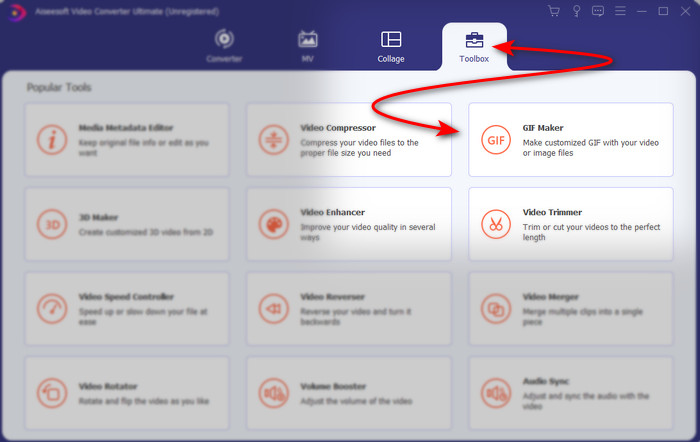
Langkah 2. Buka perisian dan pergi ke Toolbox untuk mencari GIF Maker.
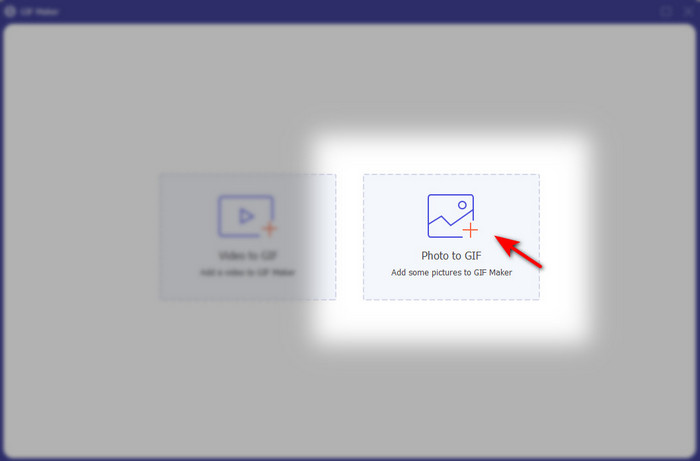
Langkah 3. Klik pilihan Photo to GIF kemudian satu folder fail akan muncul pada skrin anda. Pilih fail dan klik Open untuk memasukkannya.
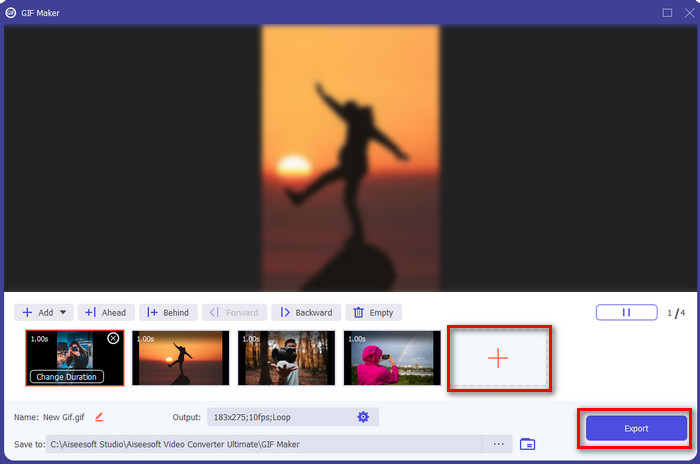
Langkah 4. Klik butang + untuk menambah lebih banyak imej bagi membuat animasi daripada foto. Kemudian tetapkan durasi dengan mengklik imej terlebih dahulu dan kemudian klik Change Duration button. Selepas itu, tekan Apply untuk menyimpan perubahan. Untuk memuat turun animasi, klik Generate GIF.
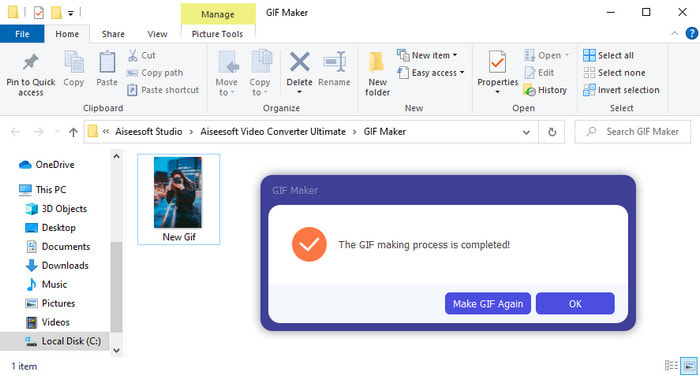
Langkah 5. Selepas GIF dijana, satu folder yang mengandungi fail GIF beranimasi akan muncul pada skrin anda. Klik fail tersebut untuk menonton animasi yang anda hasilkan tadi.
Bahagian 2. Top 3 Pembuat Foto Animasi Dalam Talian Percuma
Top 1. Ezgif
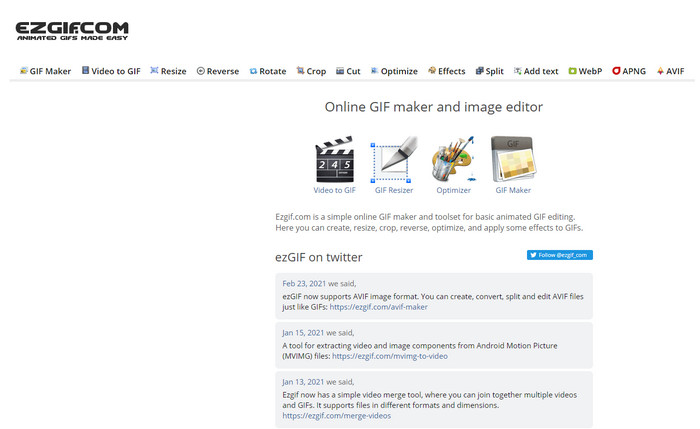
Jika anda sedang mencari pembuat foto animasi dalam talian percuma maka Ezgif mungkin pilihan itu. Alat web ini adalah antara yang terbaik untuk menghasilkan foto animasi yang mengagumkan. Jika anda gemar menciptanya, besar kemungkinan anda sudah pernah menggunakan alat dalam talian ini; jika belum, maka anda memang patut mencubanya. Namun begitu, sesetengah pengguna mendapati alat ini kekurangan beberapa ciri penyuntingan moden yang mereka ingin gunakan. Jadi, jika bajet anda terhad maka ini boleh jadi pilihan, tetapi ingat bahawa alat ini bukan pilihan terbaik untuk golongan profesional, walaupun untuk pemula ia sudah memadai.
Kelebihan
- Mudah diakses dan ia selamat.
- Alat yang sesuai untuk pemula yang ingin mencuba membuat GIF mudah.
- Alat dalam talian editor semi pro.
Keburukan
- Ia mengehadkan penggunanya untuk mengalami kehebatan.
- Alat bergantung kepada Internet. Jadi, jika anda tidak mempunyai internet maka jangkakan bahawa anda tidak boleh menggunakan alat dalam talian ini.
Top 2. Kapwing
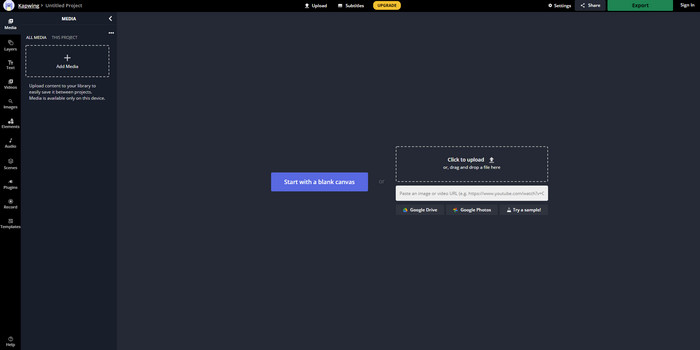
Tidak seperti Ezgif, Kapwing adalah yang terbaik dalam menambah baik visual pada imej. Jadi, jika anda bercadang menggunakan alat dalam talian ini maka mempelajari cara membuat GIF animasi daripada foto pasti akan membantu anda. Prestasi, kebolehcapaian dan fleksibiliti alat dalam talian ini sangat baik untuk digunakan oleh sesiapa sahaja yang mempunyai sedikit pengetahuan penyuntingan. Namun, proses memuat naik dan memuat turun fail imej di sini akan mengambil masa yang lebih lama berbanding alat web yang lain. Selain itu, tera air akan disertakan dalam hasil akhir, walaupun anda boleh menghapuskannya dengan mendaftar masuk ke alat ini.
Kelebihan
- Ia mempunyai banyak ciri penyuntingan utama berbanding Ezgif.
- Alat dalam talian percuma yang boleh diakses oleh sesiapa sahaja yang mempunyai internet.
- Antara muka alat dalam talian kelihatan elegan dan kemas.
Keburukan
- Output akhir akan sentiasa mempunyai tera air di sebelah kiri bawah.
- Bukan pilihan terbaik untuk mereka yang baru mula mengedit GIF.
3 Teratas. GIFMaker.me
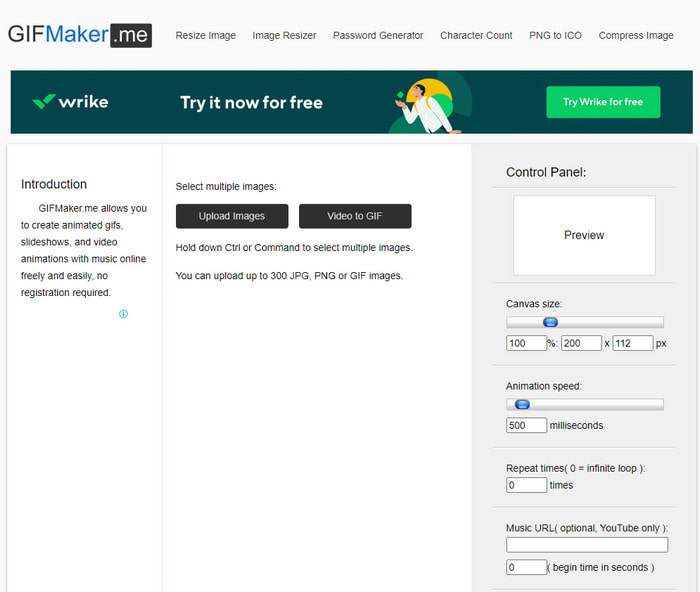
Satu lagi pembuat animasi foto dalam talian yang boleh anda akses secara percuma ialah GIFMaker.me. Alat web ini sangat sesuai untuk mereka yang tiada pengalaman membuat GIF. Ini kerana dalam alat ini anda hanya perlu memasukkan imej secara pukal dan ia akan menukarkannya menjadi GIF bertransisi. Namun begitu, alat ini adalah yang paling kurang digemari dalam artikel ini kerana kekurangan ciri penyuntingan untuk menghasilkan GIF yang mengagumkan. Walaupun kurang ciri penyuntingan, jika anda hanya mahu membuat paparan slaid imej maka ini boleh menjadi pilihan utama anda.
Kelebihan
- Pembuat GIF tanpa kos yang boleh anda gunakan di web.
- Antara muka pembuat adalah ringkas dan mudah difahami.
- Panel kawalan mudah tersedia di sebelah kanan alat dalam talian.
Keburukan
- Iklan yang menjengkelkan terdapat pada antara muka web.
- Ia tidak mempunyai kebanyakan ciri penyuntingan yang anda ingin gunakan.
Bahagian 3. Soalan Lazim tentang Pembuat Animasi Foto
Bolehkah saya menggunakan GIF animasi sebagai kertas dinding?
Anda tidak boleh menggunakan GIF animasi mentah dan menggunakannya sebagai latar belakang pada telefon atau komputer anda. Walau bagaimanapun, anda boleh menggunakan alat pihak ketiga untuk menjadikannya berfungsi. Jadi, jika anda ingin tahu cara melakukannya, klik pautan ini untuk meneruskan.
Mengapa saya tidak boleh berkongsi GIF di Instagram?
Walaupun GIF merupakan format yang paling banyak digunakan di seluruh web, masih ada platform yang tidak menyokong GIF. Hal ini kerana Instagram hanya menyokong format PNG dan MP4. Jadi, terdapat dua cara berbeza untuk berkongsi GIF di Instagram, yang pertama ialah dengan menukar GIF kepada MP4. Sebaliknya, anda boleh mempelajari pelbagai kaedah tentang cara menyiarkan GIF di Instagram dengan mengklik pautan yang disediakan ini.
Apakah tujuan GIF?
GIF dicipta untuk digunakan bagi menganimasikan imej tetapi dengan saiz fail yang lebih kecil berbanding format video lain. Walaupun ia beranimasi, GIF atau Graphic Interchange Format tidak dianggap sebagai format video. Justeru, anda boleh mempelajari banyak perkara tentang GIF jika anda mengklik dan membaca artikel ini dengan teliti.
Kesimpulannya
Sebagai rumusan semua maklumat di atas, kini lebih mudah untuk kita berdua mengetahui apakah pembuat animasi yang tersedia yang boleh kita gunakan untuk membuat animasi daripada foto. Walaupun alat-alat yang dibentangkan di atas sangat membantu, Video Converter Ultimate tetap merupakan penyunting GIF yang paling unggul yang pasti anda suka gunakan. Ini kerana ia sangat mudah digunakan, antara mukanya menarik, semua ciri canggih tersedia di sini dan banyak lagi. Jadi, jika anda masih ragu-ragu tentang alat ini, cuba sendiri dengan memuat turunnya terlebih dahulu dan ikut langkah-langkah yang dinyatakan di atas.
Muat Turun PercumaUntuk Windows 7 atau lebih baharuMuat Turun Selamat
Muat Turun PercumaUntuk MacOS 10.7 atau lebih baharuMuat Turun Selamat
-
 GIF yang luar biasa untuk Aplikasi Video untuk Peranti Android & iOS
 Adakah anda tahu bahawa anda boleh menukar GIF kepada mana-mana format video yang anda suka menggunakan telefon anda? Pilih apl terbaik pada Android atau iOS anda.
-
 Panduan Mudah Cara Menghidupkan GIF Anda ke WMV pada Windows / Mac
 Adakah anda ingin tahu cara menukar GIF kepada format WMV? Kemudian ikuti artikel ini kerana ia mempamerkan penyelesaian berbeza yang boleh anda pilih.
-
 TS ke GIF: Cara Mengubah Fail TS menjadi GIF Animasi
 Ketahui cara menukar fail TS ke dalam format GIF dengan bantuan penulisan ini. Senarai di bawah menunjukkan idea yang berbeza mengenai TS dan GIF dan cara menukar TS ke GIF.
