


 Video Converter Ultimate
 Perakam Skrin
 Pembaikan Video
Penukar Terbaik Terbaik yang Boleh Anda Gunakan untuk Menukar 3GP kepada AVI Dalam Talian & Luar Talian
3GP format is the flexible format that transfers the audio and video streams to the 3rd generation mobile phone using GSM. It matches the 3G connectivity for faster transmission of the file. This format is most commonly used on the old phone version because it is multi-purpose and quickly transferred. However, 3GP files can't be played on your local media player nowadays because this format doesn't allow the new media player to understand the structure of the format. So the best way to watch all the 3GP files on your phone or desktop is to convert. So now, instead of looking on the internet for what best converter you can use, we gather four converters you can choose from. The tools mentioned below are perfect and can convert 3GP to AVI format without any quality loss.

Bahagian 1. Tukar 3GP kepada AVI Luar Talian dengan Ultimate Converter
FVC Video Converter Ultimate
Suppose you don't want to break any sweat on converting your 3GP files. In that case, we strongly suggest that you must use the FVC Video Converter Ultimate. This software is one of the best choices in converting the file, and converting the file within a few seconds is speedy. Moreover, a lot of customers who use this experience share the same thought. To sum it up, they clearly stated that this tool helped solve their converting problem within a blink of an eye.
Penjelasan lanjut, alat ini bukan sahaja yang terbaik dalam menukar fail; ia juga mempunyai ciri paling canggih yang anda ingin cuba. Contohnya ialah editor, pembuat GIF, penggalak volum, menyegerakkan audio dan video, membalikkan dan banyak lagi. Jika anda membeli alat ini, anda akan mendapat semua alat yang disebutkan lebih awal, dan masih banyak lagi yang akan datang. Jadi sekarang, mari cuba dan ikuti langkah demi langkah untuk menukar 3GP kepada AVI pada Mac dan PC tanpa kehilangan kualitinya.
Step 1. Click the download button and choose whether you are a PC or Mac user, then install it next.
Muat Turun PercumaUntuk Windows 7 atau lebih baharuMuat Turun Selamat
Muat Turun PercumaUntuk MacOS 10.7 atau lebih baharuMuat Turun Selamat
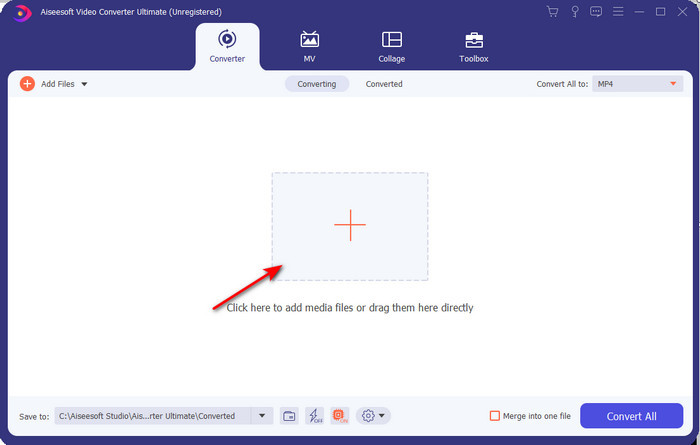
Step 2. Launch the tool, click the + sign in the middle of the interface, select the .3gp file on your folder and click Open. Also, you can do a batch conversion here if you may; click the Add Files to add more.
Step 3. To change the 3GP, click the Convert All to option and choose the AVI format under the Video category.
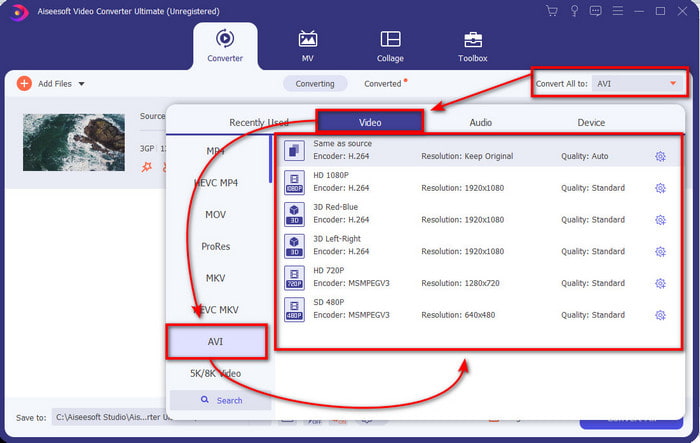
Step 4. To start the conversion process, click Convert All, and the process of converting your 3GP files will begin now.

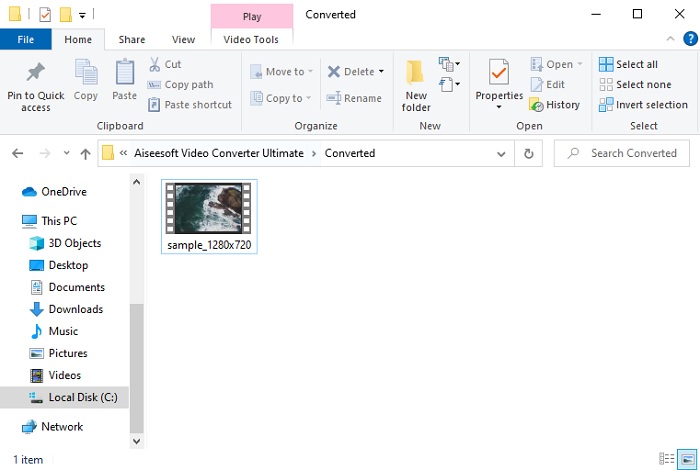
Step 5. After converting, a file folder will show on your screen with the converted 3GP file. Click the newly converted AVI you've made to watch and edit it later if you want.
Bahagian 2. 3 Penukar Dalam Talian Tersedia untuk Menukar 3GP kepada AVI
1. Penukar Video Percuma FVC Dalam Talian

We ensure that the tool in this list is the best 3GP to AVI converter online, and that is the FVC Free Video Converter Online. All of the features you would like to see on an online converter are here. It is the best online converter, we mention in all of the different aspects. For example, if you want an efficient online converter, safe conversion process, and no ads at all, then this is the web tool for you. Although the web tool looks great and works perfectly fine, it still supports a medium-range format. Advanced features that you might encounter while using the FVC Video Converter Ultimate are not available here. But the advantage of this to the software version is that you are free of charge. Without any more delays, let's proceed to the steps to convert your file into a new version.
Step 1. Hit this link to go to the website.
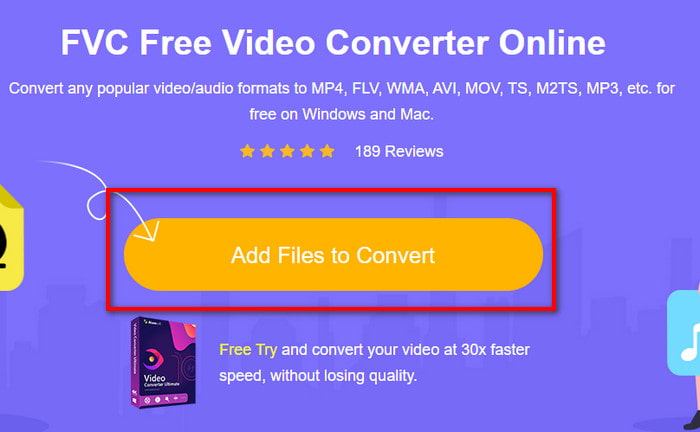
Step 2. Press the Add Files to Convert to launch the online tool, and a folder will show, then search for the .3gp file. If this is your first time using this tool, you will need to download the launcher by clicking the Add Files to Convert and then re-click it to launch.
Step 3. After selecting the file is done, choose the AVI format in the section below.
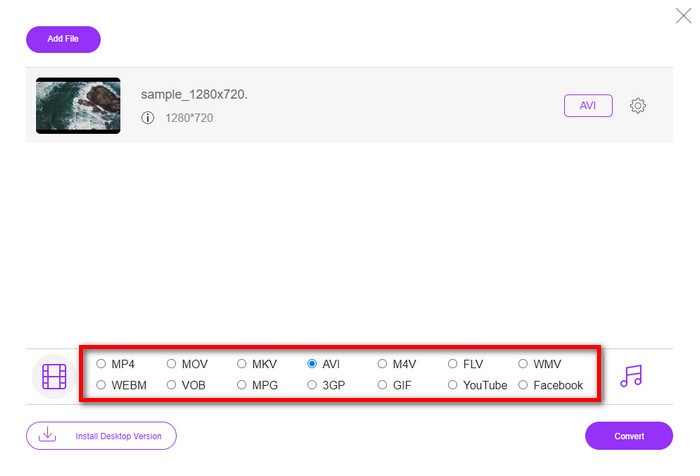
Step 4. If you are now ready to convert the file, click Convert.
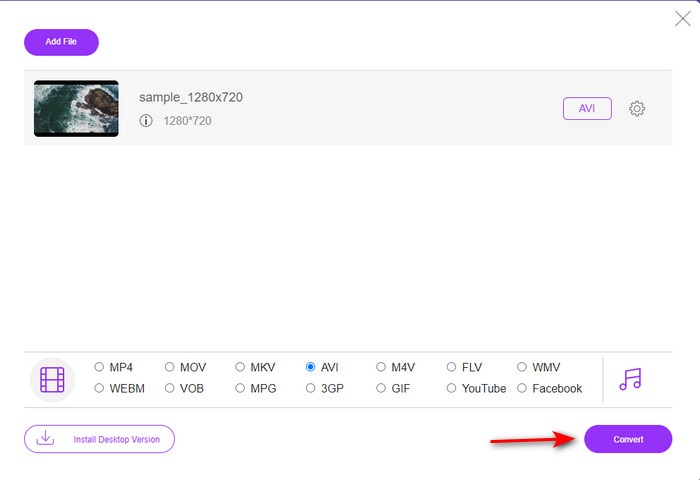
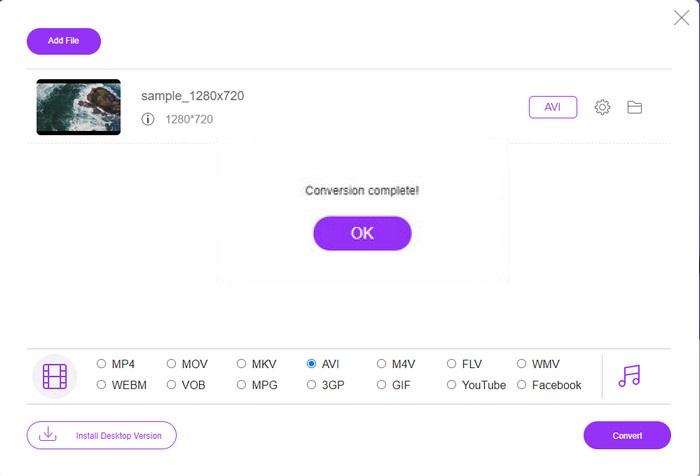
Step 5. After conversion, a folder will show again, but now with the file, you convert earlier.
2. Fconvert.com
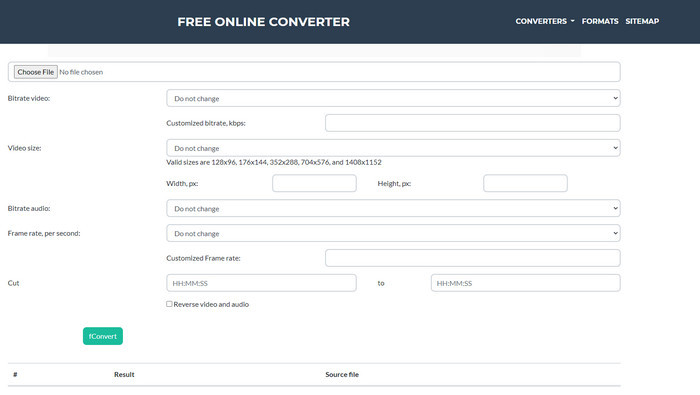
In the line of converting files, Fconvert.com must be on the list because this web tool is one of the fantastic converters you can use for free. This converter can convert almost all of the formats you know and maybe one of your files. However, there is a problem with this tool, and that is the ads. Because every time you click something on the website, an ad will be first before going on what you click. Although ads are killing, this app still looks neat and does perform great in converting format. So if you want to experience how great this tool is, follow these steps below and learn how to convert 3GP to AVI for free.
Step 1. Search the main website of this tool on your browser.
Step 2. Click the AVI under the video, click Choose File, locate the .3gp, then scroll it down and click fConvert.
Step 3. Scroll it under, and then you will see the Result; click the file to download it.
3. Anyconv
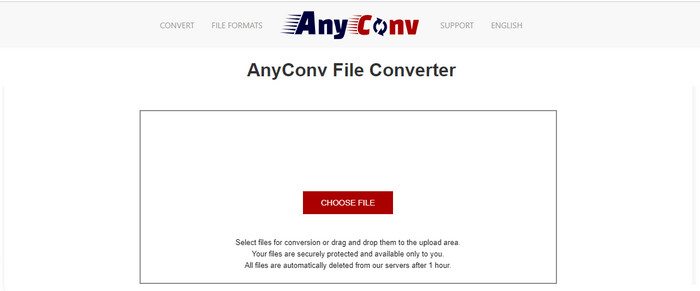
Another tool that specializes in converting formats is Anyconv. This web tool is far different on Fconvert.com because this tool is much better and faster. Also, this tool has fewer ads than the tool before this. Although it has fewer ads, they are more extensive compared to Fconvert.com, but performance-wise, this tool does well performance-wise. Let's test this tool to see if it works on converting 3GP to AVI for free without further delay.
Step 1. Open your search engine and find the Anyconv website.
Step 2. Press Choose File, and a folder will show, insert the .3gp file on the web tool and proceed. To change the format, you must click the drop-down button and find the AVI. To start the conversion process, click Convert.
Step 3. Wait for the process to end, then click Download AVI to download the converted file.
Bahagian 3. Format Mana Yang Terbaik; 3GP atau AVI
Jika anda menggunakan telefon Generasi Ke-3 dan ingin menyimpan video berkualiti tinggi, pindahkannya dengan lebih pantas dalam generasi telefon ke-3, kemudian 3GP ialah format untuk tugas itu. Walau bagaimanapun, jika anda cuba menghantar format AVI ke telefon generasi ke-3, fail itu tidak akan dibuka kerana format ini tidak disokong. Tetapi dalam kes hari ini, AVI jauh lebih baik. Ia telah mendapat banyak sokongan daripada semua pemain media dan editor berbanding 3GP. Walaupun format AVI ialah pilihan terbaik hari ini, saiz failnya sangat besar berbanding 3GP, dan jika anda akan menyimpannya pada telefon anda, ia akan memakan banyak ruang. Tambahan pula, kedua-dua format adalah hebat, tetapi ia mempunyai tujuan dan kegunaan yang berbeza.
Bahagian 4. Soalan Lazim tentang 3GP dan AVI
Bolehkah saya menggunakan FFmpeg untuk menukar 3GP kepada AVI?
You can use FFmpeg to convert your 3GP file; however, it is difficult to do, but it is manageable if you take your time. The first step is to download the zip file of FFmpeg on your computer then unzip it. The second step is to open your CDM to communicate with the tool. Then locate your file using the command prompt, ffmpeg -i input.3gp -vn -ar 44100 -ac 2 -b:a 192k output.avi copy this code and paste it on the CDM, and click Enter to start the conversion process.
Bolehkah 3GP dimainkan pada telefon generasi ke-4?
This format is used on 3rd gen phones, and you can still play videos under the 3GP format in some 4th gen phones but not in all. Because, as said earlier, 3GP are for 3rd gen and not in some 4th gen phones. Or you can turn to professional 3GP players to enjoy your videos.
Format mana yang lebih baik: 3GP atau MP4?
On quality and most supported format, MP4 is much better in this type of area. However, 3GP is much smaller and works better in 3G networks for faster transferring of this file format. Want to convert MP4 to 3GP or vice versa, click here to learn more details.
Kesimpulannya
Setiap perjalanan mesti berakhir, dan kini anda boleh menukar 3GP kepada AVI dengan mudah dengan bantuan alatan yang dinyatakan di atas. Selain itu, semua alat yang dibentangkan di atas, mari sertakan FFmpeg, lakukan kerja yang hebat. Namun, pilihan terbaik sentiasa jatuh kepada FVC Video Converter Ultimate. Alat ini mengatasi semua penukar dalam talian yang boleh lakukan dalam penukaran dan banyak lagi aspek. Jadi sekarang, jika anda ingin mendapatkan perisian klik butang muat turun dan lakukan penukaran dengan cepat.
-
 [Dalam Talian & Percuma] 3 Kaedah untuk Menukar MP4 kepada 3GP Tanpa Kerumitan
 Ingin menukar MP4 ke 3GP dengan cara yang cepat dan mudah? Di sini kita akan berkongsi 3 penukar MP4 ke 3GP untuk menukar MP4 ke 3GP untuk bermain di pelbagai telefon bimbit.
-
 3 Kaedah Percuma Teratas untuk Menukar FLV ke 3GP pada Windows / Mac
 Tidak boleh membuka fail FLV pada telefon pintar atau tablet? jangan risau! Di sini kami berkongsi tiga kaedah untuk menukar FLV kepada 3GP tanpa kehilangan kualiti untuk dimainkan di telefon bimbit.
-
 Pilihan Hebat untuk Menukar MKV ke Format AVI
 Kuasai cara menukar video MKV dengan langkah mudah yang disediakan secara eksklusif untuk anda. Adakah anda ingin tahu bagaimana? Kemudian klik pautan ini untuk mengetahui lebih lanjut.
