


 Video Converter Ultimate
 Perakam Skrin
 Pembaikan Video
2 daripada Penukar M4V ke FLV Terbaik untuk Windows/Mac/Online
Sebuah bekas video dan audio yang terutamanya digunakan pada setiap Apple iTunes, M4V. Format ini dilindungi untuk mengelakkan isu hak cipta melalui perlindungan hak cipta DRM. Dalam keadaan ini, fail sukar dimainkan jika anda tidak mempunyai akaun iTunes dengan kelayakan log masuk. Jadi jika anda mahu menonton video pada PC atau telefon Android anda, anda mesti menukarkannya kepada FLV yang boleh dimainkan. Untuk mengetahui cara menukar M4V kepada FLV, baca artikel ini dan dapatkan gambaran ringkas tentang M4V dan FLV.

Bahagian 1. Pilihan Pertama untuk Menukar M4V kepada FLV pada Mac & PC
Ini ialah penukar paling cekap yang pasti anda suka gunakan, terutamanya jika anda menukar M4V kepada FLV pada Mac atau PC. FVC Video Converter Ultimate ialah penukar pilihan utama yang sudah dipercayai ramai pengguna. Tambahan pula, jika anda mahu alat pelbagai fungsi yang memberikan output luar biasa, ini ialah pilihan wajib. Anda juga boleh menukar apa-apa fail media di sini dan menetapkan kualiti kepada SD, HD, 1080 malah video 4K. Jangan harap apa-apa yang kurang jika anda memuat turun alat ini ke pemacu anda, kerana seperti namanya, ia memang “ultimate”. Selain itu, ikut tutorial di bawah jika anda mahu merasai keupayaan penukaran maksimum alat ini.
Cara Menukar M4V kepada FLV dengan Bantuan FVC Video Converter Ultimate:
Langkah 1. Klik butang muat turun di bawah, pilih OS yang anda gunakan sekarang. Selepas muat turun, klik Install, dan antara muka alu-aluan akan muncul, kemudian tekan Start Now.
Muat Turun PercumaUntuk Windows 7 atau lebih baharuMuat Turun Selamat
Muat Turun PercumaUntuk MacOS 10.7 atau lebih baharuMuat Turun Selamat
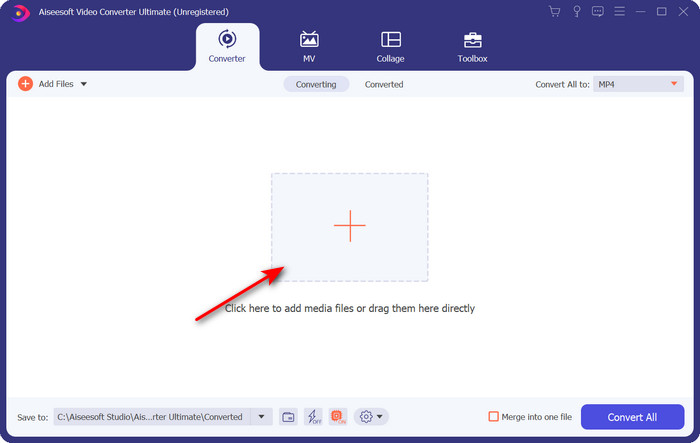
Langkah 2. Mulakan alat, klik tanda + di tengah antara muka dan pilih fail .m4 pada folder yang akan muncul, klik dan tekan Open.
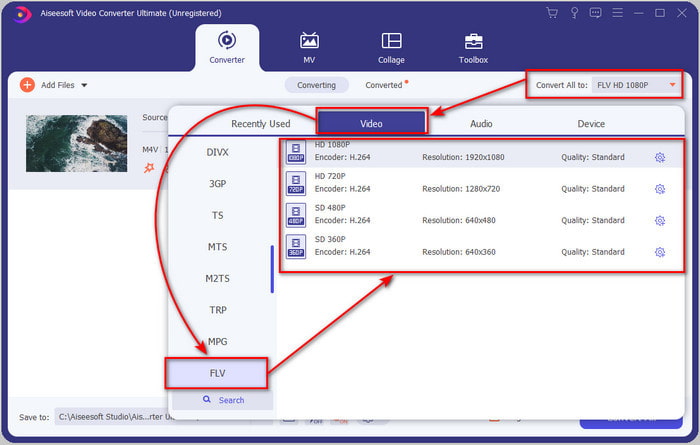
Langkah 3. Setelah fail .m4v berada pada antara muka, klik Convert All to dan cari format FLV.
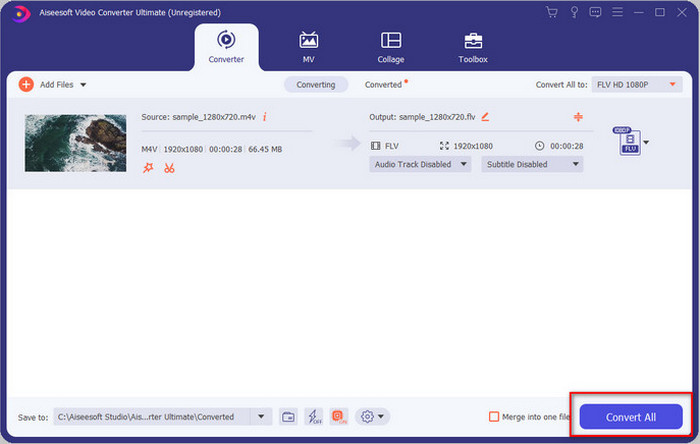
Langkah 4. Teruskan dan klik Convert All untuk mula menukar M4V kepada FLV.
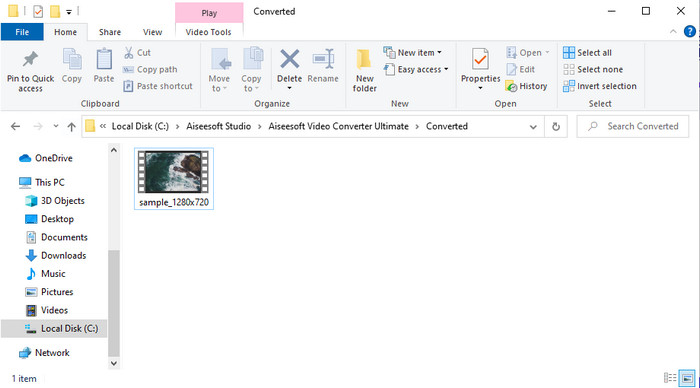
Langkah 5. Penukaran fail akan mengambil masa kurang daripada seminit kerana kelajuan penukaran pantas yang disediakan alat ini. Satu folder akan muncul memaparkan fail yang telah ditukar; klik fail tersebut untuk menontonnya atau kongsikan dalam talian.
Kelebihan
- Penukaran pantas dan Pecutan Perkakasan tersedia untuk pengalaman terbaik.
- Tersedia pada semua platform seperti PC atau Mac.
- Melakukan pengeditan video untuk menjadikannya cemerlang boleh dikalahkan di sini.
Keburukan
- Bayaran sebelum guna tapi harga mampu milik.
- Muat turun perisian sebelum digunakan.
Bahagian 2. Pilihan Kedua untuk Menukar M4V kepada FLV secara Percuma melalui Dalam Talian
Menukar fail anda dalam talian boleh dilakukan dengan cekap jika anda menggunakan penukar M4V kepada FLV dalam talian yang betul dengan bantuan FVC Free Video Converter Online. Alat dalam talian ini ialah penukar terbaik yang boleh anda capai pada semua pelayar web jika anda mempunyai sambungan internet. Anda juga boleh menukar di sini tanpa had saiz, tetapi anda tidak boleh melakukan penukaran secara kelompok. Walaupun perisian dalam talian ini hebat, sambungan internet tetap diperlukan, jadi jika anda tiada sambungan maka ini bukan pilihan, sama seperti penukar web lain yang tersedia. Namun, jika anda mempunyai sambungan internet dan mahu merasai penukaran dalam talian percuma yang mantap, anda mesti ikut langkah di bawah.
Cara Menukar M4V kepada FLV dengan Bantuan FVC Free Video Converter Online:
Langkah 1. Klik pautan ini untuk pergi ke penukar dalam talian percuma yang disediakan oleh FVC untuk anda.
Langkah 2. Pada antara muka web, klik Add Files to Convert untuk memuat turun pemasang. Setelah pemasang selesai dimuat turun, tekan Add Files to Convert sekali lagi dan satu folder akan muncul, kemudian pilih fail M4V.
Muat turun Versi Desktop untuk menukar fail secara kelompok.
Langkah 3. Satu antara muka web baharu akan muncul, di bahagian bawah pilih format FLV dengan mengkliknya.
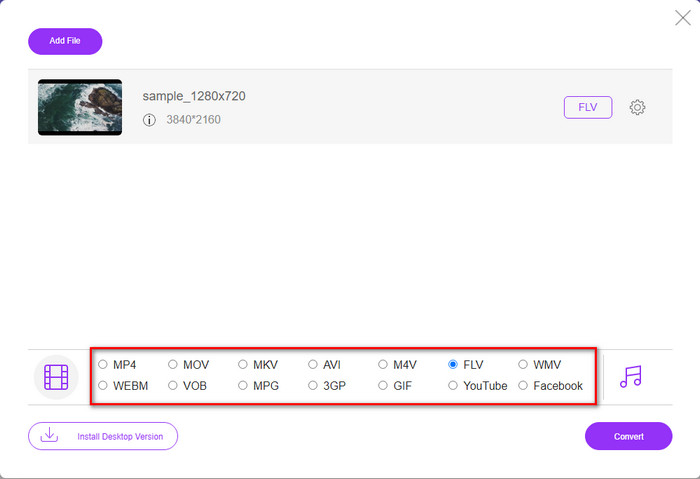
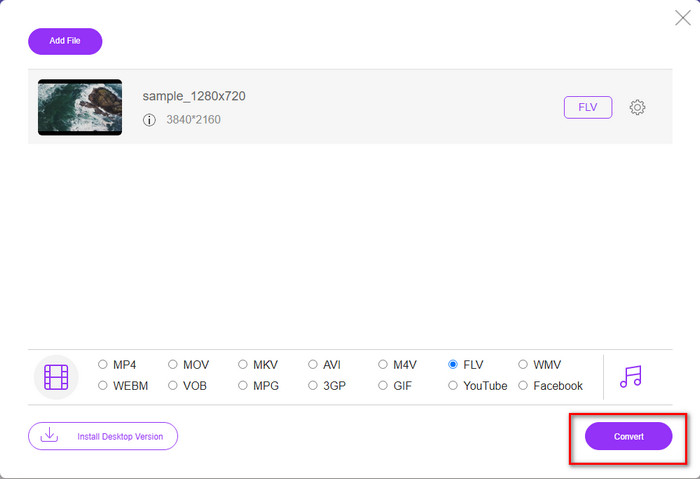
Langkah 4. Jadi, untuk mula menukar M4V kepada FLV secara percuma, klik Convert.
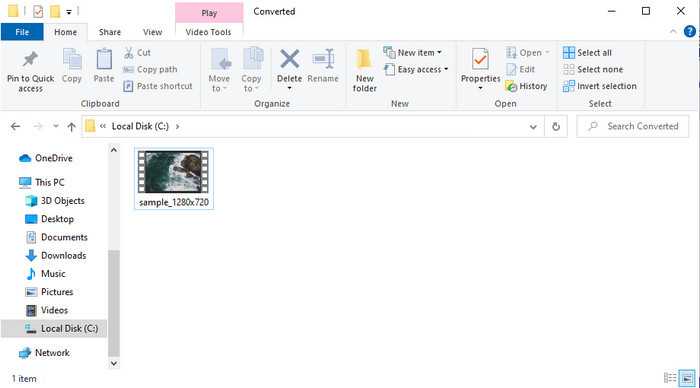
Langkah 5. Selepas penukaran, satu folder akan muncul pada antara muka; klik fail tersebut untuk memainkannya pada pemain media setempat anda.
Kelebihan
- Percuma dan serasi dalam semua pelayar web.
- Saiz dan penukaran fail tanpa had.
- Selamat dan tiada iklan dalam alat web utama.
Keburukan
- Ia memerlukan sambungan internet untuk menggunakan alat tersebut.
- Format yang kurang disokong untuk dimuat naik dan ditukar.
Bahagian 3. Perbezaan Antara Format M4V dan FLV
M4V menyimpan kualiti video tertinggi yang dimuat turun pada gedung Apple iTunes anda. Format ini serupa dengan MP4 kerana mereka menggunakan codec MPEG-4 sebagai pemampat. Tetapi video M4V dilindungi di bawah perlindungan hak cipta Apple FairPlay DRM. Jadi, memainkan video di bawah format ini adalah rumit kerana ia tidak akan dimainkan serta-merta jika anda memasukkannya pada pemain media selain daripada iTunes atau Quicktime Player. Fail M4V yang tidak dilindungi boleh diakses pada pemain media anda dengan menukar sambungan fail kepada .mp4.
Sebaliknya, FLV digunakan untuk memindahkan data video dan audio melalui web secepat mungkin. Flash Video ialah format yang paling sesuai yang terdapat pada setiap tapak web HTML 5. Walau bagaimanapun, format ini telah dihentikan kerana Adobe Flash telah pun bersara. Namun, anda masih boleh memainkannya pada pemalam pemain media anda yang diperlukan sebaik sahaja anda memuat turun atau menukarnya.
M4V lwn. FLV
M4V dibangunkan oleh Apple, yang juga menggunakan MPEG 4. Fail M4V sering digunakan untuk menyimpan video yang dimuat turun daripada gedung Apple iTunes, seperti video muzik, episod TV, dll. Anda mungkin mendapati beberapa fail M4V dilindungi salinan kerana ia menggunakan Perlindungan hak cipta DRM FairPlay Apple.
Adobe Flash Player menggunakan FLV untuk menyampaikan kandungan video seperti filem dan rancangan TV. Pada masa kini, Adobe tidak lagi membangunkan pemain dan mengesyorkan pengguna menyahpasangnya atas sebab keselamatan. Walau bagaimanapun, anda masih boleh menggunakan format FLV pada banyak program bukan Adobe/Macromedia.
Bahagian 4. Soalan Lazim tentang Penukaran M4V ke FLV
Mana yang lebih baik; MP4 atau M4V?
Jika anda ingin melindungi fail anda, maka M4V ialah format yang anda mesti gunakan kerana ini hanya tersedia pada Apple dan ia dilindungi. Tetapi katakan anda mahukan format yang serasi dengan semua pemain media, editor dan banyak lagi. Dalam kes itu, MP4 ialah format media universal yang anda ingin gunakan.
Bolehkah saya memainkan M4V pada VLC?
VLC percuma digunakan dan serasi dengan semua platform; ia juga boleh memainkan hampir semua format media. Namun M4V terlindung tidak boleh dimainkan di sini kerana ia dilindungi. Jadi kini, jika anda mahu menonton .m4v pada VLC, anda mesti menukar fail M4V kepada MP4 atau AVI.
Adakah saya kehilangan kualiti selepas menukar M4V?
Selepas menukar M4V, kualitinya harus mengekalkan kadar standard kualiti M4V asal. Walau bagaimanapun, sesetengah penukar tidak menyokong penukaran video kepada HD, 1080 atau 4k. Jadi, lebih baik anda memilih alat yang sempurna dan bukan alat yang baik yang akan mencukupi keperluan anda dalam menukar tanpa kehilangan kualitinya.
Kesimpulannya
Secara keseluruhan, dua alat dalam talian dan luar talian yang dibentangkan di sini memang hebat, khususnya jika anda mahu menukar M4V kepada FLV. Kita juga mendapat pandangan tentang dua format, iaitu M4V dan FLV. Walaupun mengubah M4V perlu dilakukan untuk menonton fail terlindung, memilih alat yang betul untuk tugas yang betul boleh menjadi sukar. Jadi, kami memperkenalkan dua alat yang boleh anda gunakan untuk menukar format secara percuma dengan menggunakan FVC Free Video Converter Online. Atau alami tahap baharu penukaran dengan menggunakan FVC Video Converter Ultimate. Sekarang, apa yang anda tunggu jika anda mahu menonton M4V anda secara percuma? Pilih salah satu alat di atas, ikut langkah pantas dan mudah yang dibentangkan, dan siap, nikmati videonya.
-
 [Panduan] Cara Menukar Video M4V ke GIF Animasi pada Windows / Mac
 Sekiranya anda ingin membuat fail GIF animasi dari video M4V kegemaran anda, anda dapat mempelajari 2 cara mudah dan efisien untuk menukar video M4V ke GIF dengan tetapan yang disesuaikan.
-
 3 Program Penukar Video Digunakan untuk Menukar iTunes M4V kepada AVI pada Mac
 Tidak mempunyai idea bagaimana untuk menukar MKV kepada format AVI? Semasa kami meneruskan membaca artikel ini, kami akan mengetahui 3 alat yang boleh membantu anda menukar format fail ini.
-
 Penukar M4V ke MOV Percuma – Bagaimana untuk Menukar M4V ke MOV
 Jika pemain media anda'tidak menyokong M4V, pernahkah anda bersusah payah menonton filem pada iPhone anda? Topik utama artikel ini adalah untuk menukarnya kepada fail video MOV.

