


 Video Converter Ultimate
 Perakam Skrin
 Pembaikan Video
Panduan Komprehensif tentang Cara Menukar AMV kepada WMV dengan Langkah [Diselesaikan]
Ingin menikmati menonton fail video AMV pada Windows anda atau menggunakannya untuk penstriman dalam talian? Jika ya, anda mesti membaca artikel ini untuk mengetahui cara untuk menukar AMV kepada WMV, meningkatkan kualiti, dan menjadikannya serasi. Dalam senarai ini, anda akan mempelajari perisian yang boleh anda gunakan untuk menukar fail AMV anda. Jadi tanpa berlengah lagi, pasang tali pinggang keselamatan anda dan ketahui lebih banyak tentang format AMV dan WMV.

Bahagian 1. Tukar AMV kepada WMV dengan FVC Video Converter Ultimate
FVC Video Converter Ultimate ialah pilihan pertama kami untuk menukar AMV kepada WMV kerana ia membolehkan anda men transkod format media dan format khusus peranti. Selain itu, ia mampu menukar bukan sahaja satu, dua, atau tiga fail serentak tetapi lebih banyak lagi. Tambahan pula, penukar ini berdedikasi kepada penggunanya untuk memberikan hasil penukaran yang terbaik. Mahu tahu sebabnya? Maka baca ciri utama di bawah.

FVC Video Converter Ultimate
4,355,888+ Muat Turun- Ia boleh membantu anda dengan masalah penukaran anda pada AMV kepada WMV, AVI, FLV, SWF, MP4, AVI.
- Ia menyokong penukaran ultra-pantas untuk menukar format dengan lebih pantas.
- Edit video AMV anda dengan ciri penyuntingan unik yang disediakan oleh alat ini.
- Bantu anda menjadi pakar dalam beberapa klik.
- Ia menyokong semua platform seperti Windows dan macOS.
Muat Turun PercumaUntuk Windows 7 atau lebih baharuMuat Turun Selamat
Muat Turun PercumaUntuk MacOS 10.7 atau lebih baharuMuat Turun Selamat
Adakah anda kagum dengan ciri-ciri alat tersebut? Jika ya, mari baca prosedur untuk menukar fail AMV dan salin langkah-langkah untuk berjaya menukar.
Langkah 1. Muat turun FVC Video Converter Ultimate pada pemacu komputer anda dengan mengklik butang muat turun yang disediakan di bawah. Teruskan dengan mengklik pemasang untuk memasang dan tekan Start Now untuk melancarkan alat tersebut.
Muat Turun PercumaUntuk Windows 7 atau lebih baharuMuat Turun Selamat
Muat Turun PercumaUntuk MacOS 10.7 atau lebih baharuMuat Turun Selamat
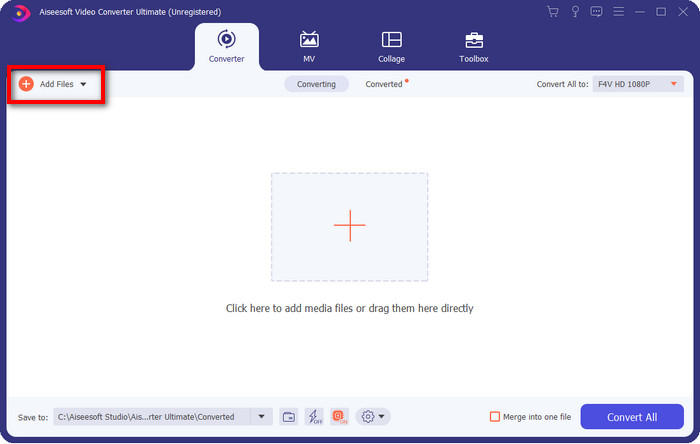
Langkah 2. Selepas melancarkan perisian, anda boleh menambah satu atau lebih fail dengan mengklik pilihan Add Files. Folder komputer akan dipaparkan pada skrin anda, pilih fail AMV, dan tekan Open untuk memuat naiknya.
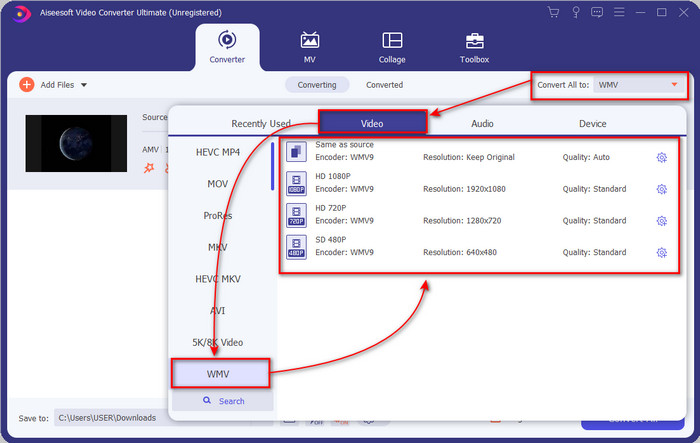
Langkah 3. Dengan mengklik pilihan Convert All to, satu senarai format akan muncul. Cari format WMV dan pilih resolusi, pengekod, dan kualiti yang anda inginkan.
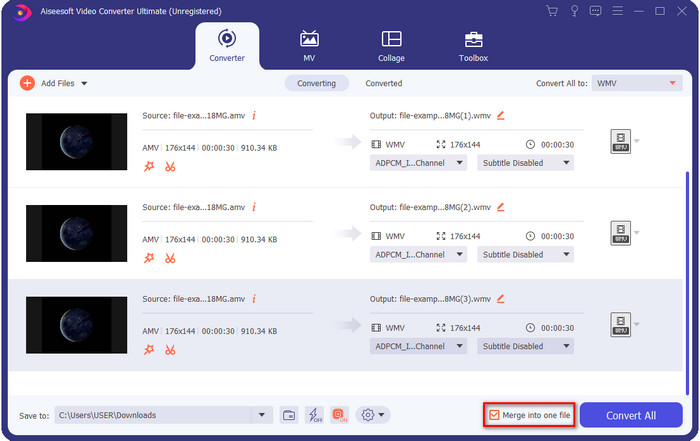
Pilihan. Mahu menjadikan semua fail AMV anda sebagai satu format WMV sahaja? Maka anda perlu menanda kotak yang menyatakan merge into one file (gabung menjadi satu fail).
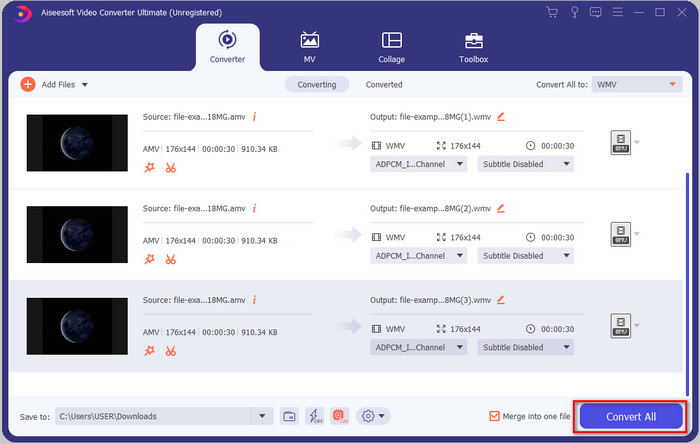
Langkah 4. Tekan Convert All untuk memulakan proses penukaran. Selepas proses selesai, satu folder akan dipaparkan pada skrin anda bersama fail WMV yang telah ditukar.
Bahagian 2. Tukar AMV kepada WMV Dalam Talian
Tidak mahu memuat turun penukar luar talian kerana anda tidak mempunyai ruang storan yang mencukupi untuk memuat turunnya? Maka gunakan FVC Free Online Video Converter. Kerana anda tidak perlu memuat turun keseluruhan penukar; sebaliknya, anda hanya memerlukan pelancar, yang sangat kecil dan tidak akan menjejaskan storan komputer anda. Selain itu, penukar web ini menukar AMV kepada WMV dengan melaraskan resolusi. Namun, proses penukaran fail akan bergantung pada kelajuan internet anda. Adakah anda mempunyai sambungan internet? Jika ya, anda patut cuba menggunakannya dan alami sendiri penukaran dalam talian.
Langkah 1. Tekan pautan ini untuk membuka laman utama penukar tersebut.
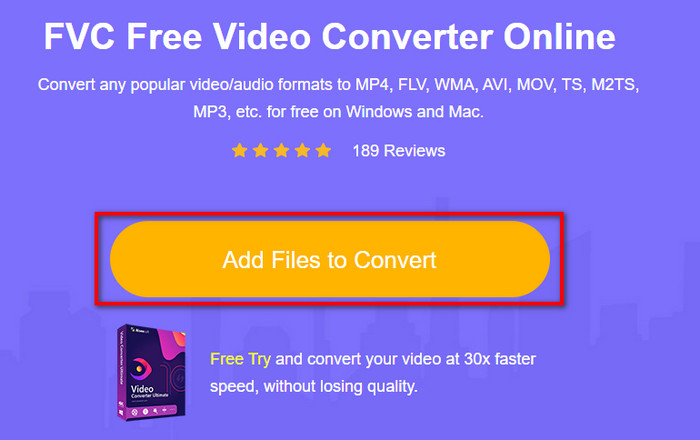
Langkah 2. Dengan mengklik Add Files to Convert, satu folder akan muncul di mana anda boleh mencari fail AMV dan tekan Open.
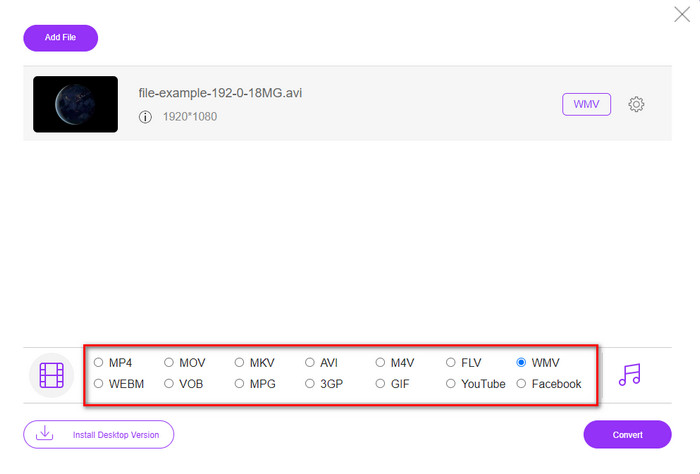
Langkah 3. Pilih format WMV yang akan dipaparkan pada skrin.
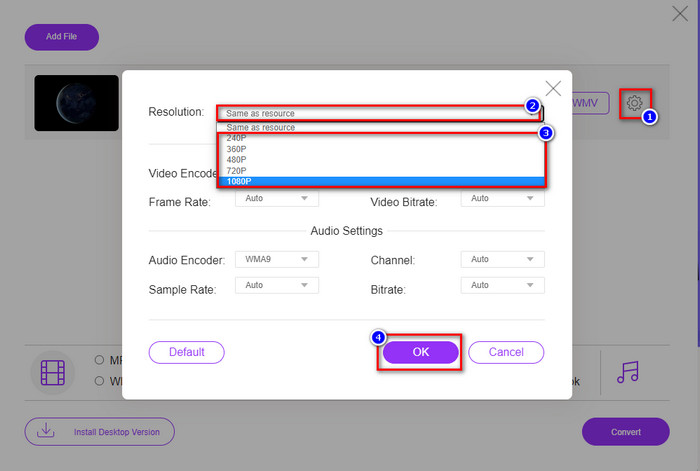
Pilihan. Seperti yang kami sebutkan tadi, anda boleh melaraskan resolusi di sini. Jadi sekarang, mari ubah resolusi dengan mengklik butang gear. Di bahagian atas, klik butang drop-down, dan satu senarai resolusi akan muncul; pilih satu dan tekan OK untuk meneruskan.
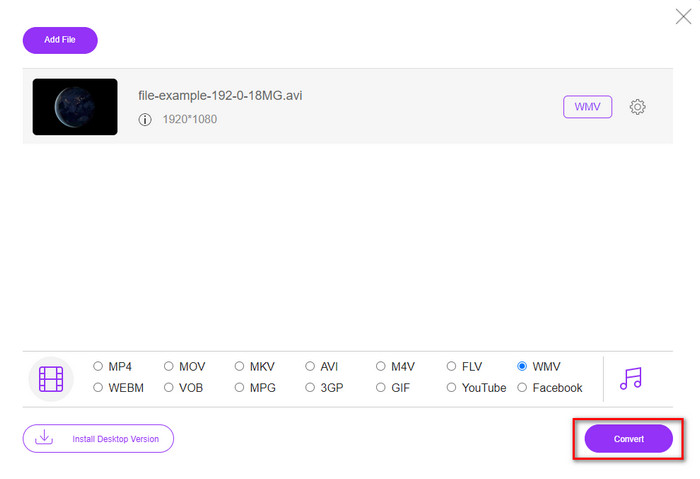
Langkah 4. Sekarang, jika anda mahu memulakan penukaran, anda boleh mengklik butang Convert, dan proses akan bermula.
Bahagian 3. Apakah Perbezaan Antara AMV dan WMV
Pertama sekali, kedua-dua bekas media ini menjadi popular kerana keupayaan unik mereka sebagai format. Tetapi hari ini, kita akan mengkaji tentang apakah kelebihan dan kekurangan format itu sendiri. Selain itu, kami akan menentukan tiga aspek dengan menjadikannya soalan untuk mengetahui lebih lanjut tentang AMV dan WMV.
Format manakah yang mempunyai resolusi media yang lebih baik?
Di antara kedua-dua format, tanpa sebarang keraguan, WMV mempunyai kualiti yang lebih baik. Fail WMV boleh menyimpan dan menstrim resolusi video sehingga 300,000 piksel untuk output visual yang lebih terperinci. Tetapi anda boleh menetapkan kadar pada resolusi skrin 528x576. Dan untuk AMV, kualiti yang boleh terkandung adalah 96x96 hingga 320x240, yang agak rendah berbanding dengan resolusi rendah WMV. Salah satu sebab AMV mempunyai resolusi yang lebih kecil ialah ia perlu dimuatkan pada skrin pemain media Cina.
Format manakah yang mempunyai saiz fail yang lebih kecil?
Kemenangan ini akan menyertai AMV kerana format ini sangat mampat. Walaupun WMV mempunyai pemampat tetapi saiz AMV lebih mesra ekonomi, terutamanya pada pemacu komputer anda, berbanding WMV.
Format manakah yang lebih serasi?
Boleh dikatakan bahawa kedua-duanya mempunyai kekuatan yang berbeza jika kita bercakap tentang keserasian kerana WMV adalah untuk program Windows sahaja. Jika anda pengguna Mac, anda tidak boleh sewenang-wenangnya menggunakan format ini dan memainkannya pada QuickTime atau menyuntingnya dalam iMovie. Sebaliknya, anda perlu menukar WMV kepada MOV untuk menjadikannya serasi. Bagi AMV pula, format ini digunakan oleh pemain media mudah alih dari China untuk memainkan format ini. Namun hari ini, anda boleh menggunakan pemain media mudah alih biasa tanpa perlu membeli pemain media AMV khusus. Walau bagaimanapun, mencari pemain media AMV sangat menyusahkan kerana hanya sebilangan kecil pemain yang menyokong format dan pengekod seperti ini. Boleh dikatakan WMV mempunyai keserasian yang lebih meluas berbanding AMV, terutamanya jika kita memindahkan fail ke Windows.
Dan sekarang kita tahu sebabnya, menukar fail ke format baharu adalah perlu dalam kes ini. Atas sebab itu, anda mesti belajar cara menukar AMV kepada WMV untuk menjadikan fail media serasi dengan perisian Windows.
Bahagian 4. Soalan Lazim tentang Penukaran AMV dan WMV
Bagaimana untuk menukar AMV saya kepada MOV?
Terdapat banyak teknik dan kaedah yang boleh kita cari dan cuba yang tersedia jika kita mencarinya di web. Tetapi sukar untuk memilih alat mana yang lebih baik digunakan untuk menukar AMV kepada MOV. Jadi, untuk memudahkannya, klik pautan ini dan fahami cara menukar AMV kepada MOV dan menjadikannya serasi dengan macOS.
Bolehkah saya menggunakan pemain media VLC untuk menonton dan memainkan AMV?
Sudah tentu, anda boleh memuat turun pemain media VLC pada desktop anda untuk memainkan fail AMV tanpa perlu memuat turun codec tambahan. Tetapi jika anda mahu mengetahui lebih lanjut tentang VLC dan alternatifnya, cuba baca artikel ini dengan mengklik pautan ini.
Mengapa saya perlu memampatkan AMV?
Kita memampatkan fail media dan AMV kerana kita perlu membebaskan sedikit ruang pada pemacu perkakasan. Jadi mahu belajar cara memampatkan fail AMV? Maka klik pautan ini.
Kesimpulannya
Kedua-dua penyelesaian ini memberikan kecemerlangan untuk menjadikan penukaran anda daripada AMV kepada WMV mudah dan berjaya. Tambahan pula, ini adalah penyelesaian terbaik yang boleh kami temui di web. Jadi sekarang, berada di tangan anda untuk memilih penukar yang anda gunakan untuk menukar fail AMV anda kepada WMV. Untuk mencapai kejayaan, anda mesti menggunakan alat FVC yang disediakan di atas.
-
 Kaedah Terbaik untuk Digunakan dalam Menukar AMV kepada AVI [Diluluskan]
 Adakah anda mengalami kesukaran untuk menukar fail video format AMV anda kepada AVI? Berikut adalah beberapa petua yang disediakan yang anda hanya boleh temui dalam artikel ini.
-
 [Terbukti] 2 Cara dalam Menukar AMV kepada FLV Luar Talian & Dalam Talian
 Pernahkah anda mempertimbangkan untuk mencuba penukar untuk menukar fail AMV anda kepada format fail FLV. Untuk menyelesaikan masalah anda dalam menonton video AMV, Baca artikel ini untuk mengetahui penukar yang sesuai yang perlu anda gunakan.
-
 Percuma | 3 Kaedah Terbaik untuk Menukar MP4 ke WMV tanpa Kehilangan Kualiti
 Catatan ini berkongsi cara menukar video MP4 ke format WMV pada Mac atau Windows. Kami juga akan menawarkan beberapa pilihan, termasuk perisian desktop dan penukar dalam talian berasaskan web. Bersedia untuk mengetahui alat penukaran MP4 ke WMV terbaik?
