


 Video Converter Ultimate
 Perakam Skrin
 Pembaikan Video
3 Cara Berkesan untuk Mengubah M4V kepada MKV pada Mac/Windows/Linux Tanpa Kehilangan Kualiti
Saya perlu menghidupkan video M4V yang saya muat turun pada iTunes. Ada idea bagaimana untuk menukar M4V kepada MKV pada Mac dan kemudian menggunakannya pada TV saya?
This problem is widespread, especially on M4V videos downloaded on iTunes because this format is under Apple's Fair Play Policy, and it is protected. Therefore, you can't play the .m4v videos instantly on other devices without converting them. This article will provide facts about the converters you can use and succeed in converting the M4V format. Without any more delays, let's start to learn the efficient method of changing M4V to MKV on Mac or Windows.

Bahagian 1. Tukar iTunes M4V kepada MKV pada Mac dan Windows [Paling Dipilih]
There are many free M4V to MKV converters on the market that you can download, and one of them is the FVC Video Converter Ultimate. But this ultimate tool provides a more effective conversion than the other converters due to its lightning speed conversion, unlimited upload to convert, and intuitive interface. Are you amazed at the ultimate converters? Or do you want to know more about the converter? In that case, here below are the key features you will see if you attain this converter.

FVC Video Converter Ultimate
2,999,368+ Muat Turun- Ia boleh menukar berbilang iTunes M4V kepada MKV atau ke dalam 200+ format media seperti MOV, AVI, MP4, dll.
- Dengan penukaran ultra-pantas, proses anda menukar M4V anda dengan serta-merta
- Ciri penyuntingan lanjutan tersedia untuk menjadikan video anda lebih baik.
- Tetapkan ciri hebat untuk memampatkan, mengubah saiz, pembuat GIF, dsb., di bawah Kotak Alat.
Muat Turun PercumaUntuk Windows 7 atau lebih baharuMuat Turun Selamat
Muat Turun PercumaUntuk MacOS 10.7 atau lebih baharuMuat Turun Selamat
Bukankah menakjubkan bagaimana semua ciri ini boleh berada pada satu alat? Jangan buang masa lagi dan tentukan cara alat ini menukar iTunes M4V anda kepada MKV secara berkesan dengan mengikuti langkah di bawah.
Step 1. First, download the ultimate converter on your drive by clicking the download button below. Choose the platform you are currently using, follow the installation process, press Start Now to proceed. Remember, you will need to be more familiarized with the tool's interface to avoid difficulties.
Muat Turun PercumaUntuk Windows 7 atau lebih baharuMuat Turun Selamat
Muat Turun PercumaUntuk MacOS 10.7 atau lebih baharuMuat Turun Selamat
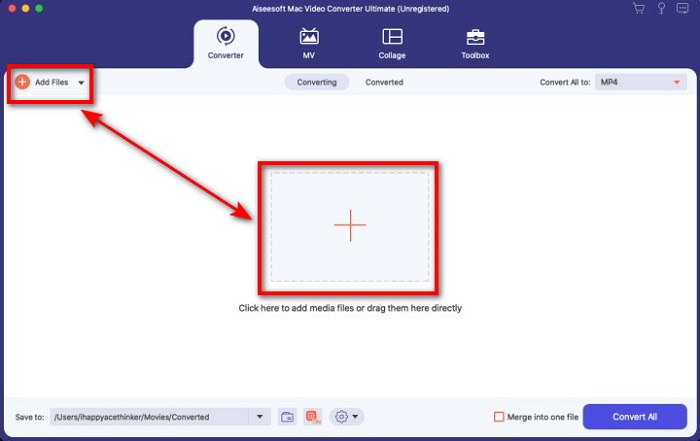
Step 2. Upload the M4V File on the interface by clicking the Add Files or the + button. After that, a computer folder will open on your screen, browse the .m4v File, and press Open.
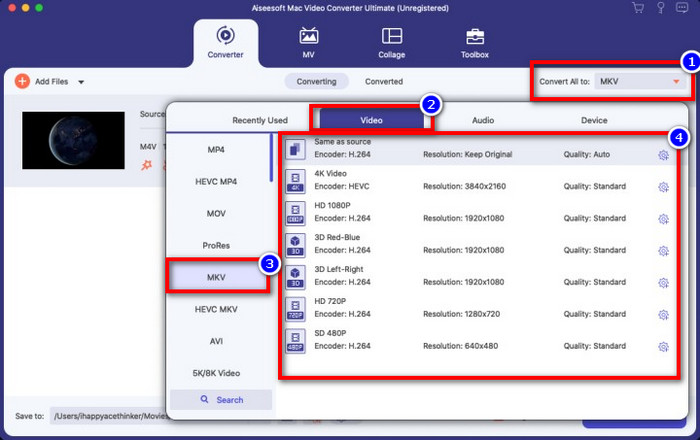
Step 3. Pick out the MKV format under the Convert All to and click it.
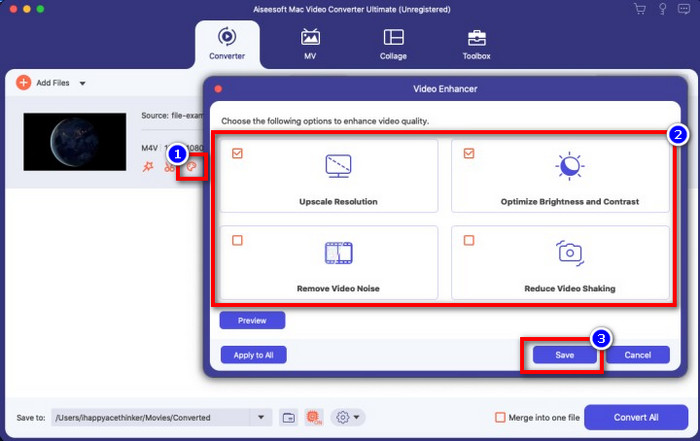
Optional. The effectiveness of this is, without a doubt doing great so far. But did you know that this tool also offers video enhancers? If you click the enhance video option, a dialog box will display; tick the box you want to improve on your video, and to apply it click Save.
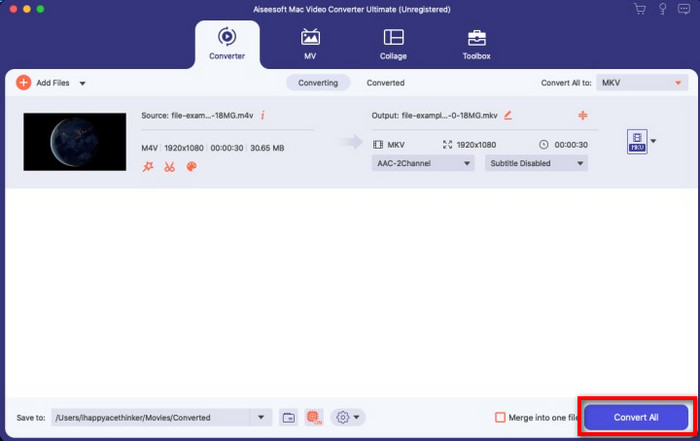
Step 4. By clicking the Convert All button, converting will begin within a short period. Here it is; with that, the file extension of your video is now .mkv.
Bahagian 2. Tukar M4V kepada MKV Dalam Talian
Doesn't want to pay to convert M4V files; instead, want to convert M4V to MKV online? If that is the case, FVC Free Video Converter Online is an online converter that guarantees your converting process efficiency even on the web. A converter can finish the job without purchasing the converter itself or even downloading it. Also, there are no ads or even registration needed to use this. Even though the converter is free, the features presented here only focus on converting. Unlike the ultimate tool, it provides wide-scale and amazing features. Furthermore, if you need to convert your M4V files online, use this converter and copy the steps below.
Step 1. Kindly click this link to open the FVC Free Video Converter Online.
Step 2. Press Add Files to Convert option to launch and upload the M4V File you need to convert.
Muat turun Versi Desktop untuk menukar fail secara kelompok.
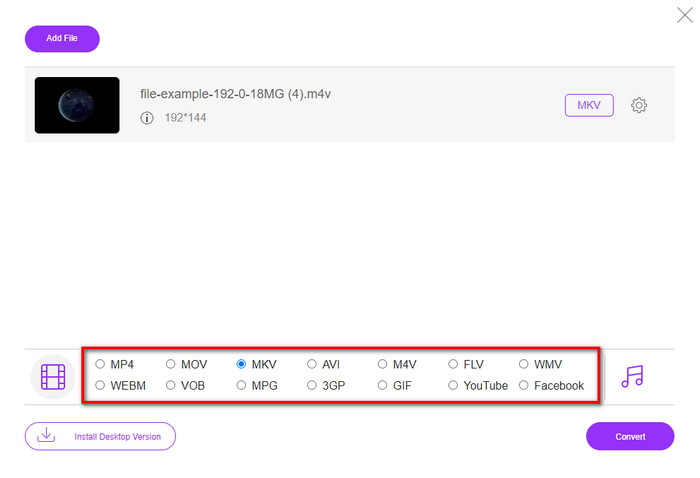
Step 3. Select the MKV format below or the other format you want to have.
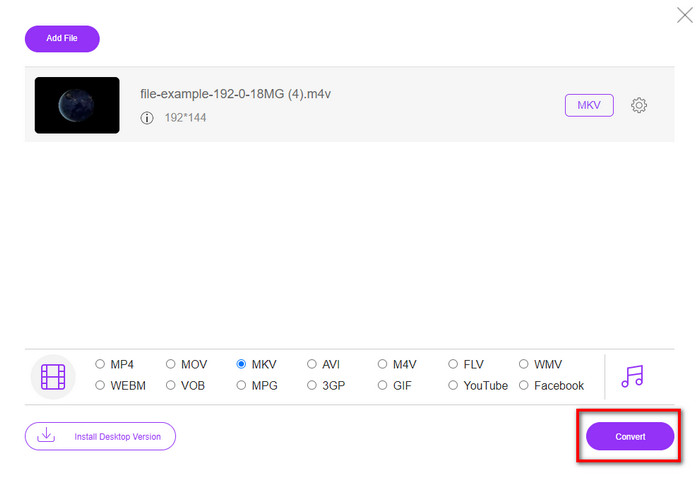
Step 4. Hit Convert for the process to begin.
Bahagian 3. Tukar M4V kepada MKV secara Percuma
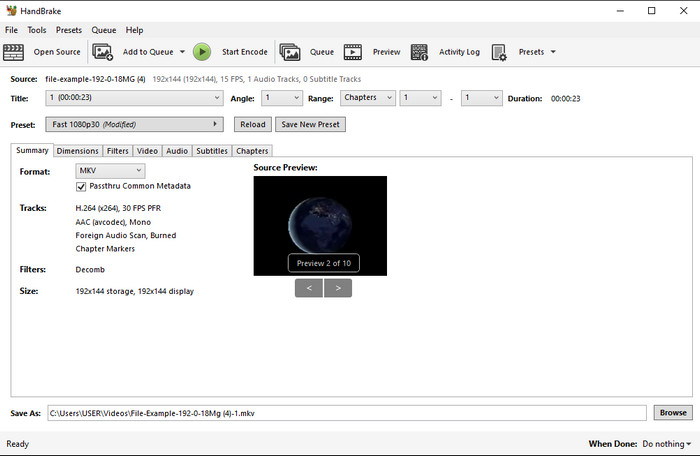
Handbrake provides a swift and efficient converting process like the other converter presented here. However, the format this tool supports is limited, which means you have no less choice option of choosing which format you want it to be. But if you want to use and convert M4V to MKV in Handbrake, apply the steps below.
Step 1. Download the Handbrake on your desktop. Upload the .m4v file by dragging and dropping it on the interface. You can also click File, locate the file on the computer folder, and press Open.
Step 2. Click Format and choose MKV.
Step 3. Click Start Encode for converting the process to begin.
Bahagian 4. Apakah Persamaan dan Perbezaan antara M4V dan MKV
Sebelum kita membandingkan M4V dan MKV, mari kita fikirkan persamaan antara kedua-dua format ini. M4V dan MKV adalah kedua-dua bekas untuk kandungan dan elemen media. Selain itu, kedua-dua format ini diketahui menyimpan salah satu kualiti video terbaik, seperti video HD atau 4k. Dan ia juga besar untuk mengandungi elemen seperti metadata. Selain itu, butiran seterusnya di bawah adalah perbezaan antara kedua-dua format.
M4V sangat serupa dengan format MP4; namun, format ini berada di bawah perlindungan salinan DRM yang bermaksud anda tidak boleh menggunakannya secara bebas. Tetapi tidak semua fail M4V mempunyai perlindungan Apple kerana sesetengah M4V yang boleh dimuat turun mempunyai lesen yang tidak dibenarkan, jadi pastikan anda memuat turun fail .m4v pada iTunes untuk mengelakkan virus berniat jahat yang akan menjangkiti sistem anda. Walaupun formatnya mempunyai had, anda masih boleh menggunakan format ini pada beberapa pemain media untuk menonton video yang anda muat turun di iTunes. Selain itu, jika anda memerlukan reka bentuk yang dilindungi pada Mac, format ini adalah pilihan terbaik.
Sebaliknya, MKV adalah khusus untuk mengandungi pelbagai kandungan media dan elemen dalam satu fail. Keupayaan ini hanya tersedia pada MKV, kerana format ini percuma untuk digunakan, dan ia lebih fleksibel daripada M4V. Selain itu, terdapat banyak sebab untuk menukar M4V kepada MKV pada Mac atau Windows, dan salah satunya adalah untuk membuat fail video tidak terhad.
M4V lwn. MKV
M4V dibangunkan oleh Apple, yang juga menggunakan MPEG 4. Fail M4V sering digunakan untuk menyimpan video yang dimuat turun daripada gedung Apple iTunes, seperti video muzik, episod TV, dll. Anda mungkin mendapati beberapa fail M4V dilindungi salinan kerana ia menggunakan Perlindungan hak cipta DRM FairPlay Apple.
Format kontena multimedia Matroska, dikeluarkan pada tahun 2002, ialah format sumber terbuka yang boleh merangkumi beberapa lagu video, audio, imej dan sari kata. Jadi, anda boleh menggunakannya untuk menyimpan klip video pendek, rancangan TV dan filem dengan mudah. Ia agak popular untuk subbing peminat anime.
Bahagian 5. Soalan Lazim tentang Penukaran M4V ke MKV
Mana yang lebih baik untuk mengedit, M4V atau MOV?
The two said format is one of the Apple formats, so you will notice that there is no significant gap between M4V and MOV. However, MOV is much better at editing because this format often contains a series of video playback that is the best choice for professional editing. Maybe you think you should make your M4V into a MOV for editing purposes. If so, click this link to know more about converting M4V to MOV with a comprehensive understanding of it.
Adakah M4V dan MP4 adalah sama?
M4V dan MP4 adalah sangat serupa dari segi struktur dan kualiti video. Tetapi disebabkan perlindungan Apple Plays, M4V mempunyai skop sokongan yang kecil dan anda tidak boleh memainkan video atau mengedit dalam sambungan .m4v sahaja.
Apakah pemain media yang menyokong M4V?
Not many media players support this type of format because of the DRM protection. So if you are looking for an MKV player, you will spend a lot of time and test it out, which consumes a lot of time. But if you read this article, you can download or use the top 5 MKV media players available on all platforms.
Kesimpulannya
The three tools presented in this article will surely give you the effective conversion you want to have by following the steps. Although the converters have a lot in common, they still have a lot of differences as well. If you read the details we presented above, you will know many about the three tools. Suppose you want to have an excellent conversion in a one-go and still achieve the efficiency of the conversion, we would recommend the FVC Video Converter Ultimate. Sounds unbelievable? Indeed it is, so download it on your desktop to try it yourself.
-
 Penukar M4V ke MP3 - 4 Kaedah Terbaik untuk Mengekstrak MP3 dari Fail M4V
 Apabila anda ingin mengekstrak audio MP3 dari video M4V dengan mudah, anda dapat mengetahui lebih lanjut mengenai 4 penukar M4V ke MP3 terbaik untuk mendapatkan fail audio yang diinginkan dari artikel tersebut.
-
 [Panduan] Cara Menukar Video M4V ke GIF Animasi pada Windows / Mac
 Sekiranya anda ingin membuat fail GIF animasi dari video M4V kegemaran anda, anda dapat mempelajari 2 cara mudah dan efisien untuk menukar video M4V ke GIF dengan tetapan yang disesuaikan.
-
 3 Program Penukar Video Digunakan untuk Menukar iTunes M4V kepada AVI pada Mac
 Tidak mempunyai idea bagaimana untuk menukar MKV kepada format AVI? Semasa kami meneruskan membaca artikel ini, kami akan mengetahui 3 alat yang boleh membantu anda menukar format fail ini.

