


 Video Converter Ultimate
 Perakam Skrin
 Pembaikan Video
Cara Mudah Menukar Fail WebM kepada WMV
WebM ialah format fail media yang disokong oleh kebanyakan pelayar web seperti Google Chrome, Mozilla Firefox, Microsoft Edge, Opera dan banyak lagi. Ia digunakan pada video HTML5 dan audio HTML5 untuk tujuan penstriman. Namun begitu, fail WebM tidak menyokong peranti Mac dan iOS tanpa menggunakan alat lain. Oleh itu, jika anda mahu membuka fail WebM pada mana-mana peranti, kami mengesyorkan menukarnya kepada fail WMV yang disokong secara meluas oleh hampir semua peranti dan pemain media. Dalam artikel ini, kami menyenaraikan beberapa Penukar WebM ke WMV terbaik untuk anda cuba.

Bahagian 1. 3 Alat Terbaik untuk Menukar WebM ke Fail WMV Tanpa Kehilangan
FVC Video Converter Ultimate
FVC Video Converter Ultimate sangat popular di seluruh web apabila bercakap tentang penukar fail. Penukar fail ini membolehkan anda menukar fail WebM anda kepada fail WMV dengan mudah. Ia juga mempunyai ciri unik yang membolehkan anda menyunting, menambah baik, malah memampatkan fail anda tanpa menjejaskan kualitinya. Selain itu, alat ini menyokong pelbagai jenis penukaran yang anda perlukan, termasuk fail WMV. Oleh itu, jika anda mahu menukar fail WebM kepada WMV dengan cekap, inilah aplikasi yang sesuai untuk anda.
Kelebihan
- Membolehkan anda mengedit, menambah baik dan memampatkan fail anda.
- Boleh menukar pelbagai format fail termasuk WebM, WMV, MP4, M4V, MOV, AVI dan banyak lagi.
- Antara muka yang mudah digunakan.
Keburukan
- Anda perlu memuat turun aplikasi terlebih dahulu, sebelum anda boleh menggunakannya.
Penukar Video Percuma FVC
FVC Free Video Converter ialah penukar dalam talian percuma yang membolehkan anda menukar pelbagai format fail, termasuk WebM ke WMV, MP4, FLV, MOV dan banyak lagi. Penukar ini juga mudah digunakan kerana antara mukanya yang ringkas. Tambahan pula, penukar ini tidak perlu dimuat turun kerana ia berasaskan web. Namun begitu, oleh sebab ia penukar dalam talian, anda mungkin mengalami proses penukaran yang perlahan kerana ia bergantung pada sambungan internet. Walau bagaimanapun, ramai yang telah menggunakan penukar ini dan mengiktirafnya sebagai salah satu penukar dalam talian terbaik untuk menukar WebM anda ke WMV secara percuma.
Kelebihan
- Jangan mengandungi iklan yang mengganggu.
- Membolehkan anda menukar banyak format fail termasuk WebM, WMV, MP4, FLV, WMA dan banyak lagi.
- Anda tidak perlu memuat turun aplikasi.
Keburukan
- Ia mungkin lambat untuk menukar.
- Hanya mempunyai ciri terhad untuk digunakan.
SavetheVideo.com
SavetheVideo.com ialah penukar dalam talian percuma yang menukar format fail video utama. Dengan penukar ini, anda boleh menukar video daripada aplikasi media sosial terkenal seperti Facebook, Twitter, Instagram, TikTok dan banyak lagi. Walau bagaimanapun, anda mungkin berdepan masalah ketika menukar sesetengah fail, terutamanya jika fail tersebut tidak disokong.
Kelebihan
- Ia boleh menukar video sehingga 420+ format pada mana-mana peranti.
- Anda boleh menukar daripada peranti android dan iphone.
Keburukan
- Ia mempunyai antara muka yang sukar untuk diikuti.
- Anda mungkin menghadapi penukaran yang perlahan.
Bahagian 2. Bagaimana untuk Menukar WebM kepada WMV Menggunakan FVC Video Converter Ultimate
Bahagian artikel ini akan menunjukkan kepada anda cara menukar fail WebM kepada format fail WMV menggunakan FVC Video Converter Ultimate. Ini kerana kami menganggap penukar ini yang terbaik antara penukar yang sedang tular di pasaran sekarang. Dalam kalangan penukar WebM ke WMV lain yang ada hari ini, penukar percuma dalam talian ini menunjukkan prestasi yang memberangsangkan, khususnya dengan ciri-cirinya yang hebat.

FVC Video Converter Ultimate
5,689,200+ Muat Turun- Ia menyokong penukaran WebM kepada WMV, MP4, MOV, MKV, atau ke dalam 200+ format dalam beberapa klik.
- Ia menawarkan penukaran kelompok untuk menukar berbilang fail WebM pada masa yang sama.
- Penukaran Ultra-Pantas membolehkan anda melakukan proses penukaran sepantas kilat dalam beberapa saat.
- Ia mempunyai ciri pengeditan di mana anda boleh memutar, memotong, menggabungkan dan banyak lagi.
Muat Turun PercumaUntuk Windows 7 atau lebih baharuMuat Turun Selamat
Muat Turun PercumaUntuk MacOS 10.7 atau lebih baharuMuat Turun Selamat
Langkah-langkah menukar WebM ke WMV menggunakan FVC Video Converter Ultimate:
Langkah 1. Untuk memuat turun penukar ini, klik butang download di bawah. Ikuti proses pemasangan, kemudian buka aplikasi.
Muat Turun PercumaUntuk Windows 7 atau lebih baharuMuat Turun Selamat
Muat Turun PercumaUntuk MacOS 10.7 atau lebih baharuMuat Turun Selamat
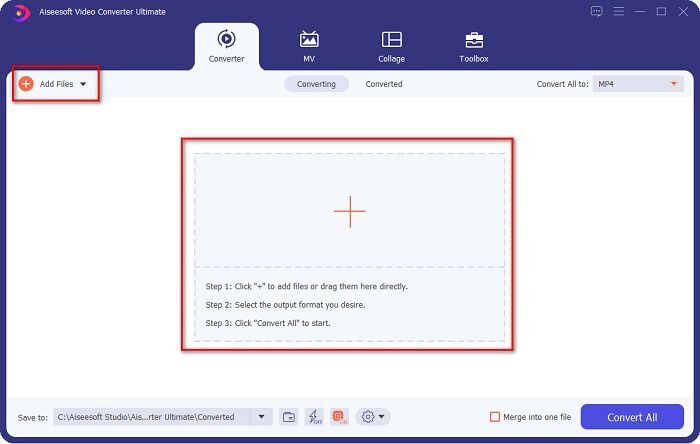
Langkah 2. Selepas membuka aplikasi, klik butang Add Files, atau anda juga boleh klik butang + untuk memuat naik fail WebM anda pada antara muka utama alat ini. Seterusnya, satu folder komputer akan muncul, di mana anda boleh mencari fail WebM anda. Kemudian tekan butang Open untuk memuat naik fail anda. Selain itu, anda boleh menambah lebih banyak fail WebM kerana alat ini menyokong penukaran kelompok (batch conversion).
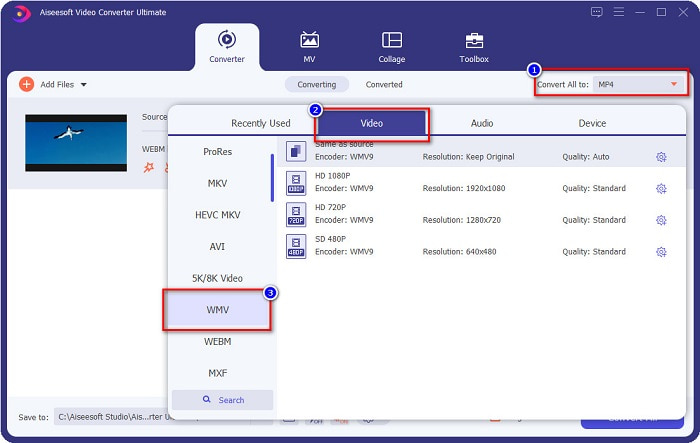
Langkah 3. Di penjuru kanan atas perisian, anda akan melihat butang Convert All to, klik butang tersebut, kemudian pilih format WMV pada senarai untuk menukar format fail daripada WebM kepada WMV.
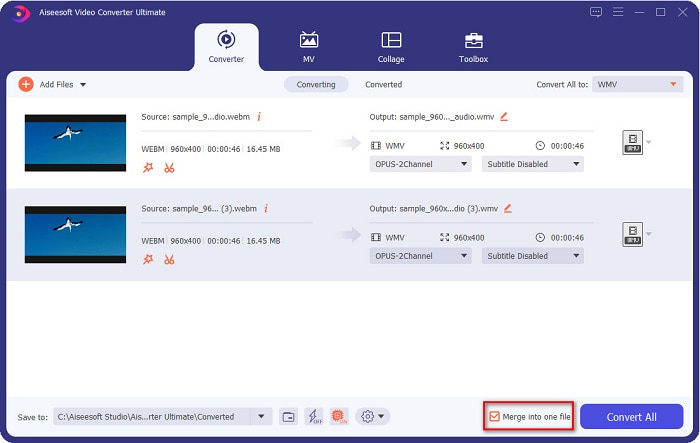
Pilihan tambahan. Mahu tahu cara menggabungkan berbilang fail WebM menjadi satu? Alat utama ini mempunyai ciri hebat untuk menggabungkannya menjadi satu fail. Untuk melakukannya, tandakan kotak yang terletak di penjuru kanan bawah perisian anda. Dengan cara ini, apabila anda menukar fail-fail anda, ia akan digabungkan secara automatik menjadi satu fail. Tetapi jika anda tidak mahu menggabungkan fail, anda boleh abaikan bahagian ini dan teruskan ke langkah seterusnya.
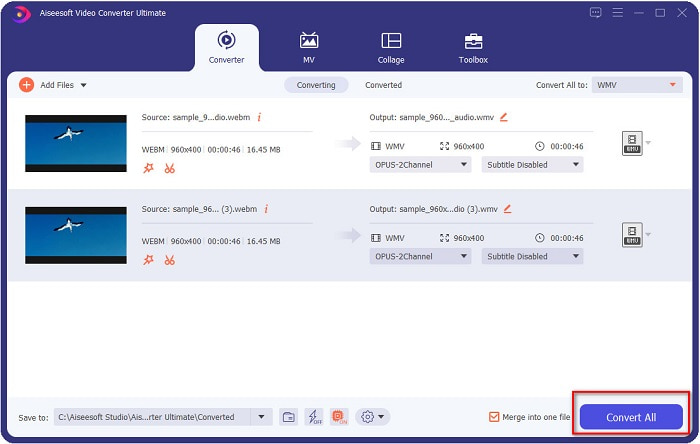
Langkah 4. Setelah anda memilih format fail yang diingini, klik butang Convert All untuk mula menukar fail WebM anda kepada WMV. Dan siap! Fail WebM anda kini telah ditukar kepada fail WMV!
Anda boleh menukar fail WebM anda kepada fail WMV dengan mudah dengan langkah mudah tersebut.
Bahagian 3. Pengetahuan Lanjutan tentang WebM dan WMV
Untuk lebih memahami kedua-dua fail ini, kami akan menanganinya dalam bahagian artikel ini.
Fail WebM ialah format fail video yang disokong secara meluas oleh pelayar web. Laman web HTML5 menggunakan format ini untuk tujuan penstriman video. Selain itu, jenis fail ini mengandungi aliran video yang dimampatkan dengan codec VP8 atau VP9. Manakala di pihak lain, WMV atau Windows Media Video dibangunkan oleh Windows; oleh itu, Sistem Windows biasanya memainkan jenis fail ini. Banyak penyandian (encoder) juga menyokong jenis fail ini. Di samping itu, format fail ini menggunakan pemampat yang membantu menjadikan saiz fail lebih kecil tanpa merosakkan kualitinya.
Bahagian 4. Soalan Lazim tentang Menukar WebM kepada WMV
Bolehkah penukar video muktamad menukar fail WebM kepada format fail MP4?
Sudah tentu. Dengan menggunakan FVC Video Converter Ultimate, anda boleh menukar fail WebM anda kepada MP4. Anda boleh klik pautan ini dan baca dengan teliti untuk maklumat lanjut tentang menukar fail WebM anda kepada format fail MP4.
Adakah QuickTime menyokong fail WebM?
QuickTime tidak menyokong format fail WebM. Ini kerana QuickTime tidak mempunyai begitu banyak codec seperti pemain media lain. Anda boleh menukar fail WebM anda kepada format seperti MOV, yang disokong oleh codec dalam QuickTime. Untuk mendapatkan lebih banyak maklumat tentang menukar WebM ke MOV, klik pautan ini.
Adakah Internet Explorer menyokong fail WebM?
ya. Internet Explorer menyokong fail WebM. Walaupun begitu, Internet Explorer telah pun ditamatkan secara berperingkat.
Kesimpulannya
Sebagai rumusan, penukar WebM ke WMV yang dibentangkan di atas akan membantu anda menukar fail WebM kepada fail WMV dengan mudah. Selain itu, alat yang ditunjukkan di atas mempunyai pelbagai ciri yang membolehkan anda melakukan lebih banyak perkara ketika menukar. Namun kami percaya bahawa FVC Video Converter Ultimate ialah alat terbaik yang membantu anda memenuhi keperluan anda. Masih belum dapat membuat pilihan penukar yang hendak digunakan? Muat turunnya sekarang dan cubalah!
-
 3 Cara Menukar WebM kepada MP3 tanpa Kehilangan Kualiti Bunyi
 Menghadapi masalah kerana fail WebM tidak boleh digunakan untuk memainkan audio yang anda simpan? Kemudian baca artikel ini semasa kami menyediakan bantuan yang berkesan dengan menukar WebM kepada MP3.
-
 3 Perisian Menakjubkan Digunakan untuk Menukar Fail WebM ke dalam Format AVI
 Tidak mempunyai idea bagaimana untuk menukar WebM kepada AVI? Kemudian mari kita mula membaca artikel ini. Semasa kami menentukan semua butiran pada WebM dan tiga penukar yang boleh anda gunakan untuk menukar.
-
 Penukar WebM ke FLV Pilihan Paling Teratas Percuma di Web & Desktop
 Adakah anda mempunyai masalah yang sama memainkan fail WebM pada telefon pintar anda? Kemudian luangkan masa 5 minit membaca artikel ini untuk mengetahui cara menukar WebM kepada FLV.
