


 Video Converter Ultimate
 Perakam Skrin
 Pembaikan Video
 Muat Turun Selamat
Panduan Pantas untuk Menukar MKV kepada DivX Dalam Talian dan Luar Talian secara Percuma dengan Mudah
Format fail MKV ialah sebuah bekas fail (file container) yang menyimpan trek audio, video dan sarikata. Ia ialah format fail pelbagai guna kerana juga boleh menyimpan video HD. Namun begitu, oleh sebab ia boleh memuatkan banyak data dalam satu fail, ia mengambil terlalu banyak ruang pada peranti. Jadi, jika anda mahu mengecilkan saiz fail MKV anda, anda mesti menukarnya kepada format fail DivX. Teruskan membaca kerana kami akan membincangkan cara terbaik untuk menukar MKV kepada DivX Dalam Talian dan Luar Talian Secara Percuma.

Bahagian 1. Maklumat tentang MKV dan DivX
Sebelum menangani penukar MKV dan DivX dalam talian dan luar talian, kita mesti terlebih dahulu mengetahui persamaan dan perbezaan antara format fail MKV dan DivX. Dalam bahagian ini, anda akan mengetahui data dan maklumat fakta mengenai kedua-dua format fail ini.
Fail MKV atau Matroska ialah format fail yang terkenal untuk peminat filem kerana ia merupakan bekas fail yang boleh mengendalikan berbilang aliran sari kata dan trek audio dalam bahasa yang berbeza. Selain itu, fail ini adalah kalis masa hadapan, yang bermaksud ia tidak akan lapuk pada masa hadapan.
Tidak seperti fail MKV, DivX ialah format fail yang membolehkan anda memampatkan saiz fail besar-besaran sehingga dua belas daripada saiz fail asal. Dengan itu dikatakan, ia adalah pilihan terbaik orang jika mereka mahu memampatkan fail MKV mereka.
Memandangkan kita kini telah mengetahui apa itu fail MKV dan DivX, kita kini akan belajar cara menukar fail MKV kepada format fail DivX.
Bahagian 2. 5 Alat untuk Menukar MKV ke format DivX Dengan Mudah
Mencari Penukar MKV ke DivX adalah sukar kerana beberapa penukar boleh menyokong format fail DivX. Tetapi kami mempersembahkan penukar MKV ke DivX terbaik untuk menukar fail MKV kepada DivX anda dengan mudah.
FVC Video Converter Ultimate
FVC Video Converter Ultimate ialah alat yang sesuai jika anda sedang mencari penukar serba lengkap untuk menukar MKV kepada DivX. Penukar luar talian ini menyokong lebih 1000 format fail, termasuk MKV, DivX, XviD, MOV, AVI, MP4, M4V, FLV dan banyak lagi. Ia juga mempunyai ciri terbaik seperti menambah efek pada fail video anda dan menambah baik kualitinya. Selain itu, ia menyokong penukaran kelompok, di mana anda boleh menggabungkan berbilang format fail ke dalam satu. Dan jika anda ingin mengetahui kelebihan alat ini berbanding penukar lain, baca kelebihan di bawah.

Kelebihan FVC Video Converter Ultimate:
5,689,200+ Muat Turun- Ia menyokong banyak format fail, termasuk MKV, DivX, MP4, MPG, AVI, FLV, WMV dan 1000+ format fail.
- Ia mempunyai ciri lanjutan seperti pembuat GIF, pembuat 3D dan banyak lagi.
- Ia mempunyai proses penukaran ultra-pantas.
- Boleh diakses pada semua platform merentas media seperti Windows dan Mac.
Muat Turun PercumaUntuk Windows 7 atau lebih baharuMuat Turun Selamat
Muat Turun PercumaUntuk MacOS 10.7 atau lebih baharuMuat Turun Selamat
Berikut ialah langkah-langkah cara menukar MKV kepada format DivX menggunakan FVC Video Converter Ultimate:
Langkah 1. Muat turun FVC Video Converter Ultimate dengan mengklik butang Muat Turun di bawah. Kemudian ikut proses pemasangan dan buka aplikasi tersebut.
Muat Turun PercumaUntuk Windows 7 atau lebih baharuMuat Turun Selamat
Muat Turun PercumaUntuk MacOS 10.7 atau lebih baharuMuat Turun Selamat
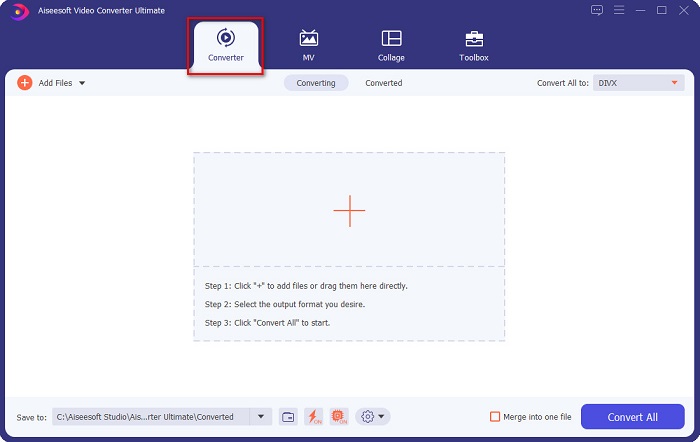
Langkah 2. Pada antara muka utama perisian, klik pilihan Converter.
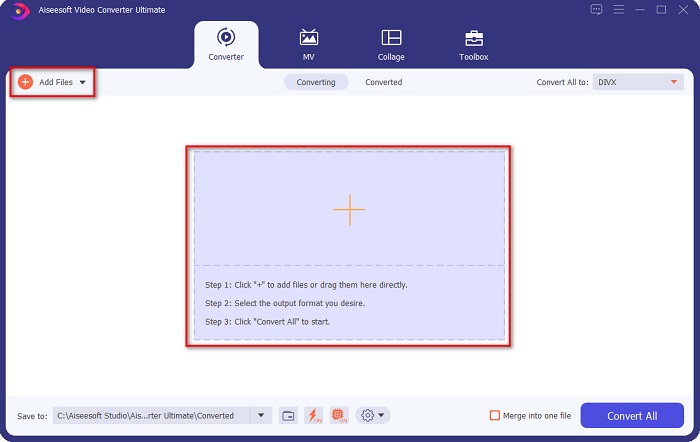
Langkah 3. Klik butang Add Files atau butang tanda + pada antara muka yang sama. Fail komputer anda akan muncul, kemudian pilih fail MKV anda untuk memuat naiknya.
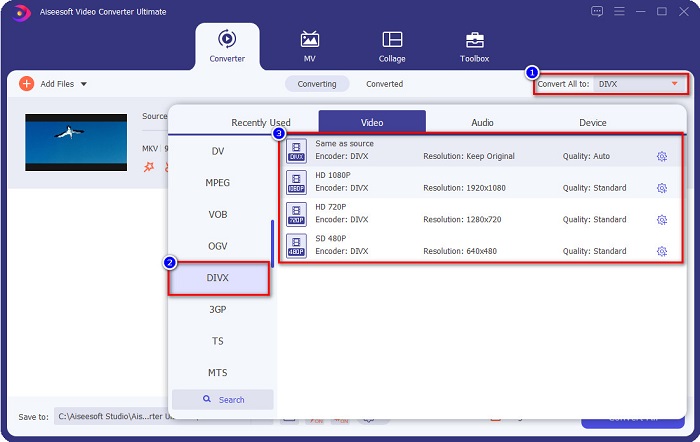
Langkah 4. Selepas memuat naik fail MKV anda, klik butang Convert All to untuk memilih format output fail yang anda mahu; klik format fail DivX.
Langkah 5. Akhir sekali, klik butang Convert All untuk menukar fail MKV anda kepada format fail DivX.
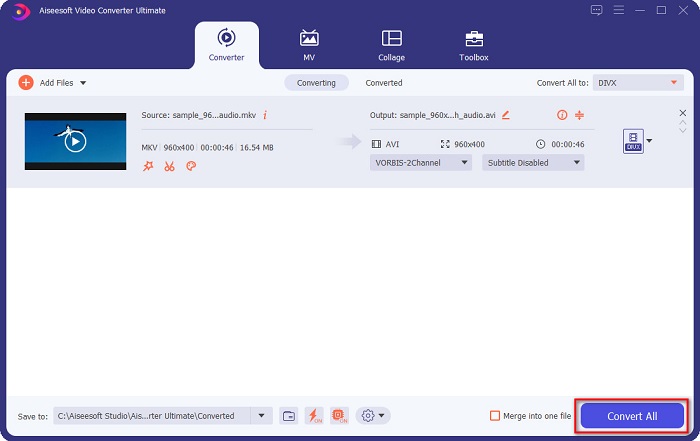
Kemudian tunggu beberapa saat, dan voila! Fail MKV anda kini ialah format fail DivX!
AnyMP4 Video Converter
AnyMP4 Video Converter ialah penukar video MKV ke DivX percuma yang menyokong pelbagai format fail. Ia mempunyai antara muka perisian yang ringkas, menjadikannya alat yang mesra pengguna. Anda juga boleh menggunakan banyak ciri yang tersedia pada penukar ini. Namun begitu, anda tidak boleh mengakses ciri-ciri khasnya jika anda tidak melanggan aplikasi tersebut.
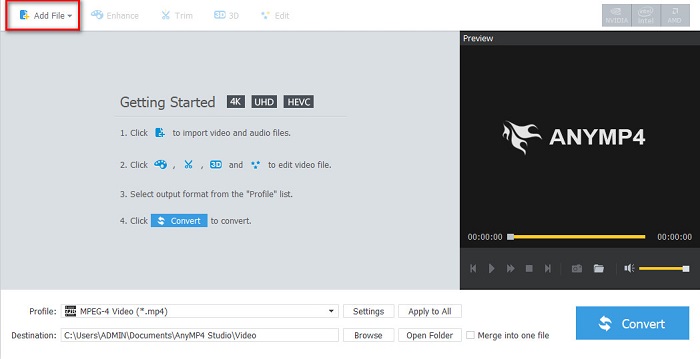
Langkah 1. Dalam pelayar anda, cari AnyMP4 Video Converter, kemudian muat turun aplikasi itu. Seterusnya pada antara muka utama perisian, klik butang Add File untuk memuat naik fail MKV anda.
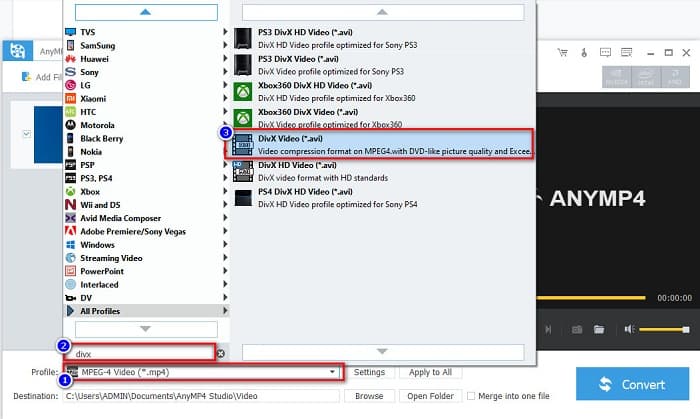
Langkah 2. Kemudian pada pilihan Profile di bahagian bawah antara muka perisian, cari format fail DivX, kemudian klik padanya.
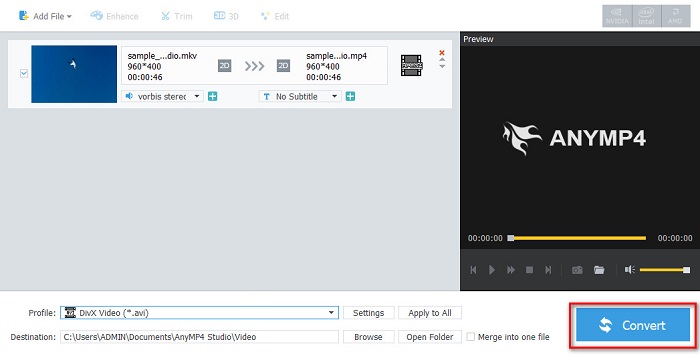
Langkah 3. Untuk langkah terakhir, klik butang Convert di penjuru bawah sebelah kanan antara muka. Kemudian tunggu sahaja proses penukaran anda selesai. Dan siap!
Media.io
Media.io ialah penukar percuma yang boleh menukar MKV kepada DivX secara dalam talian. Penukar dalam talian ini mempunyai antara muka pengguna yang ringkas. Selain itu, ia tidak mengandungi sebarang iklan seperti sesetengah penukar dalam talian yang lain. Namun begitu, anda mungkin mengalami proses penukaran yang perlahan kerana ia ialah aplikasi berasaskan web.
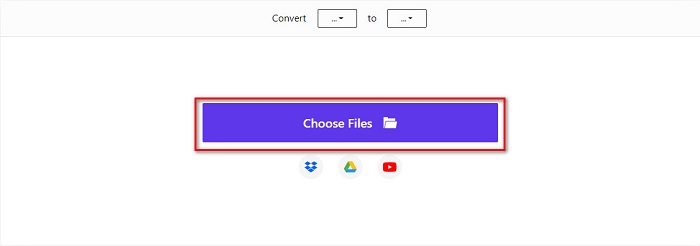
Langkah 1. Dalam pelayar dipercayai anda, cari Media.io. Kemudian pada antara muka utama perisian, klik butang Choose Files.
Langkah 2. Kemudian, klik butang drop-down untuk memilih format output DivX.
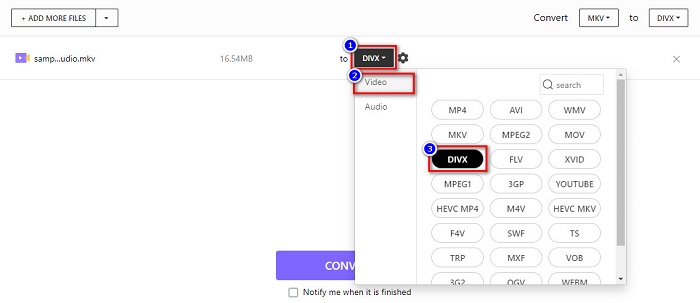
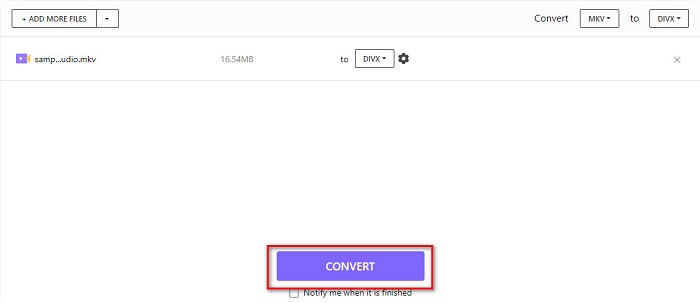
Langkah 3. Seterusnya, klik butang Convert di bawah untuk mula menukar fail MKV anda kepada format fail DivX.
MiConv
Satu lagi cara untuk menukar MKV kepada DivX dalam talian secara percuma ialah melalui MiConv. Penukar dalam talian ini merupakan salah satu penukar dalam talian yang terkenal yang anda boleh temui di web. Ia ialah aplikasi berasaskan web; oleh itu, anda tidak perlu memuat turun apa-apa. Selain itu, ia ialah alat mesra pemula kerana GUI-nya yang mudah digunakan. Namun, ia mengandungi iklan yang mengganggu yang mungkin mengganggu anda. Walau bagaimanapun, ramai orang masih menggunakan penukar dalam talian ini.
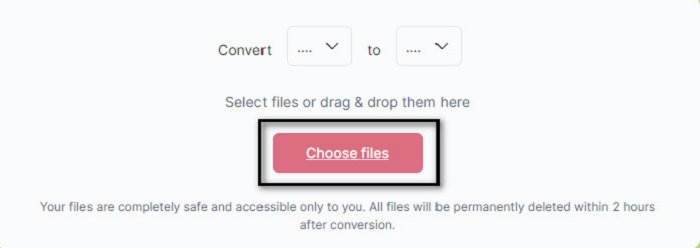
Langkah 1. Cari MiConv pada pelayar anda untuk pergi ke laman web mereka. Kemudian, klik butang Choose files. Folder komputer anda akan muncul, di mana anda akan memilih fail MKV anda.
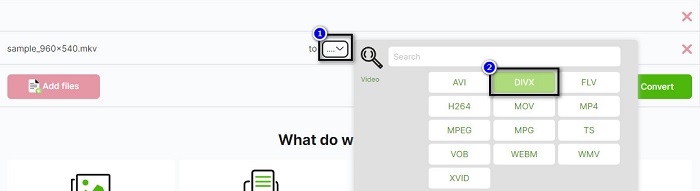
Langkah 2. Kemudian, klik butang drop-down di bahagian bawah antara muka perisian untuk memilih format output anda.
Langkah 3. Akhir sekali, klik butang Convert untuk menukarkan (transcode) fail MKV anda kepada DivX.

AnyConv
Penukar terakhir yang akan kita bincangkan ialah penukar dalam talian AnyConv. Penukar video MKV ke DivX percuma ini ialah salah satu penukar dalam talian yang paling kerap digunakan di internet. Seperti alat dalam talian lain yang dibentangkan di atas, ia juga mempunyai antara muka yang mudah digunakan. Selain itu, ia menyokong hampir semua format fail video standard. Namun begitu, ia mengandungi iklan yang mengganggu dan bergantung kepada sambungan internet, yang bermakna kelajuan proses penukaran anda bergantung pada kelajuan internet.
Langkah 1. Pergi ke laman web AnyConv dengan mencari AnyConv online converter pada pelayar anda. Kemudian, klik butang Choose File.
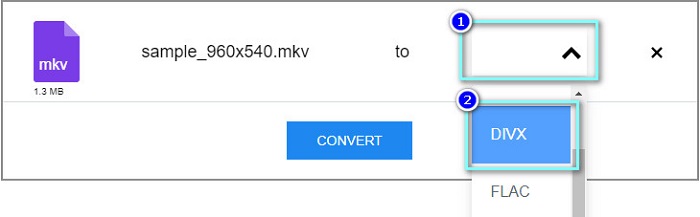
Langkah 2. Seterusnya, pilih format fail DivX sebagai format output anda pada butang drop-down.
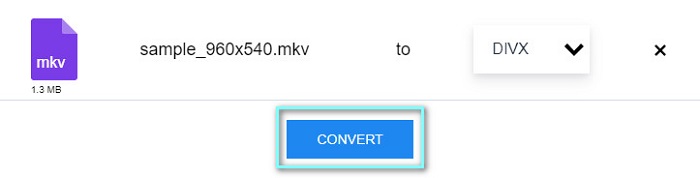
Langkah 3. Kemudian, untuk memulakan proses penukaran, klik butang Convert.
Bahagian 3. Soalan Lazim tentang Menukar MKV kepada DivX
Bolehkah anda memainkan fail MKV pada Windows Media Player?
Windows Media Player tidak menyokong format fail MKV secara natif. Memainkan fail MKV pada Windows Media Player mungkin hanya memaparkan audio sahaja. Oleh itu, jika anda mahu memainkan fail MKV anda pada Windows Media Player, anda boleh menukar MKV kepada AVI sebagai format fail.
Yang manakah mempunyai kualiti yang lebih baik, MKV atau DivX?
MKV mempunyai kualiti yang lebih baik daripada fail DivX; walau bagaimanapun, fail MKV tidak dimampatkan, menjadikannya lebih menonjol dalam saiz fail. Sebaliknya, DivX ialah format fail termampat.
Bolehkah anda memainkan fail DivX pada macOS?
Malangnya, pemain media terbina dalam Mac iaitu QuickTime tidak menyokong format fail DivX.
Kesimpulannya
Fuh! Itulah pengembaraan hebat yang kami lalui. Semua pengetahuan dan maklumat yang anda miliki hari ini akan membantu anda memilih penukar MKV ke DivX yang terbaik. Jadi, jika anda mahukan penukar dengan banyak ciri hebat untuk digunakan, ramai orang menggunakan FVC Video Converter Ultimate sebagai baris pilihan pertama mereka.
-
 MKV ke MOV - Cara Menukar MKV ke MOV
 Bagaimana cara menukar MKV ke MOV di Mac? Bolehkah iMovie membaca MKV? Apakah maksud format MOV? Catatan ini memberitahu 2 cara mudah untuk membantu anda menukar MKV ke MOV dengan penukar video dalam talian dan profesional percuma.
-
 Cara Menukar Video MKV ke GIF Animasi tanpa Photoshop / FFmpeg
 Setelah memuat turun dan menonton filem MKV di komputer anda, anda mungkin ingin berkongsi beberapa detik indah dengan rakan atau di Internet sebagai GIF. Dalam artikel ini, anda boleh mengetahui tentang 2 cara termudah untuk menukar MKV ke GIF.
-
 Petua dan Trik tentang Cara Menukar Fail MKV kepada MP3 [2021]
 Menghadapi masalah memilih penukar yang sesuai untuk MKV ke MP3? Kemudian teruskan membaca siaran ini sambil kami membentangkan penyelesaian yang berbeza pada satu masalah.
