


 Video Converter Ultimate
 Perakam Skrin
 Pembaikan Video
 Muat Turun Selamat
Tutorial Lengkap tentang Cara Mengalih Keluar Tera Air Weibo yang Perlu Anda Tahu
Weibo ialah platform media sosial yang terkenal digunakan untuk berkongsi, menyebarkan dan mendapatkan maklumat seperti Twitter yang sering anda boleh gunakan di China. Anda juga boleh menyiarkan dan memuat turun lakaran kenit, foto dan video di sini. Walau bagaimanapun, akan ada tera air sebaik sahaja anda mengeksportnya. Ramai pengguna ingin mengalih keluarnya kerana ia mengganggu visual kandungan.
Walaupun terdapat beribu‑ribu penanggal tera air di pasaran, hanya sedikit alat yang benar‑benar berkesan menghapus tera air. Jadi, jika anda tidak menyukai tera air pada media visual yang anda muat turun, artikel ini mengumpulkan alat terbaik untuk digunakan. Kami telah mengujinya bagi membuktikan bahawa ia memang berfungsi dan praktikal untuk membuang tera air. Untuk mengajar anda cara menghapus tera air Weibo, anda perlu membaca artikel ini hingga habis.

Bahagian 1. Cara Mengalih Keluar Tera Air daripada Video Weibo Menggunakan Pembuang Tera Air Terbaik
Tera air Weibo boleh menjadi masalah pada alat lain kerana kebanyakannya meninggalkan kesan comot selepas tera air dibuang. Namun, jika anda menggunakan FVC Video Converter Ultimate, tidak akan ada kesan comot yang tertinggal. Tidak kira sebesar atau sekecil mana pun tera air itu, alat ini boleh memadamkannya dengan berkesan tanpa sebarang jejak. Dengan itu, anda boleh menikmati video yang anda eksport ke Weibo. Dalam erti kata lain, menghapus tera air dengan bantuan alat ini memang sangat mudah.
Selain itu, anda juga boleh menggunakan alat ini untuk perkara lain, seperti memotong, menggabungkan, memampatkan, memangkas, mencipta GIF dan banyak lagi. Dan jika anda ingin menambah tera air pada video anda supaya tiada siapa yang boleh mencurinya daripada anda, anda boleh menggunakan perisian ini untuk melakukannya. Ia adalah perisian semua-dalam-satu yang diperlukan pada desktop anda. Adakah anda ingin tahu cara mengalih keluar tera air daripada video Weibo? Anda boleh mengikuti langkah seterusnya sambil kami menerangkan cara melakukannya langkah demi langkah.
Muat Turun PercumaUntuk Windows 7 atau lebih baharuMuat Turun Selamat
Muat Turun PercumaUntuk MacOS 10.7 atau lebih baharuMuat Turun Selamat
': Sebelum anda mengikuti langkah seterusnya, pastikan anda mengeksport video Weibo yang ingin anda alih keluar tera air supaya anda boleh menemuinya pada folder dengan mudah.
Langkah 1. Mula‑mula, muat turun perisian ini pada komputer meja anda dan pilih versi yang sepadan dengan sistem operasi. Setelah memasang perisian, ikut proses set‑up WinRAR yang dipaparkan pada skrin, klik Start Now untuk melancarkannya dan teruskan.
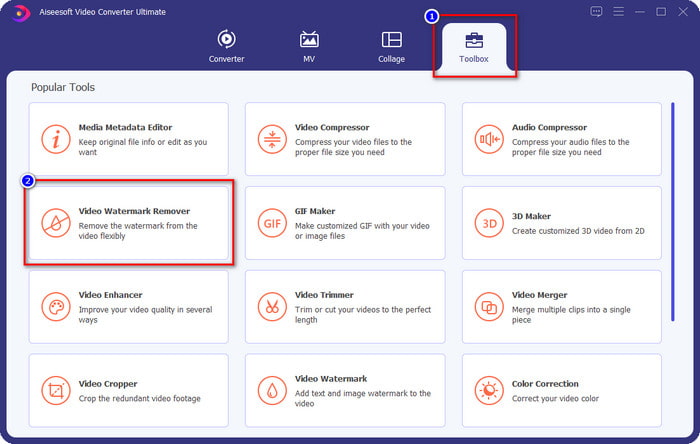
Langkah 2. Pergi ke bahagian Toolbox dan cari Video Watermark Remover; klik padanya.
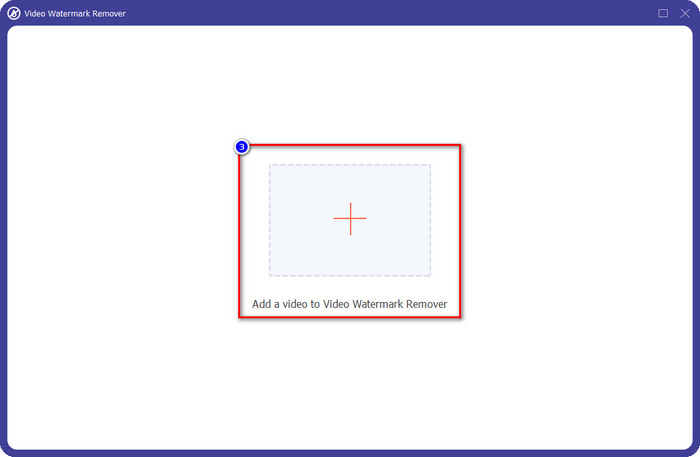
Langkah 3. Klik butang +, cari video Weibo bertanda tera air yang anda muat turun tadi dalam folder, klik fail tersebut, dan tekan Open untuk memuat naiknya sekarang.
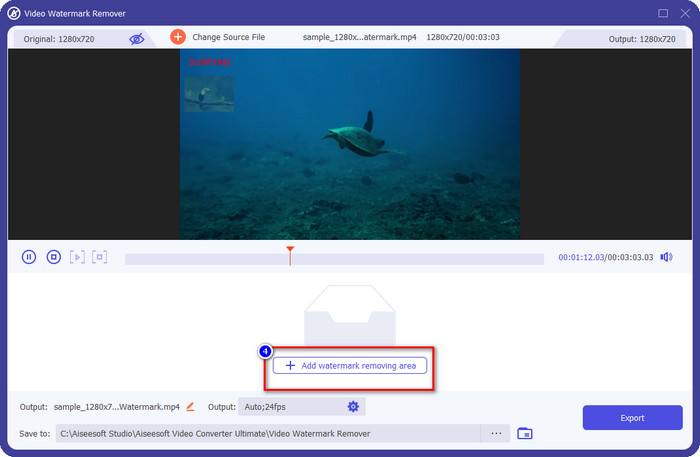
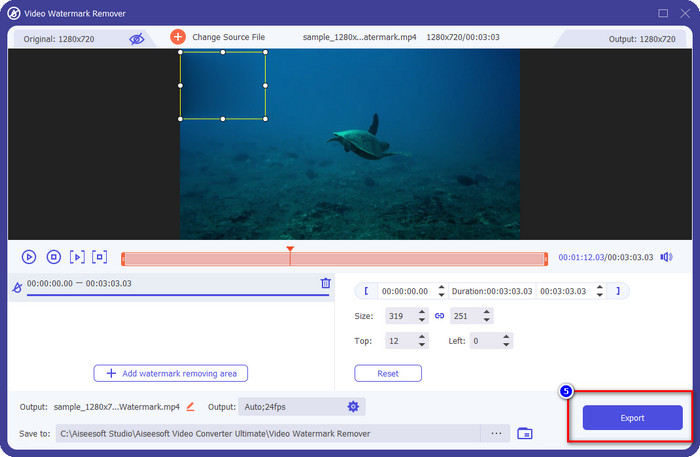
Langkah 4. Dalam tetingkap baharu yang muncul, klik Add Watermark Removing Area untuk mula membuang tera air.
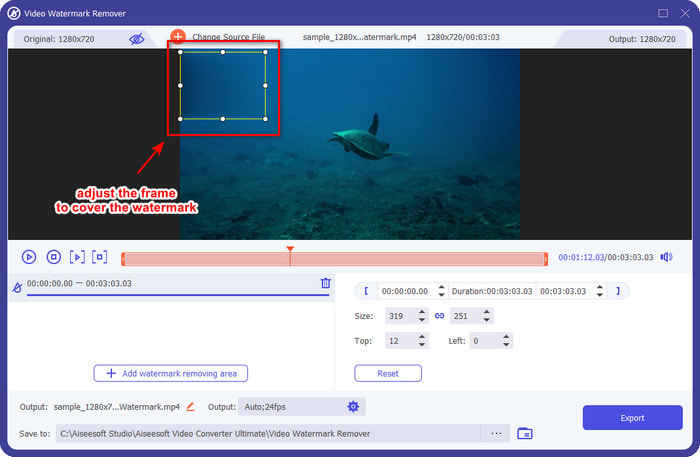
Langkah 5. Seret dan tahan kotak pilihan untuk menutup kawasan tera air; anda juga boleh membesarkan atau mengecilkannya mengikut keperluan dan pastikan ia menutupi tera air sebelum anda mengeksport.
Langkah 6. Setelah meletakkan kotak pilihan tepat pada tera air, klik Export untuk membuang tera air pada video yang anda muat naik. Anda tidak perlu menunggu lama kerana ia menyokong proses yang sangat pantas; dalam beberapa saat sahaja, anda akan mendapat video Weibo tanpa tera air.
Bahagian 2. Cara Membuang Tera Air daripada Foto Weibo Menggunakan Versi Percuma di Web
Bagaimana cara menyimpan foto Weibo tanpa tera air? Anda tidak boleh menyimpan imej tanpa tera air jika dieksport terus dari Weibo. Namun, anda boleh menggunakan FVC Free Watermark Remover untuk memadam tera air pada imej. Ia merupakan penanggal tera air yang lengkap untuk imej yang mempunyai tera air. Dari segi fungsi, boleh dikatakan alat ini jauh lebih baik berbanding penanggal tera air lain yang anda boleh gunakan di web. Jadi, jika anda mahu membuang tera air pada imej, inilah pilihan pertama yang patut anda cuba. Walaupun ia boleh menghapus tera air pada imej, ia tidak menyokong penghapusan tera air pada video seperti yang boleh dilakukan oleh perisian versi ultimate.
Walau bagaimanapun, ia percuma untuk digunakan, dan antara muka webnya bersih, jadi anda tidak akan melihat sebarang iklan yang boleh mengganggu anda. Ingin tahu cara menggunakan alat web ini? Kemudian ikuti langkah yang ditunjukkan di bawah untuk mencubanya sendiri.
Nota: Sama seperti video, pastikan anda memuat turun imej Weibo yang anda ingin miliki dan pastikan anda meletakkannya pada folder yang boleh dilihat dan mudah diakses.
Langkah 1. Untuk menggunakan penanggal tera air atas talian, klik pautan ini untuk membukanya.
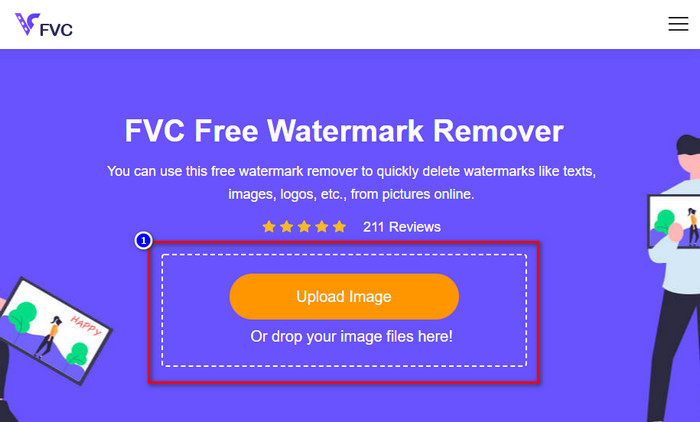
Langkah 2. Pada antara muka web, klik Upload Image, kemudian satu folder akan muncul pada skrin anda, cari imej tersebut dan tekan Open untuk memuat naiknya.
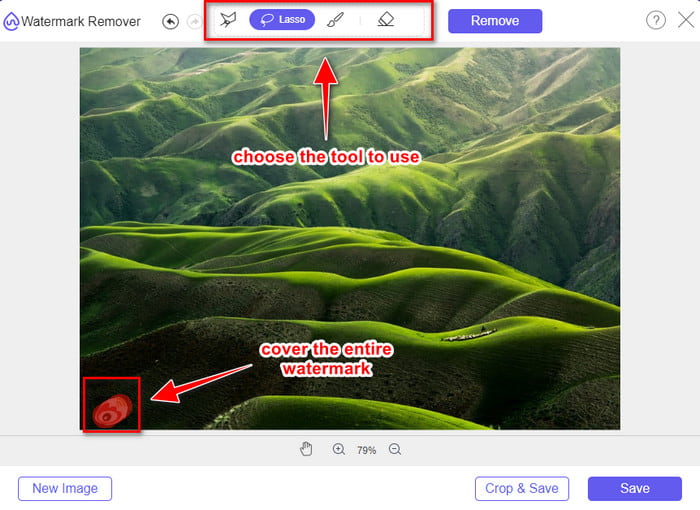
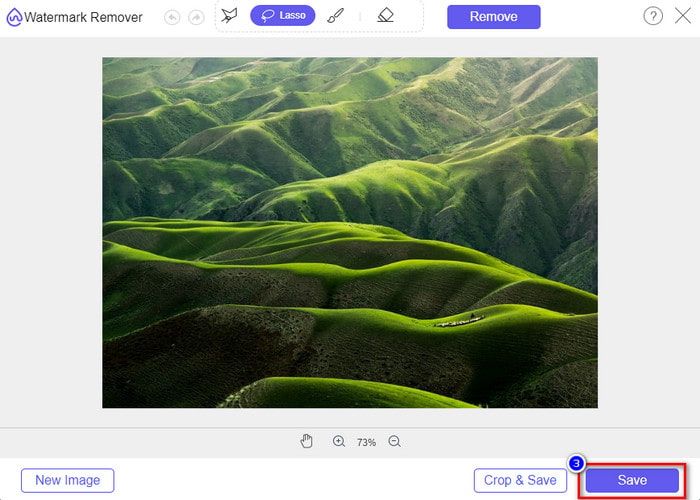
Langkah 3. Anda boleh menjejak/melakar tera air di sini untuk membuangnya dan pastikan setiap bahagian tera air berada di dalam kawasan lakaran yang anda buat.
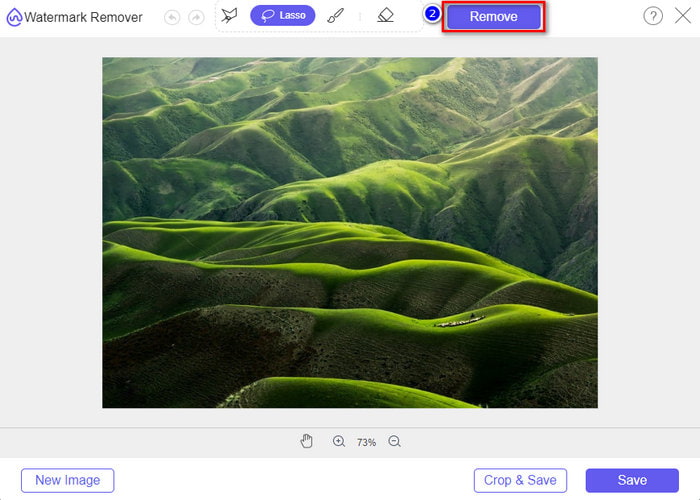
Langkah 4. Tekan Remove untuk memadam tera air pada imej anda.
Langkah 5. Selepas membuang tera air pada imej Weibo, klik Save untuk memuat turun imej Weibo tanpa tera air.
Berkaitan:
Cara Menghapus Tera Air TikTok
Cara Menambah Tera Air pada Video
Bahagian 3. Soalan Lazim tentang Cara Membuang Tera Air Weibo
Mengapakah tera air Weibo menjadi kabur selepas mengeksportnya?
Sesetengah alatan mengaburkan tera air supaya ia tidak dapat dilihat pada media visual yang telah mereka eksport di Weibo. Tetapi tidak semua alat mengaburkan tera air; ada yang mengeluarkan tera air pada media visual tanpa sebarang kesan. Jadi, jika anda ingin mengalih keluar tera air di Weibo tanpa mengaburkannya, anda mesti tahu alat yang kami nyatakan di atas untuk membantu anda mengalih keluarnya.
Bolehkah saya menutup logo Weibo pada fail yang dieksport?
Ya awak boleh. Dengan cara ini, anda tidak akan melihat tera air Weibo pada fail. Walau bagaimanapun, mengusiknya akan meliputi beberapa bahagian fail, jadi bukannya membantu anda, ia boleh memburukkan fail. Jadi, penghilang tera air diperlukan untuk memadam tera air fail.
Adakah semua fail yang dieksport di Weibo mempunyai tera air?
Mengeksport sebarang jenis fail pada platform microblogging ini akan meninggalkan kesan. Tidak kira apa itu, tera air ditambahkan pada fail. Namun, anda boleh mengalih keluarnya dengan alat yang kami nyatakan sebelum ini dalam artikel ini.
Kesimpulannya
Menakjubkan, bukan? FVC menyediakan alat yang anda perlukan untuk membuang tera air Weibo pada video dan imej dengan serta‑merta. Walaupun anda tiada pengalaman atau bukan profesional dalam jenis penyuntingan ini, penyuntingan tetap boleh dilakukan dengan alat yang disebutkan tadi. Jadi, jika anda mahu menghapus tera air pada imej, sama ada ia dieksport dari Weibo ataupun tidak, FVC Free Watermark Remover ialah alat yang anda perlukan. Tetapi untuk video dan GIF, anda mesti menggunakan perisian profesional yang mudah digunakan dan berpatutan seperti FVC Video Converter Ultimate. Tunggu apa lagi? Hapus tera air pada media visual anda supaya anda boleh menikmatinya tanpa sebarang tanda atau cap tera air.
-
 Cara Terbaik Cara Menambah Tera Air pada Video dalam Photoshop pada Windows & Mac
 Ingin tahu cara menambah tera air pada video di Photoshop? Dalam kes itu, artikel ini akan memberikan anda satu atau dua perkara yang perlu anda ketahui.
-
 3 Penyelesaian Terbaik tentang Cara Membuang Tera Air daripada Video dengan Mudah
 Mahu mengalih keluar tera air yang menjengkelkan pada video? Dengan blog ini, anda boleh mempelajari idea berbeza tentang mengalih keluar tera air pada video.
-
 4 Cara Terbaik untuk Mengalih Keluar Tera Air daripada GIF [Dalam Talian & Luar Talian]
 Perlu mengalih keluar tera air daripada GIF? Dengan alat dalam artikel ini, anda akan mempelajari gaya yang berbeza dengan penanggal tera air berbeza yang tersedia pada platform anda.
