


 Video Converter Ultimate
 Perakam Skrin
 Pembaikan Video
 Muat Turun Selamat
Ketahui Segala-galanya tentang Apa itu 3D atau Tiga Dimensi
Adakah anda ingin tahu apa itu 3D? Filem dan imej 3D atau tiga dimensi menjadi lebih popular. Memandangkan kita berada di zaman moden, adalah mudah untuk mencipta filem 3D menggunakan alat yang berbeza. Tetapi pertama, kita perlu memahami semua tentang 3D: latar belakang, definisi dan cara membuat video 3D.
In this article, we will dig into 3D and its parameters. So, if you want to learn about what is 3D, read this article.

Bahagian 1. Apakah itu 3D
Objek 3D atau tiga dimensi menunjukkan lebar, tinggi dan kedalaman. Setiap hari, kita melihat objek 3D kerana persekitaran fizikal kita adalah tiga dimensi itu sendiri. Kerana persepsi 3D yang kita ada, kita boleh melihat objek 3D, juga dipanggil persepsi kedalaman. Apabila anda melihat sekeliling, retina di mata kita membentuk imej dua dimensi, dan otak kita memproses kedua-dua imej itu sebagai visual 3D. Tetapi adakah anda tahu? Kita, manusia, mempunyai alat yang kita gunakan untuk persepsi mendalam?
Berikut ialah alat manusia yang kami gunakan untuk persepsi mendalam:
Stereoscopic vision - Stereoscopic vision is a sense of depth perceived by the two eyes. It is one of the abilities of the brain to register 3D shapes and visuals. In this vision, the objects look separated when closer than distant ones.
Parallax - The angles between two lines measure this type of vision. When you move your head side by side, closer objects move more than distant objects.
Size Familiarity - If you are familiar with the size of an object, even though it is far, you can approximately know how big it is to appear in size. In the same way, if two objects have the same size but the other one is bigger, it is assumed that the larger one is closer.
Accommodation - When you focus on a close object, your eye’s lenses physically change. In that way, you will know how far the object is. Also, it is the way of the eye to keep the focus on an object.
Aerial Perspective - In aerial perspective, you will see objects smaller because the view is far. Distant objects also appear to have less contrast and color saturation.
Terdapat juga pelbagai jenis 3D dalam dunia fizikal kita. 3D juga digambarkan sebagai imej yang memberikan ilusi kedalaman jarak yang berbeza-beza, yang biasa digunakan dalam permainan komputer, grafik, realiti maya dan filem.
Jenis 3D yang berbeza:
3D Computer Graphics - 3D computer graphics can generate 3D objects in a display screen or two-dimensional space. The pixels in 2D graphics have different properties, such as position, color, and brightness. The 3D pixels then lie on a Z-axis. When the pixels are combined with their depth, it will result in a 3D surface, also called a texture.
3D Films - 3D films are motion pictures that have 3D depth on them. With the help of 3D glasses, we can watch a 3D film. To make this kind of film, creators use stereoscopic vision, which means two images are shown simultaneously, each for one eye.
3D Printing - 3D printing is also known as additive manufacturing. It is a process of making a 3D in solid form from a digital file. Using a Computer Aided Design (CAD), you can print a 3D object from a digital model.
Bahagian 2. Cara Main Filem 3D
Setelah anda mengetahui maksud 3D, beritahu kami cara memainkan filem 3D menggunakan aplikasi perisian paling hebat yang boleh anda gunakan.
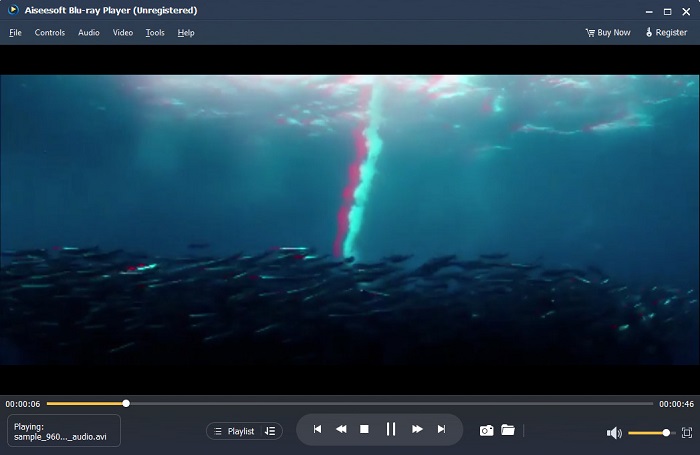
Pemain Blu-ray ialah aplikasi desktop di mana anda boleh memainkan sebarang jenis video. Dengan alat ini, anda juga boleh memainkan filem 3D tanpa menggunakan sebarang pemalam. Di samping itu, ramai orang mengesyorkan pemain media ini kerana antara muka pengguna yang mudah dan bersih. Selain itu, pemain media berkuasa ini boleh memainkan cakera Blu-ray, folder Blu-ray, fail DVD/folder/ISO, yang pemain media lain tidak menyokong. Anda juga boleh menikmati menonton video HD dengan 100 peratus audio tanpa kerugian dan bunyi sekeliling HD dramatik. Apa yang mengagumkan ialah anda boleh mencipta senarai main anda supaya anda tidak akan mengalami kesukaran untuk memisahkan video atau audio yang anda inginkan.
Cara memainkan filem 3D dalam Pemain Blu-ray:
Step 1. Download Blu-ray Player on your device. Follow the installation process, then run the app.
Step 2. On the software’s main interface, click the Open File button. Your device’s files will appear, where you will select your 3D movie.
Step 3. Then, your video will begin to upload. You can now wear your special 3D glasses and enjoy watching your 3D movie.
Bahagian 3. Apakah itu TV 3D dan Cermin Mata 3D
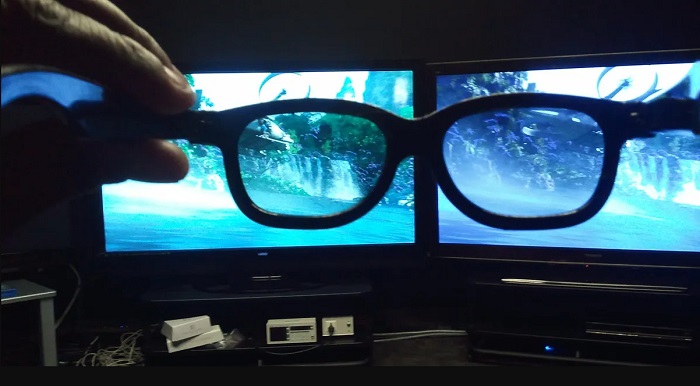
Terdapat dua jenis TV 3D: 3D pengatup Aktif, 3D Aktif dan 3D Pasif. Bahagian ini akan membezakan perbezaannya dan menentukan jenis cermin mata 3D yang hendak digunakan semasa menonton TV 3D Aktif-pengatup atau Pasif.
Active-shutter or Active 3D is a type of 3D TV that displays high-quality 3D images alternately on the screen. Active 3D TV displays alternate images on the screen for the right and left eyes. The 3D glasses then shutter black alternately to portray the 3D effect seen on your TV screen. This causes each eye to see the image made for them. The 3D glasses you must use when watching in an Active-shutter 3D are 3D active glasses. This type of 3D glass needs a battery that it uses to block and shutter the lenses on the glasses electronically. These glasses are incorporated with LCD lenses to coordinate with alternating frames.
In contrast, Passive 3D TV is somehow similar to the 3D technology that movie theaters use. This type of 3D TV uses special filters on the screen to see 3D using polarized lenses in the glasses. Furthermore, Passive 3D TVs blend the two frames in one, alternately between the horizontal lines for the left eye and right eye. The glasses that these 3D TVs use are Passive 3D glasses which contain different polarization on each lens. The other eye only sees the odd lines, while the other sees the even lines to produce a 3D image. The Passive 3D glasses do not require batteries to work.
Bahagian 4. 2D lwn. 3D
2D dan 3D ialah dimensi sebenar dalam ruang kerja komputer. 2D atau dua dimensi ialah objek rata yang menggunakan dimensi mendatar dan menegak (paksi X dan Y). Memandangkan 2D hanya mempunyai dua dimensi, anda hanya akan melihat garisan apabila anda membelokkannya ke sisi. Ia hanya mempunyai ketinggian dan lebar tetapi tidak mempunyai kedalaman. Manakala sebaliknya, 3D atau tiga dimensi mengandungi ketinggian, lebar dan kedalaman. Imejan tiga dimensi memerlukan kesan dua mata yang bekerja seiring untuk melihat persepsi tiga dimensi. Jika 2D menggunakan paksi X dan Y, 3D menambah dimensi Z, membolehkan anda melihat kedalaman objek.
Jika anda bertanya mana yang bagus untuk digunakan, 2D vs. 3D, jawapannya adalah kedua-duanya. 2D dan 3D mempunyai kelebihan dan kekurangan yang berbeza. Sebagai contoh, anda boleh menonton video atau filem 2D di mana-mana sahaja pada mana-mana peranti tanpa memakai sebarang cermin mata 3D khas. Walau bagaimanapun, kesan 3D yang dihasilkan oleh filem 3D adalah menakjubkan dan lebih menyeronokkan untuk ditonton berbanding 2D.
Bahagian 5. Cara Menukar Filem 2D kepada 3D
Jika anda ingin menonton filem atau klip 3D yang menakjubkan di rumah anda tanpa sebarang cermin mata 3D, anda boleh menukar filem 2D anda kepada 3D menggunakan penukar video muktamad. Jadi, jika anda ingin menukar filem 2D anda kepada filem 3D, gunakan aplikasi perisian yang menakjubkan ini.
FVC Video Converter Ultimate is an application that is popular for video conversion. This software application cannot just convert file formats. It also allows you to turn your 2D video into a 3D video, such as anaglyph 3D and split-screen 3D. FVC Video Converter Ultimate is famous to users because it supports almost all file formats, such as MP4, MKV, AVI, FLV, WEBM, MOV, DIVX, and 1000+ more. It also comes with tons of advanced editing features, such as a 3D maker, GIF maker, video watermark remover, etc.
Cara menukar filem 2D kepada filem 3D menggunakan FVC Video Converter Ultimate:
Step 1. First, download FVC Video Converter Ultimate by clicking the Download button below.
Muat Turun PercumaUntuk Windows 7 atau lebih baharuMuat Turun Selamat
Muat Turun PercumaUntuk MacOS 10.7 atau lebih baharuMuat Turun Selamat
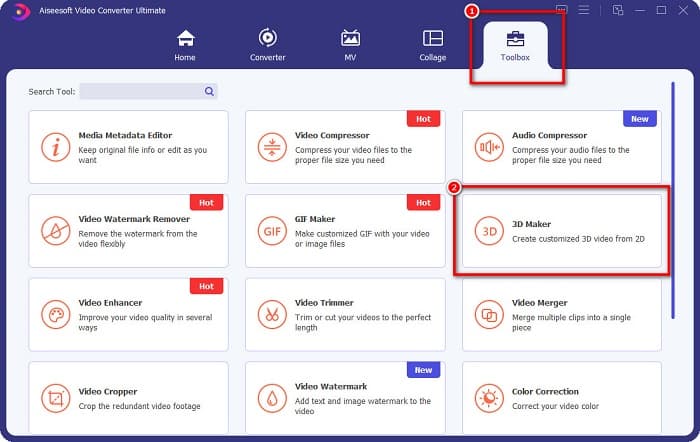
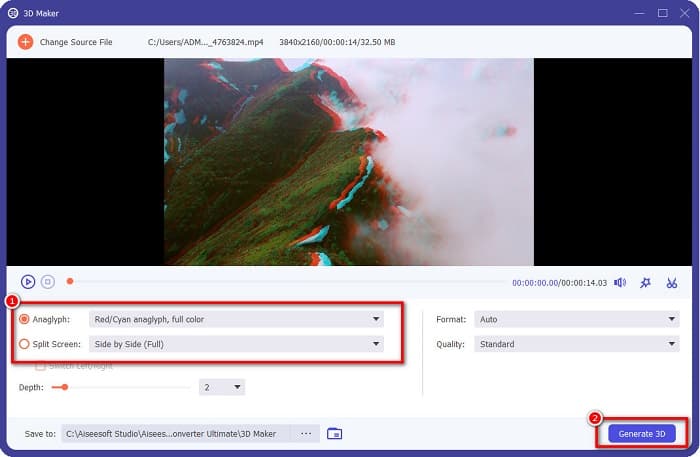
Step 2. Open the app, then go to the Toolbox panel and select the 3D Maker.
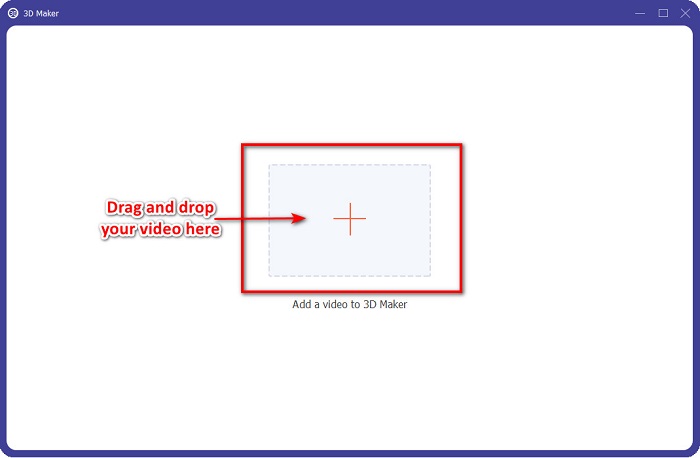
Step 3. Click the + sign button or drag and drop your 2D video into the box on the next interface.
Step 4. Then, choose between Anaglyph 3D or Split Screen 3D. And then, click the Generate 3D button.
Berkaitan dengan:
Quickest Ways to Convert AVI to WMV [Best Converters]
Easily Convert MOV to WMV Using These Amazing Converters
Bahagian 6. Soalan Lazim tentang Apa itu 3D
Bolehkah anda menonton video 3D pada VLC Media Player?
ya. VLC Media Player menyokong semua format fail. Anda juga boleh memainkan filem 3D dalam pemain media VLC.
Bolehkah anda menukar video 3D kepada 2D?
FVC Video Converter Ultimate boleh menukar video 3D kepada 2D. Anda juga boleh menukar format fail video anda dengan penukar ini.
Mana yang lebih banyak digunakan, 2D atau 3D?
Pada masa kini, dalam industri perfileman, filem 3D lebih dominan daripada filem 2D. Kerana grafik yang menarik dan animasi yang realistik, filem 3D lebih popular daripada filem 2D.
Kesimpulannya
3D or three-dimensional is widely-known in the film industry and especially on computers. Now that you know what 3D is, you have the basic knowledge of how you can create one. If you want to make a 3D video easily, use FVC Video Converter Ultimate.
-
 3 Cara untuk Menukar MPG kepada 3GP pada Windows dan Mac [Percuma]
 Jika anda sedang mencari cara untuk menukar MPG kepada 3GP, baca artikel ini untuk mengetahui cara terbaik untuk menukar MPG kepada 3GP pada Windows dan Mac.
-
 5 Terbaik Penukar MPEG ke DivX Percuma Terbaik untuk Windows dan Mac
 Tukar fail MPEG anda kepada fail DivX dengan mudah menggunakan penukar MPEG kepada DivX yang terbaik. Baca artikel ini untuk mengetahui butiran lanjut tentang mereka.
-
 MOV terbaik ke DivX Percuma untuk Menggunakan Penukar untuk Mac dan Windows
 Kami mempunyai penyelesaian untuk anda jika anda sedang mencari penukar percuma MOV ke DivX. Artikel ini membentangkan penukar MOV ke DivX teratas untuk Mac dan Windows.
