


 Video Converter Ultimate
 Perakam Skrin
 Pembaikan Video
 Muat Turun Selamat
Cara Menghilangkan Tera Air Pengarah Kuasa secara Percuma [100% Berfungsi]
Untuk memilih penyunting dan pembuat video serba lengkap, anda tidak akan tersilap jika memilih PowerDirector pada peranti anda. Anda boleh menjangkakan hasil yang hebat apabila menggunakannya untuk menyunting video bagi pembentangan, vlog, tutorial, demo dan banyak lagi. Selain itu, anda juga perlu tahu bahawa ia akan menambah tanda air pada video yang telah disunting jika anda sedang menggunakan versi percuma. Sesetengah pengguna menjadi kecewa kerana tanda air digunakan pada video yang mereka usahakan dengan bersungguh-sungguh. Daripada terus kecewa, apa kata anda cuba membaca artikel ini? Mari pelajari cara menghilangkan tanda air PowerDirector secara percuma untuk menyelesaikan masalah ini sekali gus.

Bahagian 1. Cara Menghilangkan Tera Air Pengarah Kuasa secara Percuma dengan Penyelesaian Teratas di Pasaran
FVC Video Converter Ultimate
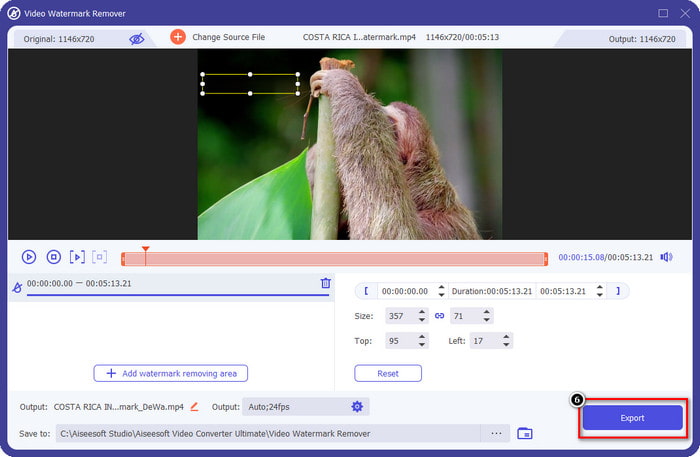
Versi terkini FVC Video Converter Ultimate mempunyai pengalih keluar tera air video yang boleh anda gunakan untuk mempunyai video pada PowerDirector untuk PC tanpa tera air. Alat ini menjadi alat lengkap yang boleh melakukan tugas pelbagai guna secara serentak dan melakukannya secara profesional dengan pemprosesan yang cepat. Apa yang mengagumkan kami dengan alat ini ialah betapa mudahnya untuk digunakan. Jika anda menggunakan ini, anda tidak perlu menjadi profesional untuk mengalih keluar tera air pada video anda. Bagi pengguna yang mencari penanggal tera air terbaik, anda tidak boleh salah dengan memuat turun perisian ini pada desktop anda secara percuma. Masih tidak yakin? Satu-satunya cara untuk meyakinkan anda bahawa ia melakukan prestasi terbaik adalah dengan menyalin tutorial yang kami tambahkan untuk anda ikuti.
Langkah 1. Anda boleh memuat turun perisian ini pada Windows atau macOS secara percuma dengan mengklik butang muat turun di bawah. Selepas memilih versi yang anda mahu muat turun, pasang perisian itu serta-merta, kemudian buka ia.
Muat Turun PercumaUntuk Windows 7 atau lebih baharuMuat Turun Selamat
Muat Turun PercumaUntuk MacOS 10.7 atau lebih baharuMuat Turun Selamat
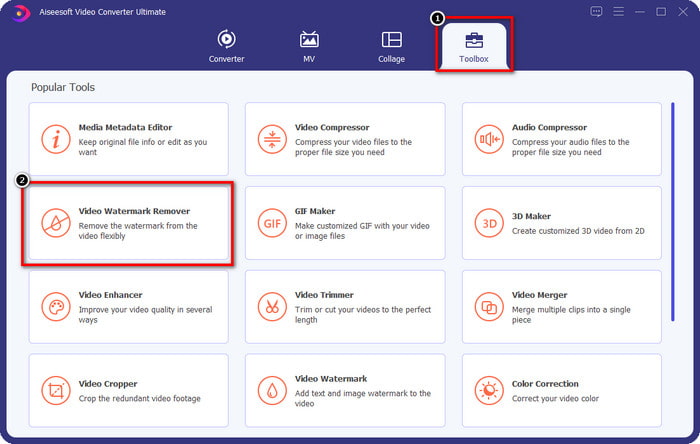
Langkah 2. Setelah ia berjalan dalam sistem, pergi ke Toolbox dan cari Video Watermark Remover dalam set ciri yang tersedia.
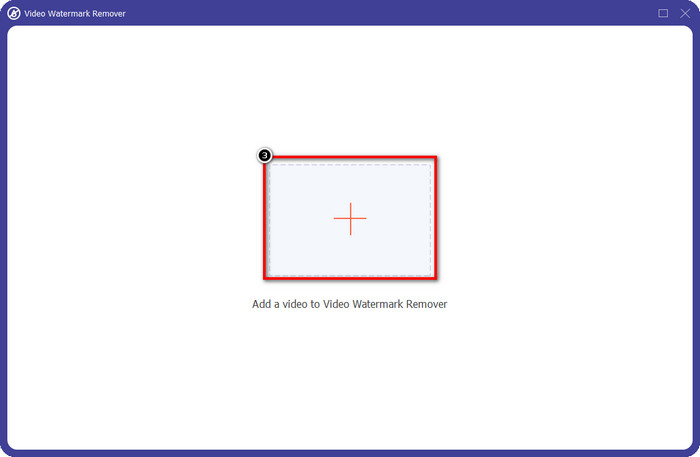
Langkah 3. Selepas itu, klik ikon + untuk memuat naik fail video yang anda hadapi masalah.
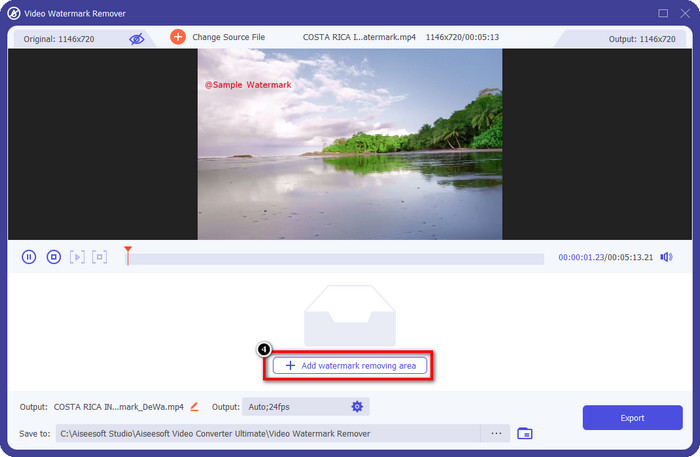
Langkah 4. Tekan Add Watermark Removing Area untuk mula menggunakan alat yang disediakan oleh perisian ini.
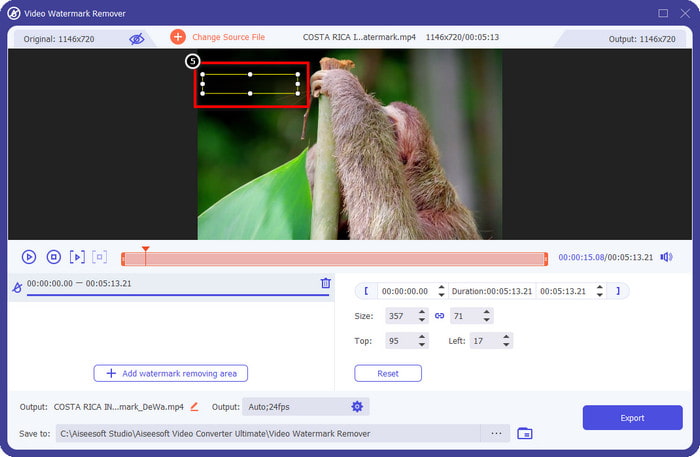
Langkah 5. Dengan tetikus anda, seret bentuk segi empat tepat ke kawasan tanda air, kemudian lepaskan. Anda dibenarkan melaras bentuk segi empat tepat itu untuk menyerlahkan kawasan tanda air.
Langkah 6. Tekan butang Export untuk memulakan proses menyingkirkan tanda air. Setelah selesai, satu folder timbul akan muncul pada skrin anda; klik fail tersebut untuk menonton video tanpa tanda air.
Pemain Media VLC
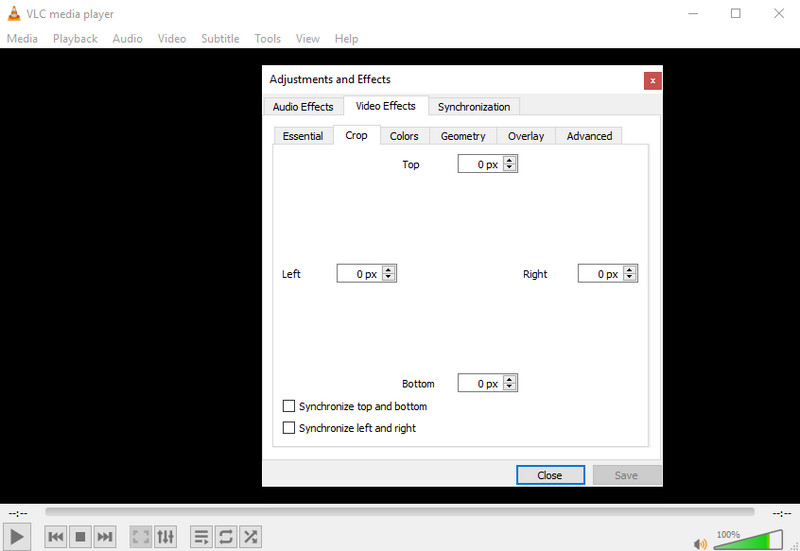
VLC Media Player bukanlah alat khusus untuk membuang tanda air. Namun, ia boleh melakukan tugas itu dengan memotong keluar tanda air pada video yang anda miliki. Alat ini bukan sahaja pemain dan pemangkas video; terdapat juga perkara lain yang boleh ditawarkan oleh pemain media popular ini. Tetapi jangan harapkan alat ini mampu melakukan suntingan profesional dan mudah digunakan kerana ia bukan begitu. Semasa memangkas video, anda perlu menambah ukuran yang tepat untuk memotong tanda air pada video. Jadi, andaikan anda mengetahui nilai tepat x dan y pada video, anda boleh ikut cara membuang tanda air “edited by PowerDirector” dengan pemain media ini.
Langkah 1. Selepas memuat turun perisian di VideoLAN.org, buka perisian tersebut. Klik Media, kemudian Open File, dan cari fail video yang anda sunting pada PowerDirector dalam pemacu lokal yang akan dipaparkan pada skrin anda.
Langkah 2. Video akan mula dimainkan, klik Tools, kemudian Effects and Filter. Anda juga boleh menggunakan papan kekunci dengan menekan Control + E untuk Windows dan Command + E untuk Mac.
Langkah 3. Pergi ke Video Effects, Crop, dan tambah ukuran pada video untuk memotong keluar tanda air.
Langkah 4. Untuk menggunakan pelarasan yang anda lakukan, klik Save.
Kapwing
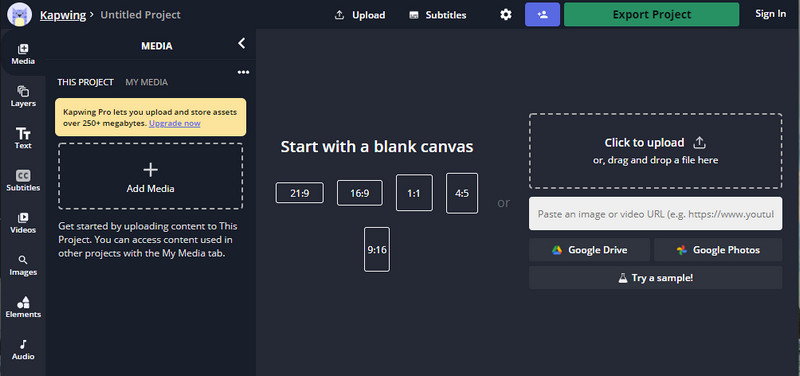
Perlukan editor video dalam talian? Cuba gunakan Kapwing. Ia ialah alat web intuitif yang boleh anda gunakan untuk mengedit video seperti yang boleh anda lakukan pada Power Director. Namun, ia tidak berada pada tahap par Pengarah Kuasa. Kebanyakan pengeditan video yang mungkin anda perlukan sudah ada di sini, seperti memangkas tera air. Walaupun alat ini melakukan kerja yang sama seperti VLC untuk mengalih keluar tera air, alat ini mempunyai anak tetingkap pratonton di mana anda boleh melihat video yang dipangkas sebelum mengeksport. Jadi, jika anda ingin menyimpan video, anda mengedit pada Powerdirector tanpa tera air untuk PC; anda mesti memotongnya dahulu di sini.
Langkah 1. Buka alat web ini dengan mencarinya pada pelayar anda, kemudian klik Add Media untuk memuat naik fail video di sini. Akan ada proses memuat naik, jadi anda perlu menunggu sebelum anda boleh menggunakan video yang dimuat naik.
Langkah 2. Klik Crop di bahagian kiri antara muka untuk membuka fungsi pemangkasan.
Langkah 3. Laraskan bingkai dan pastikan tanda air pada video tidak termasuk dalam bingkai tersebut.
Pilihan: Jika anda tidak mahu mengubah dimensi video secara manual, terdapat pilihan sedia ada di bawah yang boleh anda gunakan secara bebas.
rame dan pastikan tera air video tidak disertakan pada bingkai.” /]Langkah 4. Setelah selesai, klik Done Cropping untuk menyimpan video yang telah anda pangkas dengan Kapwing.
Berkaitan:
Cara Mengalih Keluar Tanda Air daripada Video Eksport Renderforest
Cara Mengalih Keluar Tanda Air Viva Video pada Video
Bahagian 2. Soalan Lazim mengenai Menanggalkan Tera Air Pengarah Kuasa
Adakah selamat untuk memuat turun apk Powerdirector no watermark percuma untuk Android?
Ya, anda boleh melawati Gedung Play dan mencari namanya untuk memuat turun apl Power Director. Walau bagaimanapun, versi percubaan percuma alat ini menambah tera air. Katakan anda cuba memuat turun apl di tapak web pihak ketiga untuk mendapatkan versi penuh. Dalam kes itu, anda tidak boleh melakukannya kerana mungkin terdapat virus berniat jahat dalam fail setelah dimuat turun pada Android anda. Untuk mengalih keluar tera air pada Powerdirector, anda mesti membeli kunci lesen.
Berapakah harga apl Power Director pada PC?
Anda boleh memiliki Power Director 365 untuk harga permulaan $ 4.08 setiap bulan, anda boleh pergi ke pelan dan langganan di laman web rasminya. Anda juga boleh melihat ciri yang disertakan yang anda boleh dapatkan sebaik sahaja anda menggunakan pelan pilihan anda.
Adakah Cyberlink PowerDirector mempunyai tera air?
Ya, ia menambahkan tera air sebaik sahaja anda mengeksport video pada versi percuma apl, namun ia boleh dielakkan. Jika anda membeli perisian mana-mana pelan atau langganan, anda tidak perlu risau tentang tera air kerana tiada tera air produk akan ditambahkan setelah dieksport.
Kesimpulannya
Jika anda ingin mengeksport video, anda menciptanya pada PowerDirector untuk PC tanpa tera air. Anda mesti membeli kunci lesen untuk program ini. Tetapi jika anda tidak mahu membelanjakan sekurang-kurangnya satu sen, pilih alatan yang kami tambahkan pada artikel ini kerana alatan ini boleh mengalih keluar tera air pada video anda yang diedit dengan berkesan. Masih tidak yakin dengan alat yang kami tambahkan dalam artikel ini? Kemudian ia akan membantu jika anda mencubanya dahulu, bermula dengan alat muktamad untuk mengalih keluar tera air Pengarah Kuasa.
-
 Keluarkan Tera Air Animoto pada Video dengan Mudah dan Berkesan
 Bagaimana untuk membuang tera air Animoto pada video? Teruskan membaca artikel ini kerana kami menyediakan tutorial lengkap tentang cara melakukannya.
-
 Cara Membuang Tera Air daripada Video Menggunakan Final Cut Pro [Panduan Lengkap]
 Ada masalah dengan tera air pada video? Tidak berkata lagi, kerana kami menyediakan tutorial tentang cara membuang tera air daripada video menggunakan Final Cut Pro.
-
 3 Cara untuk Mengalih Keluar Tera Air WeVideo dengan Kesan Segera
 Adakah anda menghadapi masalah menyelesaikan masalah tera air yang WeVideo tinggalkan? Jangan risau lagi, kerana kami menambah maklumat yang anda mesti tahu.
