


 Video Converter Ultimate
 Perakam Skrin
 Pembaikan Video
 Muat Turun Selamat
Cara Mengalih Keluar Tera Air dalam SmartDraw dengan 2 Cara Yang Mungkin
Jika anda memerlukan cara yang mudah dan berkuasa untuk mencipta carta, lukisan dan pemetaan, kemudian membentangkannya dengan kualiti bertaraf perusahaan, maka gunakan SmartDraw. Anda boleh menggunakan imaginasi anda dan menjadikannya realiti dengan bantuan SmartDraw. Adakah alat ini percuma? Anda boleh menggunakan percubaan percuma selama tujuh hari yang disediakan untuk menggunakan alat ini secara percuma dengan tera air padanya. Berurusan dengan tera air pada fail yang dieksport mungkin menyusahkan anda. Di sini, kami memperkenalkan catatan blog ini kerana kami hanya membentangkan alat terbaik yang anda boleh temui di pasaran yang berfungsi dengan cekap untuk mengalih keluar tera air. Teruskan membaca maklumat di bawah untuk mengetahui cara mengalih keluar tera air dalam SmartDraw dengan dua kaedah yang berkesan.

Bahagian 1. Cara Mengalih Keluar Tera Air dalam Cabutan Pintar dengan Membeli Kunci Lesen [Versi Rasmi]
Bagaimana untuk mengalih keluar tera air daripada SmartDraw? Ini adalah cara pertama yang akan kami perkenalkan kepada anda, dan ia adalah dengan membeli kunci lesen untuk alat ini. Platform ini menawarkan anda pelbagai jenis pelan yang anda boleh dapatkan yang akan memberi manfaat kepada anda. Selain itu, anda tidak boleh membeli akses sebulan kepada alat ini, jadi jika anda merancang untuk membeli kunci lesennya, anda akan dibilkan setiap bulan, tetapi jumlah yang anda akan bayar adalah dalam versi tahunannya. Jika anda menghargai prestasi alat ini dan ingin membelinya, anda boleh mengikuti langkah yang kami tambahkan di bawah.
Langkah-langkah tentang Cara Mengalih Keluar Tera Air dalam SmartDraw dengan Kunci Lesen:
Langkah 1. Buka laman web rasmi SmartDraw, dan pastikan anda mengakses laman yang betul untuk mendapatkan transaksi yang selamat.
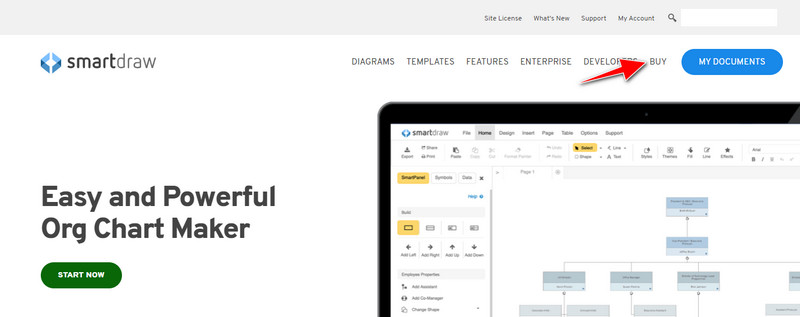
Langkah 2. Pada laman web, klik Buy untuk melihat pelan yang tersedia.
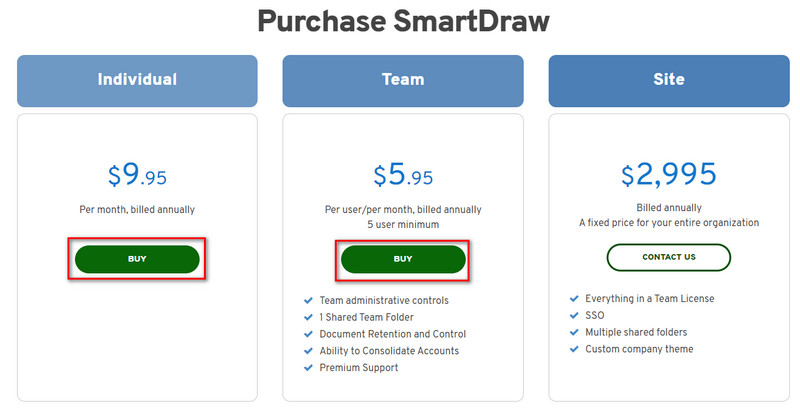
Langkah 3. Anda boleh membeli SmartDraw sebagai Individual, Team, atau Site. Klik Buy Now jika anda akan membeli versi Individual atau Team.
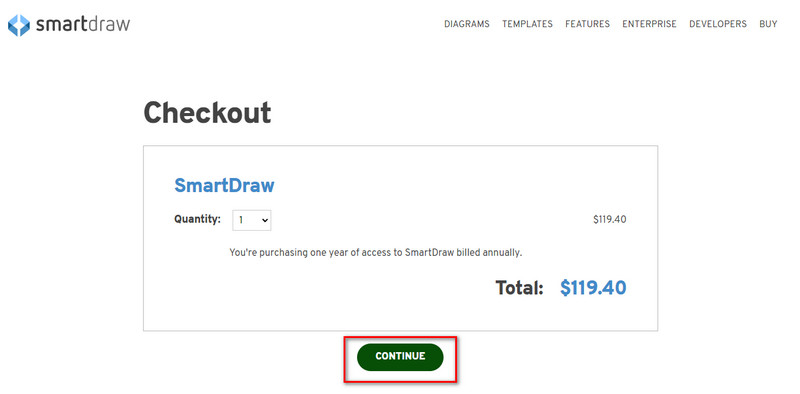
Langkah 4. Di bahagian kanan, anda akan melihat jumlah bayaran alat ini secara tahunan; klik Continue untuk meneruskan.
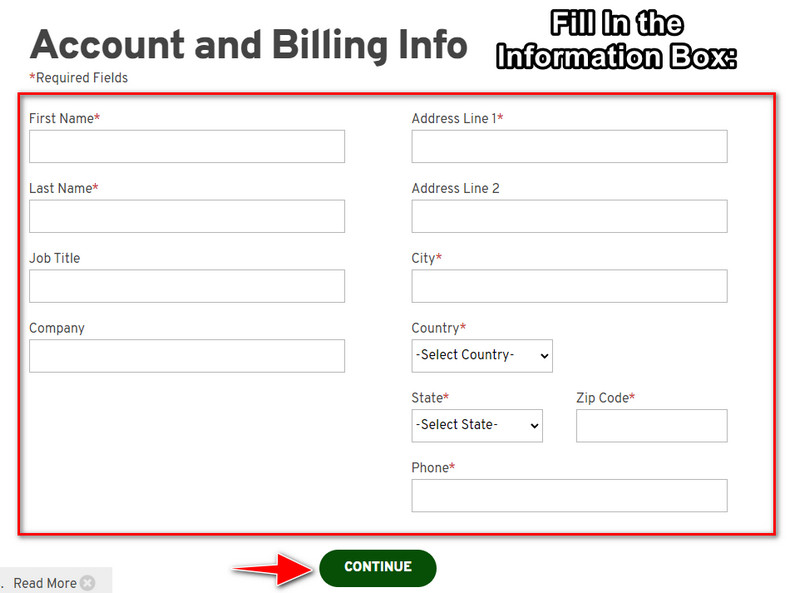
Langkah 5. Tambahkan maklumat akaun dan pengebilan yang diperlukan untuk diisi; kemudian tekan Continue untuk meneruskan dan mendapatkan kunci lesen.
Bahagian 2. Cara Membuang Tera Air dalam Cabutan Pintar secara Percuma Menggunakan Perkhidmatan Web [Tiada Kos]
Bagaimana mengalih keluar tera air daripada versi percubaan SmartDraw tanpa membeli? Maka anda perlu menggunakan FVC Free Watermark Remover Online. Pengalih tera air ini sedia untuk anda gunakan. Anda tidak memerlukan kepakaran untuk mengalih keluar tera air pada imej anda kerana menggunakan alat ini tidak akan menyusahkan. Walaupun anda seorang pakar, anda masih boleh menggunakan perisian ini untuk mengalih keluar tera air atau objek yang tidak diingini pada imej anda. Dengan bantuan pengalih tera air ini, tiada cela pada imej anda yang tidak dapat dibuang. Mahu cuba perisian ini daripada membeli kunci lesen? Jika ya, ikuti tutorial yang kami sertakan di bawah untuk mengalih keluar tera air pada imej dengan berkesan.
Langkah-langkah Cara Mengalih Keluar Tera Air SmartDraw pada Graf atau Diagram secara Percuma:
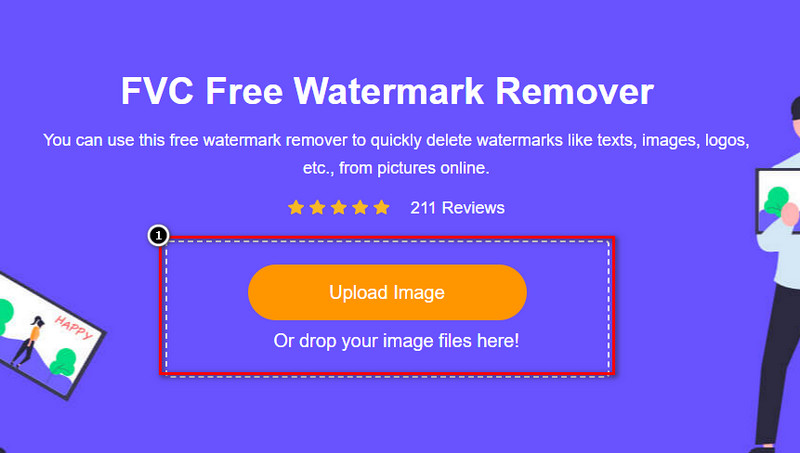
Langkah 1. Daripada mencari alat web ini pada pelayar anda, anda boleh klik pautan ini untuk membukanya, yang akan membuka tab baharu pada enjin carian anda.
Langkah 2. Dengan menggunakan tetikus anda, seret dan lepas graf atau rajah imej yang anda cipta di SmartDraw supaya anda boleh memuat naiknya.
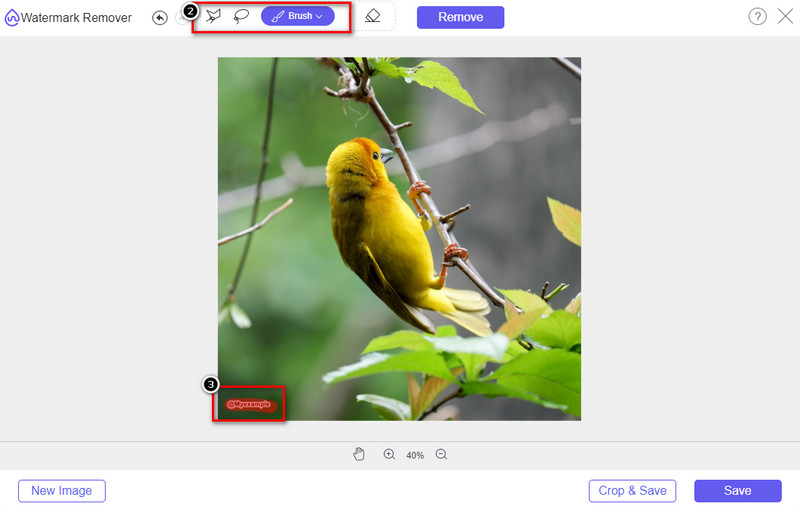
Langkah 3. Setelah pengalih tera air dalam talian dibuka, pilih alat yang anda mahu gunakan untuk menyerlahkan tera air pada imej.
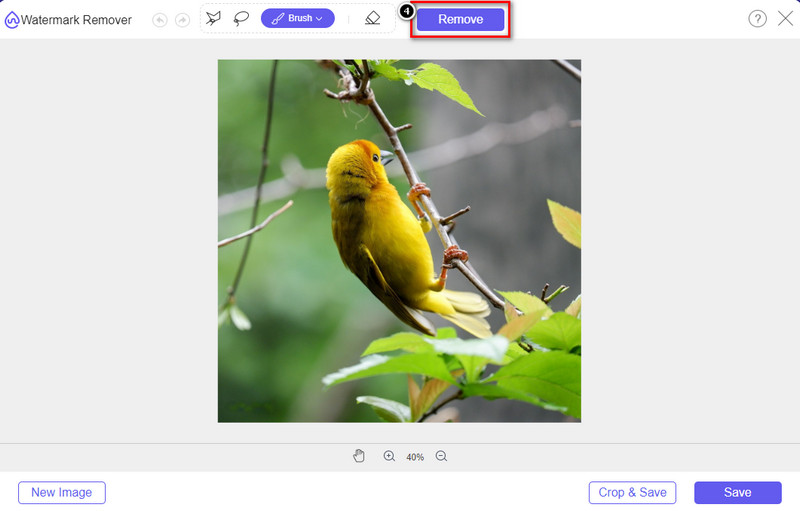
Langkah 4. Selepas menyerlahkan tera air atau logo pada imej yang anda muat naik, tekan Remove.
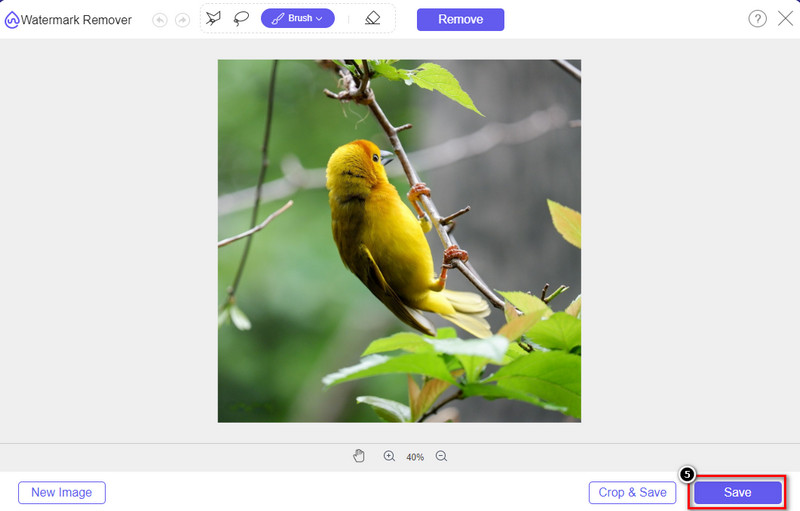
Langkah 5. Tunggu proses untuk mengalih keluar tera air, dan klik Save untuk memuat turun graf atau rajah yang anda muat naik. Satu folder akan dipaparkan pada skrin anda; kini semak versi graf atau rajah yang anda cipta tanpa tera air.
Kelebihan Menggunakan FVC Free Watermark Remover Online:
◆ Memuat turun apl tidak perlu kerana ia tersedia di web.
◆ Menyokong pelbagai jenis imej, dan ia boleh mengalih keluar tera air dengan berkesan.
◆ Ia adalah penanggal tera air khusus yang menghasilkan output berkualiti tinggi.
◆ Tiada tera air ditambahkan pada output akhir setelah dieksport.
◆ Tiada had pada berapa kali digunakan dan saiz fail.
Bahagian 3. Bahagian Tambahan – Cara Membuat Carta, Graf atau Gambar rajah pada SmartDraw dengan Langkah Terperinci
Bahagian awal mengajar anda cara menghilangkan tera air SmartDraw. Dalam bahagian ini, kami akan mengajar anda cara membuat carta, graf dan rajah dengan bantuan SmartDraw; anda boleh mengikuti langkah-langkah yang kami tambahkan di bawah untuk mengetahui cara melakukannya.
Langkah 1. Pergi ke laman web rasminya untuk mencipta graf, carta atau rajah.
Langkah 2. Setelah anda membuka laman web rasmi, klik Start Now dan buka akaun anda.
Langkah 3. Di bahagian kiri, pilih jenis templat yang anda mahu gunakan atau cipta.
Langkah 4. Tambahkan maklumat pada setiap carta alir. Akan ada pilihan tambahan yang boleh anda gunakan di bahagian kiri laman web.
Langkah 5. Klik butang Export, pilih jenis format yang anda inginkan, dan klik untuk memulakan proses. Jika anda menggunakan versi percuma, akan ada tera air; anda boleh menyalin langkah dalam bahagian 2 untuk mengalih keluar tera air.
Bacaan Lanjut:
Cara Menghapuskan Tera Air B612 daripada Imej Anda
Cara Menghapuskan Tera Air WOW Slider secara Percuma
Bahagian 4. Soalan Lazim tentang Cara Membuang Tera Air SmartDraw
Bolehkah SmartDraw mengeksport imej PNG?
Ya, anda boleh mempunyai carta lutsinar dalam format PNG. Walau bagaimanapun, ia akan menambah tera air jika anda menggunakan versi percuma. Anda boleh membeli versi rasmi, jadi akan ada tera air pada imej yang dieksport.
Berapakah harga SmartDraw?
Jika anda akan membeli pelan pada SmartDraw, anda boleh membeli pelannya bermula daripada $ 5.95. Anda boleh menyemak harga lain yang disediakan di laman web rasmi.
Apakah kelebihan membeli versi premium SmartDraw?
Anda boleh mencapai kawalan pentadbir pasukan, folder pasukan, sokongan premium dan mengeksport imej tanpa tera air untuk pelan individu. Untuk kelebihan premium lain, anda boleh dapatkan, layari laman web rasmi dan lihat apakah ciri dan fungsi yang anda boleh dapat.
Kesimpulannya
Sekarang anda tahu cara menyimpan SmartDraw tanpa tera air dengan dua cara yang kami tambahkan. Sama ada anda membelinya atau menggunakan alat untuk mengalih keluar tera air pada fail yang dieksport. Jika anda tidak suka membeli alat tersebut, anda mesti menggunakannya kerana ia adalah alat web yang paling berkesan untuk menghapuskan tera air. Jika anda berpendapat bahawa artikel ini membantu anda menyelesaikan masalah tersebut, maka anda menilai kami 5 bintang.
-
 4 Cara Terbaik untuk Mengalih Keluar Tera Air daripada GIF [Dalam Talian & Luar Talian]
 Perlu mengalih keluar tera air daripada GIF? Dengan alat dalam artikel ini, anda akan mempelajari gaya yang berbeza dengan penanggal tera air berbeza yang tersedia pada platform anda.
-
 5 Cara Paling Mudah untuk Mengalih Keluar Metadata dalam Mana-mana Fail Media
 Bagaimana untuk mengalih keluar metadata? Adakah sukar untuk melakukannya? Adakah saya perlu membeli atau menggunakan alat percuma untuk mengalih keluar tag? Semua soalan ini mempunyai jawapan dalam artikel ini.
-
 Penghilang Tera Air Photobucket Cemerlang Dalam Talian dan Luar Talian
 Ketahui cara mengalih keluar tera air Photobucket daripada foto anda menggunakan pengalih keluar tera air Photobucket yang menakjubkan ini. Baca artikel ini untuk mengetahui caranya.
