


 Video Converter Ultimate
 Perakam Skrin
 Pembaikan Video
 Muat Turun Selamat
Langkah Mudah Cara Mengubah Saiz Foto untuk Facebook
Ramai golongan milenial dan orang dewasa menggunakan Facebook sebagai platform media sosial yang paling popular. Facebook ialah aplikasi di mana anda boleh memuat naik imej dan berkongsi atau menghantarnya kepada rakan-rakan anda. Dan ramai orang mahu mempunyai imej berkualiti tinggi untuk dimuat naik di Facebook. Jika anda juga mahu memuat naik foto beresolusi tinggi dan berkualiti tinggi, kami mempunyai alat untuk membantu anda. Nasib baik, kami menemui aplikasi di iPhone, Android dan dalam talian yang boleh menukar saiz imej dengan pantas dan berkesan. Jadi, bersedialah kerana dalam artikel ini, anda akan cepat belajar cara menukar saiz foto untuk Facebook.

Bahagian 1. Cara Mengubah Saiz Foto pada iPhone untuk Facebook
Jika anda menggunakan peranti iPhone, apl boleh dimuat turun pada AppStore anda untuk membantu anda mengubah saiz foto anda. Selain itu, terdapat aplikasi percuma yang boleh anda gunakan pada peranti iPhone anda. Walau bagaimanapun, tidak semua apl menghasilkan output berkualiti tinggi. Itulah sebabnya kami mencari apl terbaik untuk mengubah saiz imej serta-merta.
Remini ialah aplikasi penukar saiz foto yang paling popular yang boleh anda muat turun pada iPhone anda. Aplikasi ini mempunyai antara muka mesra pengguna kerana fungsinya yang intuitif. Selain itu, Remini boleh menambah baik imej anda menggunakan penggalak AI (Kecerdasan Buatan) yang akan menukar saiz imej anda secara automatik dan menambah baiknya pada kualiti terbaik. Bukan itu sahaja, dengan aplikasi ini, anda juga boleh menambah baik video menggunakan ciri penggalak videonya. Tambahan pula, ia menyokong semua format imej biasa seperti JPEG, JPG dan PNG. Apa yang lebih menarik tentang aplikasi ini ialah anda boleh memuat turunnya secara percuma di AppStore. Jadi, jika anda ingin menggunakan aplikasi ini untuk menukar saiz foto bagi muka depan (cover) Facebook, ikut langkah-langkah di bawah.
Cara mengubah saiz imej menggunakan aplikasi Remini:
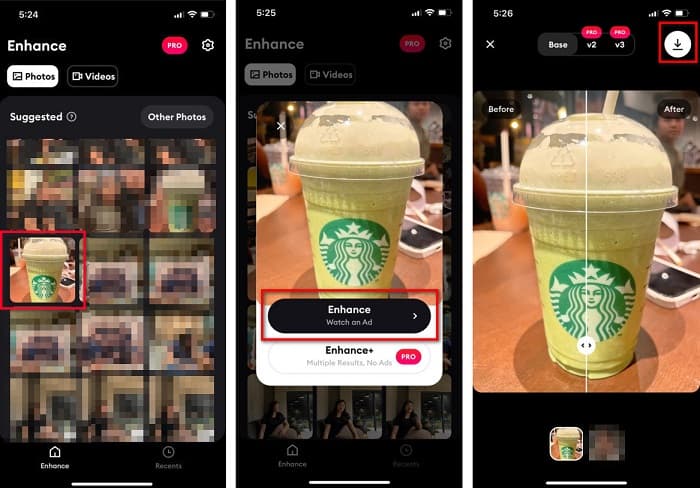
Langkah 1. Buka AppStore anda, cari aplikasi Remini dan muat turun ke peranti anda. Selepas memasang aplikasi, buka ia.
Langkah 2. Selepas membuka aplikasi, anda akan melihat foto-foto anda dan pilih imej yang anda mahu tambah baik. Kemudian, ketik butang Enhance untuk pergi ke antara muka seterusnya.
Langkah 3. Sebelum meneruskan ke antara muka berikutnya, anda perlu menonton iklan terlebih dahulu. Selepas itu, anda akan melihat perbandingan sebelum dan selepas pada imej anda. Ketik ikon Muat Turun di bahagian atas sebelah kanan skrin anda.
Bahagian 2. Cara Mengubah Saiz Foto pada Android untuk Facebook
Adakah anda pengguna Android? Jangan risau; kami juga akan membentangkan aplikasi yang boleh anda gunakan untuk mengubah saiz imej. Walaupun terdapat banyak apl yang boleh anda muat turun daripada PlayStore, kami memilih yang terbaik antaranya untuk dipersembahkan kepada anda. Baca di bawah untuk mengetahui cara mengubah saiz imej untuk Facebook pada Android.
AI Photo Enhancer & PixelLeap ialah satu lagi aplikasi hebat yang akan membantu anda menukar saiz imej untuk mendapatkan kualiti yang lebih baik. Penukar saiz foto ini boleh dimuat turun secara percuma di aplikasi PlayStore anda dan selamat digunakan. Selain itu, jika anda mahu menambah baik atau memulihkan imej lama, anda boleh menggunakan AI Photo Enhancer & PixelLeap. Dengan teknologi AI-nya, anda hanya perlu memuat naik imej yang ingin anda tukar saiz, kemudian aplikasi akan menambah baik imej anda secara automatik. Tambahan pula, ia mempunyai antara muka yang ringkas, menjadikannya aplikasi yang sangat sesuai jika anda seorang pengguna baru. Ia juga mempunyai ciri penyuntingan lain yang boleh anda gunakan, seperti membetulkan (rectify), mewarnakan (colorize), menganimasikan (animate), menambah ekspresi (emote), dan mencerahkan imej anda. Walau bagaimanapun, masalah dengan aplikasi ini ialah ia mengandungi banyak iklan yang mengambil masa lama untuk dihabiskan dan meninggalkan tera air pada output anda. Namun begitu, aplikasi ini ialah penyelesaian jika anda mahu menukar saiz foto untuk Facebook tanpa memotong (cropping).
Cara mengubah saiz imej menggunakan AI Photo Enhancer & PixelLeap:
Langkah 1. Pasang AI Photo Enhancer & PixelLeap pada peranti Android anda.
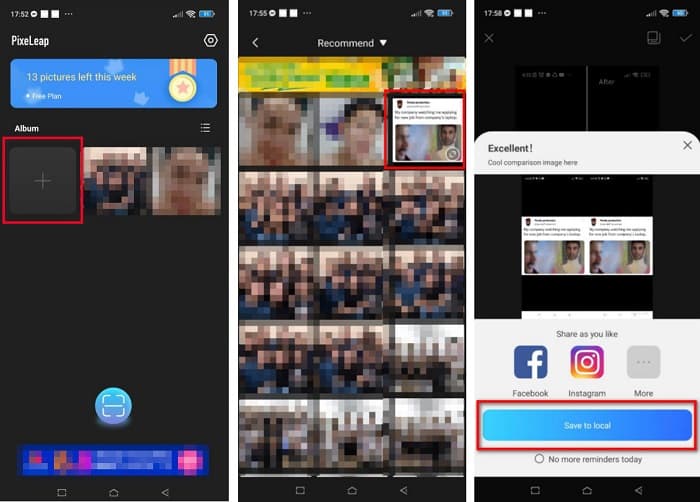
Langkah 2. Kemudian, pada antara muka utama aplikasi, ketik kotak tanda + untuk memuat naik imej yang anda mahu tukar saiz. Selepas itu, aplikasi akan meminta anda menonton iklan sebelum meneruskan ke antara muka seterusnya.
Langkah 3. Semak imbas imej yang anda mahu tukar saiz, kemudian ketiknya. Selepas memilih imej, ketik pilihan Enhance. Aplikasi akan menambah baik imej anda secara automatik. Ketik Save to local untuk memuat turun output anda.
Bahagian 3. Bagaimana Mengubah Saiz Foto Dalam Talian untuk Facebook
Kelebihan menggunakan aplikasi dalam talian ialah ia membolehkan anda menjimatkan ruang pada peranti anda. Di samping itu, terdapat banyak aplikasi web percuma untuk akses yang boleh anda gunakan pada penyemak imbas anda. Jadi, jika anda ingin menggunakan aplikasi dalam talian untuk mengubah saiz imej untuk dimuat naik di Facebook, kami akan menunjukkan kepada anda cara mengubah saiz foto untuk Facebook.
FVC Free Image Upscaler ialah penukar saiz foto dalam talian terbaik yang membolehkan anda membesarkan imej sehingga pembesaran 2x, 4x, 6x dan 8x. Dengan antara muka yang ringkas, pengguna baru boleh dengan mudah menukar saiz imej. Selain itu, ia menyokong semua format imej, termasuk JPEG, JPG, PNG dan BMP. Lebih mengagumkan lagi, aplikasi ini menggunakan teknologi AI yang secara automatik mengesan bahagian imej yang beresolusi rendah dan kemudian menambah baiknya. Di samping itu, ia boleh membaiki piksel yang hilang, tekstur warna dan lebih banyak butiran dengan lengkap dan sempurna. Ia juga boleh diakses pada semua pelayar web, termasuk Google, Firefox dan Safari. Oleh itu, jika anda mahu menggunakan FVC Free Image Upscaler untuk menukar saiz atau menambah baik imej anda, ikut langkah mudah di bawah.
Bagaimana untuk mengubah saiz imej untuk Facebook menggunakan FVC Free Image Upscaler:
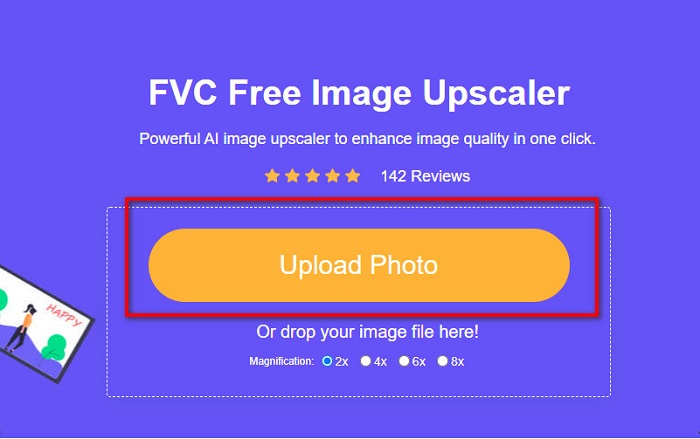
Langkah 1. Buka pelayar anda dan taip FVC Free Image Upscaler pada kotak carian. Anda boleh klik pautan yang disediakan untuk pergi terus ke laman web tersebut. Klik Upload Photo untuk melancarkan aplikasi.
Langkah 2. Pada antara muka utama perisian, klik Upload Photo untuk mengimport imej yang anda mahu tukar saiz.
Langkah 3. Pada antara muka seterusnya, pilih pratetap pembesaran yang anda mahukan untuk output imej anda. Anda boleh memilih antara pembesaran 2x, 4x, 6x, dan 8x. Kemudian teruskan ke langkah berikutnya.
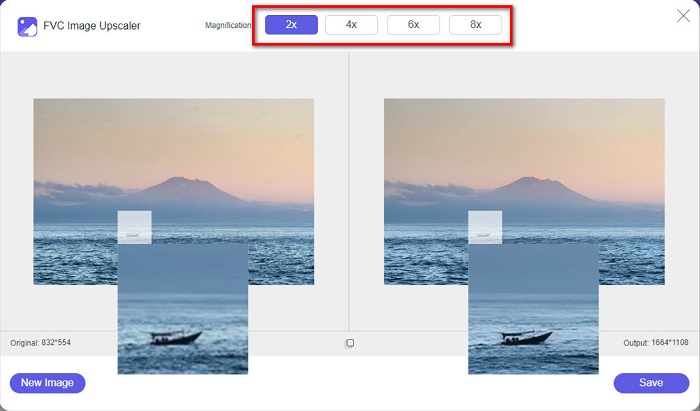
Langkah 4. Akhir sekali, tandakan butang Save untuk menyimpan output anda pada komputer. Dan anda akan melihat perbezaan antara fail asal dan imej yang telah ditukar saiz. Dalam masa sesaat sahaja, imej anda akan disimpan.
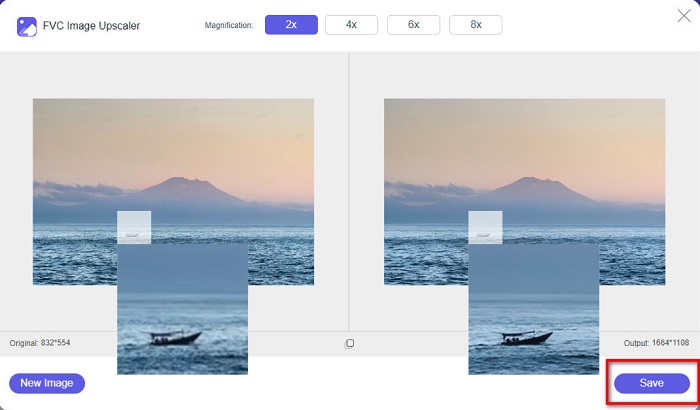
Dan itu sahaja! Semudah ABC, imej anda kini dipertingkatkan dan diubah saiznya.
Berkaitan dengan:
Cara Menajamkan Imej Dalam Talian dan Luar Talian Dengan 4 Cara Mudah
Cara Menukar Saiz Imej – Adobe Resize Image [Dalam Talian dan Luar Talian]
Bahagian 4. Soalan Lazim tentang Cara Mengubah Saiz Foto untuk Facebook
Apakah nisbah foto terbaik untuk Facebook?
Mengenai nisbah foto, menggunakan imej menegak dengan nisbah bidang 4:5 dan 1200 x 1500 px adalah yang terbaik. Dan jika anda mahukan imej segi empat sama, resolusi mestilah 1080 x 1080 px.
Apakah saiz siaran Facebook?
Saiz imej yang disyorkan untuk siaran Facebook ialah 1200 x 630 piksel untuk mengelakkan pikselasi dan mempunyai masa pemuatan yang lebih cepat.
Apakah format imej terbaik untuk dimuat naik di Facebook?
Format imej terbaik dan disyorkan untuk dimuat naik di Facebook ialah format JPG. Adalah lebih baik untuk memuat naik format JPG dengan warna RGB kurang daripada 15MB.
Kesimpulannya
Kami telah menyediakan penyelesaian di atas jika anda mahu menukar saiz foto untuk Facebook. Dengan membaca artikel ini secara menyeluruh, kami berharap anda telah mempelajari semua perkara penting yang perlu anda lakukan. Anda pasti boleh menukar saiz mana-mana imej yang anda mahu menggunakan aplikasi iPhone, Android atau dalam talian. Tetapi untuk hasil yang lebih baik, gunakan FVC Free Image Upscaler, yang juga membolehkan anda menjimatkan ruang pada peranti anda.
-
 Apl Photo Resizer Terbaik Dalam Talian, Luar Talian, Android dan iPhone
 Apakah apl pengubahsuai foto terbaik? Klik halaman untuk mengetahui lima teratas apl pengubahsuai foto paling berkuasa yang boleh anda gunakan untuk meningkatkan atau mengubah saiz fail anda.
-
 Cara Mengubah Saiz Imej - Adobe Ubah Saiz Imej [Dalam Talian dan Luar Talian]
 Jika anda sedang mencari untuk mengubah saiz imej Adobe, maka kami mempunyai penyelesaian untuk anda. Lihat siaran ini dengan teliti untuk mengetahui cara mengubah saiz imej menggunakan Adobe pada PC anda.
-
 4 Pembesar GIF Luar Talian dan Dalam Talian Terbaik yang Anda Jangan Terlepas
 Siaran ini adalah untuk anda jika anda sedang mencari pembesar GIF terbaik. Kami menyenaraikan pembesar GIF dalam talian dan luar talian berprestasi terbaik untuk komputer anda.
