


 Video Converter Ultimate
 Perakam Skrin
 Pembaikan Video
 Muat Turun Selamat
Kaedah Tidak Mencabar tentang Cara Membuang Logo iSkysoft daripada Video
iSkysoft ialah aplikasi yang sangat baik dengan banyak ciri hebat yang menjadikannya menonjol berbanding aplikasi lain. Ia ialah aplikasi ringkas yang membolehkan anda menukar format video kepada format lain dan melakukan sedikit suntingan video asas. Namun, bahagian yang paling mengecewakan tentang perisian ini ialah anda akan mendapat tera air iSkysoft yang besar pada video anda selepas menggunakannya. Mempunyai tera air/logo besar pada video langsung tidak menyenangkan untuk ditonton. Nasib baik, terdapat aplikasi boleh dipercayai yang boleh anda gunakan untuk membuang objek yang mengganggu seperti logo/tera air iSkysoft. Anda mesti membaca hantaran ini jika anda ingin mengetahui kaedah terbaik untuk membuang logo iSkysoft daripada video anda.

Bahagian 1: Buang Logo iSkysoft daripada Video pada Desktop
Logo iSkysoft pada skrin anda memang menjengkelkan, terutamanya jika anda sedang menonton video kegemaran anda. Tetapi anda tidak perlu risau lagi. Anda boleh menyingkirkan logo itu dengan menggunakan Video Converter Ultimate. Perisian yang boleh dipercayai ini boleh membantu anda membuang logo iSkysoft daripada video anda dengan dua cara mudah: alat Video Watermark Remover dan alat Video Cropper. Dengan alat ini, anda boleh membuang logo iSkysoft daripada video anda dengan mudah. Jika logo iSkysoft berada di bucu video anda, adalah disyorkan untuk menggunakan alat Video Cropper. Namun, jika logo tersebut diletakkan di bahagian tengah, anda boleh menggunakan alat Video Watermark Remover. Dengan cara ini, anda boleh menonton filem atau video kegemaran anda tanpa rasa terganggu dengan logo tersebut.
Tambahan pula, selain mengalih keluar tera air daripada video anda, Video Converter Ultimate mempunyai lebih banyak ciri. Ia mempunyai penambah video, penggabungan video, pemangkas, perapi, pemutar, penukar dan banyak lagi. Selain itu, salah satu fungsi utama aplikasi ini adalah untuk menukar pelbagai format fail video. Pengguna bukan profesional juga boleh menggunakan aplikasi ini kerana ia mempunyai antara muka yang mudah. Jika anda ingin mengetahui cara mengalih keluar logo iSkysoft daripada video anda, kami akan menunjukkan kepada anda dua cara mudah yang disediakan oleh aplikasi ini.
Menggunakan Penanggal Tera Air Video
Langkah 1: Anda mesti memuat turun Video Converter Ultimate pada desktop anda terlebih dahulu untuk menggunakan perisian hebat ini. Setelah anda memuat turunnya, ikut proses pemasangan dan lancarkan aplikasi.
Muat Turun PercumaUntuk Windows 7 atau lebih baharuMuat Turun Selamat
Muat Turun PercumaUntuk MacOS 10.7 atau lebih baharuMuat Turun Selamat
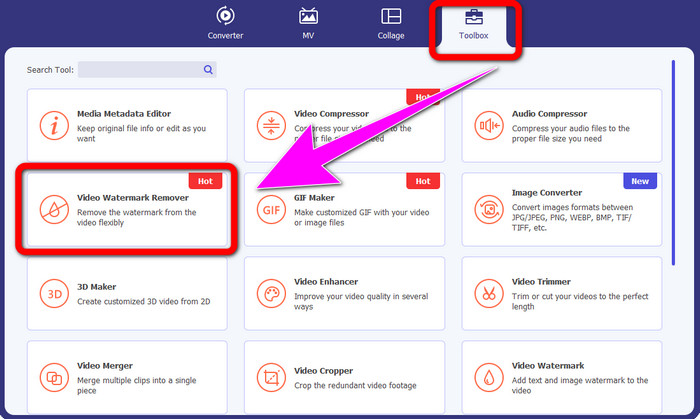
Langkah 2: Setelah anda melancarkan perisian, teruskan ke panel Toolbox dan pilih alat Video Watermark Remover. Jangka bahawa satu lagi antara muka akan muncul pada skrin anda.
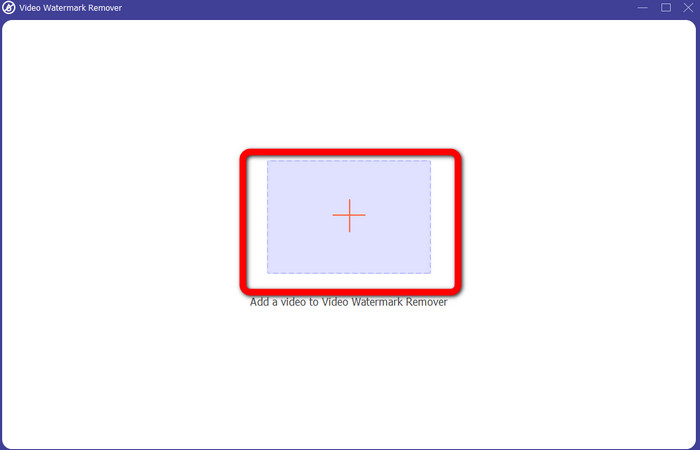
Langkah 3: Setelah anda melihat antara muka baharu, klik ikon tambah dan lampirkan video anda yang mempunyai logo iSkysoft yang ingin anda buang.
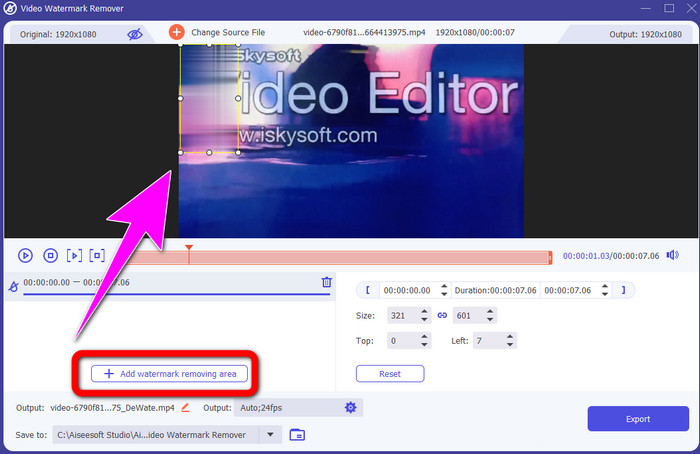
Langkah 4: Seterusnya, klik butang Add Watermark Removing Area. Gerakkan kotak pada video anda dan tutup logo iSkysoft.
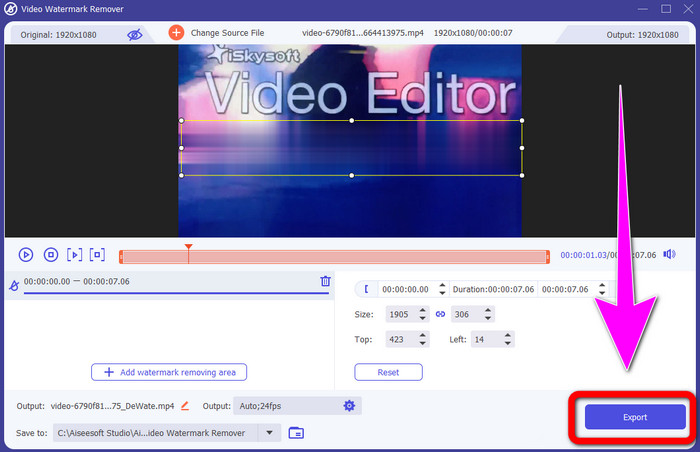
Langkah 5: Akhir sekali, klik butang Export untuk menyimpan video akhir anda.
Menggunakan Pemotong Video
Dalam bahagian ini, kami akan menunjukkan kepada anda cara untuk mengalih keluar logo iSkysoft daripada video anda menggunakan alat Video Cropper.
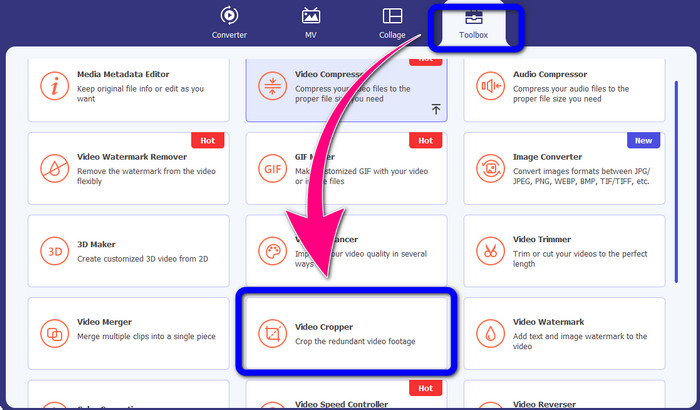
Langkah 1: Jalankan aplikasi pada desktop anda. Di bawah panel Toolbox, anda perlu klik alat Video Cropper. Sama seperti alat di atas, jangka bahawa akan ada satu lagi antara muka yang muncul pada skrin anda.
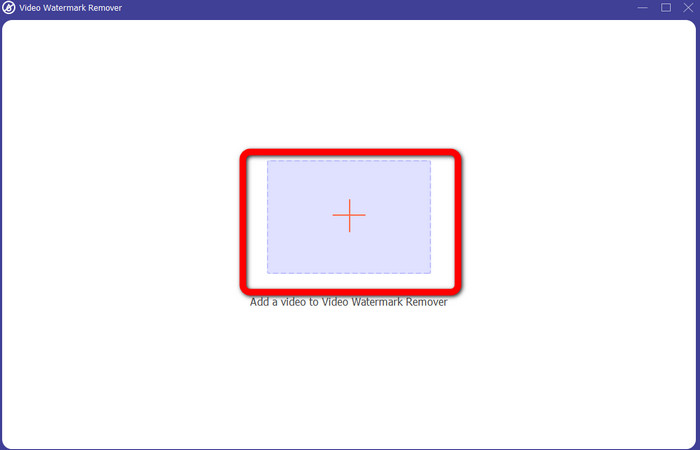
Langkah 2: Klik butang tanda Plus untuk mengimport video anda yang mempunyai logo iSkysoft.
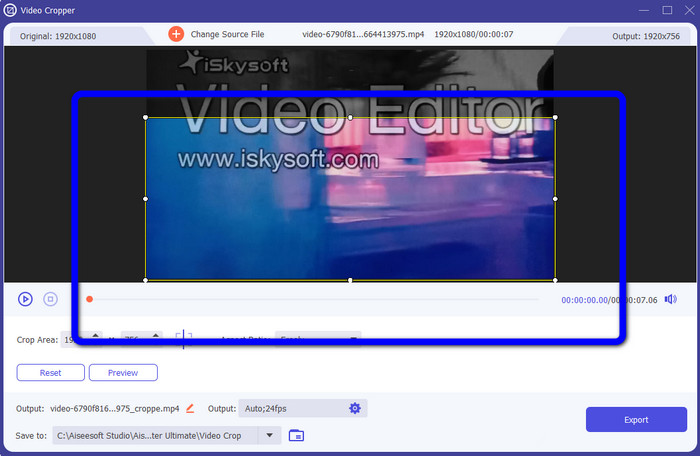
Langkah 3: Pada bahagian ini, anda kini boleh memotong video untuk membuang logo iSkysoft daripada video anda. Gunakan tetikus anda untuk menggerakkan tepi kawasan video.
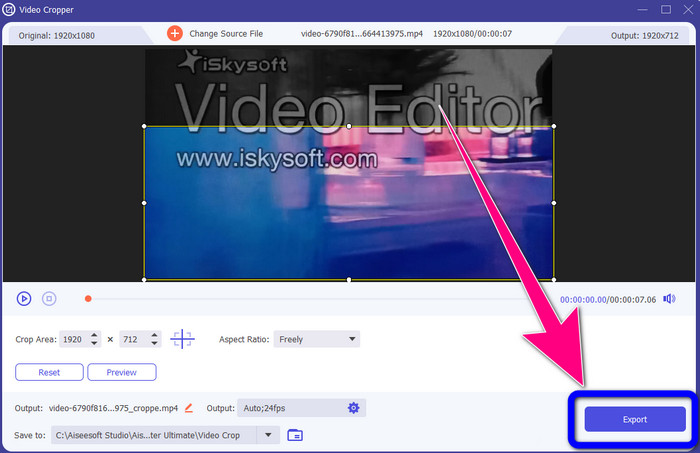
Langkah 4: Untuk langkah terakhir, klik butang Export dan simpan hasil anda pada desktop.
Bahagian 2: Bagaimana untuk Buang Logo iSkysoft daripada Video Dalam Talian
Menggunakan HitPaw
Anda juga boleh membuang logo iSkysoft secara dalam talian. Salah satu alat terbaik yang boleh anda gunakan ialah HitPaw. Aplikasi dalam talian ini boleh membuang logo daripada video anda dengan mudah. Anda boleh menggunakannya pada desktop dan juga secara dalam talian, yang memudahkan semua orang. Selain itu, HitPaw selamat digunakan. Ia memastikan video boleh disunting dan dilihat oleh anda sendiri. Tambahan pula, anda tidak perlu risau tentang had perisian ini. Ia tidak mempunyai had dari segi membuang logo daripada video anda. Anda tidak perlu membeli aplikasi ini kerana ia percuma. Namun, jika anda membuang logo atau sebarang
elemen yang tidak perlu daripada video anda, anda mesti menunggu sedikit lagi. Aplikasi ini mempunyai prosedur penyingkiran perlahan, yang memakan masa untuk pengguna. Juga, ia bergantung pada sambungan internet anda. Ia akan berfungsi dengan baik jika anda mempunyai sambungan yang pantas. Tetapi, jika anda mempunyai sambungan yang perlahan, maka jangkakan sedikit kelewatan. Ikuti langkah mudah di bawah untuk menghapuskan logo iSkysoft daripada video anda.
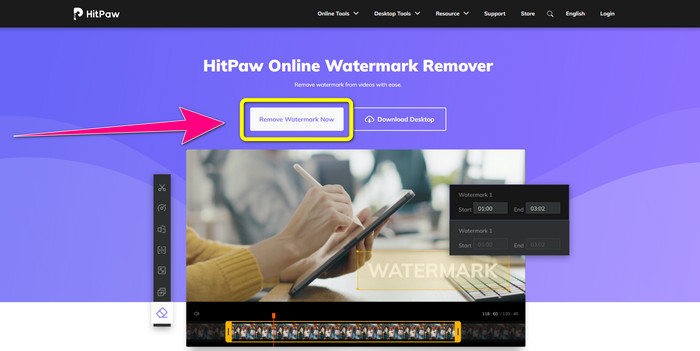
Langkah 1: Lawati laman web HitPaw. Klik butang Remove Watermark Now - Choose File untuk memasukkan video anda yang mempunyai logo iSkysoft yang ingin anda hapuskan.
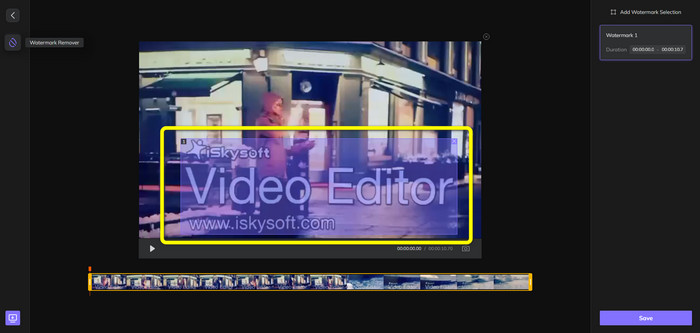
Langkah 2: Setelah anda melampirkan fail video anda, satu kotak berwarna biru akan muncul pada skrin anda. Gunakan kotak ini untuk menutup logo iSkysoft. Anda boleh mengubah saiz kotak tersebut.
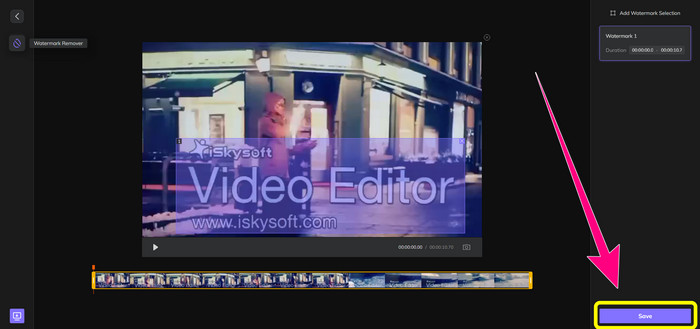
Langkah 3: Jika anda sudah selesai menutup logo iSkysoft daripada video anda, klik butang Save. Tunggu proses penyingkiran dan simpan video anda.
Menggunakan Pembuang Tera Air Video Dalam Talian
Satu lagi alat dalam talian yang boleh anda gunakan ialah Video Watermark Remover Online. Dengan menggunakan aplikasi ini, anda boleh membuang logo iSkysoft daripada video anda. Ia juga merupakan perisian yang mudah digunakan, sesuai untuk pengguna bukan profesional. Anda juga boleh membuang sebarang elemen yang menjengkelkan daripada video anda tanpa menurunkan kualiti video. Walau bagaimanapun, jika menggunakan versi percuma, terdapat had dalam menyingkirkan logo daripada video anda. Anda hanya boleh membuang logo atau tera air daripada 5 video. Anda mesti membeli langganan jika anda mahu melampirkan lebih banyak video menggunakan Video Watermark Remover Online. Selain itu, anda tidak boleh menyimpan hasil anda ke format lain. Anda hanya boleh menyimpannya dalam format yang sama, yang kurang baik. Akhir sekali, ia mempunyai proses pemprosesan fail yang perlahan. Ikuti panduan ringkas di bawah untuk membuang logo iSkysoft daripada video anda.
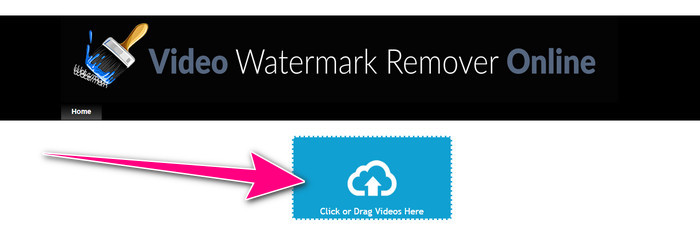
Langkah 1: Pergi ke laman web Video Watermark Remover Online. Pilih butang Click or Drag Videos Here untuk mengimport fail video anda yang mempunyai logo iSkysoft yang ingin anda padamkan.
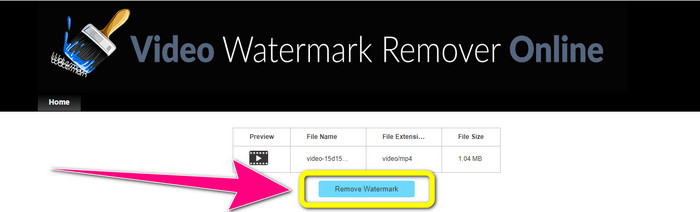
Langkah 2: Seterusnya, klik butang Remove Watermark dan tunggu proses penyingkiran.
Berkaitan dengan:
Cara Paling Pantas Membuang Logo daripada Video dalam Adobe Premiere Pro
Cara Membuang Logo daripada Video Menggunakan Windows Movie Maker
Bahagian 3: Soalan Lazim tentang Mengeluarkan Logo iSkysoft
Bolehkah anda mengalih keluar logo daripada gambar?
Ya, anda boleh menggunakan FVC Free Watermark Remover untuk memadam logo daripada gambar anda dengan mudah dan cepat.
Adakah mengalih keluar tera air itu menyalahi undang-undang?
Menurut Akta Hak Cipta AS, seksyen 1202, mengalih keluar tera air tanpa kebenaran pemilik adalah haram.
Bagaimanakah cara saya mengalih keluar logo secara percuma?
Anda boleh menggunakan percubaan percuma Video Converter Ultimate untuk mengalih keluar logo daripada video anda secara percuma.
Kesimpulannya
Artikel ini menyediakan kaedah yang sangat baik untuk membuang logo iSkysoft daripada video anda menggunakan alat untuk desktop dan dalam talian. Tetapi jika anda ingin mencari penyingkir logo yang hebat untuk digunakan, maka anda boleh memuat turun Video Converter Ultimate. Aplikasi ini menawarkan proses penyingkiran yang pantas. Ia juga mudah diakses oleh semua pengguna.
-
 8 Pembuang Tera Air Video Cemerlang Dalam Talian dan Luar Talian
 Jika anda sedang mencari perisian penghapus tera air video percuma terbaik yang boleh anda gunakan pada telefon Windows, Mac, iPhone dan Android anda, artikel ini adalah untuk anda
-
 Kaedah Terbaik tentang Cara Membuang Tera Air Boleh Digigit daripada Video
 Artikel ini akan menunjukkan kepada anda penghilang tera air boleh digigit yang paling boleh dipercayai dan hebat. Aplikasi hebat ini akan membantu anda menyelesaikan masalah seperti ini
-
 Prosedur Mudah untuk Membuang Logo daripada Video
 Adakah anda sedang mencari penyingkiran logo video yang terbaik dan mudah? Kemudian, artikel ini bagus untuk anda. Ambil peluang untuk belajar tentang mengalih keluar logo daripada video.
