


 Video Converter Ultimate
 Perakam Skrin
 Pembaikan Video
 Muat Turun Selamat
Kaedah Terperinci tentang Cara Menukar DIVX kepada MP4
DIVX ialah salah satu format video yang popular, tetapi malangnya format ini tidak disokong oleh program biasa lain seperti Windows Media Player, Apple QuickTime Player dan banyak lagi. Cara terbaik untuk memainkan fail video DIVX anda ialah menukarnya kepada format yang disokong oleh hampir semua program seperti MP4. Jadi, jika anda ingin menukar format fail DIVX ke MP4, rujuk artikel ini. Walaupun penukaran fail kelihatan sukar, kami akan menunjukkan kaedah paling mudah yang boleh anda cuba untuk menukar fail DIVX anda kepada format MP4.

Bahagian 1: Cara Terbaik untuk Menukar DIVX ke MP4 pada Mac
Cara paling berkesan untuk menukar DIVX ke MP4 pada Mac ialah dengan menggunakan Video Converter Ultimate. Aplikasi ini berbaloi digunakan kerana fungsinya yang hebat. Anda boleh menukar banyak fail secara berterusan dan berkelompok dengan serta-merta kerana ia menyokong proses penukaran kelompok. Selain itu, menukar DIVX ke MP4 menjadi sangat mudah dengan antara muka intuitif dan arahan penukaran asasnya. Di samping itu, anda boleh menukar lebih banyak format video. Ia menyokong lebih 100 format, termasuk AVI, FLV, MOV, AVI, M4V, MKV, WMV, VOB dan banyak lagi. Video Converter Ultimate juga menawarkan proses penukaran pantas dengan kelajuan 30x lebih cepat daripada penukar lain. Dengan proses penukaran yang pantas ini, anda boleh memastikan bahawa menukar banyak fail hanya mengambil masa yang singkat.
Lebih-lebih lagi, penukar ini tidak berat sebelah dari segi pengguna. Semua orang boleh mengendalikannya, walaupun anda seorang pengguna lanjutan atau pemula. Tambahan pula, aplikasi ini boleh menambah baik video DIVX anda kerana ia mempunyai banyak alat penyuntingan video, seperti penambah video, pemangkas, pembetulan warna dan banyak lagi. Selain itu, jika anda ingin mencipta video muzik yang menarik dengan gabungan imej dan video, anda boleh melakukannya. Pembuat Video Muzik ini menawarkan pelbagai tema yang boleh anda gunakan, seperti Gembira, Kemas, Romantik, Malam Salji, Jalur dan Ombak, Perkahwinan, Sukan, zaman dahulu dan banyak lagi.
Ciri-ciri
◆ Tukar video kepada pelbagai fail, seperti MP4, DIVX, M4V, AVI, MOV, FLV, MKV, VOB dan banyak lagi.
◆ Penukaran kelompok tersedia.
◆ Edit video menggunakan penambah video, pemampat, penghilang tera air, perapi, pemangkas, dsb.
◆ Tukar format imej, seperti BMP, JPG, PNG, TIF dan banyak lagi.
Ikuti arahan mudah di bawah untuk menukar DIVX kepada MP4 pada Mac menggunakan FVC Video Converter Ultimate.
Langkah 1: Muat turun FVC Video Converter Ultimate pada Mac anda dengan mengklik butang Muat Turun di bawah. Kemudian, lancarkan aplikasi selepas proses pemasangan selesai.
Muat Turun PercumaUntuk Windows 7 atau lebih baharuMuat Turun Selamat
Muat Turun PercumaUntuk MacOS 10.7 atau lebih baharuMuat Turun Selamat
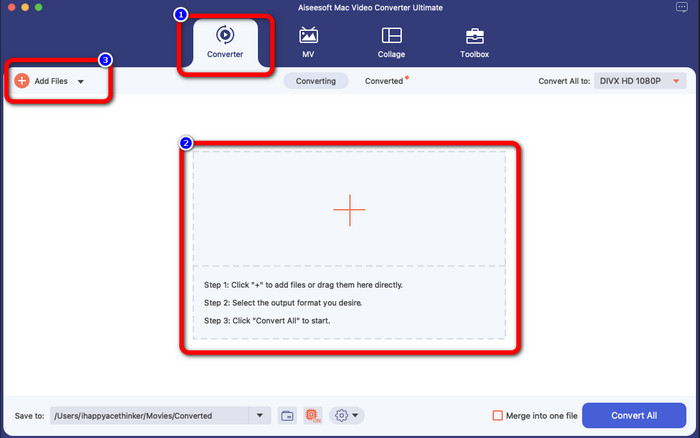
Langkah 2: Selepas melancarkan aplikasi, antara muka utama akan dipaparkan pada skrin anda. Pergi ke panel Converter dan klik ikon Tambah atau butang Add File untuk memasukkan fail video DIVX. Anda juga boleh menyeret fail ke dalam kotak.
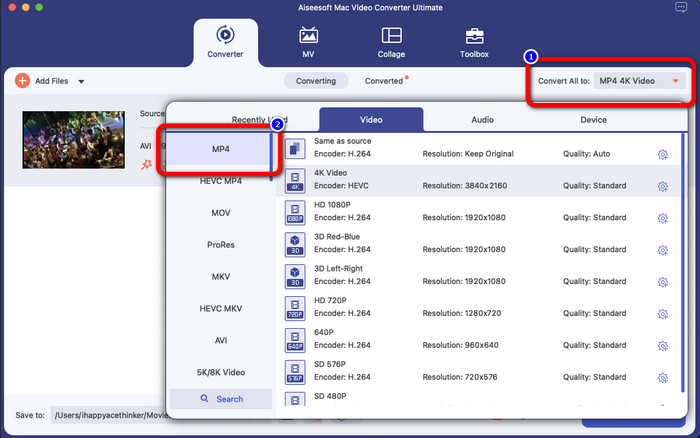
Langkah 3: Kemudian, tukar format keluaran, dan klik butang Convert All to. Pilihan format akan muncul pada skrin dan pilih format fail MP4. Anda boleh memilih resolusi yang anda inginkan, sehingga Video 4K.
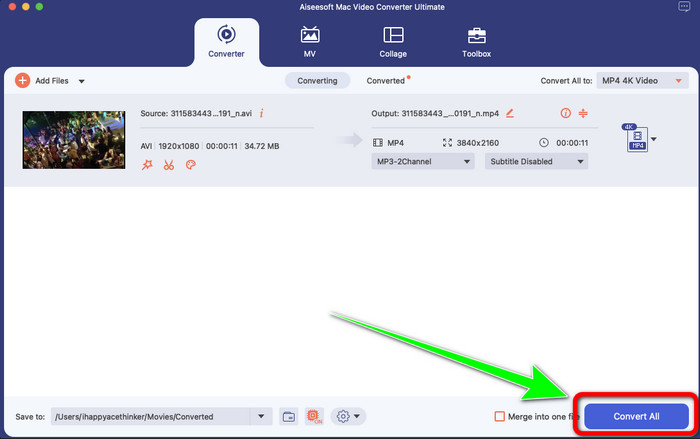
Langkah 4: Selepas menukar format keluaran, klik butang Convert All untuk memulakan. Kemudian proses penukaran akan bermula. Selepas itu, video anda akan ditukar daripada fail DIVX kepada format MP4.
Bahagian 2: Cara Mudah Menukar DIVX kepada MP4 pada Brek Tangan
Adakah anda ingin menggunakan Handbrake untuk menukar DIVX kepada MP4? Kemudian, jangan risau lagi. Dalam bahagian ini, kami akan mengajar anda cara menukar fail anda menggunakan Handbrake sebagai penukar anda pada komputer anda. Alat ini boleh dipercayai dalam menukar banyak fail kepada format lain, seperti M4V, MP4, MKV, WEBM dan banyak lagi. Walau bagaimanapun, menggunakan alat ini perlu dijelaskan kerana ia mempunyai banyak pilihan yang boleh anda temui pada antara muka. Dalam kes ini, kita boleh mengatakan bahawa penukar ini tidak sesuai untuk pemula. Juga, ada kalanya walaupun anda ingin menukar fail kepada MP4, ia menyimpan video sebagai fail M4V. Mungkin ia bermasalah atas sebab tertentu. Namun begitu, ikuti langkah mudah di bawah untuk menukar DIVX kepada MP4 menggunakan Handbrake.
Langkah 1: Muat turun aplikasi Handbrake pada komputer anda. Kemudian, setelah pemasangan aplikasi selesai, buka aplikasi tersebut.
Langkah 2: Klik pilihan File untuk menambah fail video DIVX.
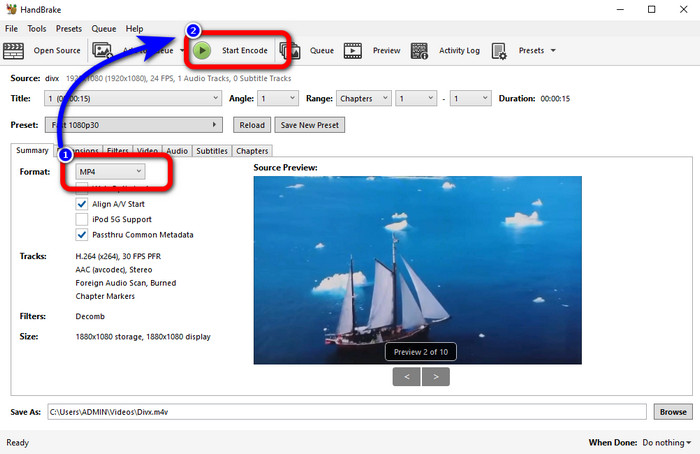
Langkah 3: Pilih pilihan Format dan pilih format MP4. Selepas itu, klik butang Start Encode untuk meneruskan proses penukaran. Selesai, kini anda sudah boleh memainkan video anda dalam format fail MP4. Perisian ini juga membolehkan anda menukar DIVX ke 3GP.
Bahagian 3: Langkah Mudah untuk Menukar DIVX ke MP4 melalui VLC
Satu lagi penukar luar talian yang boleh anda gunakan ialah Pemain Media VLC. Aplikasi ini boleh menukar DIVX kepada MP4 dengan mudah. Ini bukan sahaja bagus untuk memainkan video tetapi juga untuk menukar. Dengan bantuan alat luar talian ini, anda boleh menukar fail kepada format fail lain, seperti MPEG, AVI, ASF, WMV dan banyak lagi. Walau bagaimanapun, penukar ini tidak sesuai untuk pengguna baharu kerana ia mempunyai prosedur penukaran fail yang rumit. Juga, ia adalah sukar dan memakan masa untuk memuat turun aplikasi. Gunakan langkah di bawah untuk menukar DIVX kepada MP4 menggunakan VLC.
Langkah 1: Muat turun dan pasang VLC pada komputer anda.
Langkah 2: Pergi ke menu Media dan pilih butang Convert/Save untuk menambah fail video DIVX yang anda ingin tukar.
Langkah 3: Pada bahagian bawah antara muka, klik sekali lagi butang Convert/Save.
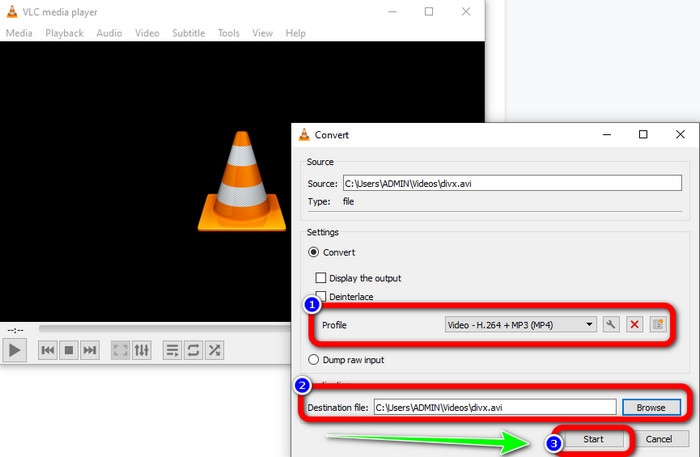
Langkah 4: Teruskan ke pilihan Profile dan pilih format fail MP4. Klik juga butang Destination file untuk menetapkan lokasi simpanan yang anda inginkan. Akhir sekali, klik butang Start untuk menukar fail DIVX kepada format MP4. Anda juga boleh menggunakan alat ini untuk menukar MP4 ke DIVX.
Bahagian 4: Cara Berkesan untuk Menukar DIVX kepada MP4 Dalam Talian
Selepas mengetahui semua penukar yang boleh anda gunakan secara luar talian, dalam bahagian ini, kami akan menunjukkan penukar DIVX ke MP4 terbaik dalam talian. Penukar hebat ini ialah FVC Free Video Converter Online. Ia boleh menukar fail DIVX anda ke format MP4 dengan mudah kerana ia mempunyai antara muka yang ringkas dan langkah yang mudah. Alat ini menyokong pelbagai format video, seperti FLV, WMA, AVI, MOV dan banyak lagi. Selain itu, anda boleh menukar fail DIVX anda tanpa kehilangan kualiti video, yang amat baik untuk pengguna. Ikuti panduan terperinci di bawah untuk menukar fail anda dengan cara yang mudah menggunakan FVC Free Video Converter Online.
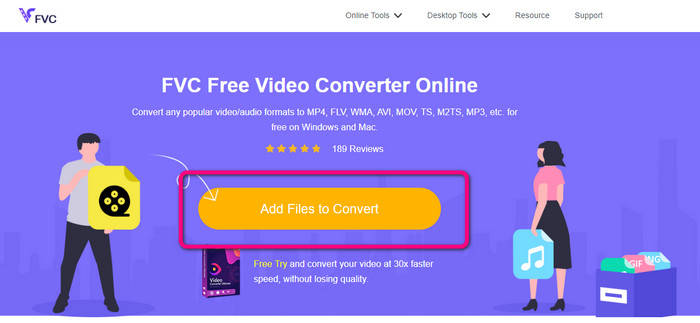
Langkah 1: Pergi ke penyemak imbas anda dan lawati FVC Penukar Video Percuma Dalam Talian laman web. Kemudian, klik pada Tambah Fail untuk Tukar butang untuk memuat naik fail DIVX.
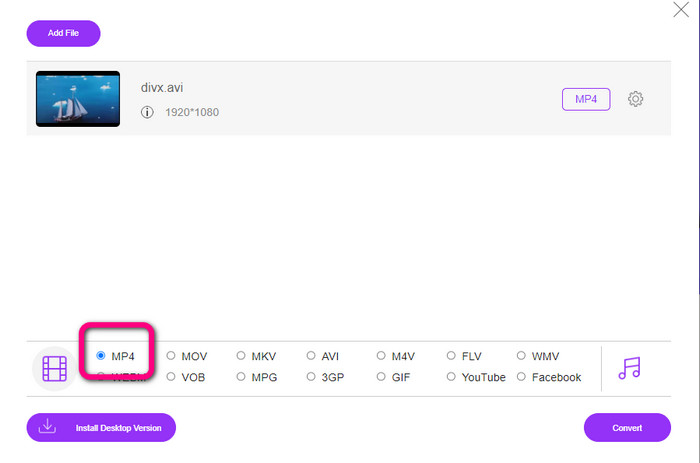
Langkah 2: Pada bahagian bawah antara muka, pilih format fail MP4 daripada pilihan format.
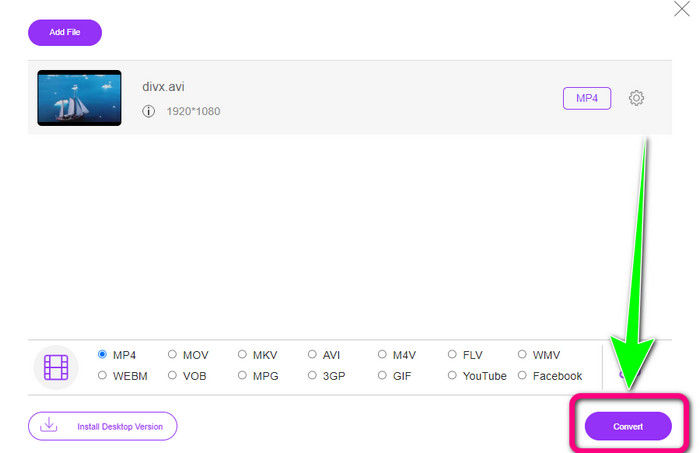
Langkah 3: Untuk langkah terakhir, klik butang Convert untuk memulakan proses penukaran. Kemudian, simpan video MP4 anda pada peranti.
Bahagian 5: DIVX lwn MP4
| DIVX | MP4 | |
| Sambungan fail | .divx/.avi | .mp4 |
| Penerangan | DivX, LLC membangunkan codec video DIVX. Codec ini serasi dengan program Windows. Ia juga boleh digunakan pada konsol permainan, stereo kereta dan banyak lagi. Selain itu, terdapat tiga codec DIVX, HEVC Ultra HD, H.264/MPEG-4 AVC DivX Plus High Definition Video codec dan MPEG-4 Part 2. | Ia adalah bekas video berdasarkan QuickTime MOV. Tetapi MP4 menyokong ciri MPEG. Selain itu, MP4 menyokong audio, video dan sari kata. Gabungan codec ini menjadikan MP4 fleksibel. |
| Dibangunkan Oleh | DivX Network Inc. | Organisasi Antarabangsa untuk Penyeragaman |
| Jenis MIME | video/divx | video/mp4 |
| Program Berkaitan | Xbox 360 Stereo Kereta Pemain DVD/BLU-ray Jam Penggera | Pemain Media VLC Pemain Apple QuickTime Pemain 5KP Pemain Media Windows |
Bahagian 6: Soalan Lazim tentang Menukar DIVX kepada MP4
1. Siapa yang menggunakan DIVX?
Mereka yang menggunakan DIVX ialah peranti elektronik pengguna yang diperakui DIVX, termasuk pemain video mudah alih, DVD dan Pemain Blu-ray.
2. Adakah MP4 lebih baik daripada DIVX?
ya. DIVX sudah lapuk berbanding fail popular sekarang iaitu MP4. Format MP4 adalah salah satu format yang paling biasa digunakan, jadi sangat disyorkan untuk menggunakan format MP4.
3. Mengapakah MP4 begitu popular?
Format MP4 popular kerana ia disokong oleh hampir semua peranti, seperti Mac, Linux, Windows dan peranti mudah alih yang berbeza. Dengan cara ini, semua pengguna menukar video mereka kepada format MP4, menjadikannya lebih mudah diakses dan tersedia untuk semua.
Kesimpulannya
Dengan membaca artikel ini, anda mendapat pandangan penting tentang cara menukar DIVX ke MP4. Terdapat empat penukar yang boleh anda cuba. Namun, sebahagian penukar agak rumit untuk digunakan, yang tidak sesuai untuk pemula. Jadi, jika anda mahu menukar fail dengan lebih mudah, anda boleh menggunakan dua penukar yang disyorkan: FVC Video Converter Online dan Video Converter Ultimate.
-
 3 Cara Terbaik untuk Menukar MPG kepada MP4 dengan Pantas
 Ingin menukar MPG anda kepada format fail MP4? Dalam artikel ini, kami menyenaraikan penukar MPG terbaik dan terpantas untuk anda!
-
 AMV Converter - 3 Kaedah Terbaik untuk Menukar MP4 ke AMV pada Win / Mac
 Apa penukar MP4 ke AMV terbaik untuk mengubah video menjadi Video Muzik Amine, anda boleh mengetahui lebih lanjut mengenai 3 kaedah paling berkesan untuk mendapatkan video yang diinginkan dengan mudah dari artikel.
-
 WebM ke MP4 | Tukar WebM ke MP4 percuma (Dalam Talian dan Desktop)
 Bagaimana untuk menonton fail WebM tanpa pelayar web? Anda perlu menukar WebM kepada MP4. Berikut ialah 10 penukar WebM ke MP4 percuma terbaik untuk menukar WebM kepada MP4 dalam talian dan pada komputer Mac dan Windows
