


 Video Converter Ultimate
 Perakam Skrin
 Pembaikan Video
 Muat Turun Selamat
Cara Sempurna tentang Cara Menukar Imej kepada PNG
Untuk memaparkan imej berkualiti tinggi, orang ramai menggunakan format fail PNG. PNG, yang dibangunkan untuk mengatasi fail GIF, menyediakan pemampatan tanpa hilang data (lossless) dan spektrum warna yang lebih terang. Penukaran imej kepada PNG adalah penting, terutamanya jika anda inginkan imej berkualiti tinggi. Anda bernasib baik kerana kiriman ini akan menunjukkan pelbagai kaedah penukaran fail. Anda boleh menukar fail menggunakan program dalam talian dan luar talian. Dengan cara ini, anda boleh menentukan aplikasi mana yang paling sesuai untuk anda. Sebelum apa‑apa lagi, mari baca artikel ini untuk mengetahui prosedur terbaik tentang cara untuk menukar imej kepada PNG.

Bahagian 1: Kaedah Paling Mudah untuk Menukar Imej kepada PNG Dalam Talian
Tukar Imej kepada PNG Menggunakan Penukar Imej Percuma FVC
FVC Free Image Converter ialah salah satu alat dalam talian terbaik untuk menukar imej kepada PNG. Penukar imej dalam talian ini menukar sebarang format fail imej kepada PNG. Ia juga menawarkan antara muka pengguna yang ringkas dan pilihan yang jelas. Pakar dan juga pemula boleh menggunakan alat ini untuk menukar foto dengan cara ini. Format input yang boleh dikendalikan oleh alat ini termasuk JPG, PNG, JPEG, TIFF, BMP, ICO dan banyak lagi. Selain itu, ia mudah digunakan. Penukar imej ke PNG ini hanya memerlukan beberapa langkah untuk menukar foto. Ia juga menjamin kualiti foto yang tinggi. Penukar imej ini juga membolehkan proses penukaran pukal. Ia membolehkan anda menukar sejumlah besar foto sekaligus. Ikuti langkah di bawah untuk menukar imej kepada JPG.
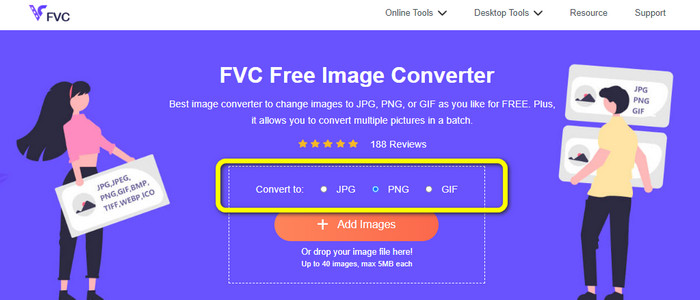
Langkah 1: Lawati laman web rasmi FVC Free Image Converter. Pilih format fail PNG sebagai format keluaran anda pada pilihan Convert to.
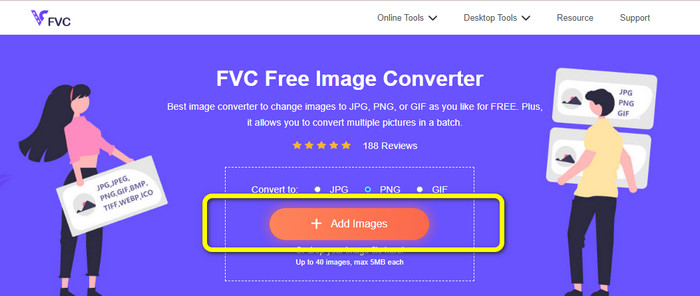
Langkah 2: Langkah seterusnya ialah memilih butang Add Images. Folder komputer anda akan muncul pada skrin, kemudian klik imej yang perlu anda tukar, dan klik Open. Tunggu proses penukaran.
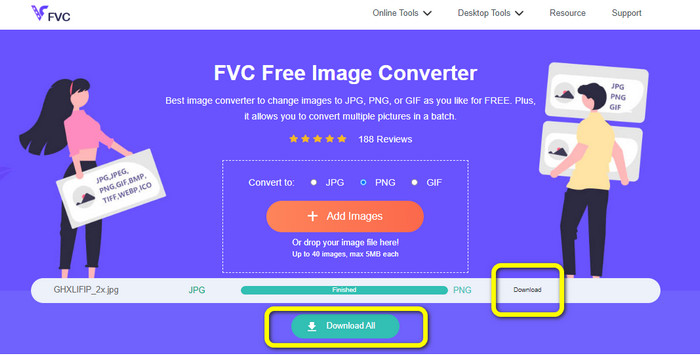
Langkah 3: Untuk langkah terakhir, klik butang Download atau Download all untuk menyimpan imej yang telah ditukar. Anda boleh membuka imej yang dimuat turun pada lokasi fail yang telah anda tetapkan.
Tukar Imej kepada PNG Menggunakan Gula-gula Imej
Image Candy ialah satu lagi alat dalam talian untuk menukar imej kepada PNG. Ia menyokong pelbagai format imej seperti PNG, JPG, GIF dan banyak lagi. Selain itu, ia boleh menukar foto sehingga saiz 2 GB. Penggunaan penukar ini adalah mudah. Ia juga boleh diakses dalam semua pelayar. Tambahan pula, privasi anda turut dilindungi oleh aplikasi ini. Aplikasi ini akan memadam foto anda selepas 24 jam.
Tetapi, ia hanya membenarkan muat naik berasaskan peranti. Anda tidak boleh memuat naik imej daripada awan atau URL. Juga, format output yang disokong adalah sedikit.
Langkah 1: Pergi ke laman web Image Candy dan klik butang Add Files untuk memuat naik imej.

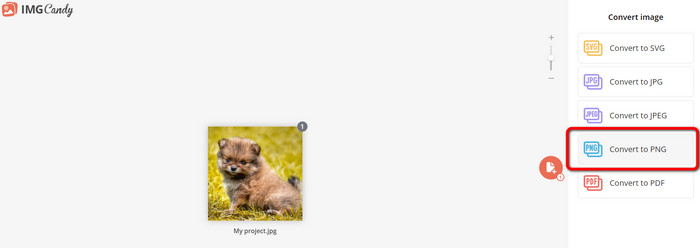
Langkah 2: Pilih pilihan Convert to PNG pada bahagian kanan antara muka. Kemudian tunggu proses penukaran.
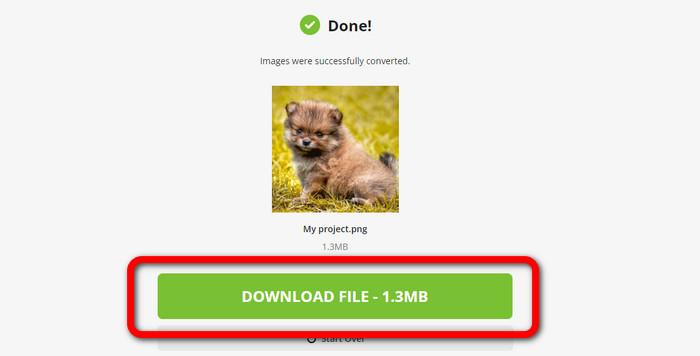
Langkah 3: Akhir sekali, pilih butang Download File untuk menyimpan imej pada komputer anda.
Tukar Imej kepada PNG Menggunakan Convertio
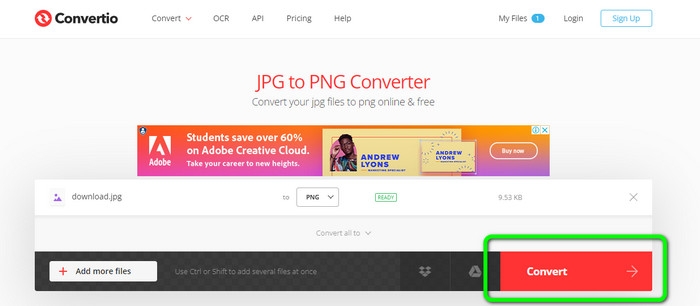
Alat dalam talian lain untuk menukar imej ialah Convertio. Menggunakan alat ini adalah mudah. Ia mempunyai antara muka yang mudah difahami. Selain itu, ia mempunyai proses penukaran yang mudah, yang sesuai untuk semua pengguna. Juga, proses penukaran adalah cukup pantas. Dengan cara ini, anda boleh menukar banyak fail imej. Selain itu, ia menyokong hampir semua format popular, termasuk JPG, PNG, BMP, TIFF dan banyak lagi. Aplikasi ini juga melindungi privasi anda. Ia memadamkan imej anda selepas 24 jam. Tetapi, apabila anda menggunakan versi percuma, terdapat beberapa batasan. Anda hanya boleh memuat naik dengan saiz fail terbesar 100 MB. Anda perlu membeli pelan langganan untuk memuat naik saiz fail tanpa had.
Langkah 1: Lawati laman web Convertio. Klik butang Choose Files untuk memuat naik imej.
Langkah 2: Selepas memuat naik imej yang anda ingin tukar, pergi ke pilihan format dan pilih format PNG.
Langkah 3: Klik butang Convert. Tunggu proses penukaran dan simpan imej yang telah ditukar.
Tukar Imej kepada PNG Menggunakan FreeConvert
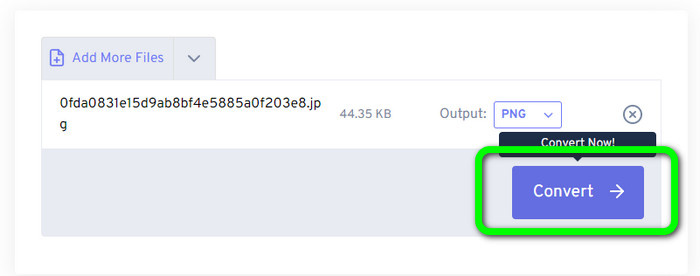
FreeConvert ialah penukar imej dalam talian yang boleh anda harapkan jika anda ingin menukar imej anda kepada PNG. Prosesnya mudah dan antara mukanya senang difahami. Pengguna profesional dan bukan profesional boleh menggunakan aplikasi ini. Selain itu, ia boleh menukar lebih daripada 500 format imej berbeza seperti JPG, PNG, WebP dan lain‑lain. Fail imej RAW daripada kamera juga boleh ditukar. Sebarang pelayar web boleh mengakses penukar imej ini, seperti Chrome, Firefox, Edge, Safari dan sebagainya. Ia menyediakan privasi dan keselamatan fail. Namun begitu, ia mempunyai beberapa had, terutamanya apabila menggunakan versi percuma. Saiz fail terbesar ialah 1GB. Membeli alat ini adalah pilihan terbaik jika anda ingin memuat naik lebih banyak imej. Selain itu, penukar imej ini memaparkan beberapa iklan pada halaman web, yang mengganggu pengguna.
Langkah 1: Pergi ke laman web FreeConvert. Pilih pilihan Choose Files untuk melampirkan foto yang anda ingin tukar kepada format PNG.
Langkah 2: Pergi ke pilihan Output untuk memilih format keluaran yang anda inginkan, iaitu format PNG.
Langkah 3: Untuk langkah terakhir, klik butang Convert dan tunggu proses penukaran. Kemudian, simpan imej tersebut dengan fail PNG.
Bahagian 2: Cara Terbaik untuk Menukar Imej kepada PNG Menggunakan Program Luar Talian
Video Converter Ultimate ialah alat terbaik untuk menukar imej kepada format PNG. Penukar imej ini menawarkan antara muka yang mudah difahami, menjadikannya sesuai untuk semua pengguna. Selain itu, ia juga mempunyai prosedur mudah yang boleh anda ikuti. Dengan cara ini, menukar imej kepada PNG menjadi sangat senang. Selain PNG, ia juga menyokong pelbagai format fail imej. Ia menyokong WEBP, BMP, TIF, TIFF, JPG dan banyak lagi, yang amat memudahkan. Anda juga boleh mengakses aplikasi ini pada Windows dan Mac.
Tambahan pula, selain menukar imej, Video Converter Ultimate menawarkan lebih banyak ciri. Anda boleh menukar video, mengalih keluar tera air, meningkatkan video dan mencipta video muzik. Selain itu, anda boleh membuat kolaj, memangkas video dan banyak lagi. Dengan ciri ini, terdapat banyak perkara yang boleh anda lakukan. Dengan cara ini, anda boleh menjadikan video dan imej anda sempurna dan menarik.
Langkah 1: Muat turun Video Converter Ultimate pada Mac atau Windows anda. Lancarkan perisian selepas proses pemasangan.
Muat Turun PercumaUntuk Windows 7 atau lebih baharuMuat Turun Selamat
Muat Turun PercumaUntuk MacOS 10.7 atau lebih baharuMuat Turun Selamat
Langkah 2: Selepas membuka aplikasi, pergi ke panel Toolbox. Seterusnya, pilih ciri Image Converter.
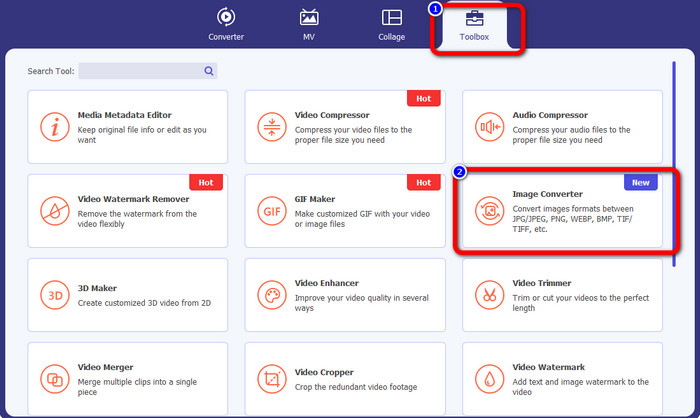
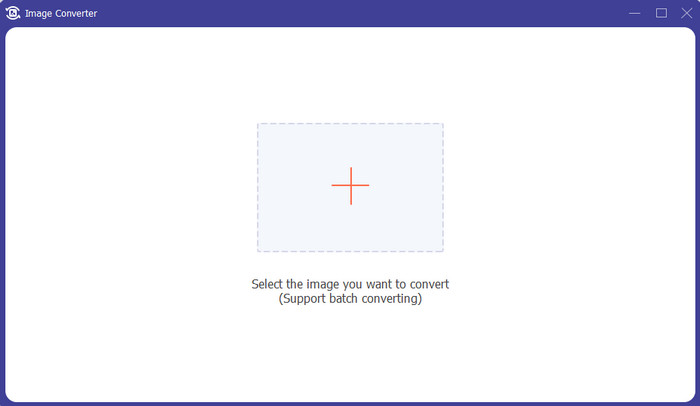
Langkah 3: Antara muka lain akan muncul pada skrin anda. Klik butang tanda + untuk menambah imej.
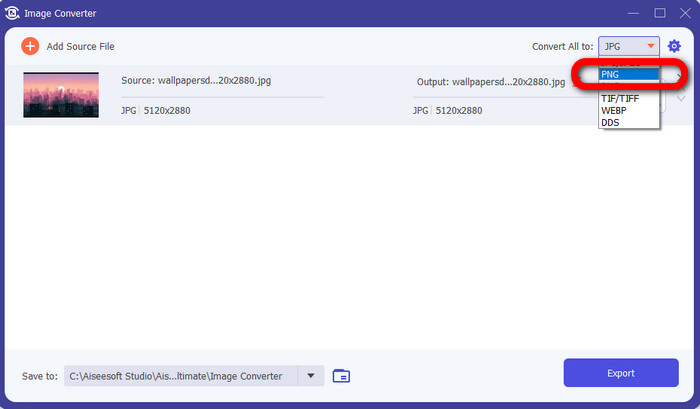
Langkah 4: Selepas menambah foto, pilih pilihan format dan klik format fail PNG.
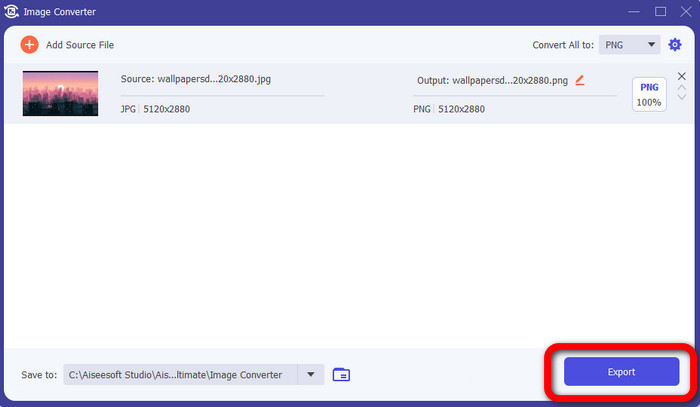
Langkah 5: Klik butang Export pada sudut kiri bawah antara muka untuk menyimpan imej. Anda juga boleh menggunakan perisian ini untuk menukar imej kepada JPG.
Bahagian 3: Soalan Lazim tentang Menukar Imej kepada PNG
1. Apakah fail PNG?
Disebabkan keupayaannya membenarkan ketelusan dalam penyemak imbas, PNG ialah format imej standard yang digunakan di internet. PNG ialah pengganti GIF, yang menggunakan kaedah pemampatan proprietari pada tahun 1990-an. PNG ialah format yang boleh diakses. Seperti GIF dan JPG, PNG menyokong warna 8-bit dan 24-bit. Mereka juga dianggap sebagai fail tanpa kerugian, bermakna kualiti tidak mempunyai kesan. Tidak kira berapa kali anda membuka dan menyimpan fail.
2. Apakah faedah PNG?
Hakikat bahawa PNG adalah format tanpa kerugian dengan keupayaan warna 24-bit adalah salah satu kelebihan utama. Jika menukar daripada JPG, ingat bahawa fail ini adalah lossy. Pemampatan awal mereka mungkin telah mengakibatkan beberapa kehilangan kualiti. Namun, PNG tidak rugi. Oleh itu, lebih banyak bukaan atau penjimatan imej tidak akan mengakibatkan kehilangan kualiti selanjutnya.
3. Mengapakah PNG lebih baik?
Jelas daripada faedah yang dinyatakan di atas bahawa format fail PNG adalah lebih baik. Ia lebih baik untuk format foto penting lain yang digunakan. Mampatan tanpa rugi adalah ciri terbaik. Jika anda menyimpan imej dalam format fail PNG, ia tidak akan membahayakan format fail sama ada anda menyimpan, membuka atau menyimpannya semula. Di sini, algoritma pemampatan berfungsi. Anda boleh menggunakan banyak kaedah untuk mengurangkan keterlihatan pembaziran data yang sangat baik. Fail PNG mempunyai pemampatan yang lebih baik daripada fail JPG dan GIF.
Kesimpulannya
Panduan ini menunjukkan kepada anda banyak cara dalam talian dan luar talian untuk menukar imej kepada PNG. Namun, jika anda mahukan alat berasaskan web yang terbaik, gunakan FVC Free Image Converter.
-
 Cara Batch Menukar HEIC kepada PNG pada Mac, iPhone dan Dalam Talian
 Mencari cara bagaimana untuk menukar HEIC kepada PNG? Artikel ini memberi anda cara terbaik untuk menukar HEIC kepada PNG dalam talian dan luar talian dengan mudah
-
 9 Penukar HEIC ke PNG Terbaik untuk PC dan Mac [Dalam Talian & Luar Talian]
 Ketahui penukar dalam talian dan luar talian terbaik di sini. Kami mempersembahkan kepada anda penukar HEIC ke PNG yang terbaik dan percuma untuk Windows dan Mac.
-
 5 Terbaik Penukar PNG kepada HEIC Terbaik yang Anda Jangan Terlepas
 Jika anda ingin mengetahui penukar PNG ke HEIC yang paling kerap digunakan, kami menyediakan anda penukar PNG ke HEIC terbaik dalam talian. Baca artikel ini untuk maklumat lanjut.
