


 Video Converter Ultimate
 Perakam Skrin
 Pembaikan Video
 Muat Turun Selamat
Cara Menukar WebP kepada PNG: Cara Paling Sesuai untuk Anda
Google membangunkan WebP untuk memaparkan imej web menggunakan sistem pemampatan yang sangat baik. Ini mengurangkan saiznya sehingga satu pertiga berbanding format tradisional JPEG dan PNG. Ia boleh mengekalkan kualitinya selepas pemampatan. Masalahnya ialah sesetengah penyunting imej, termasuk yang berbayar, tidak menyokong WEBP. Ini bermakna anda tidak boleh membuka fail imej WebP yang anda muat turun ke desktop jika anda ingin menggunakannya semula dan menyuntingnya. Salah satu penyelesaian terbaik ialah menukar WebP kepada format lain seperti PNG. Hampir semua pelayar dan perisian penyuntingan imej menyokong fail PNG. Jadi anda boleh memuat naik imej anda ke mana‑mana sahaja. Dalam hal ini, artikel ini mempunyai kaedah terbaik untuk anda menukar WebP kepada PNG. Baca artikel ini kerana kami akan menunjukkan kepada anda penukar imej yang paling boleh dipercayai yang boleh anda gunakan.

Bahagian 1: WebP lwn. PNG
| Format fail | WebP | PNG |
| Sambungan fail | .webp | .png |
| Dibangunkan Oleh | Kumpulan Pembangunan PNG | |
| Nama penuh | Imej di Laman Web | Grafik Rangkaian Mudah Alih |
| Penerangan | Imej di web boleh dimampatkan tanpa rugi dan rugi menggunakan WebP format imej. Pereka web boleh menggunakan WebP untuk menghasilkan grafik yang lebih kaya dan padat yang mempercepatkan web. Berbanding dengan PNG, imej tanpa kehilangan WebP bersaiz 26% lebih kecil. | Grafik Rangkaian Mudah Alih atau PNG adalah untuk menyimpan imej digital dan grafik web. Selain itu, terdapat gambar dengan latar belakang telus. Bersama-sama dengan JPEG, TIFF, GIF dan EPS, PNG ialah salah satu jenis fail gambar yang paling banyak digunakan. |
| Pemampatan | Lossy dan Lossless | Tidak rugi |
| Program/Pelayar Berkaitan | Google Chrome, Internet Explorer, Microsoft Edge, Mozilla Firefox | Photoshop, Microsoft, GIMP, Paint, Pemapar Imej FastStone, Google Chrome, Internet Explorer |
Bahagian 2: Kaedah Terbaik untuk Menukar WebP kepada PNG Dalam Talian
Cara Menukar WebP ke PNG menggunakan FVC Free Image Converter
FVC Free Image Converter ialah salah satu alat dalam talian hebat yang boleh anda gunakan untuk menukar WebP kepada PNG. Penukar imej dalam talian ini boleh menukar sebarang format fail imej kepada PNG. Format imej yang disokong oleh alat ini termasuk JPG, PNG, JPEG, TIFF, BMP, WEBP, ICO dan banyak lagi. Ia juga menawarkan susun atur yang ringkas dan pilihan yang jelas. Dengan cara ini, pakar dan pemula boleh menukar foto menggunakan penukar dalam talian ini. Semua pelayar menyokong FVC Free Image Converter, termasuk Google, Firefox, Microsoft Internet Explorer, Safari dan lain‑lain. Selain itu, FVC Free Image Converter menawarkan penukaran foto percuma. Tidak seperti penukar lain, tidak akan ada iklan mengganggu semasa menukar fail imej. Ia juga menjamin kualiti tinggi pada foto. Anda boleh mengekalkan rupa imej asal walaupun selepas penukaran. FVC Image Converter juga menawarkan penukaran kelompok. Anda boleh menukar sejumlah besar gambar sekali gus. Untuk menukar imej kepada JPG, ikut sahaja arahan ringkas di bawah.
Langkah 1: Pertama sekali, buka pelayar anda dan pergi ke laman web rasmi FVC Free Image Converter. Pilih format output yang anda inginkan daripada pilihan Convert to, iaitu format PNG.
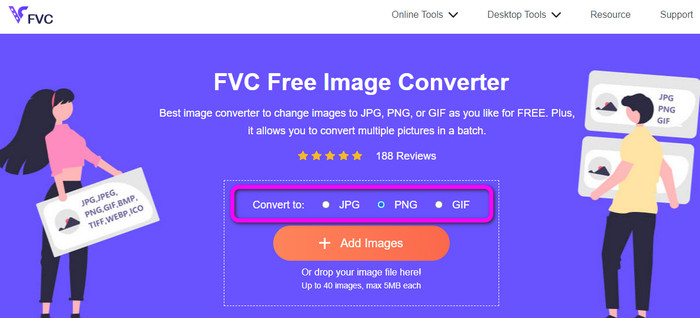
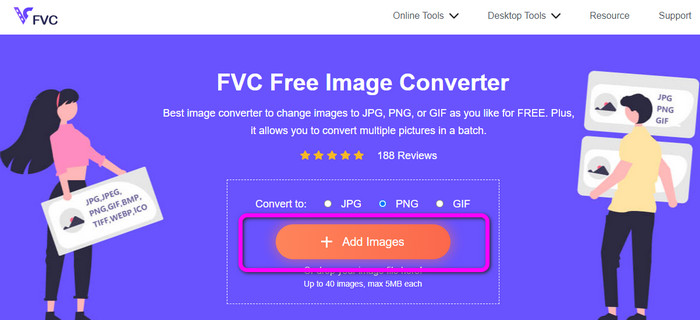
Langkah 2: Klik butang Add Images untuk memuat naik imej WebP yang anda ingin tukar. Anda dibenarkan memuat naik berbilang imej jika mahu. Buka imej daripada folder komputer anda. Selepas proses memuat naik, ia akan meneruskan proses penukaran secara automatik.
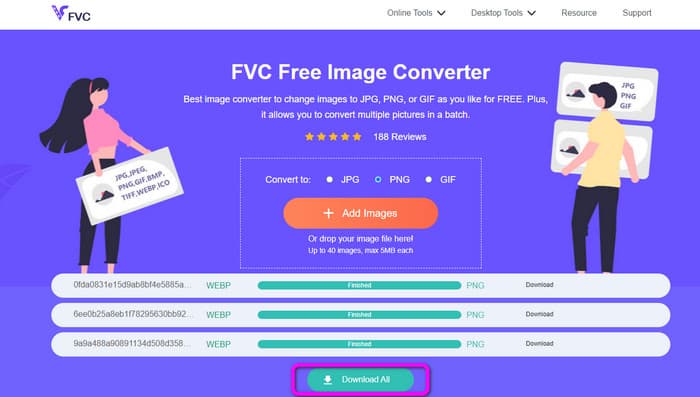
Langkah 3: Untuk langkah terakhir anda, klik butang Download di bahagian tepi untuk menyimpannya satu per satu. Tetapi, jika anda mahu memuat turun semuanya dalam satu proses, klik butang Download All. Selepas menyimpan, anda sudah boleh membuka imej yang telah ditukar pada komputer anda.
Cara Menukar WebP ke PNG menggunakan Convertio
Cara lain untuk menukar WebP kepada PNG ialah menggunakan Convertio. Penukar WebP ke PNG ini boleh menukar fail WebP anda kepada format PNG. Selain itu, ia menawarkan antara muka pengguna yang mudah difahami. Oleh itu, pakar dan juga pengguna baru boleh menggunakan penukar ini. Alat ini juga mempunyai proses penukaran kelompok. Jadi, anda boleh menukar banyak fail imej sekali gus. Selain itu, proses penukaran lebih pantas berbanding penukar lain. Penukaran fail boleh dilakukan tanpa mengambil terlalu banyak masa. Tambahan pula, Convertio boleh diakses melalui semua pelayar. Google, Edge, Explorer dan banyak lagi program termasuk dalamnya. Selain itu, penukar imej dalam talian ini menawarkan fungsi tambahan. Video, audio, dokumen dan banyak lagi juga boleh ditukar menggunakan penukar ini. Namun, terdapat beberapa had pada versi percuma alat ini. Anda hanya boleh memuat naik fail dengan saiz maksimum 100MB. Kemudian, jika anda bercadang untuk melakukan proses penukaran kelompok, bilangan maksimum imej yang boleh anda muat naik ialah dua. Jika anda bercadang memuat naik banyak imej dalam satu klik, membeli pelan langganan adalah pilihan terbaik. Akhir sekali, anda memerlukan sambungan internet untuk menggunakan alat ini.
Langkah 1: Pergi ke pelayar anda dan cari Convertio. Selepas itu, klik butang Choose Files. Apabila folder komputer muncul pada skrin, pilih imej WebP yang anda ingin tukar dan buka.
Langkah 2: Pergi ke pilihan format selepas memuat naik imej WebP. Pilih fail PNG sebagai format output anda.
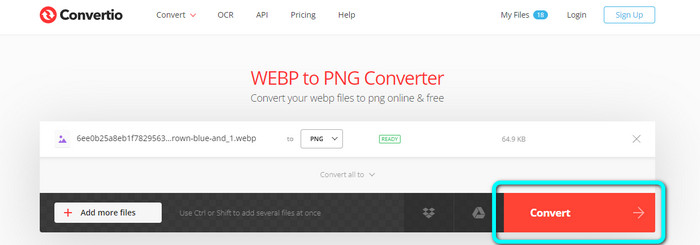
Langkah 3: Apabila anda selesai memilih fail PNG, klik butang Convert. Kemudian, tunggu proses penukaran. Klik butang Download untuk menyimpan imej yang telah ditukar ke desktop anda.
Cara Menukar WebP ke PNG menggunakan Online-Convert
Online-Convert ialah satu lagi penukar imej dalam talian yang boleh anda percayai apabila menukar WebP kepada PNG. Ia menyokong pelbagai format imej, termasuk JPG, BMP, GIF, TIFF dan banyak lagi. Proses penukarannya sangat mudah. Ia hanya memerlukan tiga langkah untuk menukar fail imej WebP kepada format PNG. Dengan cara ini, semua pengguna boleh mengendalikan penukar ini, terutamanya pemula. Selain itu, Online-Convert tersedia di semua pelayar. Ia termasuk Google, Firefox, Edge, Explorer dan banyak lagi, menjadikannya mudah digunakan. Ia juga menawarkan proses penukaran kelompok untuk menukar berbilang imej sekali gus. Namun, apabila menggunakan versi percuma, anda hanya boleh memuat naik maksimum 3 imej setiap kelompok. Had saiz fail pula hanya 25MB. Selain itu, proses penukarannya agak perlahan dan memakan masa. Dalam hal ini, dapatkan versi berbayar jika anda ingin menikmati ciri hebat tanpa had.
Langkah 1: Pergi ke laman web Online-Convert pada pelayar anda. Klik butang Choose File untuk memuat naik imej WebP. Anda boleh memuat naik sehingga 3 imej apabila melakukan proses penukaran kelompok.
Langkah 2: Apabila proses memuat naik selesai, klik butang Start. Dengan cara ini, proses penukaran akan bermula.
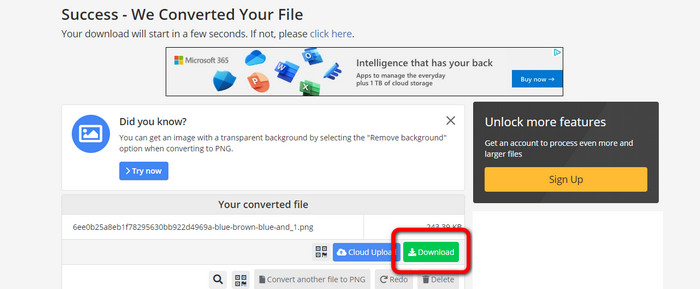
Langkah 3: Klik butang Download untuk menyimpan imej yang telah ditukar.
Bahagian 3: Cara Praktikal untuk Menukar WebP kepada PNG Luar Talian
Tukar WebP kepada PNG menggunakan Video Converter Ultimate
Anda boleh menggunakan Video Converter Ultimate jika anda lebih gemar menukar WebP kepada PNG secara luar talian. Ia boleh menukar fail anda dengan segera kerana mempunyai proses penukaran yang pantas. Selain itu, anda boleh menukar berbilang fail serentak dengan ciri penukaran kelompoknya. Di samping itu, ia menyokong pelbagai format fail imej. Ini termasuk JPG, BMP, TIFF, GIF, SVG dan banyak lagi. Video Converter Ultimate menawarkan proses penukaran yang ringkas, menjadikannya sesuai untuk semua pengguna. Dengan cara ini, sama ada anda pengguna baharu atau tidak, anda berupaya mengendalikan penukar ini. Selain itu, anda boleh memuat turun penukar luar talian ini pada kedua‑dua Mac dan Windows, menjadikannya mudah untuk pengguna. Ini juga merupakan program yang boleh dimuat turun secara percuma. Ini bermakna anda tidak perlu membayar untuk mengakses penukar tersebut. Salah satu perkara terbaik tentang penukar ini ialah anda boleh menyimpan imej yang telah ditukar tanpa sebarang tera air yang tidak diperlukan. Dengan itu, anda boleh mendapatkan imej yang bersih dan memuaskan. Ikuti langkah mudah di bawah untuk menukar imej WebP kepada format PNG dengan cekap.
Langkah 1: Muat turun Video Converter Ultimate pada Windows atau Mac anda. Selepas itu, teruskan dengan proses pemasangan dan lancarkan penukar. Jika anda mahu mengakses penukar dengan mudah, klik butang Download di bawah.
Muat Turun PercumaUntuk Windows 7 atau lebih baharuMuat Turun Selamat
Muat Turun PercumaUntuk MacOS 10.7 atau lebih baharuMuat Turun Selamat
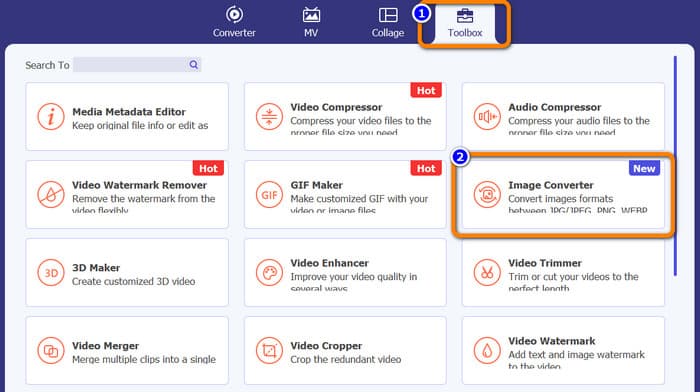
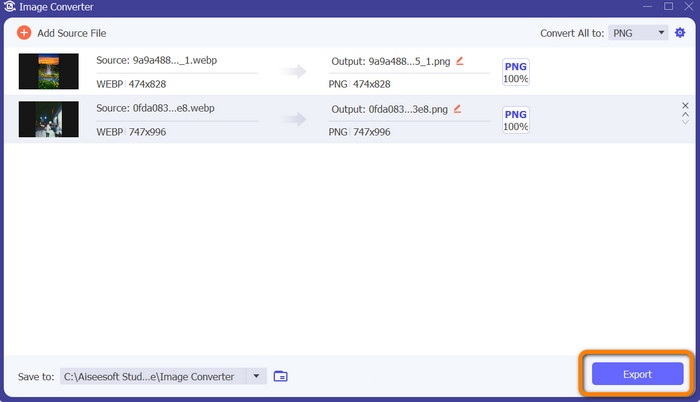
Langkah 2: Selepas melancarkan penukar imej, navigasi ke panel Toolbox. Pilih alat Image Converter di bahagian bawah. Antara muka lain akan muncul selepas anda mengkliknya.
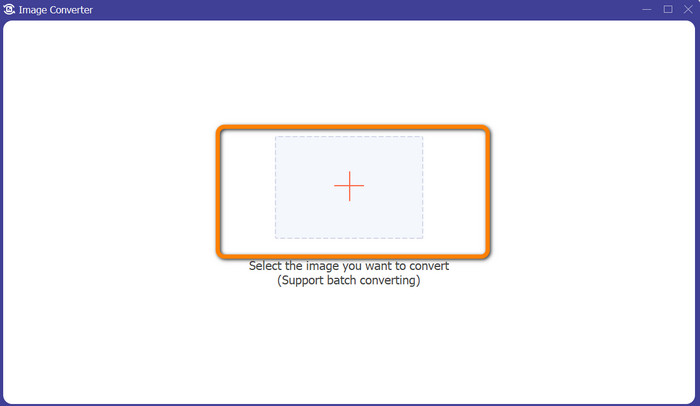
Langkah 3: Klik butang tanda Plus di bahagian tengah antara muka. Apabila folder komputer muncul, pilih imej WebP yang anda ingin tukar dan buka. Klik butang Add source file untuk menambah lebih banyak fail imej.
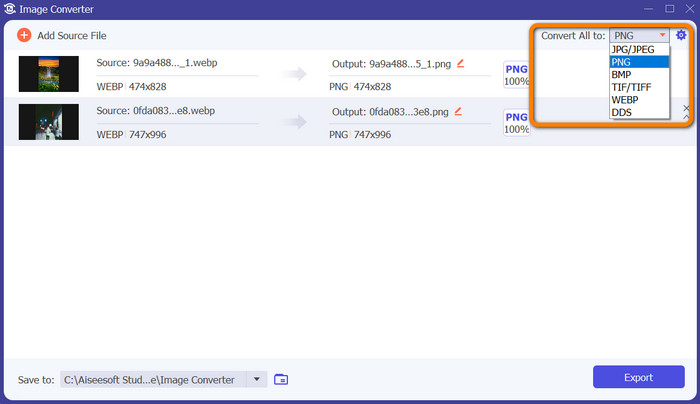
Langkah 4: Selepas menambah semua fail yang ingin anda tukar, klik pilihan Convert All to di sudut kanan atas antara muka. Kemudian, pilih format PNG.
Langkah 5: Langkah terakhir ialah mengklik butang Export di sudut kanan bawah antara muka. Apabila proses eksport selesai, anda kini boleh membuka imej yang telah ditukar daripada komputer anda. Anda juga boleh menggunakan perisian ini untuk menukar WebP kepada JPG.
Bahagian 4: Soalan Lazim tentang Menukar WebP kepada PNG
1. Bagaimana untuk Menukar WebP kepada PNG pada Microsoft Paint?
Menukar WebP kepada format PNG adalah mudah selagi anda tahu proses yang betul. Lancarkan MS Paint dengan memilihnya daripada menu Start dengan menaip Paint dalam kotak carian Windows. Kemudian pilih Paint daripada senarai hasil di bahagian atas halaman. Buka Paint dengan memilih File > Open daripada menu yang muncul. Pilih fail imej WEBP yang ingin anda tukar daripada sistem fail komputer anda, kemudian klik Open. Setelah imej WEBP dimuatkan dalam Paint, pilih File daripada menu dan klik Save as. JPEG Picture harus dipilih dalam menu sisi. Masukkan nama fail dan folder tempat anda ingin menyimpan imej yang telah ditukar apabila kotak Save As muncul. Klik Save selepas memastikan JPEG dipilih.
2. Bagaimana untuk membuka imej WebP dalam GIMP?
Dalam GIMP, buka fail imej WebP. Gimp-web ialah nama pemalam GIMP yang diperlukan untuk membuka imej WebP. Terima kasih kepada pemalam ini, format imej WebP baharu boleh digunakan untuk memuatkan dan menyimpan fail. Berita baiknya ialah pemalam ini boleh diakses pada semua sistem pengendalian yang popular. Ia termasuk Mac, Linux dan Windows.
3. Apakah kelebihan WebP?
Terdapat empat kelebihan utama WebP. Ia boleh meningkatkan prestasi tapak web, menjimatkan lebih lebar jalur, meningkatkan pengoptimuman enjin carian dan menunjukkan imej berkualiti tinggi.
Kesimpulannya
Ini ialah empat kaedah hebat yang boleh anda cuba untuk menukar format fail WebP kepada PNG. Tetapi, jika anda mahukan penukar imej percuma dengan prosedur yang mudah, gunakan FVC Free Image Converter.
-
 Tutorial Langkah demi Langkah tentang Cara Menukar ICO kepada PNG
 Klik catatan panduan ini untuk mengetahui kaedah paling mudah untuk menukar ICO kepada PNG. Mari temui penukar ICO ke PNG untuk prosedur dalam talian dan luar talian.
-
 Kaedah Paling Mudah untuk Menukar SVG kepada PNG
 Ketahui cara menukar fail imej anda daripada SVG ke PNG menggunakan penukar imej yang berguna. Baca catatan panduan ini untuk mengetahui semua yang anda perlu tahu tentang penukaran.
-
 Cara berskala penuh untuk Menukar JPG kepada PNG Dalam Talian dan Luar Talian
 Mencari kaedah yang berguna untuk menukar format fail JPG kepada PNG? Tiang panduan ini mempunyai jawapan yang anda perlukan. Untuk mengetahui kaedah ini, baca artikel.
