


 Video Converter Ultimate
 Perakam Skrin
 Pembaikan Video
 Muat Turun Selamat
Cara Menukar AIFC kepada MP3 Menggunakan Penukar Audio Terbaik
AIFC, singkatan dari Audio Interchange File Format, ialah format audio yang dibangunkan pada mulanya oleh Apple Inc. Ia adalah standard untuk menyimpan data audio, dan anda biasanya boleh mencari fail AIFF pada sistem Mac. AIFC ialah lanjutan AIFF, di mana varian termampat dikenal pasti dengan sambungan fail .aifc.
Cabaran dengan fail AIFC terletak pada keserasian terhadnya dengan pelbagai peranti dan pemain media. Selain itu, apabila mengedit fail AIFC, isu keserasian boleh menimbulkan masalah besar jika penyunting tidak menyokong format ini. Untuk mengatasinya, kami telah mengumpulkan beberapa kaedah berkesan untuk membantu anda menukar fail AIFC kepada format MP3 yang disokong secara meluas. Menukar fail AIFC anda kepada MP3 memastikan keserasian yang lebih baik merentas peranti dan peluang penyuntingan yang lancar. Mari kita terokai kaedah penukaran ini untuk mengatasi halangan keserasian bagi fail audio anda.

Bahagian 1. 5 Cara Menukar AIFC kepada MP3
1. Video Converter Ultimate
Video Converter Ultimate ialah alat penukar AIFC ke MP3 yang boleh dipercayai dan profesional, direka untuk menukar format AIFC kepada MP3 dan pelbagai format lain dengan lancar. Perisian ini membolehkan anda menukarkan fail video dan audio anda dengan mudah dan selamat, sekali gus meningkatkan pengalaman hiburan luar talian anda sambil memastikan keserasian optimum. Sila manfaatkan keupayaan hebatnya dengan memuat turun perisian tersebut untuk percubaan percuma hari ini.
Muat Turun PercumaUntuk Windows 7 atau lebih baharuMuat Turun Selamat
Muat Turun PercumaUntuk MacOS 10.7 atau lebih baharuMuat Turun Selamat
Ikuti langkah mudah ini untuk menukar fail AIFC anda kepada MP3 menggunakan Video Converter Ultimate:
Langkah 1. Import fail AIFC
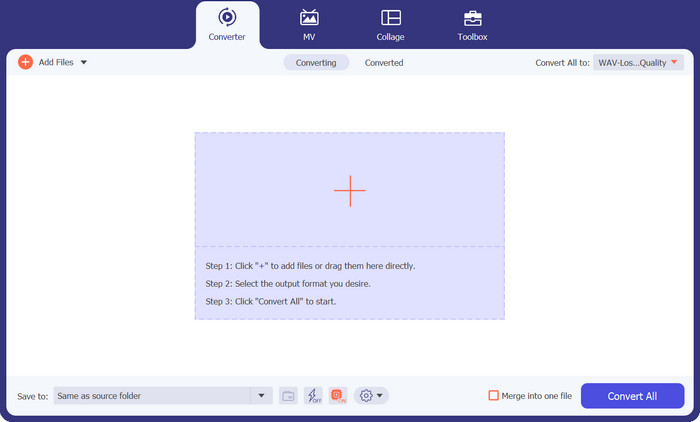
Lancarkan perisian selepas memasang Video Converter Ultimate pada komputer Windows atau Mac anda. Klik butang Add Files yang terletak pada reben atas dan import fail AIFC yang ingin anda tukar.
Langkah 2. Pilih MP3 sebagai format keluaran
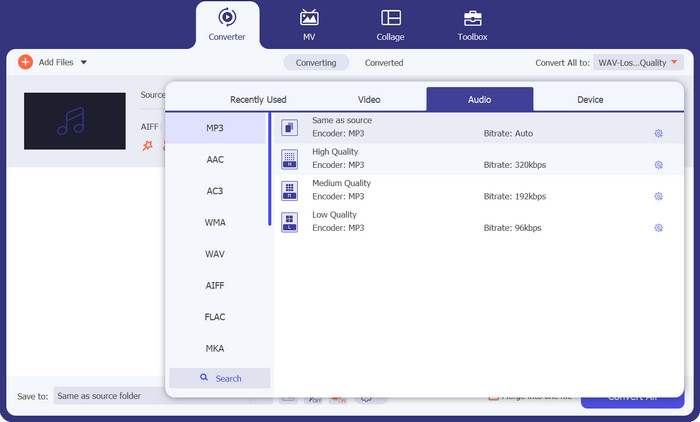
Cari fail audio AIFC dalam pustaka dan klik pada menu tarik turun Convert All to yang berada di bahagian kanan. Pilih tab Audio dan pilih MP3 sebagai format keluaran yang dikehendaki. Kemudian, klik butang tarik turun di bahagian bawah untuk menyemak dan menetapkan folder bagi menyimpan fail MP3 yang telah ditukar.
Langkah 3. Tukar AIFC kepada MP3
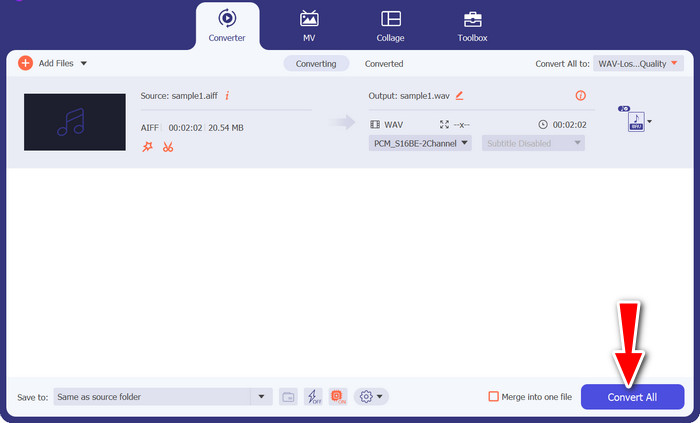
Sebaik sahaja anda mengkonfigurasi tetapan keluaran, pilih semua fail AIFC yang ingin anda tukar dalam kawasan pustaka. Klik butang Convert All yang terletak di penjuru kanan bawah untuk memulakan proses penukaran, menukarkan fail AIFC anda kepada format MP3. Selepas penukaran, anda boleh memindahkan dan menikmati fail MP3 anda dengan mudah pada mana-mana peranti yang serasi.
2. iTunes
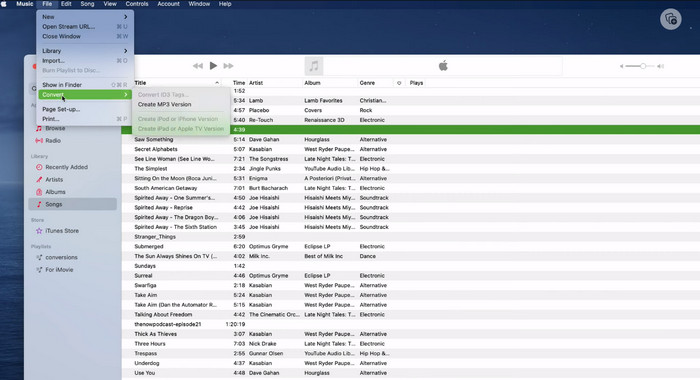
iTunes ialah platform serba boleh untuk memainkan, mengurus dan memuat turun muzik dan video pada Mac OS X dan Windows OS. Selain itu, ia mempunyai keupayaan terbina dalam untuk menukar fail audio AIFC. Di bawah, anda akan menemui panduan langkah demi langkah yang komprehensif tentang penukaran AIFC kepada MP3 dengan cekap pada Mac menggunakan iTunes.
Langkah 1. Buka iTunes pada komputer anda. Pada Mac, akses iTunes dengan memilih iTunes > Preferences daripada bar menu di bahagian atas skrin.
Langkah 2. Dalam tetingkap keutamaan iTunes, pergi ke General dan kemudian klik pada Import Settings di bahagian bawah. Dalam dialog Import Settings, klik menu tarik turun di sebelah Import Using dan pilih MP3 Encoder. Klik OK untuk mengesahkan pilihan. Jika anda menggunakan Mac, tekan kekunci Option, klik File > Convert > Convert to MP3 dan pilih folder yang mengandungi lagu AIFC yang ingin anda tukar.
Langkah 3. Setelah anda menyelesaikan proses penukaran, lagu-lagu tersebut akan ditukar kepada format MP3 dan muncul dalam pustaka iTunes anda, sedia untuk dimainkan atau dipindahkan ke peranti anda. Selepas itu, anda sepatutnya telah mempelajari cara menukar AIFC kepada MP3 pada Mac.
3. Penukar MP3 Percuma Dalam Talian
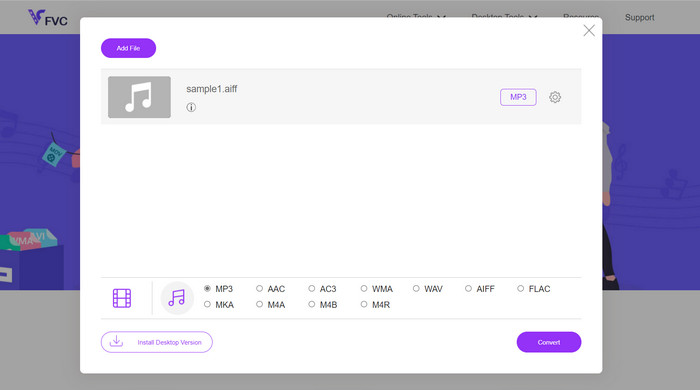
Penyelesaian yang paling mudah dan paling senang ialah menggunakan penukar AIFC ke MP3 dalam talian yang boleh dipercayai, dan pilihan peribadi saya ialah Free MP3 Converter Online. Perkhidmatan berasaskan web ini tidak memerlukan sebarang log masuk atau alamat e-mel, membolehkan pengguna menambah fail untuk penukaran terus tanpa kerenah. Satu ciri mengagumkan yang patut disebut ialah sokongan meluasnya untuk pelbagai format.
Langkah 1. Mulakan dengan melawati halaman rasmi program tersebut. Klik butang Add Files to Convert dan pilih fail AIFC yang dikehendaki daripada pemacu keras komputer anda.
Langkah 2. Setelah fail ditambah, akses menu format dan pilih format keluaran MP3 sebagai format fail yang dikehendaki.
Langkah 3. Akhir sekali, klik butang Convert untuk memulakan proses penukaran. Dalam beberapa saat, fail akan berjaya ditukar kepada format MP3 dan disimpan terus ke komputer anda untuk akses yang mudah.
4. Zamzar
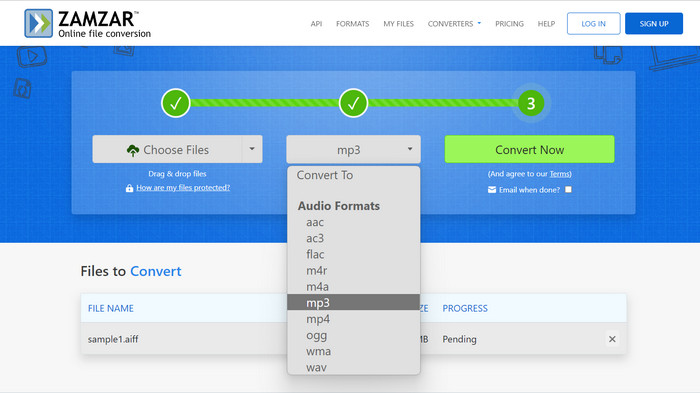
Memilih untuk aplikasi penukaran audio berasaskan web memberikan alternatif yang menarik untuk menukar AIFC kepada MP3. Tanpa memerlukan pemasangan, aplikasi ini mengendalikan tugas penukaran audio dengan cekap. Untuk menggambarkan proses tersebut, kami akan menggunakan Zamzar sebagai contoh.
Langkah 1. Akses halaman penukaran AIFC ke MP3 dalam pelayar web anda. Muat naik fail AIFC anda daripada pemacu keras komputer, URL, atau terus daripada akaun storan awan anda.
Langkah 2. Untuk mengubah format keluaran, klik pada menu tarik turun untuk format dan pilih MP3 sebagai format yang dikehendaki.
Langkah 3. Setelah anda mengkonfigurasi tetapan, klik butang Convert Now untuk memulakan proses penukaran. Tunggu sehingga penukaran selesai, kemudian muat turun fail MP3 yang telah ditukar ke komputer anda untuk digunakan serta-merta.
5. Convertio
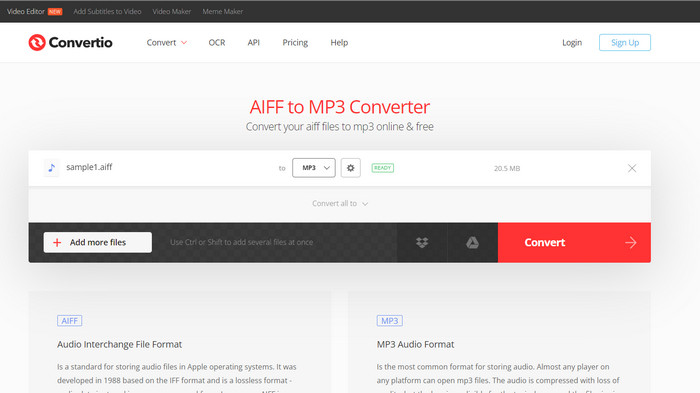
Convertio tidak terhad kepada penukaran AIFC kepada MP3 sahaja. Malah, ia menawarkan pelbagai kemungkinan untuk menukar fail AIFC kepada pelbagai format popular lain, termasuk WAV, WMA, AAC, AC3, FLAC, OGG, RA dan banyak lagi. Dengan Convertio, anda boleh menukar fail AIFC anda dengan mudah kepada format audio pilihan anda, menjadikannya alat yang serba boleh dan berharga untuk penukaran audio.
Langkah 1. Lawati laman web Convertio (https://convertio.co/aifc-mp3/) dalam pelayar web anda.
Langkah 2. Klik butang Choose Files untuk memuat naik fail AIFC anda daripada komputer. Sebagai alternatif, anda juga boleh seret dan lepas fail terus ke laman web.
Langkah 3. Selepas memuat naik fail AIFC, klik pada menu tarik turun untuk format keluaran. Pilih MP3 daripada senarai format audio yang tersedia.
Langkah 4. Klik butang Convert untuk memulakan proses penukaran AIFC ke MP3. Tunggu sehingga penukaran selesai.
Bacaan Lanjut:
Ulasan Program Penukaran AIF ke WAV Terbaik [2023]
FLAC vs. MP3: Format Fail Audio Manakah yang Paling Unggul
Bahagian 2. Soalan Lazim tentang Penukaran AIFC kepada MP3
Adakah QuickTime menukar AIFC kepada MP3?
Walaupun QuickTime boleh membaca fail AIFC, ia tidak mempunyai keupayaan untuk menukar AIFC kepada MP3.
Adakah AIFC lebih baik daripada AIFF?
AIFC ialah varian popular AIFF yang menggunakan pemampatan, menghasilkan saiz fail yang lebih kecil berbanding AIFF. Walau bagaimanapun, pemampatan ini juga membawa kepada kualiti audio yang lebih rendah daripada format AIFF asal.
Mana yang lebih baik, MP3 atau AIFC?
AIFC ialah format lossy, dan kualitinya ditentukan oleh kadar bit yang dipilih. Mengubah suai kadar bit boleh memberi kesan sama ada AIFC mengatasi atau ketinggalan MP3 dalam kualiti audio. Walaupun begitu, MP3 menikmati keserasian peranti yang luas. Pilihan yang lebih baik antara MP3 dan AIFC bergantung pada keperluan dan pilihan khusus anda.
Bolehkah saya menukar fail AIFC kepada MP3 pada peranti mudah alih saya?
Ya, sesetengah apl mudah alih atau penukar dalam talian menawarkan penukaran AIFC kepada MP3 terus pada peranti mudah alih anda untuk kemudahan.
Bagaimanakah saya boleh memastikan kualiti audio terbaik semasa proses penukaran?
Untuk mencapai kualiti audio terbaik, gunakan kadar bit yang lebih tinggi semasa penukaran. Walau bagaimanapun, perlu diingat bahawa saiz fail yang lebih besar akan terhasil daripada kadar bit yang lebih tinggi.
Kesimpulannya
Menukar AIFC kepada MP3 memberikan fleksibiliti dan keserasian peranti yang lebih luas, menjadikannya pilihan popular untuk penukaran audio. Walaupun AIFC mungkin menawarkan kualiti yang lebih baik pada kadar bit lebih tinggi, MP3 kekal sebagai pilihan yang praktikal dan diterima secara meluas untuk kegunaan harian.
-
 4 Kaedah Terbaik untuk Menukar AIFF ke MP3 pada Mac & PC
 Menghadapi kesukaran kerana fail AIFF terlalu besar untuk disimpan? Jadi, anda mesti terus membaca sambil kami menerangkan cara membetulkannya dengan menukar AIFF kepada format MP3.
-
 Muat Turun Pemain MP3 – 10 Pemain Muzik MP3 Percuma Terbaik 2023
 topi adalah pemain muzik MP3 terbaik? Bagaimanakah saya boleh meletakkan muzik pada pemain MP3? Bagaimana untuk membuat pemain muzik MP3 dimuat turun? Siaran ini memberi anda ulasan terperinci tentang 10 pemain MP3 percuma terbaik untuk Windows PC dan Mac.
-
 5 Pemotong MP3 untuk Memotong Sebarang Audio Dengan Mudah [2023 Dikemas Kini]
 Adakah anda memerlukan pemotong MP3 untuk memangkas audio? Dalam kes itu, baca artikel ini kerana kami menyediakan alat yang anda boleh bergantung pada yang menyediakan pemotongan mudah untuk audio.
