


 Perakam Skrin
 Pembaikan Video
 Muat Turun Selamat
Cara Mengalih Keluar Latar Belakang daripada GIF Menggunakan Program Berkesan
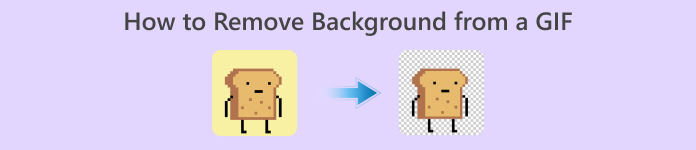
GIF ialah singkatan bagi Graphics Interchange Format dan digunakan secara meluas dalam komunikasi dalam talian, seperti ketika menghantar mesej kepada seseorang atau memberi komen pada kiriman. Mengalih keluar latar belakang daripada GIF atau imej boleh menjadi sukar melainkan anda mempunyai perisian yang memang dibuat untuk tugas sebegitu! Disebabkan popularitinya, semakin ramai pengguna ingin tahu cara menyunting dan mencipta GIF mereka sendiri. Nasib baik, kami telah mengumpulkan perisian dalam talian yang boleh dipercayai serta mudah digunakan yang boleh membantu pengguna mengalih keluar latar belakang daripada GIF.
Disyorkan: Pembuang Latar Belakang Percuma FVC
FVC Free Background Remover ialah utiliti yang berguna untuk mengalih keluar latar belakang daripada gambar anda. Ia menggunakan AI untuk mengesan dan mengenal pasti individu dalam foto. Selain itu, alat ini tersedia pada Windows/Mac. Secara keseluruhan, ia merupakan alat yang mudah dan boleh dipercayai yang boleh anda gunakan pada bila-bila masa dan di mana-mana sahaja.
Langkah 1. Muat Naik Imej/GIF
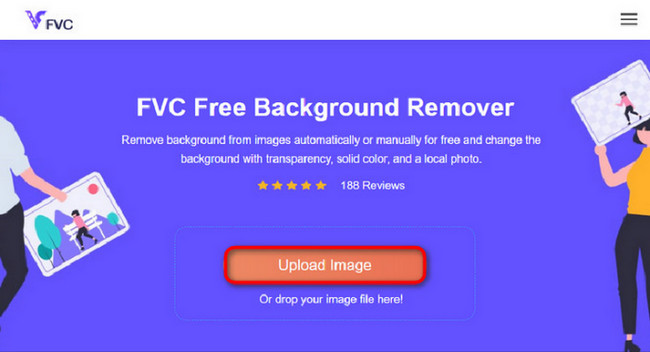
Langkah pertama ialah membuka pelayar pada komputer anda. Setelah membuka program dalam talian itu, anda akan diberi pilihan untuk memuat naik imej anda. Klik Upload Image untuk menambah GIF yang anda ingin alih keluar latar belakangnya.
Langkah 2. Sunting Imej
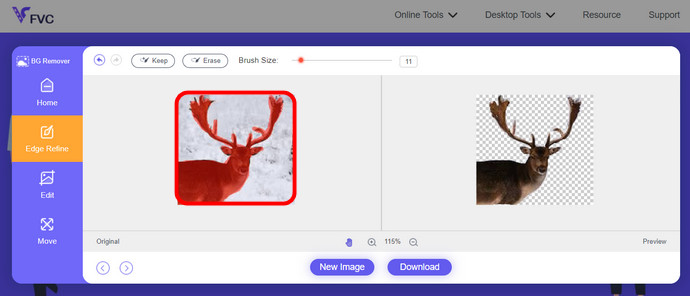
Selepas memuat naik, anda kini dibenarkan mengalih keluar sebarang penyingkiran sorotan yang tidak tepat daripada pengecaman AI. Hanya klik dan seret tetikus anda, dan lakukan mengikut keinginan anda.
Langkah 3. Muat Turun Imej yang Telah Disunting
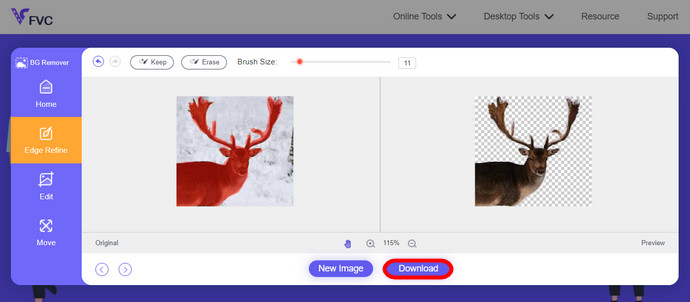
Akhir sekali, klik butang Download. Anda kini telah berjaya mengalih keluar latar belakang daripada gambar anda.
Bahagian 1. Buang Latar Belakang GIF menggunakan EZGIF.com
Perisian dalam talian ini ialah perisian penyuntingan dan penukaran foto/gif. Ia boleh mengedit dan menukar GIF, PNG, WEBP, IMG dan banyak lagi format. Di sini, anda boleh mengedit GIF anda dengan perisian penyuntingan yang disertakan dengan perisian tersebut.
Langkah 1. Masuk ke Laman
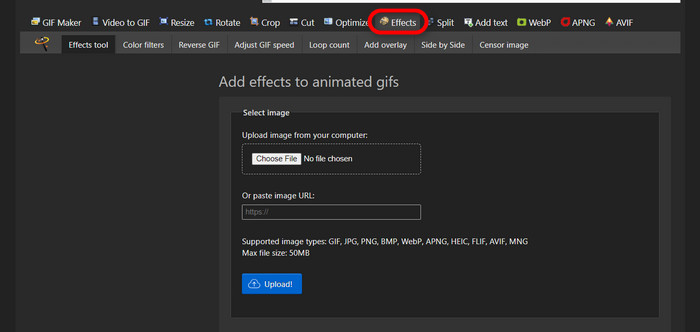
Untuk menggunakan alat dalam talian ini, buka pelayar anda dan masukkan pautan tersebut. Anda serta-merta diberikan pilihan mengikut keperluan anda. Laman ini membolehkan anda mengalih keluar latar belakang daripada GIF anda. Klik Effects untuk bermula.
Langkah 2. Pilih dan Muat Naik Imej/GIF
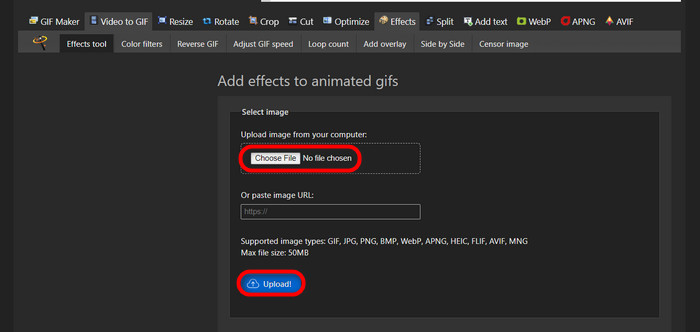
Sekarang, pilih fail pilihan anda untuk dimuat naik. Klik Choose Files, cari dalam direktori yang ditetapkan, dan tekan Upload untuk memuat naik fail pilihan anda.
Langkah 3. Sunting Imej
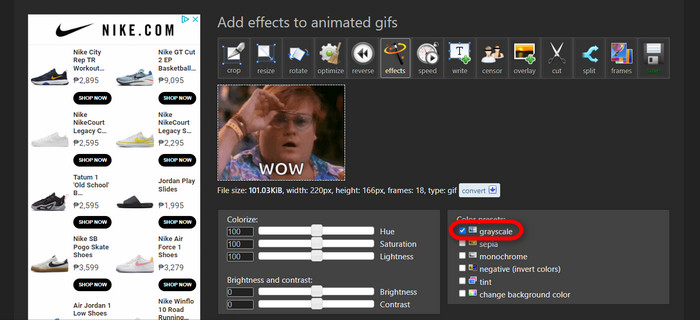
Selepas memuat naik, anda hampir selesai dengan proses mengalih keluar latar belakang daripada GIF anda atau menjadikan latar belakang GIF anda berwarna hitam. Sekarang, klik grayscale untuk menjadikan latar belakang anda gelap.
Langkah 4. Pratonton dan Tukar Imej/GIF
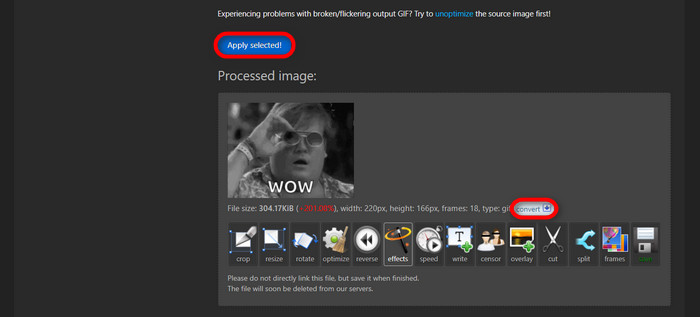
Selepas menambah efek, menukar saiz, dan memotong GIF baharu anda, klik Apply Selected, dan ia akan menunjukkan pratonton GIF yang telah disunting. Kemudian, klik butang convert untuk memuat turun fail anda.
Bahagian 2. Buat GIF tanpa sebarang Latar Belakang dalam Remove.bg
Laman web ini juga direka untuk mengalih keluar sebarang latar belakang dari mana-mana foto. Di sini, ia memberi anda pilihan untuk masih mengedit foto latar belakang anda yang dialih keluar secara automatik. Ia dikuasakan dengan AI yang mahir yang boleh mengecam subjek utama dan mengalih keluar latar belakangnya dengan sempurna.
Langkah 1. Muat Naik Imej/GIF
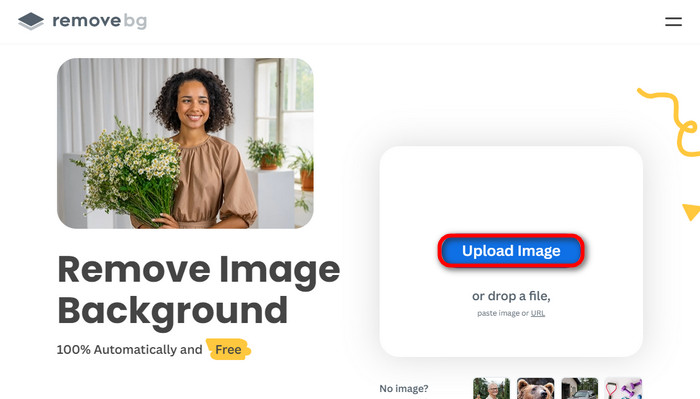
Mari mulakan dengan memuat naik imej kita. Buka perisian dalam talian pada pelayar anda apabila anda sudah berada di halamannya. Kemudian, klik Upload Image.
Langkah 2. Semak dan Sunting Imej
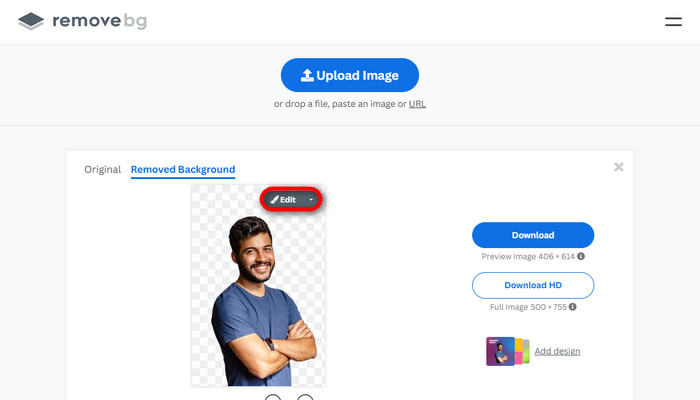
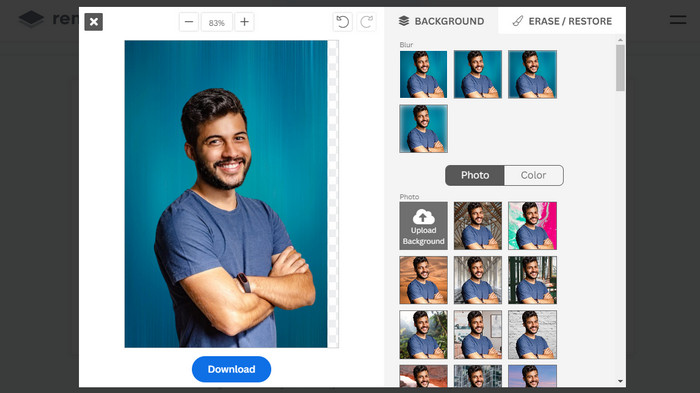
Sebaik sahaja imej anda dimuat naik, latar belakang foto anda sepatutnya telah dialih keluar secara automatik, tetapi anda masih boleh menyunting foto anda. Anda boleh melihat foto asal dengan mengklik butang Original di sebelah butang Removed Background. Pengguna boleh meletakkan latar belakang hitam pada imej mereka dengan lancar menggunakan perisian ini.
Langkah 3. Muat Turun Imej yang Telah Disunting
Dalam bahagian ini, anda telah selesai menyunting dan kini boleh memuat turun foto imej anda. Hanya klik butang Download di bawah foto anda.
Bahagian 3. Gunakan GIFMagic dalam Pembuangan Latar Belakang GIF
Dalam GIFMagic, kesan khas, menambah teks, menganimasikan dan banyak lagi! Ini semua mungkin menggunakan program dalam talian ini. GIF adalah mudah untuk digunakan semasa menyunting dalam perisian ini!
Langkah 1. Muat Naik Imej/GIF
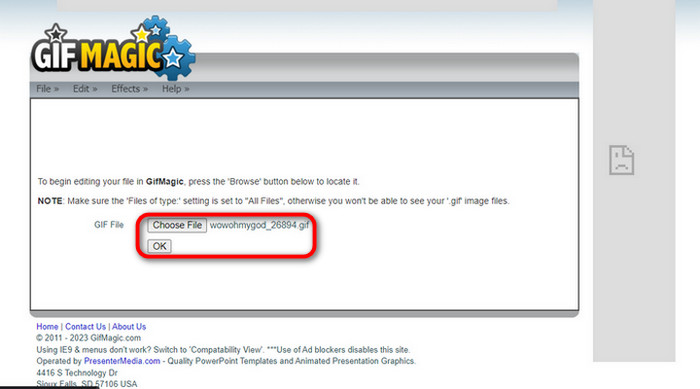
Selepas log masuk, laman tersebut membenarkan anda memuat naik fail pilihan anda ke dalam perisian. Anda boleh memuat naik fail .gif atau .img yang berguna kepada pengguna lain. Untuk memilih fail anda, klik Upload, dan selepas anda memilih fail, klik butang OK.
Langkah 2. Sunting Imej
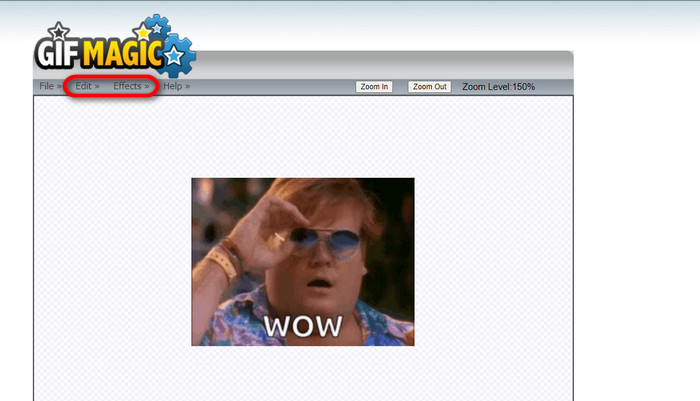
Sebaik sahaja anda berada pada halaman tersebut, anda akan melihat butang Edit dan Effects di sebelah butang File. Fail anda boleh disunting dalam bahagian ini, jadi lakukan kreativiti anda dan nikmati penyuntingan.
Langkah 3. Muat Turun GIF yang Telah Disunting
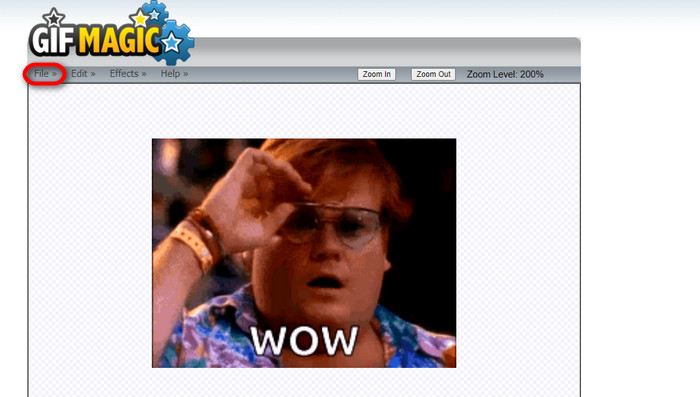
Selepas anda menjadikan latar belakang GIF lutsinar, hanya klik butang File dan klik Save. Siap! Selesai dan dimuat turun.
Bahagian 4. Jadikan Latar Belakang GIF Telus Menggunakan LunaPic
LunaPic ialah alat dalam talian percuma yang mampu mengalih keluar GIF latar belakang dalam talian. Ia boleh menilai dan mengedit PNG, GIF, JPG, JPEG dan banyak lagi jenis imej. Ia adalah perisian asas yang digunakan untuk menyunting pada banyak platform.
Langkah 1. Muat Naik Imej/GIF
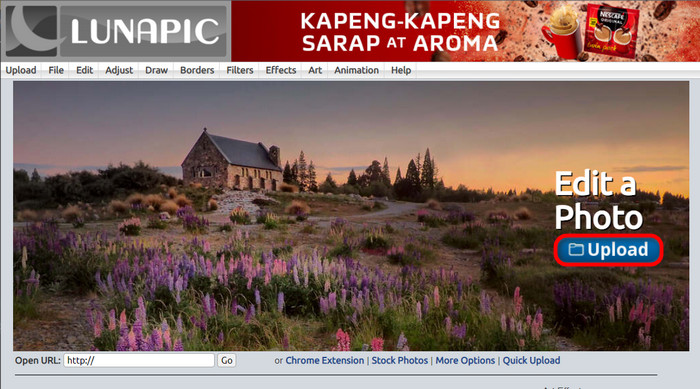
Selepas memasuki laman tersebut melalui pelayar lalai anda atau mana-mana pelayar pilihan anda, muat naik fail .img atau .gif anda ke laman itu. Hanya klik butang Upload.
Langkah 2. Sunting Imej/GIF
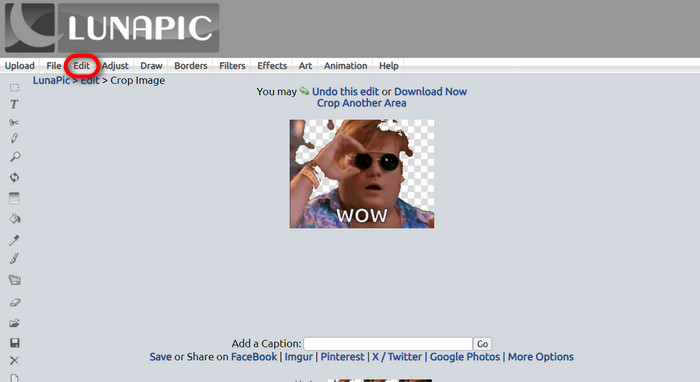
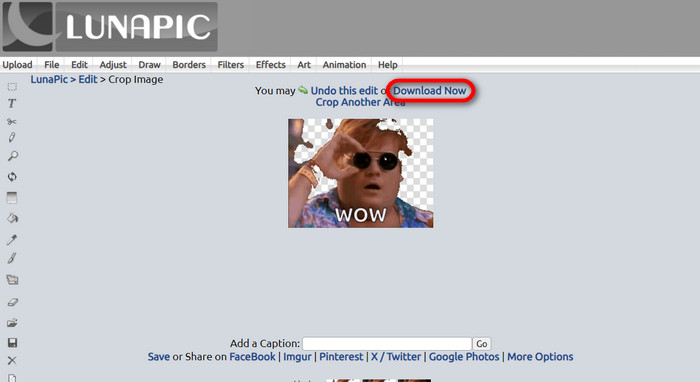
Kemudian, anda boleh menyunting fail anda dan menjadikan latar belakang GIF lutsinar dengan mengklik butang alat Edit kemudian Crop Image. Mula memotong imej latar belakang.
Langkah 3. Muat Turun GIF yang Telah Disunting
Selepas memotong latar belakang atau jika anda cuba meletakkan GIF berlatar belakang putih, anda kini boleh klik butang Download now! untuk menyimpan fail yang telah disunting!
Bacaan Lanjut:
4 Cara Terbaik untuk Mengalih Keluar Tera Air daripada GIF [Dalam Talian & Luar Talian]
Mendedahkan Alat Terbaik untuk Nikmat Desktop, Dalam Talian dan Mudah Alih

Video Converter Ultimate
345+ Muat Turun- Nikmati menonton video anda tanpa tera air menjengkelkan yang menyekat kandungan anda.
- Hasilkan video berkualiti baik yang mempunyai resolusi tinggi untuk tontonan yang lebih baik.
- Benarkan anda mengalih keluar sebarang tera air daripada sebarang jenis video.
- Menyediakan anda dengan banyak format untuk menukar fail anda.
Muat Turun PercumaUntuk Windows 7 atau lebih baharuMuat Turun Selamat
Muat Turun PercumaUntuk MacOS 10.7 atau lebih baharuMuat Turun Selamat
Bahagian 5. Soalan Lazim tentang Mengalih Keluar Latar Belakang
Bolehkah saya menukar PNG animasi kepada GIF?
Ya, adalah mungkin untuk menukar PNG kepada GIF. Walau bagaimanapun, terdapat beberapa jenis data yang boleh ditukar kepada beberapa format selagi anda mempunyai program yang betul.
Bolehkah saya menukar warna latar belakang GIF saya selepas mengalih keluarnya?
Sememangnya, terdapat banyak program yang menawarkan kerja sebegitu. Cuba FVC Background Remover untuk pengalihan latar belakang yang mudah.
Bolehkah saya membuat latar belakang GIF telus dalam cat?
Tidak, cat tidak mempunyai keupayaan seperti itu. Tetapi anda boleh mencari program lain yang menawarkan pekerjaan seperti itu.
Apakah GIF animasi dengan ketelusan?
GIF animasi dengan ketelusan ialah imej yang hanya memaparkan bahagian tertentu imej setelah diletakkan di tapak web tertentu. Ia boleh memaparkan berbilang imej jika dimasukkan ke dalam tapak web lain.
Adakah GIF membenarkan ketelusan?
Ya, tetapi tidak telus sepenuhnya. Ia hanya menyokong ketelusan 1-bit.
Kesimpulannya
Kini terdapat kepentingan dan permintaan yang besar terhadap program yang boleh menyunting GIF, seperti yang disebutkan di atas. Memotong, menyunting, melapis, dan memadam semuanya boleh dilakukan hanya dengan beberapa klik pada masa kini. Pengguna kini berinovasi dan memikirkan perkara yang tidak pernah dilakukan sesiapa pun, seperti membuat GIF berlatar belakang putih. Golongan pengguna sebegini lah sebabnya program hebat seperti ini dicipta, seperti FVC Background Remover.
-
 Pilih GIF Cropper Terbaik Dalam Talian dan Luar Talian untuk Memangkas GIF [2023]
 Memilih alat pemangkasan terbaik adalah satu kemestian sementara ciri ini pada pembuat GIF tersedia. Jadi apakah pilihan terbaik anda untuk memangkas fail dan cara menggunakannya?
-
 Ketahui 4 Cara Cara Membuat GIF daripada Imej [Dalam Talian & Luar Talian]
 Adakah anda ingin tahu cara membuat GIF daripada kompilasi imej anda? Kemudian klik pautan ini dan baca contoh berikut
-
 Gelung GIF dengan Looper GIF Animasi Terbaik pada Windows & Mac
 Ingin tahu rahsia GIF gelung terbaik dan buat satu? Jika ya, anda berada di tempat yang betul. Ketahui cara membuat gelung dengan gelung terbaik yang tersedia.
