


 Video Converter Ultimate
 Perakam Skrin
 Pembaikan Video
 Muat Turun Selamat
Membetulkan Kod Ralat 224003: Semua yang Anda Perlu Tahu
Sekurang-kurangnya seseorang ingin mengalami adalah untuk mereka melihat penampilan Kod Ralat 224003 pada skrin mereka. Memahami punca biasa Kod Ralat 224003, seperti isu rangkaian, keserasian penyemak imbas dan perisian lapuk, adalah penting untuk penyelesaian masalah yang berkesan. Mengetahui alat yang betul adalah perlu apabila menangani perkara sedemikian, yang memerlukan membuat keputusan untuk memastikan anda tidak akan merosakkan fail video sepenuhnya.
Artikel ini akan menghuraikan penyelesaian langkah demi langkah, menangani setiap punca yang berpotensi serta memberikan tip praktikal untuk menyelesaikan ralat tersebut. Pada akhir panduan ini, anda akan dilengkapi dengan pengetahuan untuk menavigasi kerumitan Ralat Kod 224003 dan memastikan pengalaman digital yang lancar. Sama ada anda menghadapi ralat ini buat pertama kali atau telah mengalaminya berulang kali, panduan kami bertujuan untuk memberdayakan anda dengan alat untuk menyelesaikan masalah, membaiki, dan mencegah Error Code 224003 pada masa hadapan. Pastikan anda membaca keseluruhan artikel hari ini supaya anda tahu cara menanganinya jika ia berlaku lagi pada masa akan datang.

Bahagian 1. Memahami Kod Ralat Video 224003
Kod Ralat 224003 boleh nyata dalam pelbagai bentuk, selalunya menunjukkan gangguan atau isu dalam sistem. Pengguna mungkin menghadapi ralat ini semasa menggunakan aplikasi tertentu, perkhidmatan penstriman atau penyemak imbas, yang membawa kepada kesulitan yang ketara. Untuk menangani dan menyelesaikan ralat ini dengan berkesan, adalah penting untuk memahami potensi puncanya, yang disenaraikan di bawah.
Punca Biasa Kod Ralat 224003
◆ Masalah Rangkaian: Sambungan internet yang lemah atau tidak stabil boleh mencetuskan Ralat Kod 224003, terutamanya apabila menstrim kandungan dalam talian. Ini juga menjadi punca kepada Ralat kod 232404.
◆ Keserasian Pelayar: Pelayar tertentu mungkin tidak serasi sepenuhnya dengan aplikasi atau perkhidmatan, lalu menyebabkan ralat ini.
◆ Perisian Ketinggalan Zaman: Perisian usang, termasuk pelayar dan aplikasi, boleh menjadi faktor berlakunya ralat ini.
◆ Cache atau Kuki Rosak: Cache yang terkumpul atau kuki yang rosak dalam pelayar anda boleh mengganggu fungsi aplikasi dengan baik, sekali gus mengakibatkan Ralat Kod 224003.
Dalam Situasi Apa Kod Ralat Berlaku
◆ Masalah dengan Platform Penstriman: Masalah pada bahagian pelayan platform penstriman, seperti penyelenggaraan, isu teknikal, atau trafik yang tinggi, boleh menyebabkan ralat kod 224003. Dalam keadaan sebegini, pengguna mempunyai kawalan terhad untuk menyelesaikan isu tersebut dan mungkin perlu menunggu sehingga pihak platform menanganinya.
◆ Pecutan Perkakasan (Hardware Acceleration): Pecutan perkakasan dalam tetapan pelayar anda kadangkala boleh menyebabkan masalah keserasian dengan kandungan video tertentu, lalu menghasilkan ralat kod 224003. Menyahdayakan pecutan perkakasan boleh menjadi satu penyelesaian yang berpotensi dalam kes sebegini, begitu juga untuk isu main balik video lain seperti video skrin hijau, video tersekat, dan sebagainya.
◆ Ketidakserasian dengan Peranti: Peranti atau sistem pengendalian tertentu mungkin tidak serasi sepenuhnya dengan kandungan video, menyebabkan ralat semasa main balik.
◆ Firewall Rangkaian atau Perisian Keselamatan: Perisian keselamatan atau firewall tertentu mungkin menyekat penstriman kandungan video tertentu, lalu memaparkan Ralat Kod 224003.
◆ Gangguan Sambungan Pelayar: Sambungan (extension) atau add-on pelayar tertentu boleh mengganggu fungsi pemain video dalam talian dengan baik, lalu mengakibatkan Ralat Kod 224003.
Adalah penting untuk memahami bahawa keadaan khusus yang mengakibatkan kod ralat 224003 mungkin berbeza; oleh itu, langkah penyelesaian masalah mungkin juga berbeza. Mengenal pasti sebab asas bergantung pada konteks di mana ralat berlaku untuk membetulkan isu dengan betul.
Bahagian 2. Panduan Langkah demi Langkah untuk Menyelesaikan Ralat 224003
Pembaikan Video Aiseesoft
Ralat 224003 boleh berlaku kepada sesiapa pada bila-bila masa dan pada mana-mana fail video, dan apabila ralat ini berlaku, anda mungkin melihat mesej seperti Error 224003: The video file cannot be played. Aiseesoft Video Repair ialah alat yang boleh dipercayai untuk membaiki masalah seperti fail video yang rosak atau terjejas, termasuk ralat 224003. Ia boleh membaiki video dalam pelbagai format, termasuk MP4, MOV, AVI, WMV, MKV dan FLV. Ia juga menyokong pembaikan video yang rosak akibat virus, perisian hasad dan faktor lain. Ikuti panduan langkah demi langkah ini untuk menyelesaikan masalah anda menggunakan Aiseesoft Video Repair dan pulihkan video anda ke keadaan asal yang sempurna.
Langkah-langkah Menyelesaikan Ralat 224003 Menggunakan Aiseesoft Video Repair:
Langkah 1. Lawati laman web Aiseesoft, muat turun Video Repair, dan ikut arahan pemasangan.
Muat Turun PercumaUntuk Windows 7 atau lebih baharuMuat Turun Selamat
Muat Turun PercumaUntuk MacOS 10.7 atau lebih baharuMuat Turun Selamat
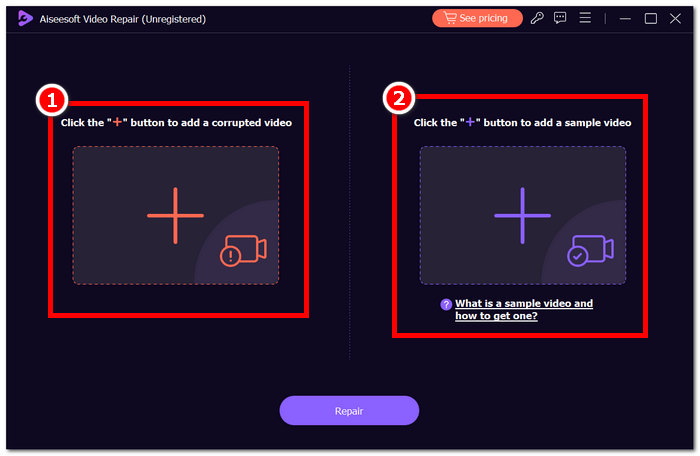
Langkah 2. Buka Aiseesoft Video Repair dan tambah video yang mengalami ralat kod 224003 pada simbol + merah. Klik simbol + ungu di sebelah kanan untuk menambah video sampel anda.
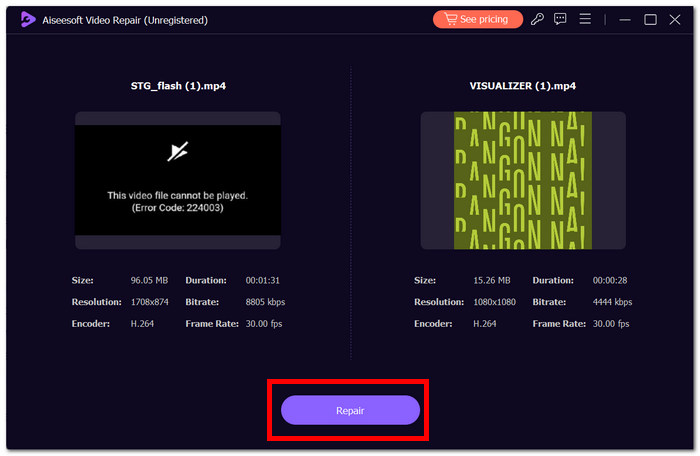
Langkah 3. Klik Repair, dan perisian akan menganalisis serta membaiki video tersebut.
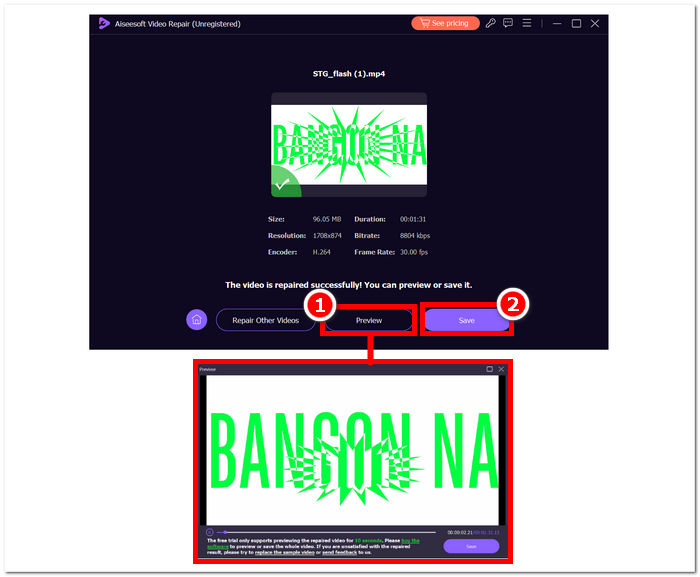
Langkah 4. Selepas pembaikan, klik Preview untuk menyemak. Klik Save untuk memuat turun video yang telah dibaiki, dan buka dengan pemain media anda untuk memeriksa sama ada Ralat 224003 telah diselesaikan.
Tip Tambahan:
◆ Simpan sandaran fail video asal sebelum mencuba sebarang pembaikan.
◆ Pastikan anda menggunakan versi terkini Pembaikan Video Aiseesoft untuk prestasi optimum.
Dengan tekun mengikuti arahan langkah demi langkah ini, anda boleh menggunakan Pembaikan Video Aiseesoft dengan cekap untuk menangani dan menghapuskan Ralat 224003, mengembalikan fail video anda kepada keadaan berfungsi dan menyeronokkan. Ingat untuk menyimpan video yang telah dibaiki ke lokasi pilihan anda dan nikmati tontonan tanpa gangguan tanpa kekecewaan Ralat 224003. Jika anda menghadapi sebarang cabaran semasa proses, rujuk dokumentasi Pembaikan Video Aiseesoft atau dapatkan bantuan daripada sumber sokongan mereka untuk panduan selanjutnya.
Bahagian 3. Soalan Lazim Mengenai Kod Ralat 224003
Mengapa Firefox terus mengatakan kod ralat video 224003?
Ralat video Firefox 224003 mungkin timbul disebabkan oleh isu sambungan rangkaian, percanggahan tetapan penyemak imbas atau ketidakserasian dengan kandungan video. Untuk menangani ralat ini, mulakan dengan mengesahkan kestabilan sambungan Internet anda, memastikan penyemak imbas anda dikemas kini dan mengosongkan cache dan kuki penyemak imbas anda. Selain itu, mengalih keluar sambungan sementara daripada penyemak imbas anda boleh membantu menentukan dan menyelesaikan konflik keserasian, yang berpotensi menghapuskan berlakunya ralat 224003 semasa main balik video.
Adakah membetulkan fail video mengurangkan kualiti video?
Membetulkan fail video boleh dicapai tanpa menjejaskan kualiti jika dilaksanakan dengan betul. Proses ini terutamanya menangani kebimbangan seperti rasuah atau ralat pemformatan dalam fail. Adalah penting untuk bergantung pada alat pembaikan video yang dipercayai dan, sebagai langkah berjaga-jaga, buat sandaran fail video asal sebelum memulakan sebarang prosedur pembaikan.
Bolehkah anda membetulkan kod ralat video dalam talian?
Untuk menangani kod ralat video dalam talian seperti 224003, muat semula halaman, semak sambungan Internet anda dan kemas kini penyemak imbas anda. Jika isu itu berterusan, pertimbangkan untuk mencuba penyemak imbas lain untuk keserasian. Jika semuanya gagal, hubungi sokongan platform atau forum komuniti untuk mendapatkan bantuan dalam menyelesaikan ralat dan memulihkan main balik video yang lancar.
Kesimpulannya
Error Code 224003 boleh menjengkelkan, tetapi anda boleh mengatasinya dengan maklumat dan prosedur penyelesaian masalah yang betul. Anda boleh membaiki ralat ini dengan mudah dan mengembalikan pengalaman digital yang lancar dengan mengenal pasti serta membetulkan punca berpotensi seperti masalah rangkaian, keserasian pelayar, dan perisian ketinggalan zaman. Jika anda menghadapi Error Code 224003 lagi, sila rujuk tutorial kami untuk penyelesaian langkah demi langkah. Dengan panduan ini, kekecewaan berkaitan teknologi anda akan menjadi sejarah, dan anda boleh menikmati aktiviti digital tanpa gangguan dengan mudah.
-
 Apakah Ralat 0xc10100bf dalam Video dan Cara Membetulkannya
 Adakah video anda tidak dimainkan kerana Ralat 0xc10100bf, dan anda sedang mencari cara untuk membetulkannya? Dalam artikel ini, anda akan mengetahui apa itu dan cara membetulkannya.
-
 Penyelesaian Pantas untuk Membetulkan Ralat Tidak Dapat Memainkan Video 150
 Pernah mengalami ketidakupayaan yang mengecewakan untuk memainkan ralat video 150 semasa pengalaman menonton video anda? Jangan risau kerana kami memberi anda perlindungan tentang cara membetulkannya.
-
 [Panduan Terperinci] Cara Membetulkan Video Google Drive Tidak Dimainkan pada Komputer
 Video di Google Drive tidak dimainkan dengan ralat "Terdapat masalah semasa memainkan video ini". Ia boleh disebabkan oleh Google Drive sendiri atau masalah krom. Artikel ini akan memperkenalkan 6 penyelesaian secara terperinci.
