


 Video Converter Ultimate
 Perakam Skrin
 Pembaikan Video
 Muat Turun Selamat
2 Cara Pantas untuk Mengecilkan Fail OGV Besar [Percuma & Dalam Talian]
OGV files are often used for playing webpage video content using the HTML5 < video > tag. When you are going to send large OGV files to partners, clients, or friends, compressing those files becomes incredibly useful. Since there are many file size limitations of many email and file transfer platforms, compressed videos can greatly prevent the file transfer failure, at least in most cases. So, we’ll take a look at two online ways to compress your OGV files and make them smaller in this post.

Bahagian 1. Cara Dalam Talian untuk Memampatkan Fail OGV dengan Pemampat OGV
Free Video Compressor is a popular and useful free online OGV compressor tool available for users. Unlike many other common free online tools, Free Video Compressor comes without restrictions on either the number or size of the files uploaded. More importantly, there will be no watermark on your exported video files. Also, it allows you to compress MP4, AVI, WMV, MOV, and many other common video files without destroying quality.
Cara Memampatkan Fail OGV menggunakan Pemampat Video Percuma
Step 1. Go to the online OGV video compressor website by entering https://www.free-videoconverter.net/free-video-compressor/.
Step 2. Locate and click Add Files to Compress button, and then download its launcher to activate the service. In the window that pops up, go and find your OGV files and hit Open to confirm.

Step 3. Next, you should define the compression settings to make the file smaller. You can set the size of your video, change the resolution, select the bitrate, and more.

Step 4. Hit on the Compress button to commence the process. After it’s finished, the file will be downloaded to your computer automatically.

Selain itu, pemampat video percuma ini dapat membantu anda menyelesaikan masalah pemampatan video yang lain. Cukup periksa artikel berikut:
How to Compress a Video for Email
How to Compress AVCHD Video Files for Free on Windows and Mac
Bahagian 2. Cara Memampatkan dan Mengoptimumkan Fail OGV dengan Clideo
Clideo adalah kotak alat video all-in-one percuma. Ia berfungsi dengan semua format yang popular dan memampatkan dengan pantas dan tidak memerlukan muat turun. Ini membolehkan anda memampatkan fail OGV hingga 500MB secara percuma, tetapi tidak mempunyai had kuantiti. Sekarang anda boleh mengikuti langkah-langkah di bawah untuk mengurangkan saiz fail OGV anda.
Step 1. Visit https://clideo.com/compress-video and then hit on the Choose file button.
Step 2. Upload an OGV file you want to compress from your computer. You can also select the file from Dropbox or Google Drive by clicking the blue downward arrow.
Step 3. When the file is uploaded, the tool will start processing the video. The processing time depends on the size of the video.
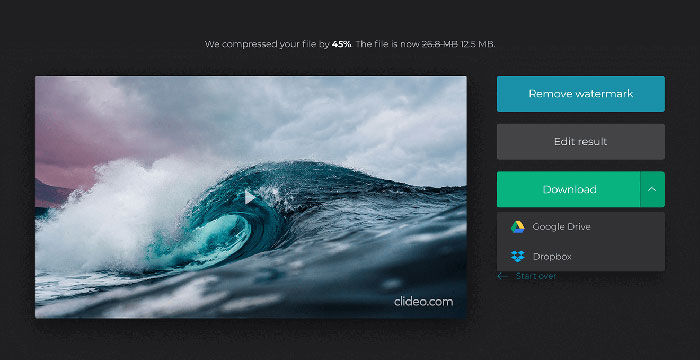
Step 4. Once the compression is over, you can see the initial file size and the compressed one. Now, you can preview the result to make sure it looks good. If you’re satisfied with it, you can click on the Download button to save it to your device or cloud storage.
Bahagian 3. Soalan Lazim Memampatkan Fail OGV
Apakah fail OGV?
Fail OGV adalah fail video yang disimpan dalam format bekas Ogg sumber terbuka Xiph.Org. Ini mengandungi aliran video yang mungkin menggunakan satu atau lebih codec yang berbeza, seperti Theora, Dirac, atau Daala. Fail OGV boleh dimainkan menggunakan pelbagai media player.
Bagaimana pemampatan OGV berfungsi?
Ketika datang ke pemampatan fail OGV, itu adalah pemampatan antara bingkai yang menyebabkan pengurangan ukuran file dengan menghapus persamaan yang terjadi di antara bingkai video.
Bagaimana saya memampatkan format MP4 ke OGV?
Anda boleh menggunakan alat yang disebutkan di atas - Pemampat Video Percuma untuk memampatkan fail MP4 anda ke OGV. Atau anda boleh memilih aplikasi penukar video untuk membantu anda membuatnya.
Kesimpulannya
Kaedah dalam talian di atas dapat membantu anda mengecilkan video OGV dengan cekap. Yang mana yang anda lebih suka menggunakan? Anda boleh berkongsi cadangan anda dalam komen di bawah!
-
 Dari 50MB hingga 5MB - Cara Memampatkan Fail MP4 dalam Detik
 Video MP4 terlalu besar untuk dimuat naik? Ingin mengurangkan saiz video? Berikut adalah 3 kaedah yang cekap untuk memampatkan fail MP4 ke saiz yang lebih kecil tanpa had.
-
 Tutorial - 7 Cara Memampatkan Video secara Percuma tanpa Kehilangan Kualiti
 Baca dan dapatkan 7 cara untuk memampatkan video secara percuma di komputer atau telefon anda. Anda boleh mengurangkan video besar menjadi ukuran fail kecil untuk e-mel, Twitter, Instagram, YouTube, WhatsApp dan banyak lagi dengan mudah.
-
 Cara Memampatkan Fail MOV pada Windows, Mac, iPhone dan Android
 Artikel ini menunjukkan cara memampatkan video QuickTime MOV pada telefon atau komputer anda secara terperinci. Sekiranya video MOV anda terlalu besar untuk dihantar, dikongsi atau disimpan, anda boleh mendapatkan 4 penyelesaian yang boleh dilaksanakan di sini.
