


 Video Converter Ultimate
 Perakam Skrin
 Pembaikan Video
Muat Naik Foto Berkualiti Tinggi (HD) ke Facebook untuk Meningkatkan Profil
Kepentingan memuat naik foto HD ke Facebook tidak boleh dipandang remeh. Profil Facebook anda berfungsi sebagai representasi digital diri anda atau jenama anda, dan kualiti imej yang anda muat naik sangat mempengaruhi cara audiens memandang anda. Tiada siapa yang mahu cara perkenalan diri yang berkualiti rendah di dunia digital. Walaupun masalah seperti foto kabur dan berkualiti rendah kadangkala tidak dapat dielakkan, ia tetap bergantung kepada mencari alatan yang betul untuk mengelakkan atau membaiki isu tersebut apabila memuat naik foto HD ke Facebook.
Dalam artikel ini, kami akan menyelidiki peningkatan kualiti imej anda, menawarkan petua dan teknik berharga untuk meningkatkan profil anda ke tahap baharu, daripada memberikan penyelesaian kepada melaraskan tetapan Facebook anda untuk memastikan muat naik berkualiti tinggi. Oleh itu, mulakan membaca artikel ini, dan belajar untuk menambah baik dan membetulkan kualiti buruk foto Facebook anda.

Bahagian 1. Cara Muat Naik Foto Berkualiti Tinggi ke Facebook
Bagaimana cara memuat naik foto HD di Facebook? Memuat naik foto berkualiti HD di platform seperti Facebook kadangkala boleh menimbulkan masalah seperti kualitinya diturunkan secara automatik, menjadikannya kabur atau kurang terperinci apabila dilihat di profil anda. Semasa memuat naik foto berkualiti tinggi ke Facebook, pastikan anda mempunyai saiz imej terbaik yang tersedia di pihak anda dan cara terbaik untuk mengekalkan foto pada kualiti setinggi mungkin. Di sinilah kegunaan alat pembesar imej dalam talian, iaitu FVC Free Image Upscaler. Dengan memanfaatkan teknologi AI yang canggih, alat ini memastikan ketepatan yang lebih baik dalam setiap hasil, di samping pantas dan selamat. Yang penting, tiada pendaftaran akaun diperlukan untuk mengakses fungsinya, membolehkan pengguna menggunakan alat ini secara bebas merentasi pelbagai format imej di semua peranti dan pelayar web. Dengan antara muka yang mesra pengguna dan langkah yang mudah, menambah baik imej anda menjadi satu proses yang bebas masalah.
Langkah-langkah Menggunakan FVC Free Image Upscaler:
Langkah 1. Sebelum memuat naik foto anda ke Facebook, pastikan kualiti foto anda telah dipertingkat dengan melayari laman web FVC Free Image Upscaler.
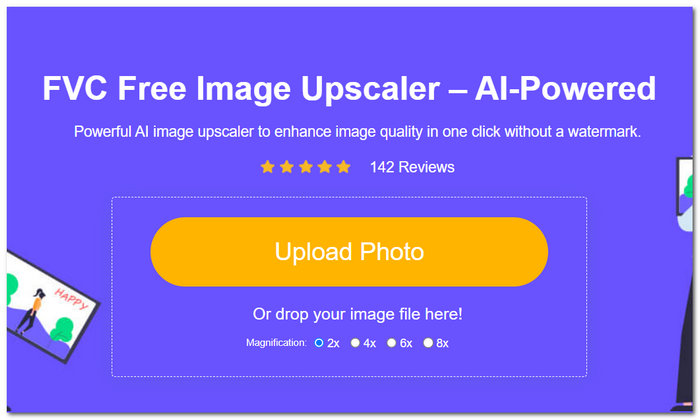
Langkah 2. Pada antara muka alat, klik pada bahagian Upload Photo. Kemudian, sebaik sahaja foto anda dimuatkan ke dalam alat tersebut, tetapkan dan klik pilihan Pembesaran (Magnification) yang anda inginkan pada bahagian atas skrin daripada 2x hingga 8x.
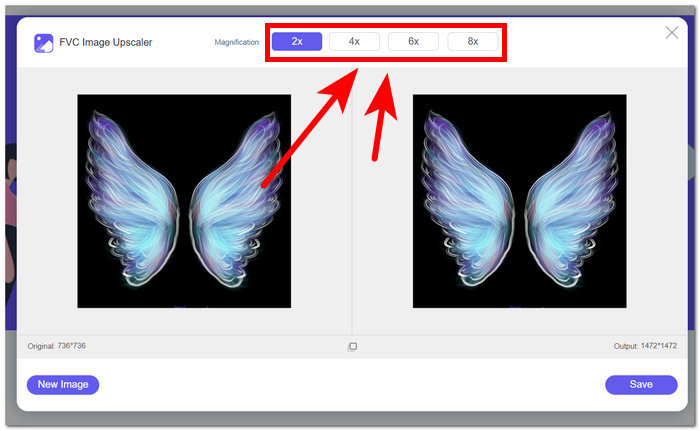
Langkah 3. Setelah anda memilih tetapan pembesaran yang sesuai, foto anda akan menjalani proses untuk meningkatkan kualitinya.
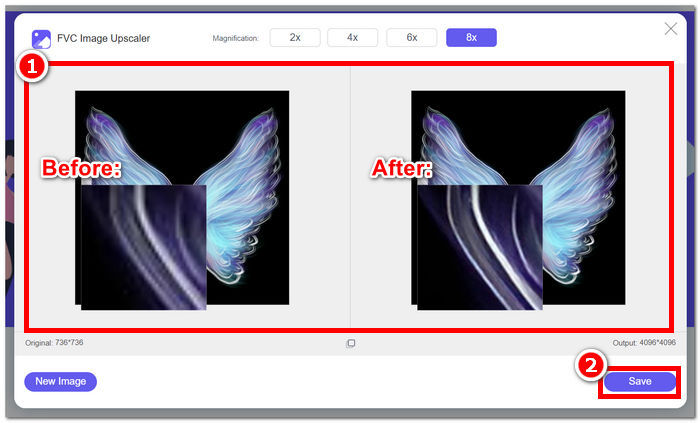
Langkah 4. Akhir sekali, setelah proses selesai, muat turun foto yang telah dipertingkatkan dengan mengklik butang Save.
Langkah-langkah Memuat Naik Foto yang Telah Dipertingkat ke Facebook:
Langkah 1. Untuk memuat naik foto yang telah dipertingkat menggunakan alat FVC Free Image Upscaler, pergi ke akaun Facebook anda.
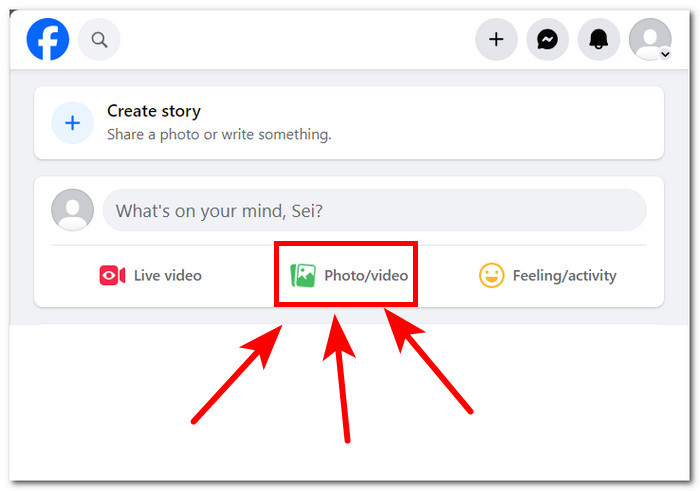
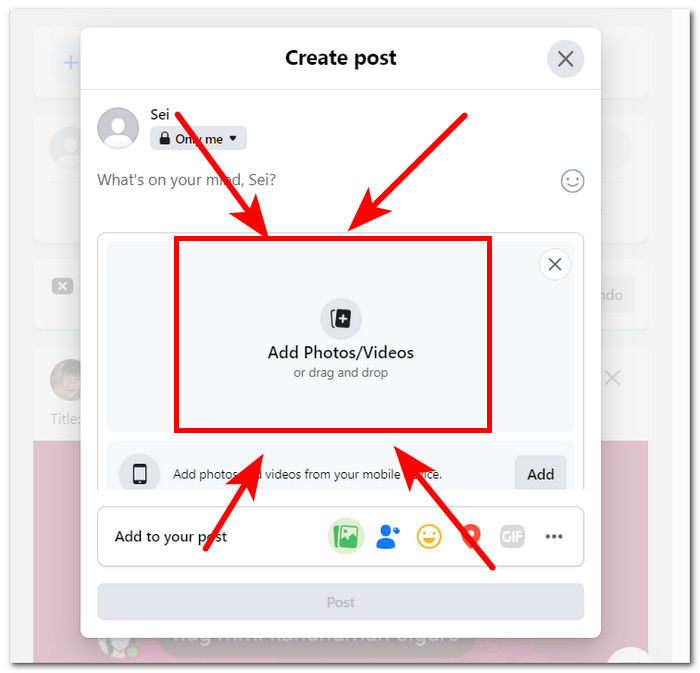
Langkah 2. Klik pada bahagian Photo/Video yang terletak betul-betul di bawah bahagian Create Post anda.
Langkah 3. Muat naik foto yang telah dipertingkat dengan mengklik pada bahagian Add Photos/Videos.
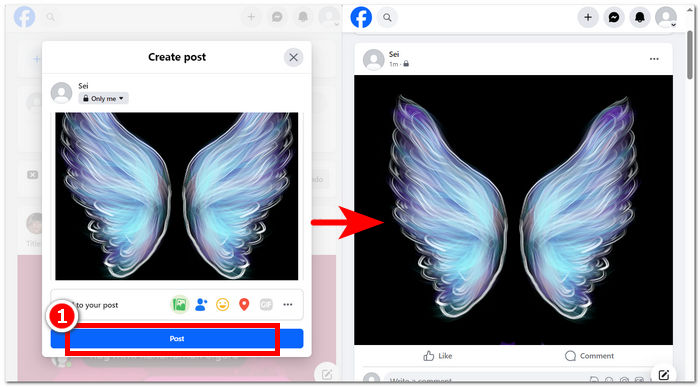
Langkah 4. Akhir sekali, setelah foto anda selesai dimuat untuk siaran, klik butang Post dan nikmati imej berkualiti tinggi tanpa kehilangan butiran.
Kesimpulannya, menggunakan alat dalam talian seperti FVC Free Image Upscaler boleh menjamin proses penjimatan masa apabila ingin memuat naik foto anda dalam resolusi HD mereka di Facebook. Menggunakannya secara percuma tanpa perlu anda mendaftar atau membayar untuk alat itu hanya menjadikan alat ini sebagai alat yang ideal untuk digunakan untuk setiap pengguna. Mengikuti langkah di atas pastinya menjawab kebimbangan seperti cara memuat naik foto definisi tinggi di Facebook.
Bahagian 2. Laraskan Tetapan Kualiti Muat Naik Foto Facebook
Memuat naik foto anda ke Facebook kadangkala boleh menghasilkan kualiti yang kabur. Akibatnya, ini membolehkan pengguna tidak menikmati masa mereka di platform kerana foto Facebook dimuat naik kabur dan kadangkala berpixel sebagai tindak balas kepada tetapan kualiti muat naik anda. Bahagian ini akan membolehkan anda melaraskan tetapan kualiti anda dalam memuat naik foto serta video anda.
Langkah 1. Pergi ke akaun anda melalui aplikasi atau laman web Facebook.
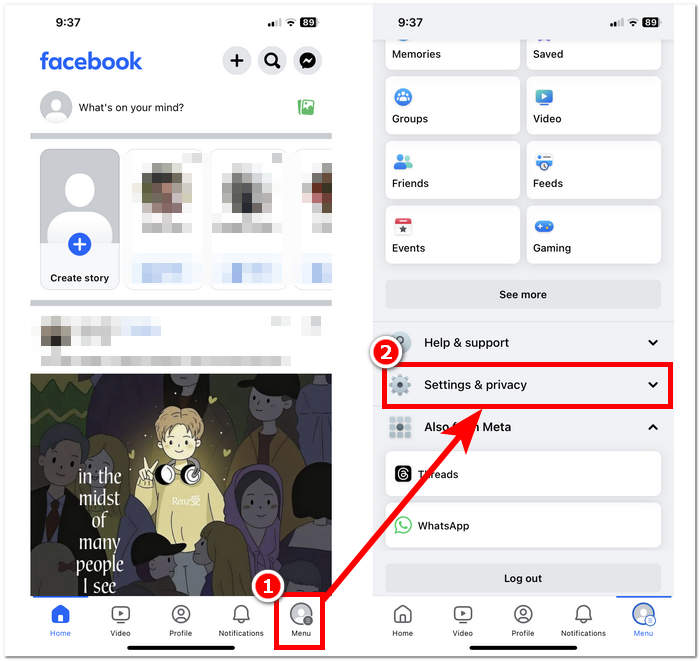
Langkah 2. Klik pada bahagian Menu, kemudian tatal ke bawah untuk mencari dan klik pada bahagian Settings & Privacy.
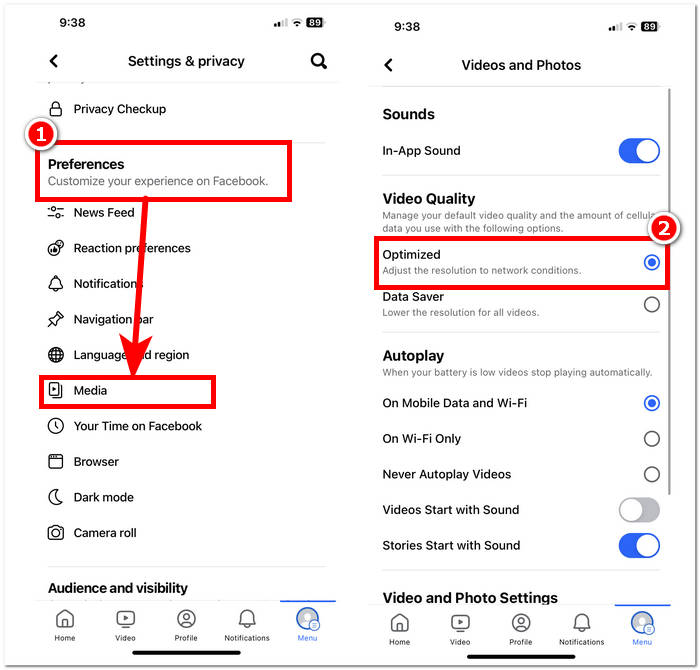
Langkah 3. Di bawah Settings & Privacy, cari kemudian klik pada bahagian Media di bawah tetapan Preferences.
Langkah 4. Untuk menukar kualiti muat naik foto dan video anda, pastikan anda memilih tetapan Optimized untuk Kualiti Video. Ini akan memastikan bukan sahaja video anda, tetapi juga foto, sentiasa dimuat naik dalam kualiti terbaik bergantung pada sambungan internet anda.
Langkah-langkah yang diberikan di atas sebenarnya lebih mudah diikuti daripada yang anda jangkakan. Justeru, ini menjawab persoalan tentang cara memuat naik foto berkualiti tinggi ke Facebook mudah alih. Dengan mengikuti langkah-langkah di atas, anda mendapat penyelesaian untuk membaiki atau mengoptimumkan kualiti foto anda yang dimuat naik ke Facebook serta juga video.
Bahagian 3. Soalan Lazim Mengenai Memuat Naik Foto HD ke Facebook
Apakah kualiti foto maksimum yang disokong oleh Facebook?
Kualiti foto maksimum yang disokong oleh Facebook ialah 2048 piksel pada sisi terpanjang untuk imej yang dimuat naik dari komputer. Walau bagaimanapun, untuk imej yang dimuat naik dari peranti mudah alih, Facebook menyokong resolusi sehingga 960 piksel pada bahagian terpanjang.
Bolehkah anda memuat naik foto Langsung di Facebook?
Ya, anda boleh memuat naik Foto Langsung di Facebook. Live Photos ialah ciri yang tersedia pada peranti iOS yang merakam beberapa saat video sebelum dan selepas anda mengambil foto. Apabila anda memuat naik Foto Langsung ke Facebook, ia akan muncul sebagai imej pegun, tetapi pengguna boleh menekan dan menahan foto untuk melihat gerakan yang ditangkap dalam Foto Langsung.
Mengapa foto Facebook saya kabur?
Mungkin terdapat beberapa sebab mengapa foto Facebook anda kelihatan kabur. Beberapa sebab biasa termasuk memuat naik foto dengan resolusi rendah atau memampatkannya terlalu banyak, memuat naik foto yang terlalu kecil untuk ruang yang disediakan di Facebook atau melihat foto dalam mod resolusi rendah pada sambungan internet yang perlahan. Untuk memastikan foto anda kelihatan tajam di Facebook, cuba muat naik imej dengan peleraian yang lebih tinggi dan elakkan pemampatan yang berlebihan. Selain itu, pastikan anda melihat foto pada sambungan internet yang stabil untuk menghalangnya daripada dimuatkan dalam resolusi rendah.
Mengapa saya perlu memuat naik foto HD ke Facebook?
Memuat naik foto HD ke Facebook memastikan imej anda mengekalkan kualiti dan kejelasannya, memberikan pengalaman tontonan yang lebih baik untuk khalayak anda. Foto resolusi tinggi juga lebih menonjol pada suapan berita pengguna, meningkatkan kemungkinan penglibatan dengan kandungan anda.
Adakah memuat naik foto HD menjejaskan had storan saya di Facebook?
Memuat naik foto HD mungkin menggunakan lebih banyak ruang storan di Facebook berbanding imej resolusi standard. Walau bagaimanapun, Facebook menawarkan storan yang mencukupi untuk foto dan video, jadi anda tidak mungkin menghadapi masalah storan melainkan anda memuat naik sejumlah besar kandungan.
Kesimpulannya
Perlu diingat bahawa memuat naik foto HD di Facebook adalah sangat penting. Foto yang anda hantar ke profil Facebook adalah versi digital diri anda atau jenama anda, dan cara audiens memandang anda sangat dipengaruhi oleh mutu foto yang anda muat naik. Secara asasnya, memberi keutamaan kepada muat naik berkualiti tinggi di Facebook akan menambah baik profil anda dan juga pengalaman audiens anda, menjadikannya lebih menarik dan menggiurkan dari segi visual. Dalam dunia digital hari ini, mengetahui cara memuat naik foto berkualiti tinggi adalah penting bagi sesiapa sahaja yang ingin membina kehadiran dalam talian yang kemas ataupun perniagaan yang mahu menonjolkan imej profesional.
-
 Cara Meningkatkan Saiz Imej Dalam Talian dan Luar Talian
 Temui cara termudah untuk meningkatkan saiz imej tanpa kehilangan kualiti. Lihat alat dan perisian mengubah saiz kami untuk memastikan kualiti optimum untuk gambar anda.
-
 Kajian Fotor Untuk Penyingkiran Latar Belakang dan Penambah Foto
 Apa yang anda perlu tahu tentang Pembuang Latar Belakang Fotor dan Penambah Foto. Lihat beberapa cirinya dan lihat alternatif cadangan yang sesuai dengan keperluan anda.
-
 Penambah Imej Potongan Pro: Muat Naik, Berskala Tinggi untuk Menawan
 Alami tahap peningkatan imej yang seterusnya dengan penambah foto Cutout Pro. Ketahui ciri utamanya, kualiti output dan format imej yang disokong.
