


 Video Converter Ultimate
 Perakam Skrin
 Pembaikan Video
 Muat Turun Selamat
3 Cara untuk Memampatkan Foto untuk E-mel dengan Mudah [Panduan]
E-mel ialah platform yang hebat untuk menghantar mesej dengan lampiran foto dan fail lain yang diperlukan. Walau bagaimanapun, sesetengah pengguna menghadapi kesukaran untuk menghantar foto fail besar kerana ia membawa kepada masa muat naik yang perlahan, penghantaran gagal atau melebihi had saiz lampiran yang dikenakan oleh pembekal e-mel. Untuk mengelakkan isu ini, saiz semula foto anda sebelum menghantarnya adalah penting.
Dengan itu, dalam artikel ini, kami akan membimbing anda melalui 3 kaedah tentang cara memampatkan foto untuk e-mel, bagi memastikan lampiran foto anda mudah dihantar dan diterima tanpa menjejaskan kualitinya.

Bahagian 1. Faedah Memampatkan Foto untuk E-mel
Memampatkan foto, secara amnya, mempunyai banyak faedah, termasuk untuk penggunaan e-mel. Berikut ialah perkara yang anda boleh nikmati apabila mengubah saiz foto untuk e-mel:
• Oleh kerana pemampatan imej bermaksud menukarkan saiz foto kepada saiz yang lebih kecil, anda boleh menghantar berbilang lampiran foto dalam satu e-mel dengan lebih mudah berbanding foto yang tidak dimampatkan.
• Selalunya, penyedia perkhidmatan e-mel mengenakan had saiz pada lampiran yang boleh anda hantar. Dengan memampatkan foto anda untuk e-mel, anda boleh kekal dalam had ini, sekali gus memastikan e-mel anda dihantar tanpa sebarang masalah. Ini berguna apabila menghantar e-mel kepada berbilang penerima atau apabila menyertakan jenis lampiran lain bersama foto anda.
• Apabila foto dimampatkan, ini hanya bermaksud ia akan mengambil ruang yang lebih sedikit, membolehkan anda menggunakan kuota storan e-mel anda dengan lebih baik.
• Lampiran e-mel yang besar kadangkala boleh ditandai oleh pelayan e-mel, yang mengakibatkan kegagalan penghantaran atau e-mel ditandakan sebagai spam. Memampatkan foto anda untuk e-mel membantu mengelakkan masalah ini, sekali gus memastikan lampiran e-mel anda sampai kepada penerima yang dimaksudkan tanpa sebarang isu.
• Dalam situasi tertentu di mana pengguna menggunakan telefon bimbit untuk menyemak e-mel mereka, foto yang telah dimampatkan lebih mudah dimuat turun dan dilihat pada peranti mudah alih berbanding foto yang tidak dimampatkan.
Bahagian 2. Mampatkan Foto untuk E-mel dengan Menukar Format Imej
Jika anda ingin memampatkan foto untuk e-mel, kaedah pertama yang anda boleh cuba ialah dengan menggunakan alat penukar imej. Dengan ini, ia akan menukar imej anda kepada format yang anda inginkan di mana proses penukaran turut mengoptimumkan foto anda kepada saiz yang diingini dan lebih terurus.
FVC Free Image Converter ialah alat penukar percuma yang membolehkan pengguna menukar foto mereka kepada pelbagai format fail imej, seperti JPG, PNG dan GIF. Jadi, jika anda menghantar satu fail imej melalui e-mel dalam format yang menyimpan lebih banyak data sekali gus menjadikan saiz fail lebih besar, anda sememangnya boleh memanfaatkan alat ini. Selain itu, ia sangat sesuai apabila anda ingin menghantar berbilang fail besar kerana ia boleh menukar secara kelompok sehingga 40 imej sekaligus. Berikut ialah cara anda boleh menggunakan alat ini untuk memampatkan foto anda bagi e-mel:
Langkah 1. Mula-mula, pada pelayar anda, cari FVC Free Image Converter untuk membolehkan anda mengakses alat dalam talian tersebut.
Langkah 2. Seterusnya, pilih format fail output yang anda inginkan dalam pilihan Convert to. Selepas itu, klik butang Add Images untuk mengimport imej yang anda mahu tukar.
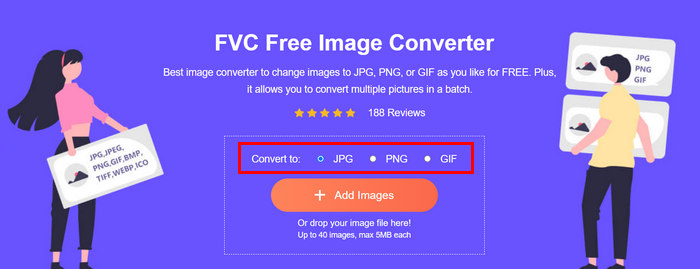
Langkah 3. Setelah selesai, klik butang Download All.
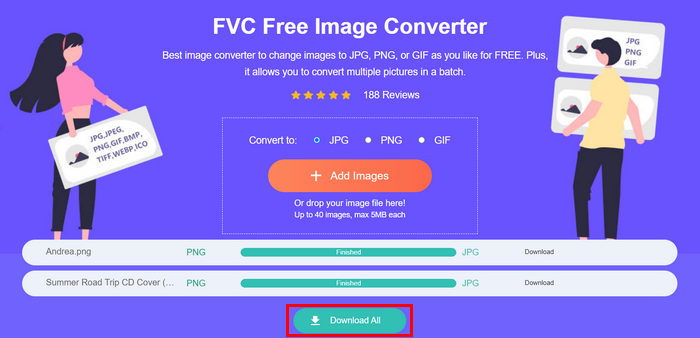 Dengan alat Penukar Imej Percuma FVC, ia dijamin bahawa foto anda yang ditukar kini dimampatkan dan telah dikecilkan saiznya, yang sesuai untuk kegunaan e-mel.
 Bahagian 3. Kecilkan Foto untuk E-mel dengan Alat Pemampatan Dalam Talian
FVC Free Image Compressor ialah alat pemampat dalam talian percuma yang memudahkan proses pemampatan foto untuk e-mel. Pengguna hanya perlu memuat naik atau mengimport fail imej dan biarkan alat tersebut memampatkannya secara automatik. Jika anda bimbang tentang kehilangan kualiti, alat ini menggunakan pengoptimuman terbaik dan algoritma pemampatan lanjutan. Ini akan memastikan kualiti imej anda dikekalkan semasa memampatkannya untuk e-mel.
Selain itu, jika anda perlu memampatkan sekumpulan imej, alat ini membolehkan anda memampatkan 40 imej secara serentak. Akhir sekali, ia menyokong pelbagai format imej popular seperti JPEG, PNG, SVG dan GIF animasi.
Langkah 1. Pada pelayar anda, akses laman web rasmi mereka.
Langkah 2. Selepas itu, klik Upload Images untuk mengimport imej yang anda mahu mampatkan untuk web anda. Sila ambil perhatian bahawa alat ini akan secara automatik memampatkan foto anda sebaik sahaja anda memilihnya dan klik open.
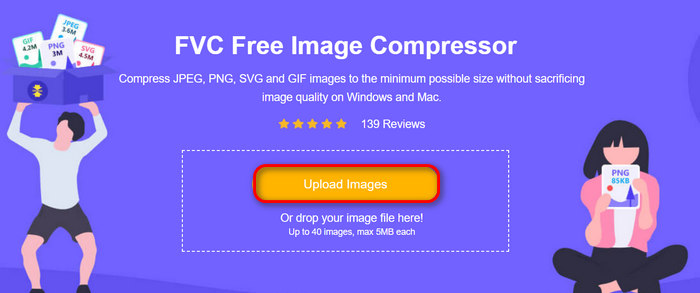
Langkah 3. Selepas memampatkan imej anda, anda boleh pratonton dengan menyemak saiz baharunya selepas pemampatan. Akhir sekali, klik Download All untuk menyimpan imej anda.
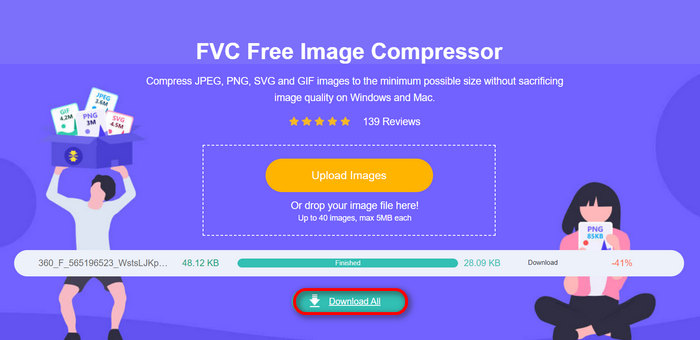
Kaedah ini benar-benar boleh membantu anda memampatkan foto untuk e-mel tanpa menanggung langkah rumit dan yuran langganan. Selain itu, antara muka yang mesra pengguna dan intuitif menjadikannya alat yang ideal untuk mana-mana peringkat pengguna. Jadi, jika anda ingin mengoptimumkan foto anda untuk penggunaan e-mel, cuba kaedah ini sekarang.
Bahagian 4. Ubah Saiz Foto untuk E-mel kepada Saiz Yang Ditentukan
Jika anda ingin mengubah saiz foto untuk e-mel kepada saiz yang ditentukan, maka anda boleh mencuba alat IMGonline. Alat pemampat imej ini membolehkan anda mengubah saiz imej anda kepada saiz pilihan anda. Begini cara melakukannya:
Langkah 1. Pada laman web mereka, klik butang Choose File untuk menambah foto yang ingin anda mampatkan.

Langkah 2. Seterusnya, tetapkan tetapan untuk pemampatan fail JPEG. Masukkan saiz yang anda mahukan, sama ada dalam KB atau MB, bergantung pada pilihan anda.

Langkah 3. Dalam menu Size Reducing in Megapixel, pilih tahap pemampatan yang anda inginkan untuk foto anda atau bagaimana anda mahu menghadkan pemampatan foto tersebut.
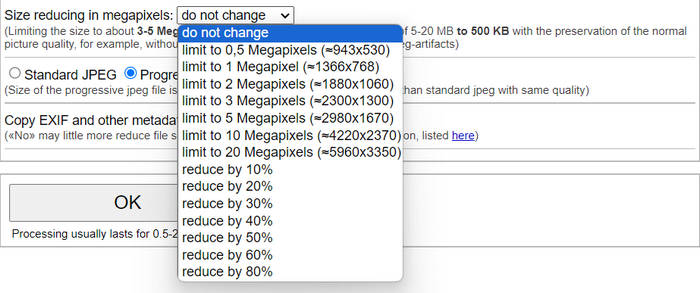
Langkah 4. Selepas itu, pilih antara Standard JPG atau Progressive JPG.

Langkah 5. Setelah selesai, hanya klik butang OK.
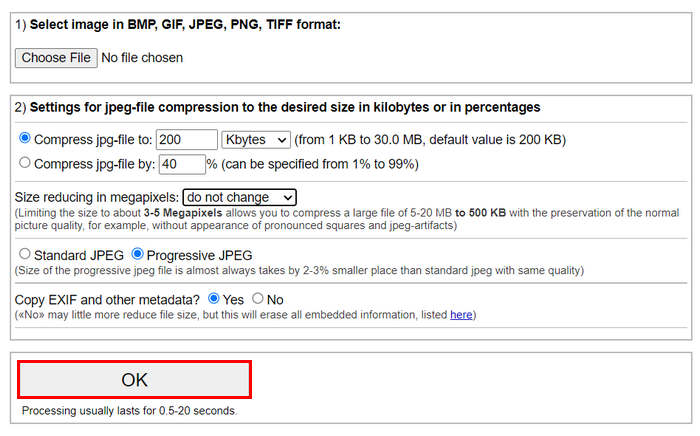
Berhubung dengan memilih antara JPG standard dan JPG progresif, perlu diingat bahawa saiz fail jpeg progresif sentiasa diambil oleh 2-3% tempat yang lebih kecil daripada jpeg standard dengan kualiti yang sama.
Bahagian 5. Soalan Lazim tentang Memampatkan Foto untuk E-mel
Apakah saiz yang perlu saya ubah saiz foto saya untuk e-mel?
Apabila bercakap tentang saiz yang sesuai untuk menghantar foto dalam e-mel, walaupun tiada sekatan, namun, ia secara amnya disyorkan untuk mengubah saiz foto anda kepada maksimum 1024x768 piksel. Selain itu, mengekalkan saiz imej anda di bawah 1MB membantu mengelakkan masalah dengan had lampiran dan memudahkan penerima memuat turun dan melihat imej.
Bagaimana untuk memampatkan imej untuk Gmail?
Memampatkan imej untuk Gmail boleh dilakukan dengan pelbagai kaedah. Salah satu cara yang paling mudah ialah menggunakan alat pemampatan dalam talian seperti alat pemampat imej percuma FVC. Untuk menggunakannya, anda hanya perlu memuat naik fail imej anda, dan alat tersebut akan memampatkannya secara automatik.
Apakah jenis imej yang terbaik untuk e-mel?
Jenis imej terbaik untuk e-mel ialah JPEG dan PNG. JPEG digunakan secara meluas kerana kadar pemampatannya yang baik dan keseimbangan antara saiz fail dan kualiti, menjadikannya ideal untuk foto dan imej yang mempunyai banyak warna. PNG pula lebih digemari untuk imej yang memerlukan latar lutsinar atau yang mengandungi teks, logo, atau grafik dengan tepi yang tajam kerana ia mengekalkan kualiti yang lebih tinggi untuk elemen ini, walaupun saiz failnya boleh menjadi lebih besar berbanding JPEG.
Kesimpulannya
Adalah sangat penting untuk mengetahui cara memampatkan foto untuk e-mel bagi mengelakkan masa muat naik yang perlahan, kegagalan penghantaran dan had saiz lampiran. Dengan mengikuti kaedah yang telah dihuraikan secara menyeluruh dalam artikel ini, anda boleh memastikan lampiran foto anda mudah diurus serta pantas untuk dihantar dan diterima.
Apa tunggu lagi Mula mengoptimumkan lampiran e-mel anda hari ini dengan 3 cara mudah ini.
-
 Foto Terlalu Mampat: Begini Cara Membaikinya dengan Mudah
 Tertanya-tanya apa yang perlu dilakukan apabila imej anda terlalu dimampatkan? Baca artikel ini dan ketahui sebab masalah imej ini berlaku dan pelajari 2 kaedah tentang cara membetulkannya.
-
 Ubah Saiz Imej kepada 100KB: 3 Cara Terbaik untuk Pemampatan yang Cekap
 Mencari alat untuk membantu anda mengubah saiz imej kepada 100KB? Baca artikel ini dan pelajari 3 kaedah bagaimana anda boleh mengecilkan imej anda kepada saiz fail yang anda inginkan.
-
 Cara Memampatkan Gambar dalam Word [Windows dan Mac]
 Tertanya-tanya bagaimana anda boleh memanfaatkan Word anda untuk pemampatan imej? Panduan ini akan mengajar anda cara untuk memampatkan imej dalam Word untuk pemampatan lancar.
