


 Video Converter Ultimate
 Perakam Skrin
 Pembaikan Video
 Muat Turun Selamat
2 Cara Terbaik untuk Bergabung dengan Fail MKV untuk Menonton Filem Tanpa Henti
Biasanya, filem yang anda muat turun dari Internet dipisahkan menjadi 2 atau 3 fail MKV kerana fail filem selalu besar terutamanya yang berkualiti tinggi. Dan siri TV yang disalin dari cakera DVD selalu dibahagikan kepada beberapa fail MKV. Sekiranya anda peminat filem, anda pasti ingin tahu bagaimana cara memasukkan fail MKV. Anda mungkin telah mencuba mengubah enkode asal untuk bergabung dengan fail MKV mengikut arahan FFmpeg, tetapi terlalu rumit dan sukar untuk kita pelajari. Dalam kes ini, 2 alat profesional berikut akan membantu anda menggabungkan fail MKV dengan mudah dan cekap.

Bahagian 1: Cara Bergabung dengan Fail MKV Dalam Talian Percuma
FVC Penggabung Video Dalam Talian Percuma ialah penyambung video paling cekap untuk membantu anda menggabungkan fail MKV secara percuma dalam talian. Hanya dengan 3 langkah, anda boleh mendapatkan satu fail filem MKV lengkap dengan sari kata yang tersusun.
- 1. Gabungkan dua atau lebih fail MKV menjadi satu dengan tiga langkah mudah secara dalam talian.
- 2. Gunakan semua fungsi termasuk menggabungkan fail MKV tanpa memuat turun perisian.
- 3. Menyokong pelbagai format input dan output termasuk fail filem MKV.
- 4. Fail yang diunggah akan dihapus dalam 24 jam untuk melindungi privasi anda.
Langkah 1: Buka FVC Penggabung Video Dalam Talian Percuma dan klik butang Muat Naik Fail untuk Digabungkan untuk melancarkan pemalam, kemudian klik butang itu sekali lagi untuk memilih fail MKV yang ingin anda gabungkan.

Langkah 2: Klik butang masukkan baharu untuk memilih fail MKV yang lain. Kemudian pilih resolusi 1920x1080 untuk mengekalkan kualiti tinggi dan pilih format MKV asal untuk mengekalkan pengekodan asal, yang akan memastikan sari kata dimainkan dengan baik.

Langkah 3: Klik butang Gabung Sekarang dan pilih folder yang dikehendaki untuk menyimpan.

Bahagian 2: Gunakan Penukar Video untuk Bergabung dengan Fail MKV
Penggabung Dalam Talian Percuma boleh memenuhi keperluan anda dengan beberapa klik mudah tanpa memuat turun perisian. Walau bagaimanapun, jika anda juga menghadapi masalah sari kata yang tidak teratur atau kualiti rendah, FVC Video Converter Ultimate adalah lebih profesional berbanding alat dalam talian untuk menggabungkan fail MKV dengan kualiti imej dan audio yang tinggi. Selain itu, ia menyokong resolusi yang lebih tinggi termasuk HD 1080P, 4K, dan juga 8K.
- 1. Gabungkan beberapa fail MKV menjadi satu tanpa kehilangan kualiti untuk mengekalkan pengalaman menonton.
- 2. Sertailah fail MKV ke format MKV yang asal dengan sebarang pengekodan termasuk H.264, HEVC, dan XVID.
- 3. Pilih sari kata dan saluran audio yang berbeza yang sesuai untuk anda.
- 4. Sokong mengedit video MKV dengan menambahkan kesan, penapis, tanda air dan memotong kawasan tersebut.
Muat Turun PercumaUntuk Windows 7 atau lebih baharuMuat Turun Selamat
Muat Turun PercumaUntuk MacOS 10.7 atau lebih baharuMuat Turun Selamat
Langkah 1: Muat turun FVC Video Converter Ultimate untuk Windows/Mac dan lancarkannya. Kemudian klik butang Tambah Fail dalam alat penukar untuk memilih semua fail MKV yang anda ingin gabungkan mengikut turutan yang betul.

Langkah 2: Klik anak panah di sebelah Tukar Semua kepada dan pilih format MKV dalam senarai video. Kemudian pilih tetapan sama seperti sumber, yang akan mengekalkan kualiti imej dan audio asal. Jika anda ingin memainkan video MKV pada peranti lain, anda juga boleh memilih format serasi yang lain, seperti MP4, AVI, dan sebagainya.
Pengekod: Adalah lebih baik anda memilih pengekod H.264/HEVC dalam tetapan untuk memastikan filem dapat dimainkan dengan baik pada komputer atau televisyen.
Sari Kata dan Trek Audio: Jika fail filem MKV asal mempunyai beberapa sari kata dan trek audio, anda juga boleh memilih bahasa yang dikehendaki di bahagian bawah setiap fail atau buang sari kata daripada MKV.
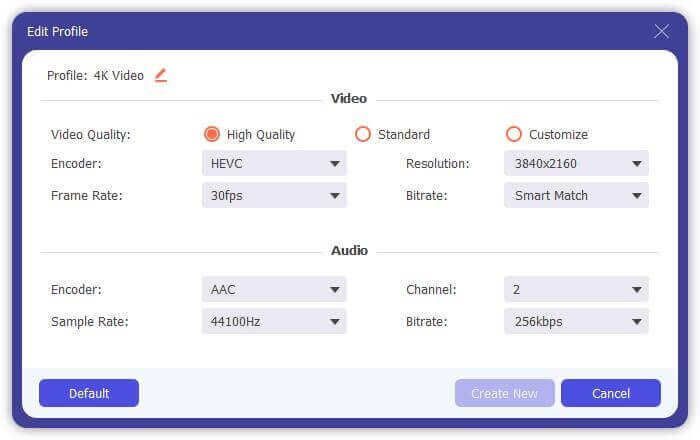
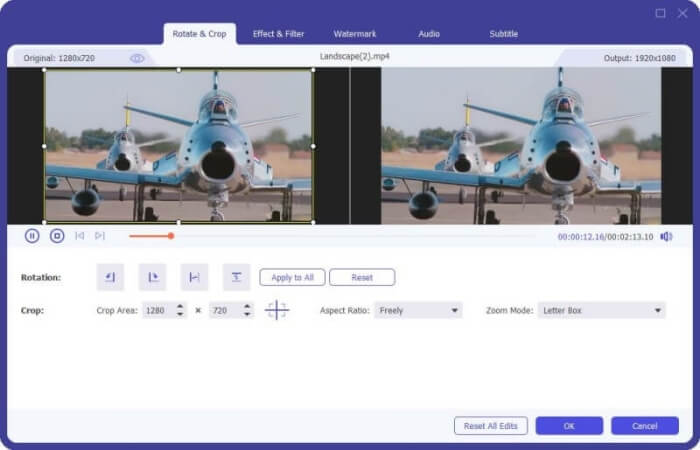
Langkah 3: Klik butang Edit di bahagian bawah fail, anda boleh menemui 5 alat penyuntingan termasuk memutar atau memangkas video, serta menambah kesan dan penapis. Dengan cara ini, anda boleh mencipta filem yang lebih baik dengan kesan khas. Kotak alatnya boleh memampatkan MKV, menyunting maklumat metadata untuk MKV, menukar MKV daripada 2D ke 3D dan banyak lagi.
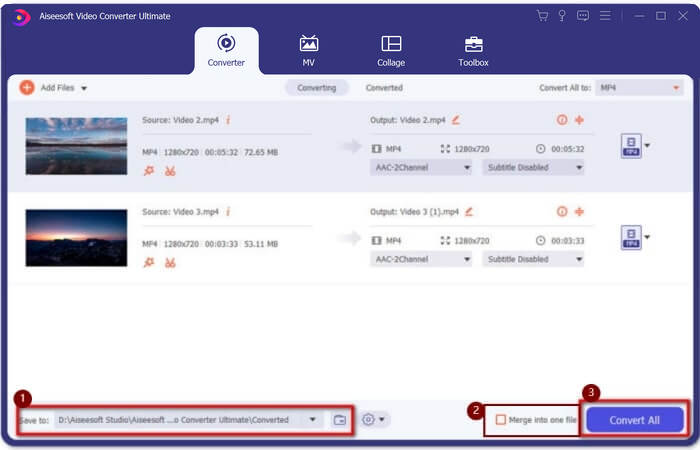
Langkah 4: Sebelum menggabungkan semua video MKV bersama-sama, anda boleh menyeret fail video ke atas dan ke bawah dan meletakkannya di kedudukan yang betul untuk melaraskan turutan. Kemudian tandakan kotak Gabung menjadi satu fail dan klik butang Tukar Semua untuk menyambung fail MKV dan menyimpannya dalam laluan storan yang telah ditetapkan.
Bahagian 3: Soalan Lazim Cara Bergabung dengan Fail MKV
1. Apa itu MKV?
Biasanya MKV dikatakan sejenis format video, tetapi sebenarnya, MKV adalah format wadah multimedia yang dapat menggabungkan fail audio, video, dan sari kata dengan kod yang berbeza ke dalam satu fail. Oleh itu, hampir semua filem disimpan dalam fail format MKV.
2. Bolehkah saya menggunakan Handbrake untuk bergabung dengan fail MKV?
Tidak, anda tidak boleh. Handbrake hanyalah sejenis perisian untuk penukaran video untuk menukar fail MKV. Sekiranya anda ingin bergabung dengan fail MKV, anda boleh menggunakan penggabung video dalam talian percuma atau penukar video lain untuk menyelesaikan masalah anda.
3. Pemain video mana yang menyokong fail filem MKV?
Filem format MKV tidak memerlukan pemain video khusus untuk dimainkan. Walau bagaimanapun, anda perlu memasang pemalam penyahkodan MKV yang sesuai. Dengan cara ini, hampir semua pemain video termasuk pemain video asal di komputer anda dapat memainkan fail filem MKV.
Kesimpulannya
Semasa anda memuat turun filem untuk menonton tetapi mendapati bahawa fail filem MKV itu dipisahkan menjadi beberapa fail. Untuk menontonnya tanpa henti, anda boleh menggunakan video joiner untuk menggabungkan fail MKV secara dalam talian secara percuma. Lebih-lebih lagi, menggunakan penukar video juga dapat membantu menggabungkan fail MKV dengan kualiti gambar dan audio yang tinggi. Selamat datang untuk meninggalkan soalan anda mengenai penggabungan fail MKV di bawah.
-
 Cara Menggabungkan Fail WebM menjadi Satu Tanpa Kerugian di Komputer
 Apabila anda ingin menggabungkan fail video WebM untuk menonton video secara berterusan atau ingin membuat video baru mengikut fail WebM, terdapat dua cara yang berkesan untuk menggabungkan fail WebM tanpa kehilangan kualiti.
-
 8 Pemain MKV Teratas untuk Memainkan Fail MKV dengan Subtitle Yang Diinginkan
 Apabila anda ingin memainkan video MKV dengan sari kata yang dikehendaki, anda boleh mengetahui lebih lanjut mengenai 8 pemain fail MKV teratas untuk PC / Mac dan memilih yang dikehendaki mengikut kehendak anda.
-
 MKV ke MOV - Cara Menukar MKV ke MOV
 Bagaimana cara menukar MKV ke MOV di Mac? Bolehkah iMovie membaca MKV? Apakah maksud format MOV? Catatan ini memberitahu 2 cara mudah untuk membantu anda menukar MKV ke MOV dengan penukar video dalam talian dan profesional percuma.
