


 Video Converter Ultimate
 Perakam Skrin
 Pembaikan Video
 Muat Turun Selamat
Cara Menukar Fail Video FLV Anda ke Format 3GP Secara Percuma
Artikel ini akan menunjukkan kepada anda cara terbaik untuk menukar FLV kepada 3GP. Menurut tinjauan, terdapat banyak format fail video di pasaran. Pembangun mengeluarkannya untuk tujuan yang berbeza. FLV, sebagai contoh, bermaksud Flash Video, digunakan untuk menyimpan kandungan visual untuk dimainkan dalam Adobe Flash Player melalui internet.
3GP, sebaliknya, adalah format multimedia yang dibuat oleh Third Generation Partnership Project untuk menjimatkan lebar jalur dan penggunaan data pada peranti mudah alih. Dengan kata lain, anda lebih baik menukar FLV ke 3GP dan menonton video di telefon bimbit.

Bahagian 1: Cara Terbaik untuk Menukar FLV ke 3GP di Desktop
FVC Free FLV Converter ialah penukar video yang berkuasa. Seperti yang dinyatakan dalam namanya, ia membolehkan anda menukar FLV kepada 3GP tanpa membayar walau satu sen. Selain itu, ia menawarkan banyak fungsi berguna, seperti suntingan video dan audio. Yang lebih penting, antara muka mesra pengguna memudahkan anda mencari apa yang anda perlukan dengan cepat.
Ciri-ciri Utama Penukar FLV Percuma Terbaik
- 1. Tukarkan video FLV ke format multimedia, seperti 3GP.
- 2. Kumpulan mengendalikan banyak fail video pada masa yang sama.
- 3. Transkod fail FLV untuk dimainkan pada peranti mudah alih.
Muat Turun PercumaUntuk Windows 7 atau lebih baharuMuat Turun Selamat
Muat Turun PercumaUntuk MacOS 10.7 atau lebih baharuMuat Turun Selamat
Cara Menukar FLV ke 3GP Secara Percuma
Mulakan penukar FLV percuma terbaik selepas anda memasangnya pada komputer anda. Ia serasi dengan Windows 10/8/7 dan Mac OS X. Klik butang Add File(s) untuk memaparkan dialog buka fail. Pilih fail FLV yang anda ingin tukar dan klik Open. Kemudian video akan muncul di kawasan pustaka.

Langkah 2: Tetapkan format keluaran
Klik dan kembangkan menu juntai bawah Profile format di bahagian bawah dan anda akan melihat kotak profil. Masukkan 3GP dalam kotak Search Profile dan tekan kekunci Enter pada papan kekunci anda. Kemudian pilih format keluaran. Jika anda mahu memainkan video pada peranti mudah alih anda, pilih pengeluar dan terus pilih model yang betul.

Langkah 3: Tukar FLV kepada 3GP
Tetapkan direktori khusus untuk menyimpan keluaran dengan menekan butang Open Folder di bahagian bawah. Akhir sekali, klik butang Convert untuk memulakan penukaran FLV kepada 3GP. Beberapa minit kemudian, anda akan menemui fail 3GP pada pemacu keras anda.

Bahagian 2: Cara Menukar FLV ke 3GP Dalam Talian
Apl penukar video web ialah satu lagi cara popular untuk menukar FLV kepada 3GP secara percuma. Namun, kebanyakannya mempunyai pelbagai kekurangan, seperti had saiz fail, tera air, isu keselamatan dan banyak lagi. Mujurlah, FVC Free Online Video Converter boleh membantu anda menyelesaikan masalah ini. Ia percuma sepenuhnya tanpa sebarang sekatan. Kualiti keluarannya sangat baik.
Langkah 1: Lawati https://www.free-videoconverter.net/free-online-video-converter/ dalam pelayar web dan klik butang Add Files to Convert untuk mendapatkan pelancar. Ia tidak akan mengambil ruang storan setempat komputer anda.
Muat turun Versi Desktop untuk menukar fail secara kelompok.
Langkah 2: Klik menu Add File dan muat naik fail FLV yang ingin anda tukar. Apl web ini membolehkan anda menukar video secara kelompok pada satu masa.
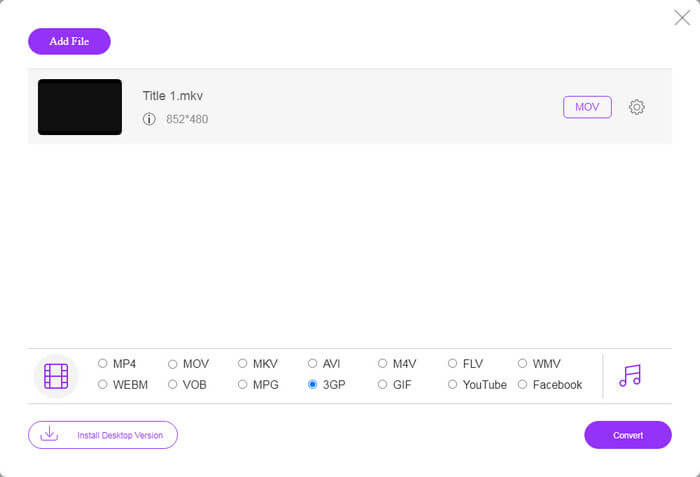
Langkah 3: Pergi ke bahagian bawah dan pilih 3GP pada bahagian profil. Klik butang Convert untuk memulakan penukaran FLV kepada 3GP dalam talian. Jika rangkaian anda pantas, ia akan siap dalam beberapa saat. Kemudian muat turun fail 3GP ke pemacu keras anda.
Jangan Terlepas:
Bahagian 3: Cara Menukar FLV ke 3GP dengan VLC
Kadang kala, perisian percuma sekuat perisian profesional. VLC, misalnya, adalah pemain media sumber terbuka yang popular. Ia dapat menukar FLV ke 3GP pada Windows, Mac dan Linux secara percuma. Sudah tentu, perbelanjaannya jelas, seperti sukar digunakan. Oleh itu, kami berkongsi langkah-langkah di bawah:
Langkah 1: Jalankan penukar FLV kepada 3GP percuma pada komputer anda. Anda perlu memasangnya terlebih dahulu. Laman web rasmi menyediakan pemasang yang selamat.
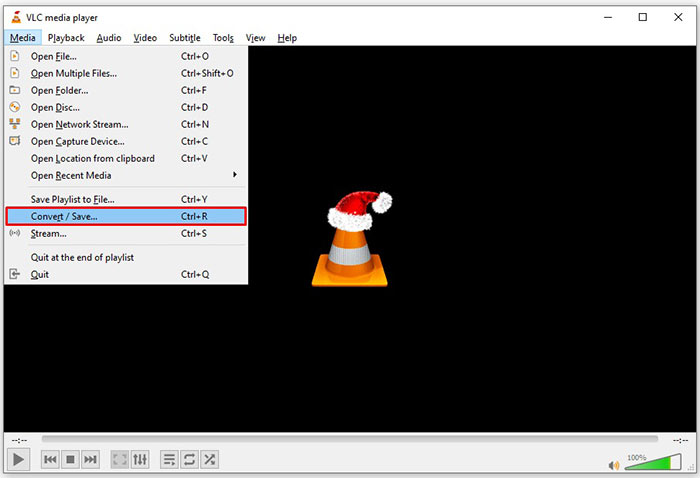
Langkah 2: Pergi ke menu Media pada reben atas dan pilih Convert/Save. Kemudian dialog media terbuka akan muncul.
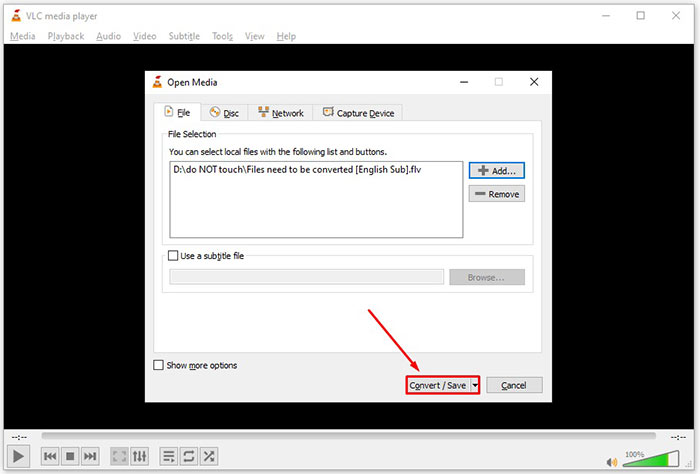
Langkah 3: Klik butang Add, cari fail FLV yang perlu anda tukar dan pilih, kemudian klik Open. Tekan butang Convert/Save untuk beralih ke tetingkap seterusnya.
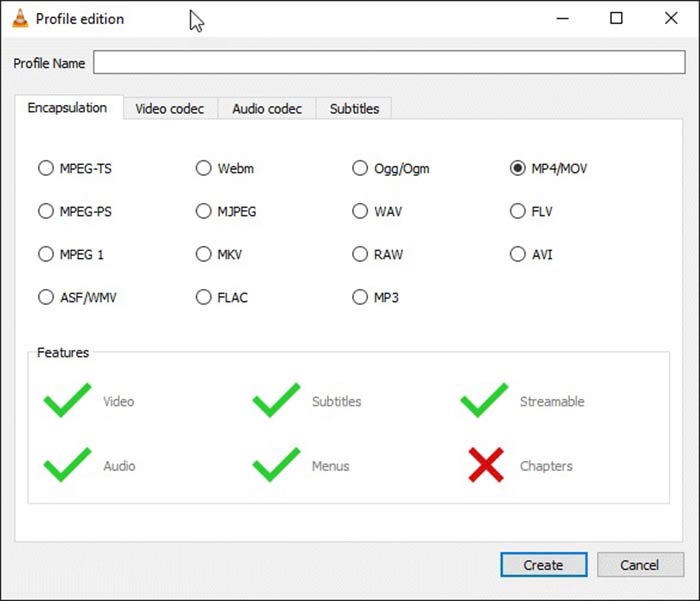
Langkah 4: Kembangkan senarai juntai bawah di sebelah Profile dan pilih 3GP atau format video yang berkaitan. Jika anda mahu menukar codec video atau parameter lain, klik butang Profile Edit di sebelah senarai juntai bawah dan tambah 3GP.
Langkah 5: Klik butang Browse dan pilih folder khusus untuk menyimpan fail 3GP keluaran dalam bahagian Destination.
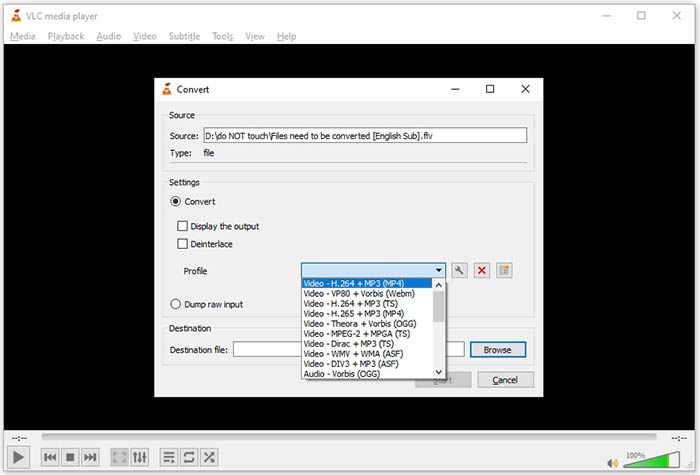
Langkah 6: Sebaik sahaja anda klik butang Start, VLC akan mula menukar FLV kepada 3GP.
Perlu beberapa saat untuk menyelesaikan penukaran kerana VLC melakukan tugas dengan merakam video asal. Ini bermaksud bahawa proses menghabiskan sepanjang video FLV anda.
FLV lwn. 3GP
Adobe Flash Player menggunakan FLV untuk menyampaikan kandungan video seperti filem dan rancangan TV. Pada masa kini, Adobe tidak lagi membangunkan pemain dan mengesyorkan pengguna menyahpasangnya atas sebab keselamatan. Walau bagaimanapun, anda masih boleh menggunakan format FLV pada banyak program bukan Adobe/Macromedia.
Projek Perkongsian Generasi Ketiga (3GPP) menghasilkan format 3GP/3GPP sebagai format kontena multimedia. Ia sebenarnya berdasarkan format fail media ISO. Kami sering menggunakannya untuk menyimpan strim video/audio yang dihantar antara telefon mudah alih 3G dan dalam talian.
Bahagian 4: Soalan Lazim mengenai Menukar FLV ke 3GP
Adakah menukar FLV ke 3GP akan merosakkan kualiti video?
Secara umumnya, penukaran video akan kehilangan kualiti. Walau bagaimanapun, program penukar video yang kuat dapat menyelesaikan masalah ini dan mengoptimumkan kualiti video menggunakan teknologi canggih.
Berapa lama masa yang diperlukan untuk menukar video FLV?
Ini ditentukan oleh beberapa faktor, seperti panjang video, perisian penukaran video yang anda gunakan, prestasi perkakasan anda dan banyak lagi. Sekiranya anda menggunakan penukar video web, sambungan internet anda adalah elemen penting.
Mengapa FLV tidak bermain di iPhone saya?
iPhone menyokong MOV, bahagian MP4, ASF dan AVI. Oleh itu, anda tidak boleh membuka FLV pada iPhone secara langsung. Walau bagaimanapun, ada cara untuk menonton FLV pada peranti mudah alih. Sekiranya fail FLV anda dihoskan oleh perkhidmatan internet, seperti Google Drive, pemain media terbina dalam tersedia. Anda juga boleh menggunakan pemain media lain, seperti VLC.
Kesimpulannya
Panduan ini telah memberitahu anda tiga cara percuma untuk menukar fail video FLV ke format 3GP di komputer atau dalam talian. Sekiranya anda bersiap untuk menonton video FLV pada peranti mudah alih, lebih baik anda menukarnya ke 3GP atau format video mesra mudah alih lain dengan FVC Free FLV Converter. Ia bukan sahaja mudah digunakan, tetapi juga dapat melindungi kualiti video anda. Lebih banyak soalan? Sila tinggalkan mesej di bawah.
-
 Cara Menukar Fail Video FLV Anda ke MP4 tanpa Membayar Wang
 Panduan ini berkongsi empat kaedah percuma untuk menukar fail video FLV anda ke format MP4 pada Windows 10/8/7 / XP dan Mac OS X, sehingga anda dapat menikmati video di mana-mana peranti.
-
 Cara Menukar Video FLV Anda ke Fail Audio MP3 di Desktop dan Dalam Talian
 Bagaimana cara menukar FLV ke fail MP3? Yang perlu anda lakukan ialah membaca artikel ini dengan teliti, cari kaedah kegemaran anda dan ikuti panduan langkah demi langkah kami untuk mendapatkan apa yang anda mahukan.
-
 3 Kaedah Teratas untuk Menukar FLV ke MOV
 Bagaimana untuk menukar FLV ke MOV? Bagaimanakah cara menukar FLV kepada MOV pada Mac? Adakah terdapat cara percuma untuk menukar FLV ke MOV dalam talian? Siaran ini berkongsi 3 penukar FLV ke MOV untuk menukar fail FLV kepada MOV.

