


 Video Converter Ultimate
 Perakam Skrin
 Pembaikan Video
 Muat Turun Selamat
Bagaimana Menggabungkan Fail M4V? Berikut adalah 2 Penyelesaian Terpantas
M4V files, also known as MPEG-4 video files, are usually downloaded from iTunes. They are very similar to MP4 files because they both use MPEG-4 container format. It is very likely to happen that you just downloaded several incomplete video clips in M4V format from iTunes and then want to merge the M4V files into one complete story seamlessly. How to combine M4V files? This article intends to give you two methods to do it efficiently and without losing image quality.

Bahagian 1: Penyelesaian Tercepat - Gunakan Penggabungan M4V Percuma dalam talian
For the quickest solution, you can use FVC Free Online Video Merger, which doesn't take you a long time to learn about the steps and settings. Just load the tool in your browser, add your M4V files, and then give one click to merge the M4V files.
Key Features
- • Gabungkan fail M4V dengan jumlah dan saiz apa pun ke dalam satu fail secara percuma.
- • Antara muka yang mudah digunakan dan proses pra-penggabungan intuitif.
- • Anda boleh menyimpan fail M4V yang digabungkan sebagai 9 format utama yang lain.
- • Jangan tinggalkan tanda air dalam gabungan video M4V.
- • Muat naik fail anda dengan pelbagai ukuran hanya dalam 1 saat.
Steps to join M4V files online for free
Step 1. Click here to load FVC Free Online Video Merger. On the online tool's webpage, click the Upload Videos to Merge button in the middle of your screen.

Note: The tool will prompt you to download and install a launcher if you are using the tool for the first time. Once you installed the launcher, click the Upload Videos to Merge button again.
Step 2. Now the Open window should pop up. Here you need to select the M4V files and then click the Open button at the bottom of the window.
Step 3. After uploading the M4V files, you can adjust the sequence of the M4V files by removing the existing ones and inserting new ones in the desired places.
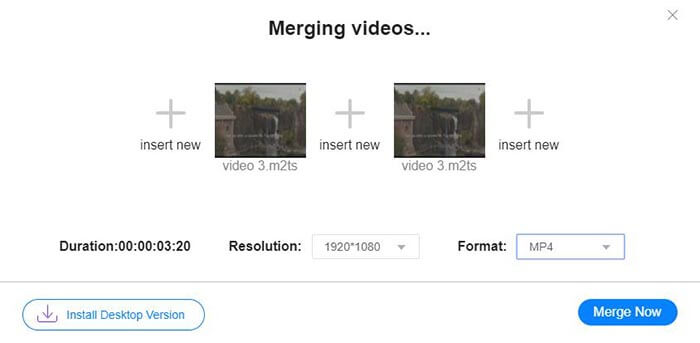
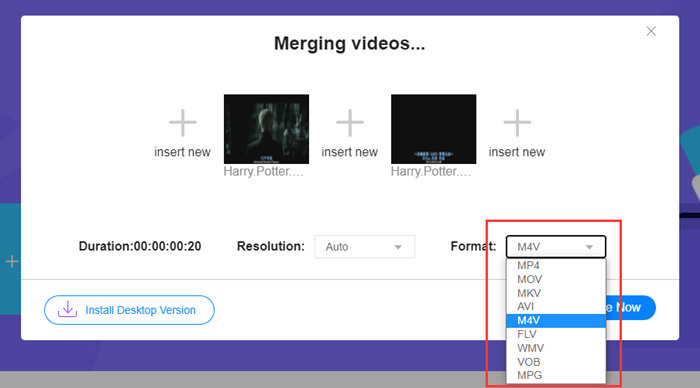
Step 4. To retain the merged file as M4V format, you need to choose M4V on the Format list. You can also choose any of the listed formats to convert the merged M4V video.
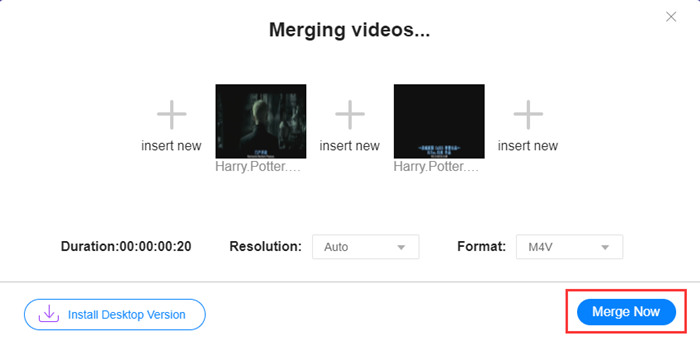
Step 5. Click the Merge Now button to start combining the M4V files. The tool will then ask you to decide the destination of the output file.
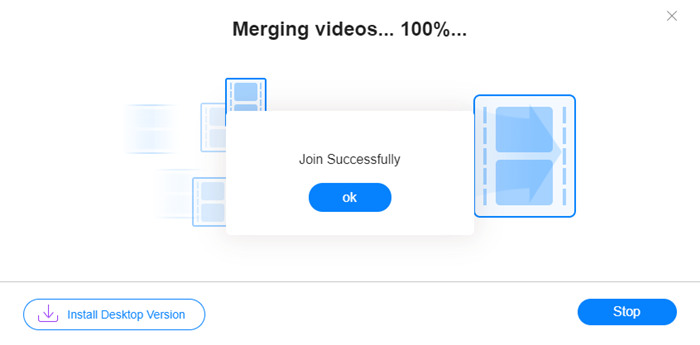
Apabila anda melihat notis kejayaan di bawah, video gabungan akan disimpan di komputer anda.
You have already learned about the quickest way to combine M4V files. However, this method only allows you to connect the videos end by end, but cannot help you trim the unwanted ends, which may lead to periods of black screen in the video. Maybe you also need the next method to not only join M4V files, but also trim them seamlessly. You can compress M4V files here.
Bahagian 2: Kaedah Menggabungkan Fail M4V dengan lancar
To get a complete and seamless video, merely joining the M4V files end by end is not enough. You also need to trim the unwanted segments at the starts and endings. So this involves a video editing tool. You have numerous choices to choose from, but here we'd like to recommend Video Converter Ultimate. The reason is simple. It's easy to use and its features are powerful enough.
Key Features
- • Gabungkan, potong, putar, pangkas, dan tambahkan kesan pada video M4V.
- • Teknologi mempercepat perkakasan membantu menyelesaikan penggabungan fail M4V 70x lebih cepat.
- • Koleksi penapis dan kesan yang melimpah untuk menghiasi video anda
- • Gunakan penambah video bawaan untuk meningkatkan kualiti video anda
- • Ubah video anda menjadi 3D dan nikmati dengan kacamata 3D anda
Muat Turun PercumaUntuk Windows 7 atau lebih baharuMuat Turun Selamat
Muat Turun PercumaUntuk MacOS 10.7 atau lebih baharuMuat Turun Selamat
Steps to merge M4V files seamlessly
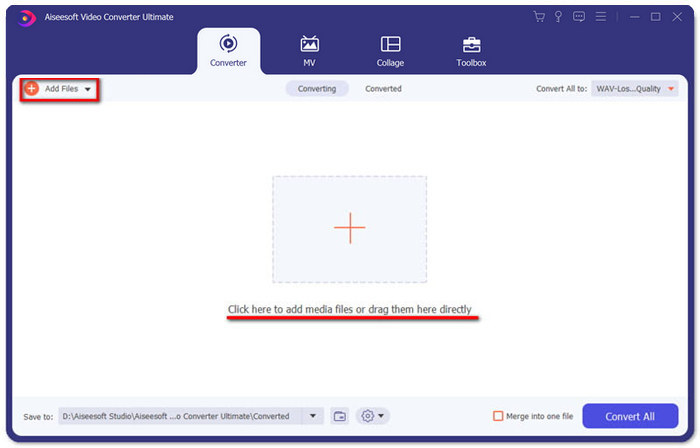
Step 1. Install and launch the Video Converter Ultimate. Click the Add Files button or drag files into the interface to add videos.
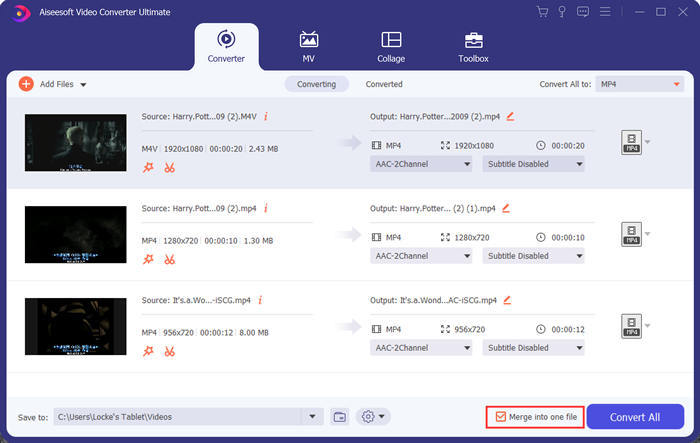
After adding them, you can drag the files up and down to arrange the order of them. Also, you need to tick the box for Merge into one file so that the program won't convert the added videos separately.
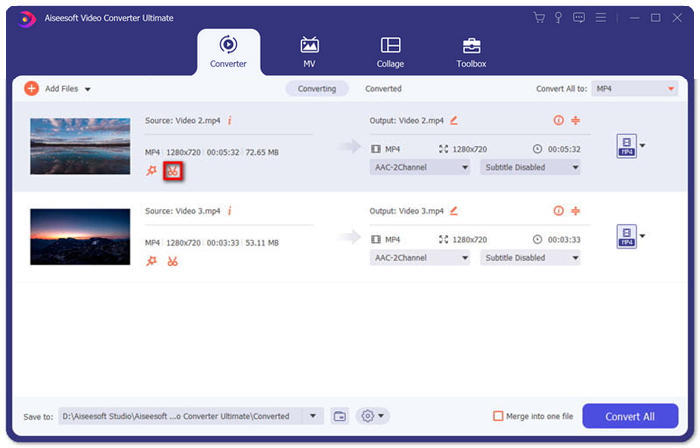
Step 2. To use the trimming feature, you can click the Cut icon on an added video.
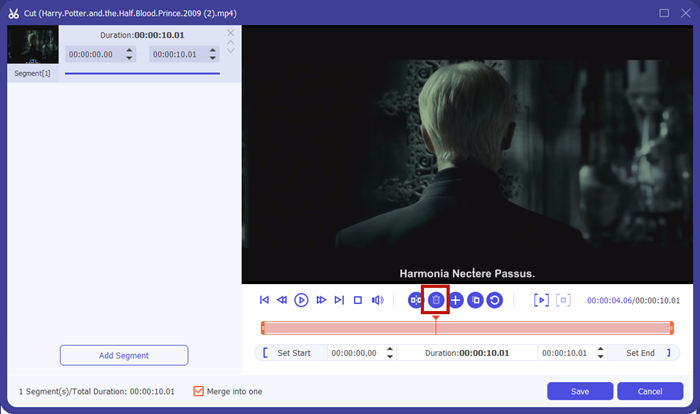
In the Cut interface, you can cut the unwanted parts of a video easily. Just select a segment by setting its start and end points, and then click the dustbin icon to remove it.
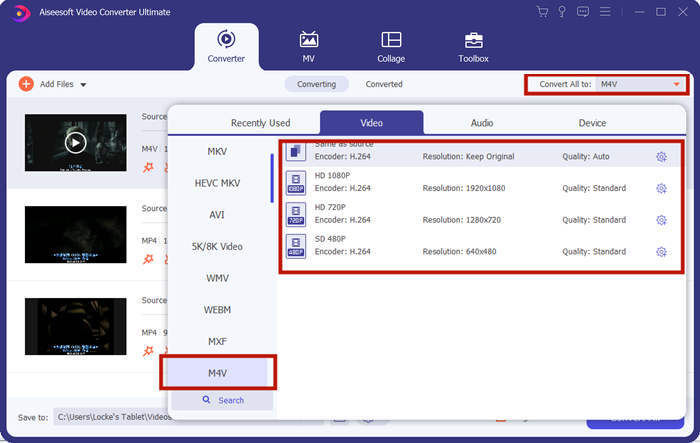
Step 3. Back to the main interface, you can choose the output file. Click the down-arrow beside Convert All to. Then you can select M4V or other formats as the output format.
Step 4. Click the Convert All button in the bottom-right corner of the program and wait for the program to join the M4V files.
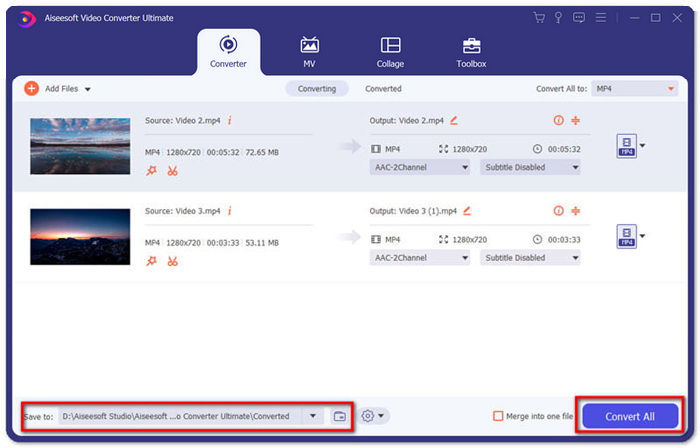
Apabila penggabungan selesai, anda akan melihat notis kejayaan. Kemudian anda dapat mencari fail M4V yang digabungkan dalam folder tujuan. Di atas adalah dua kaedah untuk menggabungkan fail video M4V. Kami juga telah menyimpulkan beberapa soalan yang sering ditanya di bawah.
Bahagian 3: Soalan Lazim mengenai Bergabung dengan Fail M4V
Apakah fail M4V?
M4V, yang direka oleh Apple, kadang-kadang dipanggil iTunes Video File. Ia serupa dengan MP4 kerana keduanya berdasarkan MPEG-4. Ciri M4V yang paling istimewa ialah iTunes dapat menambahkan perlindungan DRM di dalamnya untuk mencegah penyebaran video iTunes yang tidak dibenarkan.
Bagaimana cara membuka fail M4V?
If not protected by DRM, an M4V file can be played in VLC, QuickTime, Windows Media Player, and many other media players. Sometimes it also works to change the .M4V extension to .MP4 to open it. However, an M4V file with DRM protection can only be played on authorized devices.
Bolehkah saya membuang perlindungan DRM dari fail M4V?
Ya awak boleh. Anda boleh menjumpai banyak program penyingkiran DRM di pasaran. Berikut adalah beberapa daripadanya: TunesKit DRM M4V Converter, Aimersoft DRM Media Converter, Requiem DRM Remover, Ondesoft iTunes Convertert, Apple Music Converter.
Kesimpulannya
This passage introduced two efficient ways to join several M4V video files into one. For the quickest solution, the FVC Free Online Video Merger is your best choice. You can use it without downloading any program. The uploading process can also be complete immediately. But if you want a higher quality, or not only to combine M4V files but also trim them, you can turn to Video Converter Ultimate. It provides you with powerful editing features while the UI is friendly to beginners. If you have found any better solutions, we'd like to know. Just leave us a comment below.
-
 Cara Menukar M4V ke MP4 dengan / Tanpa DRM
 6 Cara Percuma Menukar M4V ke MP4 (Termasuk Penghapusan DRM)
-
 5 Pemain M4V Terbaik untuk Memainkan Fail M4V dengan Mudah di Komputer / Mobiles
 5 Pemain M4V Teratas untuk Windows / Mac / Android / iOS yang Anda Perlu Tahu
-
 Cara Mengekstrak MP3 dari M4V dengan 4 Kaedah Cemerlang yang Anda Perlu Tahu
 Penukar M4V ke MP3 - 4 Kaedah Terbaik untuk Mengekstrak MP3 dari Fail M4V
