


 Video Converter Ultimate
 Perakam Skrin
 Pembaikan Video
 Muat Turun Selamat
Cara Menukar Fail Video FLV Anda ke Format 3G2 di Desktop dan Dalam Talian
Dikatakan bahawa teknologi mengubah kehidupan dan menjadikan kehidupan harian serta kerja kita lebih mudah. Namun, setiap perkara ada baik dan buruknya, begitu juga dengan teknologi. Contohnya, video digital memberi kita peluang untuk mendapatkan hiburan dan maklumat di mana-mana dan pada bila-bila masa. Masalahnya ialah format video. Menurut satu tinjauan baru-baru ini, terdapat lebih daripada seratus format video. Panduan ini menumpukan pada cara membantu anda menukar FLV kepada 3G2 atau 3GP pada komputer dan dalam talian secara percuma.

Bahagian 1: Cara Menukar FLV ke 3G2 pada PC / Mac
Kaedah 1: Tukar FLV ke 3G2 dengan Penukar FLV Percuma
Hanya terdapat beberapa penukar video yang menyokong format 3G2. FVC Free FLV Converter ialah salah satunya. Selain itu, ia boleh memenuhi keperluan anda tanpa mengeluarkan walau satu sen. Jika anda mempunyai banyak fail FLV, ia boleh memprosesnya secara serentak dengan pantas.
Ciri Utama Penukar FLV ke 3G2 Terbaik
- 1. Tukar FLV ke 3G2 tanpa kehilangan kualiti.
- 2. Kumpulan mengendalikan banyak fail FLV menggunakan teknologi multi-utas.
- 3. Tawarkan pelbagai alat bonus, seperti penyuntingan video.
Muat Turun PercumaUntuk Windows 7 atau lebih baharuMuat Turun Selamat
Muat Turun PercumaUntuk MacOS 10.7 atau lebih baharuMuat Turun Selamat
Cara Menukar FLV ke 3G2 Secara Kelompok (Batch) Secara Percuma
Langkah 1: Tambahkan fail FLV
Apabila anda perlu menukar FLV ke 3G2, pasang penukar video percuma terbaik pada komputer anda dan jalankannya. Klik butang Add File(s), cari semua fail FLV yang ingin anda tukar, dan buka fail tersebut.

Langkah 2: Pilih format output
Pergi ke bahagian bawah selepas video dimuatkan. Klik dan kembangkan pilihan Output format, cari 3G2 dengan bar carian, dan pilihnya di bahagian kanan. Klik butang Open Folder dan pilih folder tertentu untuk menyimpan keluaran.

Langkah 3: Tukar FLV ke 3G2
Akhir sekali, klik butang Convert untuk mula menukar FLV ke 3G2 serta-merta. Beberapa minit kemudian, anda akan menemui fail 3G2 dalam folder yang anda tetapkan.

Kaedah 2: Cara Menukar FLV ke 3G2 dengan VLC
VLC bukan sahaja pemain media sumber terbuka, tetapi juga penukar FLV ke 3G2 percuma. Ia membolehkan anda melakukan penukar video secara percuma pada Windows dan Mac. Berikut adalah langkah-langkahnya:
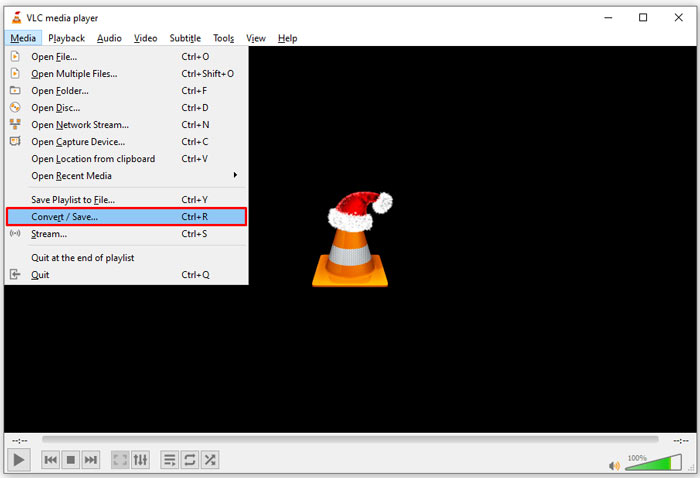
Langkah 1: Buka VLC, pergi ke menu Media pada reben bahagian atas, dan pilih Convert/Save.
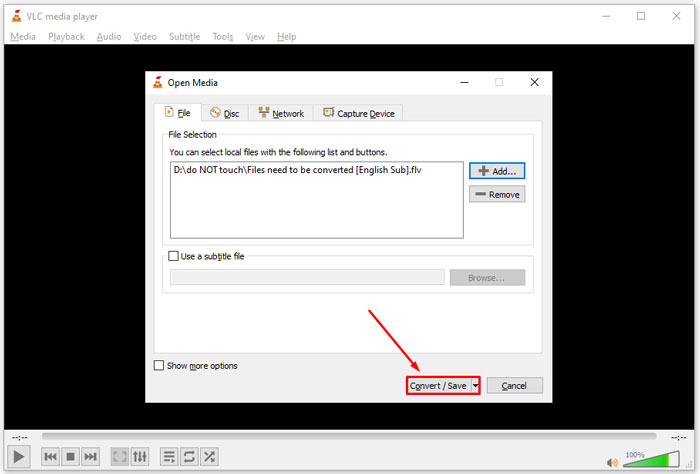
Langkah 2: Klik butang Add dan buka fail FLV yang anda ingin tukar kepada format lain. Tekan butang Convert/Save untuk meneruskan.
Langkah 3: Kembangkan pilihan Profile dan pilih 3G2 atau format yang berkaitan. Kemudian tetapkan folder keluaran dengan menekan butang Browse.
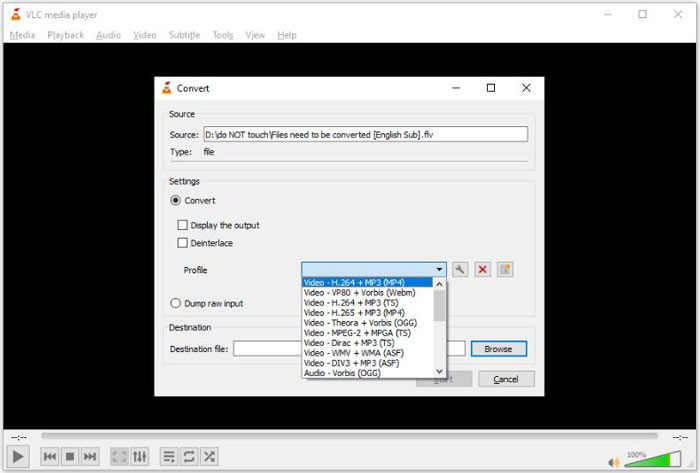
Langkah 4: Sebaik sahaja anda klik butang Start, VLC akan menukar FLV ke 3G2. Proses ini mengambil sedikit masa dan anda perlu bersabar.
Bahagian 2: Cara Menukar FLV ke 3G2 Dalam Talian
Kadangkala, anda hanya perlu menukar FLV ke 3G2 sekali-sekala. Dalam keadaan sebegini, aplikasi web ialah pilihan yang mudah, seperti FVC Free Online Video Converter. Ia percuma tanpa pendaftaran atau had saiz fail.
Langkah 1: Lawati https://www.free-videoconverter.net/free-online-video-converter/ dalam mana-mana pelayar. Klik butang Add Files to Convert dan dapatkan pelancar (launcher).

Langkah 2: Apabila muat turun selesai, pelancar akan muncul. Klik butang Add File dan muat naik fail FLV. Aplikasi penukar video web ini menyokong penukaran secara kelompok (batch).
Jika anda ingin melaraskan parameter, seperti resolusi, kadar bingkai (framerate) dan lain-lain, klik ikon Gear dan buka dialog Settings.

Langkah 3: Pergi ke bahagian bawah dan pilih format keluaran yang sesuai dalam kawasan format. Setelah anda bersedia, klik butang Convert. Kemudian muat turun hasilnya ke pemacu keras anda.
Mungkin anda juga berminat:
Bahagian 3: Soalan Lazim mengenai FLV hingga 3G2
Apakah fail 3G2?
3G2, singkatan dari 3rd Generation Partnership Project Group 2, adalah lanjutan untuk fail multimedia berdasarkan MPEG-4. Ia dibuat oleh sekumpulan tujuh organisasi pembangunan standard untuk telefon bimbit di rangkaian CDMA. Ia sangat serupa dengan 3GP.
Bolehkah Windows Media Player membuka 3G2?
Tidak, WMP tidak dapat membuka atau memutar fail video 3G2 kerana kekurangan codec yang sesuai. Anda mempunyai tiga pilihan untuk membuka fail 3G2: menukarnya ke format video standard, memuat turun pemain video 3G2, atau memasang pakej codec tambahan untuk WMP.
Adakah FLV lebih baik daripada 3G2?
Jawapannya bergantung pada tujuan anda. Sekiranya anda menonton video di telefon bimbit dengan rangkaian CDMA, 3G2 adalah pilihan yang lebih baik. Untuk perkongsian video, FLV lebih baik daripada 3G2.
Kesimpulannya
Sekarang, anda harus memahami apa singkatan 3G2 dan bagaimana menukar FLV ke 3G2 tanpa kehilangan kualiti. VLC adalah penukar video percuma yang mempunyai keupayaan untuk menukar format video. Walau bagaimanapun, FVC Free FLV Converter berprestasi lebih baik. Lebih mudah digunakan daripada VLC dan benar-benar percuma. Sekiranya anda mempunyai lebih banyak masalah, tinggalkan mesej di bawah catatan ini dan kami akan membalasnya dengan cepat.
-
 FLV ke WAV - Tukar FLV ke WAV Dalam Talian Percuma dan pada Mac / PC
 Bagaimanakah cara menukar fail FLV? Bolehkah VLC menukar FLV kepada WAV? Siaran ini memberitahu 3 cara percuma untuk menukar FLV kepada WAV tanpa kehilangan kualiti.
-
 FLV ke MPG - Cara Menukar FLV ke MPG pada Mac, PC dan Percuma Dalam Talian
 Bagaimana cara menukar FLV ke MPEG? Bolehkah saya menukar FLV ke MPG secara percuma? Catatan ini berkongsi 3 penukar video percuma untuk membantu anda menukar FLV ke MPG tanpa kehilangan kualiti.
-
 FLV ke Xbox - Cara Menukar dan Memainkan FLV di Xbox
 Tidak dapat memainkan fail FLV di Xbox One atau Xbox 360? Perlu menukar format FLV ke Xbox yang disokong seperti MP4, AVI, MOV, atau WMV? Catatan ini menyenaraikan 3 penukar FLV ke Xbox percuma untuk anda bermain FLV di Xbox.
