


 Video Converter Ultimate
 Perakam Skrin
 Pembaikan Video
 Muat Turun Selamat
Bolehkah Fail MKV Main di PS3? Inilah Kaedah Terbaik untuk Memainkan Fail MKV di PS3
Play Station 3 bukan sahaja sebuah konsol permainan video, ia juga boleh digunakan sebagai pemain media untuk menonton fail video pada Sony PS3 daripada Pemacu USB. Jika anda mengumpul banyak filem MKV dan mahu memainkannya pada PS3 anda, anda boleh membaca artikel ini untuk belajar cara memainkan fail MKV pada PS3.

Bahagian 1. Cara Menukar dan Memainkan Fail MKV di PS3
Oleh kerana PS3 tidak menyokong format MKV, anda perlu menukar MKV kepada format yang serasi dengan PS3 jika anda ingin memainkan MKV pada PS3 dengan bebas. Untuk menukar video MKV kepada fail video yang disokong PS3, Video Converter Ultimate amat disyorkan. Ia adalah penukar video profesional yang direka untuk pengguna menukar antara pelbagai format video dan audio, seperti MKV ke MP4, MOV ke MP4, WMV ke PS3 dan sebagainya. Ia menyediakan profil video yang dioptimumkan untuk PS3. Anda boleh menukar sebarang format video kepada format yang disokong PS3 hanya dengan beberapa klik.
Selain itu, program ini juga memiliki fitur penyuntingan video, yang memungkinkan anda memotong ukuran bingkai, menambah tanda air, menerapkan kesan video, memuat sari kata, menggabungkan beberapa video ke dalam satu fail, memotong bahagian video yang tidak diingini, dan banyak lagi. Cukup muat turun dan pasang perisian di komputer anda dan cubalah.
Muat Turun PercumaUntuk Windows 7 atau lebih baharuMuat Turun Selamat
Muat Turun PercumaUntuk MacOS 10.7 atau lebih baharuMuat Turun Selamat
Langkah 1. Tambahkan fail MKV
Pasang dan lancarkan penukar MKV ke PS3 dan klik butang Tambah Fail untuk memuat fail .mkv dari komputer anda. Untuk menjimatkan masa anda, anda boleh menambahkan beberapa fail MKV sekaligus dan menukarnya secara serentak.

Langkah 2. Pilih PS3 sebagai format output
Selepas memuatkan fail MKV anda, buka menu Convert All to, pilih kategori Device, dan tatal ke bawah untuk mencari format keluaran PS3 di bawah tab Game.
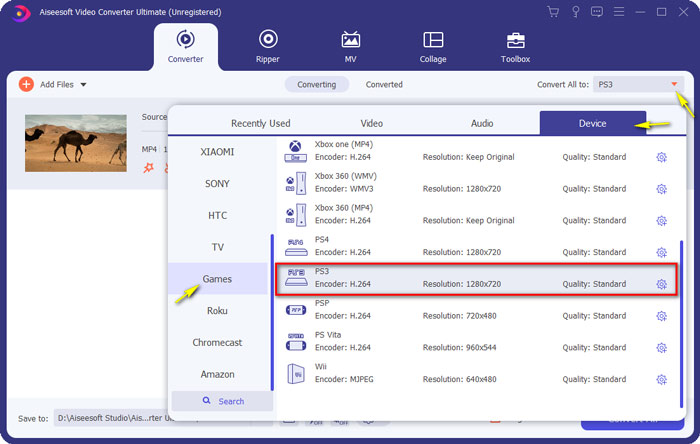
Langkah 3. Mulakan Penukaran dari MKV ke PS3
Kemudian, pergi ke medan Save to dan tentukan folder destinasi untuk menyimpan fail yang telah ditukar. Akhir sekali, klik butang Convert All untuk mula menukar fail MKV anda kepada format PS3.

Langkah 4. Mainkan fail MKV yang ditukar pada PS3
Apabila penukaran selesai, anda boleh meletakkan video yang telah ditukar ke dalam folder VIDEO, dan kemudian menyalinnya ke pemacu USB. Seterusnya, sambungkan pemacu USB ke PS3, dan pergi ke VIDEO dan cari peranti anda. Tekan butang Triangle untuk melihat semua kandungan. Kemudian, pilih fail video yang anda mahu tonton dan tekan X untuk mula menikmati. Kini anda boleh menonton fail MKV kegemaran anda pada PS3 anda pada bila-bila masa dan di mana sahaja.
Bahagian 2. Mainkan Video MKV dengan Alternatif PS3
Jika anda sedang mencari cara percuma dan terus untuk menonton fail MKV pada komputer anda, gunakan FVC Free Video Player. Memandangkan ia ialah penyelesaian berasaskan web, anda boleh memainkan fail MKV anda dengan lancar tanpa memuat turun sebarang perisian pada komputer anda.
Ciri-ciri Utama FVC Free Video Player
1. Sokongan main balik untuk video 4K, HD dan SD dari semua format.
2. Ia juga memainkan fail audio, seperti MP3, AAC, dll dengan kualiti yang tidak hilang.
3. Benar-benar percuma untuk digunakan, tidak diperlukan pendaftaran atau muat turun.
4. Antara muka yang bersih dan intuitif.
5. Perkhidmatan berasaskan web, boleh diakses di mana-mana penyemak imbas.

Bahagian 3. Soalan Lazim Memainkan Fail MKV di PS3
Fail video apa yang boleh dimainkan oleh PS3?
Berikut adalah jenis fail PS3 yang disokong: MPEG, MP4, AVI, AVCHD, DivX, dll.
Bolehkah saya bermain MKV di PS3 tanpa menukar?
MKV hadir dalam banyak standard dan hanya H.264 / MPEG-4 AVC yang dapat disokong pada PS3. Sekiranya fail MKV anda terdapat dalam bentuk lain, anda harus menukarnya ke format yang disokong PS3 agar mudah dimainkan.
Bagaimana cara memainkan fail MKV di PlayStation 3 dari USB?
Oleh kerana PS3 tidak dapat menyahkod fail MKV secara langsung, anda harus menukar MKV ke fail video yang disokong oleh PS3. Setelah mendapatkan fail yang ditukar, sambungkan pemacu kilat USB anda ke salah satu dari dua port USB yang terletak di bahagian depan PlayStation 3. Hidupkan PS3 anda, pergi ke Video, dan kemudian pilih pemacu USB anda. Kemudian, tekan butang segitiga dan pilih Paparkan Semua. Sekarang anda boleh memilih video yang ingin anda mainkan atau tonton. Akhirnya, tekan butang X.
Kesimpulannya
Secara keseluruhannya, saya berharap semua pengguna PS3 akan dapat mengetahui cara memainkan video MKV pada PS3 dengan berjaya selepas membaca artikel ini. Selain PS3, anda boleh memainkan fail MKV anda dalam Windows Media Player, FVC Free Video Player, atau pemain media MKV yang lain.
-
 Pemain VLC Tidak Akan Memainkan MKV, Bagaimana Memperbaikinya
 Adakah pemain VLC menyokong fail MKV? Mengapa VLC tidak akan memainkan MKV? Siaran ini berkongsi 4 petua berguna untuk anda memperbaiki pemain VLC tidak akan memainkan fail MKV.
-
 Cara Main Fail MKV pada iPad 2021
 Bagaimana cara memainkan fail MKV pada iPad 2? Bolehkah saya menukar MKV ke MP4 untuk bermain di iPad Pro / Air / 2? Catatan ini berkongsi 2 cara mudah untuk bermain MKV di iPad.
-
 MKV ke MOV - Cara Menukar MKV ke MOV
 Bagaimana cara menukar MKV ke MOV di Mac? Bolehkah iMovie membaca MKV? Apakah maksud format MOV? Catatan ini memberitahu 2 cara mudah untuk membantu anda menukar MKV ke MOV dengan penukar video dalam talian dan profesional percuma.
