


 Video Converter Ultimate
 Perakam Skrin
 Pembaikan Video
Penukar MPG kepada GIF Terbaik untuk Menukar MPG kepada GIF [ Tanpa kos & Versi Premium]
Cara terbaik untuk meluahkan perasaan anda kepada orang yang anda sayangi adalah dengan mencipta mesej yang bermakna. Tetapi adakah anda ingin tahu apa yang lebih baik untuk diungkapkan dengan cara yang berbeza? Anda boleh menggunakan GIF. Juga dikenali sebagai Format Pertukaran Grafik ini ialah imej yang anda hantar tetapi ia dinaik taraf. Imej bergerak ini dicipta untuk sekadar meluahkan perasaan anda terhadap seseorang secara langsung atau tidak langsung. Adakah anda tahu kebanyakan apl pemesejan menyokong GIF serta messenger terbina dalam kami? Tetapi dalam beberapa versi lama telefon, ia tidak menyediakan format ini. Walaupun GIF menyeronokkan, tidak sepanjang masa akan memberikan anda emosi yang ingin anda ungkapkan.
Jadi, anda berada di sini untuk mengetahui cara terbaik menukar format MPG kepada GIF. Bukankah seronok dapat mencipta GIF anda sendiri? Daripada terus mencari apa yang patut digunakan, apa kata anda cuba hasilkan sendiri GIF dengan menambah sentuhan peribadi anda. Cara terbaik untuk mengetahui bagaimana melakukannya ialah dengan membaca artikel ini. Kerana ia menyediakan maklumat, langkah, dan alat yang mencukupi untuk kerja tersebut. Jadi tanpa berlengah lagi, mari terus kepada butiran penting dalam artikel ini. Teruskan membaca untuk mengetahui lebih lanjut tentang senarai penukar ini.

Bahagian 1. 4 Alat Terbaik untuk Menukar MPG kepada format GIF PC atau Mac
1. FVC Video Converter Ultimate
Jika anda ingin berkongsi mesej lucu tanpa perlu menaip terlalu banyak butiran maka alat ini akan membantu anda. Alat ini membolehkan anda menukar mpg kepada gif animasi dan ia juga dibangunkan oleh FVC. FVC Video Converter Ultimate membolehkan pengguna menukar apa jua jenis format kepada format boleh main yang anda suka guna. Mungkin anda tertanya-tanya mengapa memilih alat ini. Adakah sesuatu yang istimewa tentang alat ini? Ya, alat ini serba guna. Ia boleh menjadi perisian ripper paling dipercayai, pembuat MV, kolaj, dan banyak lagi. Ini bermaksud alat ini boleh melakukan lebih banyak daripada apa yang ditawarkan oleh alat lain. Satu lagi ciri menakjubkannya ialah penukaran Ultrafast, menukar video anda dalam masa singkat dengan bantuan alat ini. Untuk mengetahui cara menggunakan alat ini, ikut langkah ini dengan teliti supaya anda boleh mendapat penukaran yang berjaya mengikut kualiti format anda.
Langkah 1. Pasang alat ini pada PC atau Mac anda. Ikut arahan selepas pemasangan dan klik Finish untuk memulakan alat.
Muat Turun PercumaUntuk Windows 7 atau lebih baharuMuat Turun Selamat
Muat Turun PercumaUntuk MacOS 10.7 atau lebih baharuMuat Turun Selamat
Langkah 2. Selepas semua proses pemasangan. Antara muka mini seperti ini akan muncul pada skrin anda.
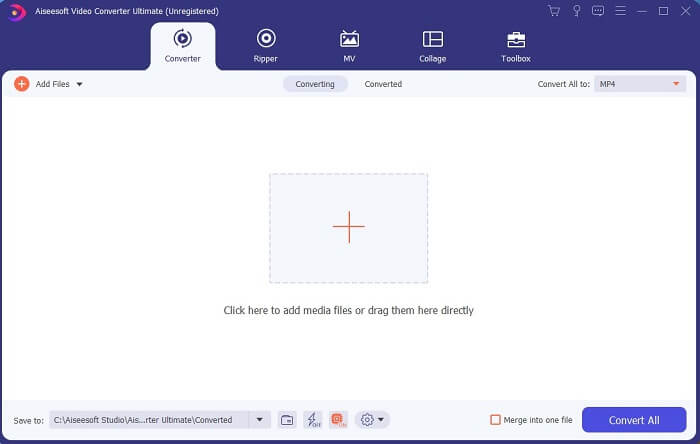
Langkah 3. Klik tanda tambah untuk menambah fail dan klik Open untuk memulakan penukaran atau anda juga boleh seret dan lepaskan fail video ke dalam alat. Berapa banyak video langsung tidak menjadi masalah.
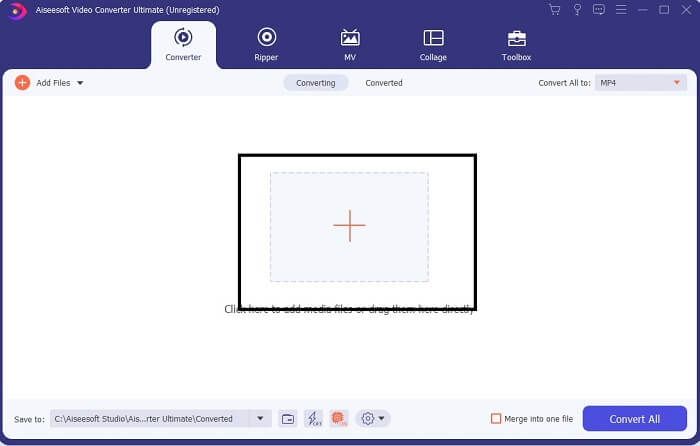
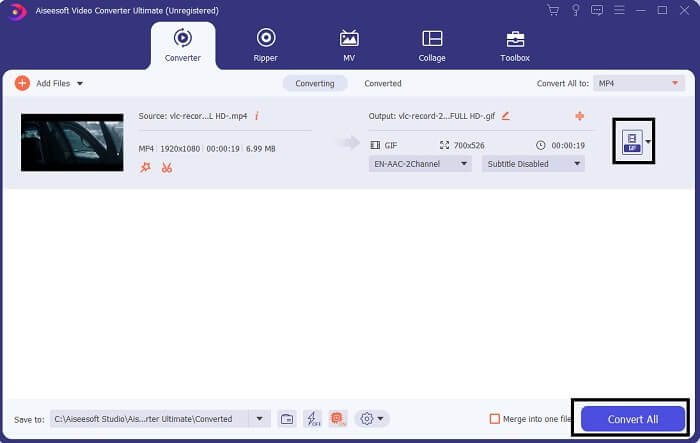
Langkah 4. Klik butang drop-down di bahagian kanan atas antara muka dan skrol ke bawah lalu klik format GIF. Pilih resolusi yang anda mahu; sama ada Besar, Sederhana atau Kecil. Jika semuanya sudah sedia, klik Convert All untuk memulakan penukaran.
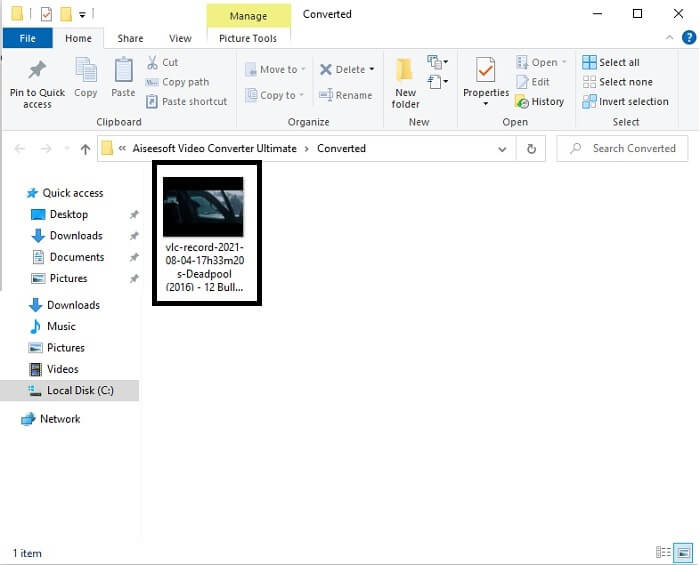
Langkah 5. Selepas penukaran. Pengurus fail akan terpapar dan menunjukkan hasil akhir anda dan kini anda boleh menikmati format GIF anda. Tetapi anda juga boleh menukar fail .gif kepada .mpg dengan langkah yang sama cuma tukarkan formatnya.
2. Penukar Video Dalam Talian Percuma FVC
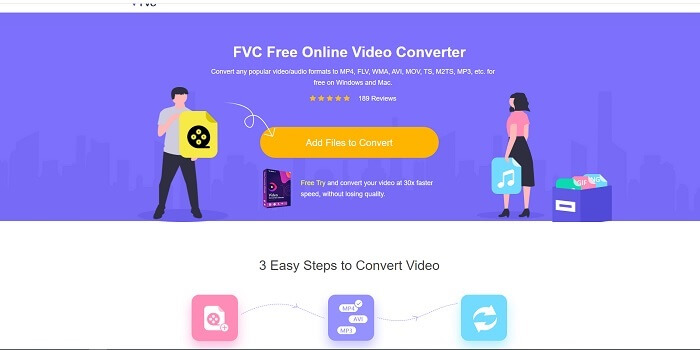
Mungkin anda berfikir, bagaimana jika anda tidak mempunyai wang adakah saya masih boleh mengalami penukaran yang sama seperti yang pertama? Jawapannya YA gemuk besar. FVC sentiasa memberikan pengalaman terbaik untuk pelanggannya yang tidak mempunyai wang dan juga kepada mereka yang ingin mencuba alat mereka. Walaupun, alat ini hanya melakukan penukaran mudah jadi jangan mengharapkan terlalu banyak kerana versi premium boleh menyediakan. Dan ia tidak boleh menukar berbilang format video dan audio dengan cara yang lebih pantas.
Namun proses penukaran yang disediakannya jauh lebih baik daripada penukar berbayar dan penukar percuma yang lain. FVC Free Online Video Converter ada untuk menyelamatkan hari anda. Seperti namanya, ia ialah alat dalam talian percuma yang membolehkan anda menukar pada tahap maksimum. Tidak seperti penukar lain, alat ini tiada iklan atau perisian hasad, tiada pendaftaran, log masuk, dan tiada maklumat peribadi diperlukan sebelum anda menggunakannya. Jika anda mencari penukar yang ringkas maka inilah alat yang sesuai untuk anda. Ikuti langkah berikut untuk mengetahui bagaimana alat ini berfungsi sebagai penukar.
Langkah 1. Pergi ke laman web rasmi dengan mengklik pautan ini.
Langkah 2. Halaman web sepatutnya kelihatan seperti ini. Kemudian klik Add Files to Convert untuk melancarkan alat dalam talian ini.
Muat turun Versi Desktop untuk menukar fail secara kelompok.
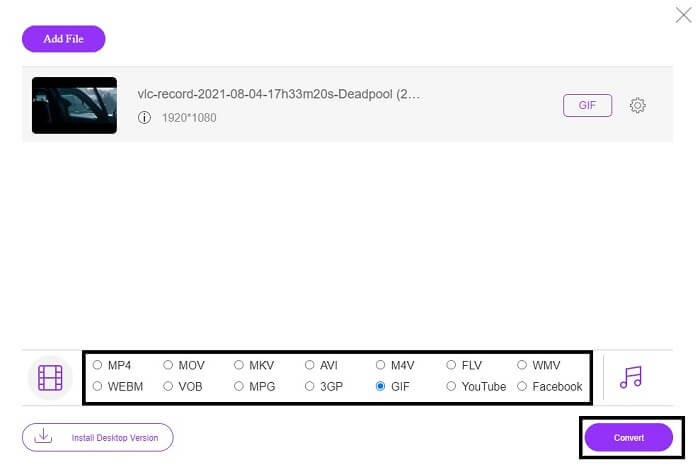
Langkah 3. Pilih video yang anda ingin tukar. Selepas memilih video, pilih format fail GIF. Untuk maklumat tambahan anda juga boleh memilih format video dan audio lain, anda boleh lihat kemudian jika mahu.
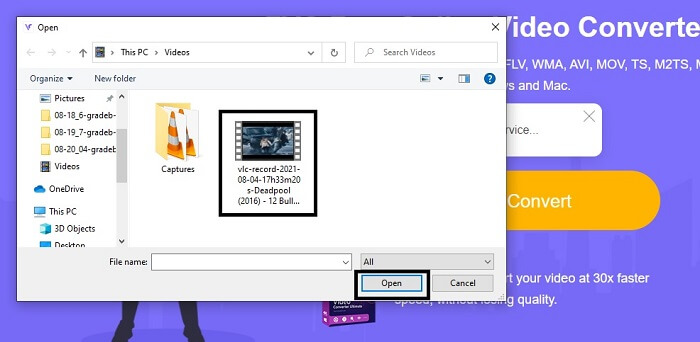
Langkah 4. Pilih di mana anda mahu meletakkan hasil akhir. Kemudian jika semuanya sudah siap, klik Convert untuk memulakan penukaran. Ia hanya mengambil beberapa saat untuk menyiapkan proses penukaran.
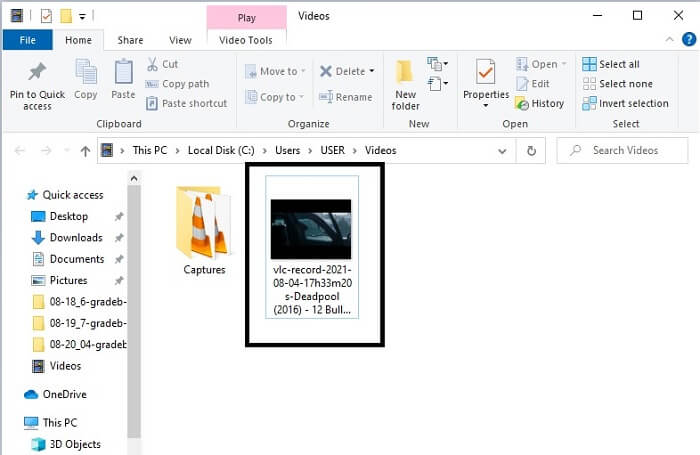
Langkah 5. Untuk menyemak penukaran anda yang berjaya. Anda boleh cari fail GIF yang telah ditukar dalam pengurus atau penjelajah fail anda. Klik dan nikmatinya.
3. Pemain Media VLC
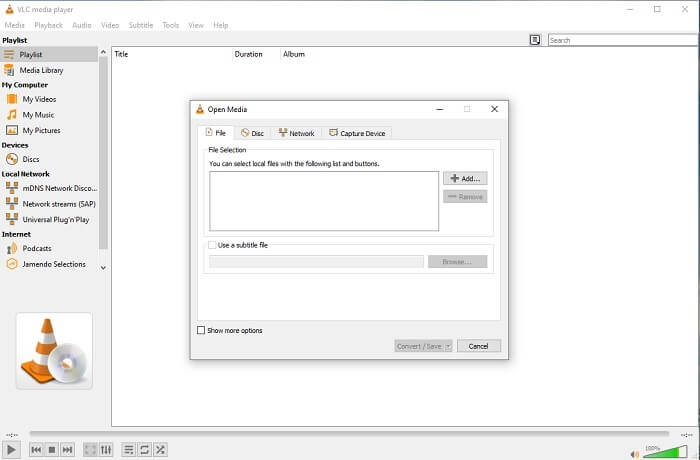
Alat ini dikenali sebagai salah satu pemain media yang paling berkuasa. Tetapi tahukah anda bahawa pemain VLC juga boleh menukar MPG kepada GIF? Namun format yang disediakannya sangat terhad kepada format yang biasa digunakan sahaja. Walaupun terkenal sebagai pemain media terbaik, fungsi penukarannya bukan pilihan terbaik untuk anda. Jadi, jika anda mahukan penukar yang lebih baik, anda perlu memilih alat dalam talian di atas dan bukannya alat ini. Tetapi jika anda mahu menonton video maka VLC Media Player mesti menjadi pilihan anda kerana alat satu lagi tidak menyediakan pemain video kerana tujuan utama mereka ialah penukaran.
4. Zamzar
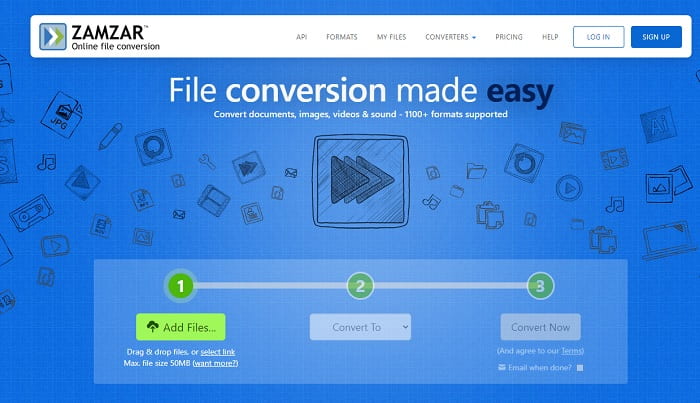
Alat dalam talian lain yang menyediakan penukaran hebat ialah Zamzar. Seperti mana-mana penukar dalam talian yang lain, mereka berkongsi antara muka yang sama, dan ia juga menyediakan arahan mengenai cara untuk menukarnya. Tetapi proses menukar dan memuat turun adalah berbeza. Walaupun versi percuma, anda hanya boleh menukar saiz fail maksimum 50 MB. Kerana selepas anda menukar video, anda mesti pergi ke fasa memuat turunnya. Ia adalah banyak kerumitan kepada mereka yang meninggalkan penukaran mereka dan hanya menunggu produk untuk dimainkan.
Bahagian 2. Carta Perbandingan
| Ciri Alat | FVC Video Converter Ultimate | Penukar Dalam Talian Percuma FVC | Pemain Media VLC | Zamzar |
| Penukar |  | | | |
| Alat penyuntingan | |  | | |
| Penukar Berkuasa | | | | |
| Pendaftaran Diperlukan | | | | |
| Platform | Apl berasaskan desktop | Aplikasi berasaskan web | Apl berasaskan desktop | Aplikasi berasaskan web |
| Julat harga | $25.00 1 Bulan/1 PC $55.20 Pembelian sekali untuk 1 PC $119.00 Sepanjang Hayat 5 PC | Ini adalah alat dalam talian percuma | Ini adalah alat dalam talian percuma | Alat dalam talian percuma Tetapi ia juga menyediakan premium bulanan. Untuk asas: $9 Untuk pro: $16 Untuk perniagaan: $25 |
MPG lwn GIF
Dibuat oleh Moving Picture Experts Group (MPEG), MPG ialah format video digital biasa untuk menyimpan maklumat video, audio dan metadata. Ia agak berguna apabila mencipta filem untuk dikongsi di Internet. Fail tersebut dalam MPG biasanya mengandungi pemampatan video/audio MPEG-1 atau MPEG-2.
GIF ialah format imej biasa untuk grafik web. Selain menyimpan imej kecil dan imej yang mengandungi teks, GIF juga boleh mengandungi dan memaparkan animasi asas di tapak web. Ia adalah format tanpa kerugian, dan pemampatan GIF tidak merendahkan kejelasan imej.
Bahagian 3. Soalan Lazim Mengenai MPG hingga GIF
Adakah terdapat cara untuk menggunakan Photoshop dan menukar video kepada GIF?
Ya, anda boleh menukar MPG kepada GIF dengan Photoshop. Tetapi bukan hanya format fail MPG sahaja, anda juga boleh memilih format lain dan ia boleh ditukar menjadi GIF. Satu lagi ciri istimewanya ialah anda juga boleh menambah baik GIF tersebut supaya lebih baik. Klik di sini untuk mengetahui cara menukar MP4 kepada GIF.
Apakah alat perakam skrin terbaik untuk merakam GIF?
Alat perakam skrin terbaik yang anda boleh gunakan untuk kerja itu ialah FVC Screen Recorder. Alat ini bukan sahaja terbaik untuk merakam video. Ia juga mempunyai perakam audio terbina dalam dan perakam permainan untuk pengalaman permainan yang lebih berkualiti. Namun, alat ini memerlukan bayaran sebelum digunakan. Jangan risau kerana ia mempunyai alat dalam talian yang boleh melakukan rakaman.
Mengapa GIF dicipta?
Ia dicipta untuk memaparkan imej sambil menjimatkan ruang storan. Pencipta GIF ialah Steve Wilhite, seorang saintis komputer Amerika dengan bantuan gergasi teknologi CompuServe pada akhir tahun 1987. Klik di sini untuk mengetahui lebih banyak maklumat tentang GIF.
Kesimpulannya
Akhirnya, sekarang anda tahu cara membuat GIF pada diri sendiri, anda lebih baik mencuba dan menikmatinya. Hanya dengan menggunakan alat mudah ini, anda boleh membuat perubahan. Daripada mencari melalui web, anda kini seorang pembuat GIF yang diperakui. Selain itu, anda kini boleh meluahkan perasaan anda dengan cara anda sendiri dengan sentuhan peribadi dan kepakaran anda yang dibangunkan hanya dengan membaca artikel ini. Harap anda boleh menikmati kehidupan GIF yang lebih baik yang anda cipta dan berkongsi GIF terbaik anda kepada dunia.
-
 [Panduan] Cara Menukar Video M4V ke GIF Animasi pada Windows / Mac
 Sekiranya anda ingin membuat fail GIF animasi dari video M4V kegemaran anda, anda dapat mempelajari 2 cara mudah dan efisien untuk menukar video M4V ke GIF dengan tetapan yang disesuaikan.
-
 WebM ke GIF - 3 Penukar WebM ke GIF Percuma untuk Membuat GIF Anda Sendiri
 Adakah WebM adalah GIF? Bagaimana mengubah video menjadi GIF? Adakah terdapat penukar WebM ke GIF percuma? Catatan ini berkongsi 3 cara percuma untuk membantu anda menukar WebM ke GIF.
-
 Cara Menukar Video MKV ke GIF Animasi tanpa Photoshop / FFmpeg
 Setelah memuat turun dan menonton filem MKV di komputer anda, anda mungkin ingin berkongsi beberapa detik indah dengan rakan atau di Internet sebagai GIF. Dalam artikel ini, anda boleh mengetahui tentang 2 cara termudah untuk menukar MKV ke GIF.

