


 Video Converter Ultimate
 Perakam Skrin
 Pembaikan Video
 Muat Turun Selamat
5 Kaedah untuk Menukar WMA kepada MP3: Desktop & Dalam Talian
WMA is an audio format developed by Microsoft. Obviously, it's compatible with Windows devices, but outside of that, it's a mediocre fit. Some legacy models of mobile devices and music players do not support this format. If we want to make sure that the content of this audio file can be read using any device or platform, try converting WMA to MP3. MP3 files are smaller in size and, therefore, also save us a lot of storage space on the hard disk. And no platform can edit and play music that doesn't support MP3.
Menukar WMA kepada MP3 ialah pilihan yang sangat menjimatkan kos, dan banyak program serta platform boleh melakukannya untuk kami. Selepas penyelidikan dan penggunaan sebenar, artikel ini memilih 5 daripada yang terbaik. Anda akan menemui butiran tentang cara menggunakannya dan melihat kelebihan dan kekurangan setiap penukar di sini.

Bahagian 1. Bagaimana untuk Menukar WMA kepada MP3 pada Win/Mac [Tiada Kehilangan Kualiti]
FVC Video Converter Ultimate
If you are fond of the stable performance of the software on the desktop side, you should definitely be the first to try FVC Video Converter Ultimate. This software is friendly to both Windows and Mac users and supports more than 1,000 formats, which ensures that we hardly encounter compatibility problems when using it. Its batch conversion feature and hardware acceleration technology ensure that it can handle multiple WMA to MP3 conversion tasks with 30X faster efficiency at all times. FVC Video Converter Ultimate is never just a format converter; it has a complete set of video, audio, and image editing tools in its toolbox, such as cropping, enhancement, compression, noise removal, and so on. By downloading this software, we no longer need to travel to multiple platforms but solve all the problems in one breath.
Muat Turun PercumaUntuk Windows 7 atau lebih baharuMuat Turun Selamat
Muat Turun PercumaUntuk MacOS 10.7 atau lebih baharuMuat Turun Selamat
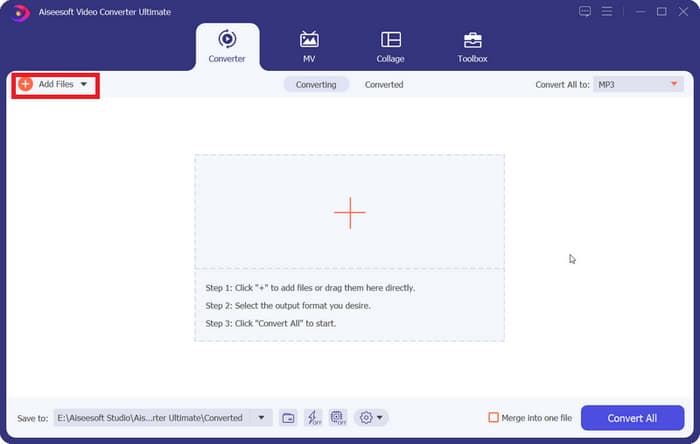
Step 1. Download and install FVC Video Converter Ultimate on your computer. We will use a Windows device as an example. Press Converter > Add Files to upload your WMA audio.
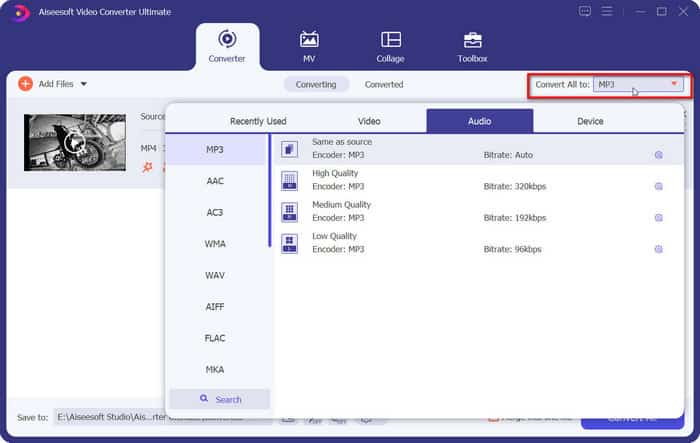
Step 2. Go to Convert All to, expand the list under this tab, and choose Audio > MP3. There are many different options for audio quality. Choose your target one.
If you want to trim the added audio file, click Cut under the file name.
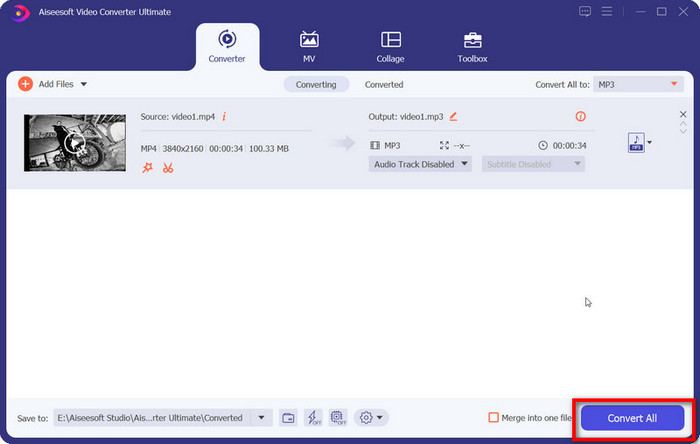
Step 3. After finishing all these settings, click Convert All to export your MP3 audio.
Bahagian 2. Bagaimana untuk Menukar WMA kepada MP3 secara Percuma
Bagaimana untuk Menukar WMA kepada MP3 dengan VLC Media Player
Selain FVC Video Converter Ultimate, terdapat satu lagi program desktop yang boleh anda gunakan: VLC Media Player. Walaupun penggunaan paling biasa bagi aplikasi ini adalah untuk membuka dan memainkan fail multimedia, ia juga menyokong penyiapan beberapa operasi penyuntingan mudah, seperti penukaran format. Di samping keserasian yang sangat baik, VLC Media Player mempunyai kelebihan kerana ia bebas sepenuhnya dan mudah digunakan.
Berikut ialah cara menukar fail WMA kepada MP3 dengan VLC Media Player.
Step 1. Prepare your computer for VLC Media Player. In the top left corner, choose Media > Convert/Save.
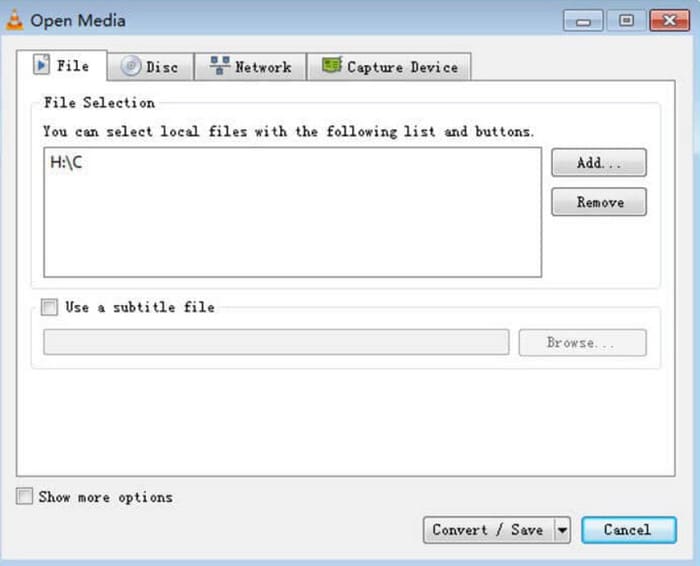
Step 2. The Open Media window will then be launched. Choose File and click + Add to select your prepared WMA audio. Next, click Convert/Save.
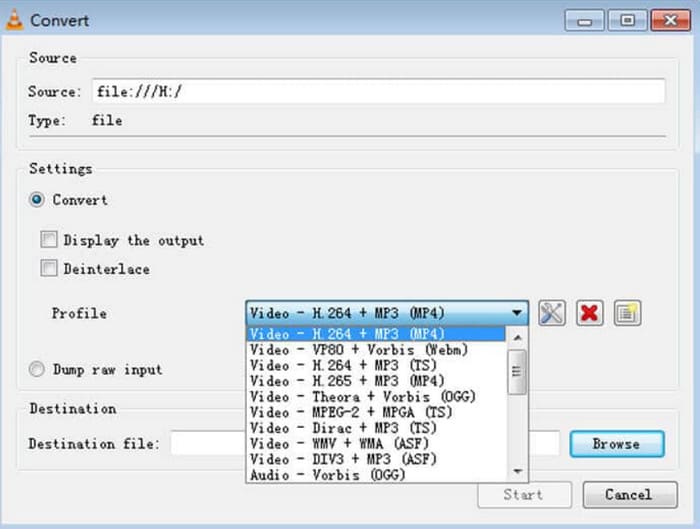
Step 3. Please navigate to the Profile option and expand the list next to it. Choose your target format and click Browse to find a storage path.
Step 4. When you finish all the settings above, click Start to launch the WMA format to MP3 conversion.
VLC Media Player tidak menyokong banyak pilihan format output, dan kami hanya boleh menemui alat pelarasan parameter audio yang sangat asas padanya. Tidak mengapa untuk hanya memindahkan WMA ke MP3, tetapi untuk pengeditan yang lebih khusus, kami mengesyorkan FVC Video Converter Ultimate.
dengan Pemain Media VLC
iTunes, pemain multimedia yang dibangunkan oleh Apple, boleh melakukan lebih daripada memainkan dan menyimpan fail audio juga. Kami juga boleh membiarkannya melakukan beberapa tugas penukaran format asas. Walaupun diiktiraf sebagai yang paling serasi dengan peranti Mac, ia juga menawarkan versi yang boleh dimuat turun oleh pengguna Windows.
Beberapa perkhidmatan asas iTunes adalah percuma. Seterusnya, kami akan menunjukkan cara menukar WMA ke MP3 menggunakan iTunes.
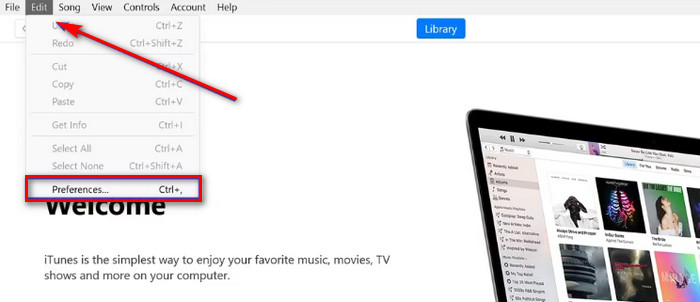
Step 1. Launch iTunes on your computer. Choose Edit > Preference.
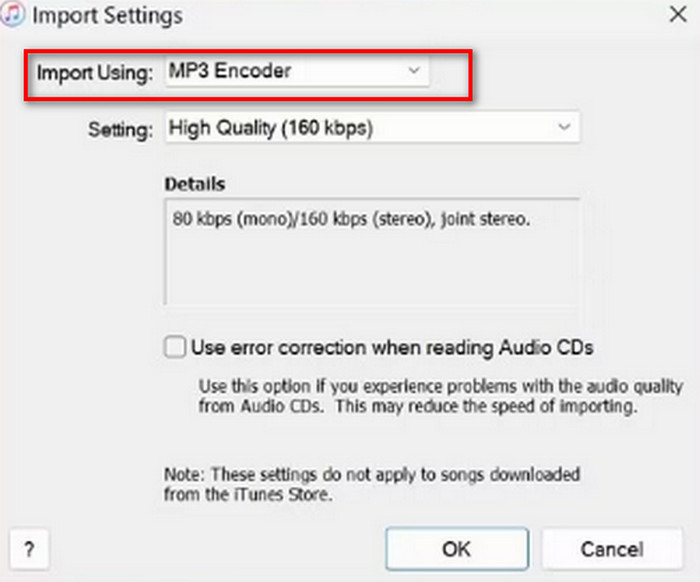
Step 2. After opening the General Preference window, choose General and go to Import Settings. Select MP3 Encoder and choose OK to keep the change.
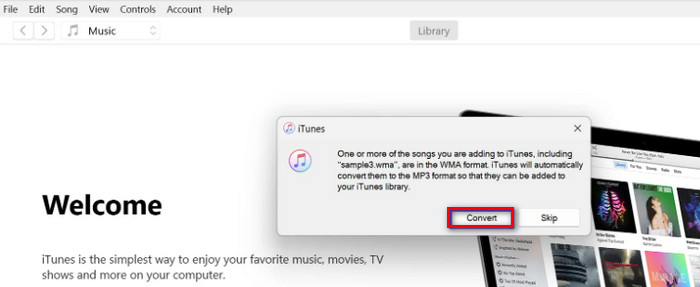
Step 3. Go back to File again and tap Add File to Library. A pop-out window will appear. You should click Convert.
Adalah penting untuk ambil perhatian bahawa iTunes juga menawarkan beberapa alat penyuntingan audio profesional, dan apl itu telah dihentikan untuk peranti Apple selepas keluaran versi macOS Catalina. Pastikan model peranti anda sepadan sebelum memuat turunnya.
Bahagian 3. Bagaimana Menukar WMA kepada MP3 Dalam Talian
Penukar Audio Percuma FVC
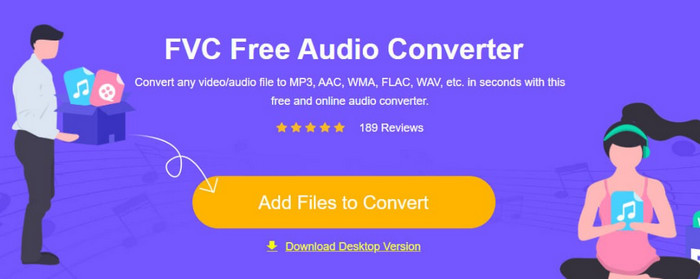
These are the recommendations given for users who prefer desktop applications. If you find it too troublesome to download and install the software and want to have a platform that can start converting as soon as you enter the interface to help you, try FVC Free Audio Converter.. It can be opened in your browser, and the design interface is straightforward. This free and efficient converter is our most loyal assistant when we have any urgent need to adjust audio formats.
Berikut ialah cara menukar WMA kepada MP3 dalam talian dengan FVC Free Audio Converter.
Step 1. Launch the FVC Free Audio Converter with your browser. Click Add Files to Start and upload your WMA audio file.
Step 2. Choose MP3 as the output format. Then click Convert to start the process. If you want to adjust some parameters of your audio, choose the Settings icon on the right side of the audio file.
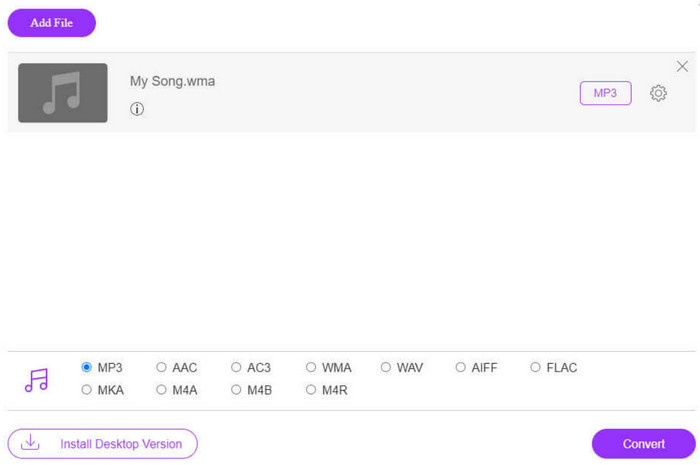
Kelajuan penukaran FVC Free Audio Converter sangat pantas, tetapi ia masih mempunyai ciri yang lebih sedikit daripada FVC Video Converter Ultimate. Jika anda mahukan tahap output audio yang lebih tinggi, kami mengesyorkan anda memuat turun bahagian desktop.
Tukar Percuma
Satu lagi penukar format dalam talian yang juga berjalan ringan ialah FreeConverter. Ia menyokong lebih 1500 penukaran format fail dan mengendalikan fail eBook selain video, audio dan imej. Platform mendakwa untuk memadam fail sumber secara automatik dalam masa beberapa jam selepas pengguna selesai mengedit untuk memastikan privasi tidak terjejas.
Baca panduan di bawah untuk mengetahui cara menukar WMA menjadi MP3 menggunakan FreeConverter.
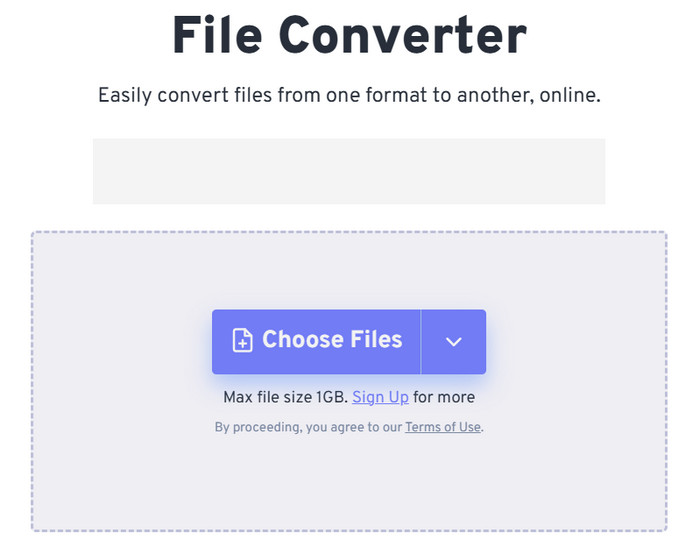
Step 1. Visit FreeConverter's official website. Click Choose Files to add your WMA audio to this platform.
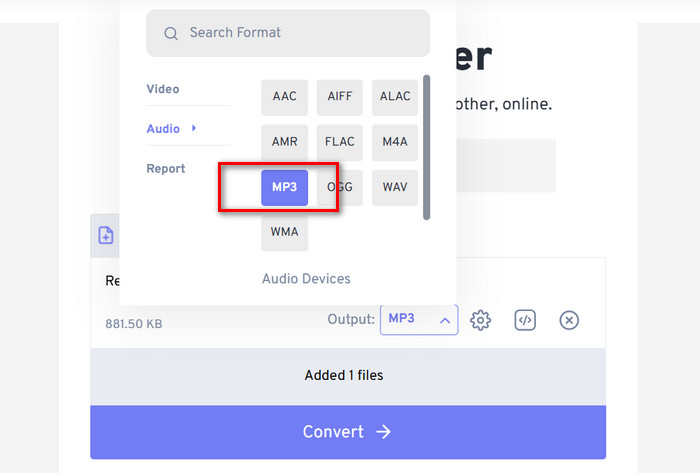
Step 2. Expand the menu of Output. Choose Audio > MP3.
If you want to enhance the audio quality, click the Advanced settings icon.
Step 3. Click Convert to launch the transforming process.
Although FreeConvert claims that converting audio formats is entirely free, let's not forget that it has a file size limit. It can't handle audio over 1GB, so if our file exceeds this limit, we'll need to pay to continue converting with this WMA to MP3 converter properly.
Bahagian 4. Soalan Lazim Menukar WMA kepada MP3
Fail WMA VS MP3, yang mana lebih baik?
Bergantung pada cara kami membandingkan, MP3 jelas lebih unggul daripada WMA dari segi keserasian. Saiz fail MP3 lebih kecil daripada WMA, satu ciri yang menjadikannya lebih sesuai untuk menyimpan dan memindahkan audio. Tetapi WMA lebih baik dari segi kualiti bunyi.
Bagaimanakah cara saya memainkan fail WMA lama?
When it comes to choosing a WMA audio player, the best option is Windows Media Player, which comes with Windows. Of course, some third-party players, such as VLC Media Player and MPlayer, are also worth trying.
Bolehkah muzik YouTube memainkan fail WMA?
Ya, WMA kini berada dalam julat format audio yang disokong secara rasmi oleh YouTube.
Bahagian 4. Kesimpulan
This is a guide that teaches you how to convert WMA to MP3. Although the audio sound quality of the WMA format is slightly better, its files are more significant at the same time. What's more, not many platforms and music players support this format nowadays. To make sure that you are not hindered when reading audio, converting WMA to MP3 is necessary. Here, you will find five tools, including three desktop software and two online platforms. Comparing these five tools, FVC Video Converter Ultimate is the most versatile choice.
-
 Pemain Muzik WMA – Ulasan 10 Pemain Muzik WMA Terbaik 2025
 Bolehkah Muzik Google Mainkan WMA? Apakah pemain muzik WMA terbaik? Pemain muzik Android apa yang boleh memainkan fail WMA? Catatan ini membuat senarai 10 pemain muzik WMA terbaik untuk anda memainkan muzik WMA di Mac, PC Windows, Android dan iPhone.
-
 2 Kaedah untuk Menukar Audio FLV kepada WMA [Percuma & Dalam Talian]
 Ingin mengekstrak audio WMA dari video FLV? Berikut adalah 2 pengekstrak audio WMA percuma untuk menukar FLV (Flash Video) ke WMA (Windows Media Audio) dengan kelajuan penukaran pantas pada Mac OS X dan Windows 10/8/7.
-
 3 Alat Perakam WMA Mudah Digunakan Sesuai untuk Bakat Suara
 Adakah anda bakat suara? Artikel ini membincangkan mengenai perakam WMA yang menghasilkan kualiti tinggi seperti WMA untuk pencipta kandungan suara.

