


 Video Converter Ultimate
 Perakam Skrin
 Pembaikan Video
 Muat Turun Selamat
Edit MP3 Dengan Alat Terbaik pada Windows, Mac, Dalam Talian dan Telefon Mudah Alih
MP3 bermaksud MPEG-1 Audio Layer III, dan ia ialah sejenis fail yang menyimpan muzik dalam format termampat. Jenis fail ini jauh lebih kecil berbanding fail muzik yang tidak dimampatkan, menjadikannya lebih mudah untuk disimpan dan dipindahkan. Apabila semakin banyak muzik dicipta, orang ramai mencari cara mudah untuk edit MP3 bagi menjadikannya kedengaran lebih baik. Ini kerana MP3 boleh menjadi lebih baik daripada muzik asal yang tidak dimampatkan. Masalahnya, perisian penyuntingan boleh jadi mahal dan memerlukan komputer berkuasa tinggi. Mujurlah, panduan ini akan menunjukkan kepada anda cara menggunakan penyunting MP3 yang paling disyorkan supaya anda boleh mengedit muzik pada semua platform yang anda gunakan. Jadi, apa pun keperluan anda, inilah tempat terbaik untuk bermula!

Bahagian 1. Pilihan Terbaik untuk Mengedit MP3 dengan Editor MP3 All-in-One
Perisian pertama yang menyunting fail MP3 ialah FVC pilihan khas Video Converter Ultimate. Ya, ia ialah penukar media yang bukan sahaja dikhaskan untuk video tetapi juga fail audio. Ia membolehkan anda melaraskan volum dengan mudah, sama ada sehingga dua kali ganda lebih kuat atau serendah bisikan. Anda juga boleh mempercepat atau memperlahankan audio tanpa perlu bersusah payah dengan tetapan teknikal.
Selain itu, ia boleh mengeluarkan bunyi latar belakang, memotong bahagian yang tidak diingini, membahagikan fail kepada bahagian, dan juga mengedit rakaman suara. Selain itu, ia menawarkan antara muka yang mudah digunakan yang, walaupun anda seorang pemula dengan penyuntingan audio, program ini memudahkan untuk melakukan semua perkara ini dalam beberapa langkah sahaja. Anda juga akan menyukai teknologi canggih yang ditawarkannya, seperti pecutan perkakasan, NVIDIA, Intel, AMD dan alat penyuntingan berkuasa AI yang boleh anda gunakan.
Ciri Utama:
• Penukaran audio yang menukar sehingga 120x lebih pantas.
• Sokongan untuk lebih daripada 1000 pelbagai format.
• Pisahkan, potong dan cantumkan fail audio dengan lancar.
• Edit panjang MP3 tanpa sebarang had.
• Mampatkan fail audio kepada saiz yang anda inginkan.
• Ubah suai pengekod fail MP3, kadar sampel, saluran dan kadar bit.
Muat Turun PercumaUntuk Windows 7 atau lebih baharuMuat Turun Selamat
Muat Turun PercumaUntuk MacOS 10.7 atau lebih baharuMuat Turun Selamat
Cara Edit Fail Audio dengan FVC
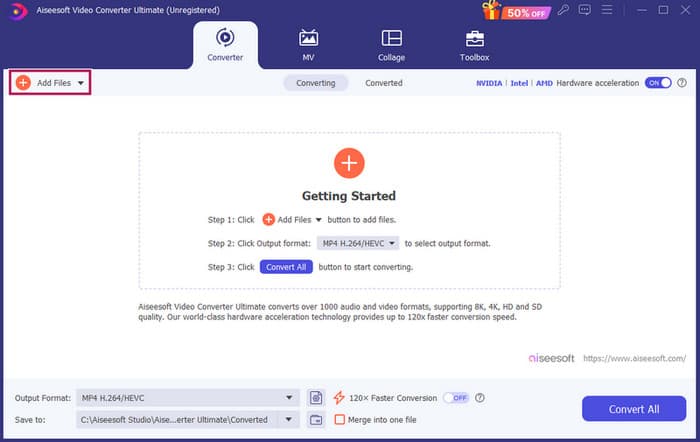
Langkah 1. Setelah melancarkan perisian, anda boleh menambah fail MP3 dengan menekan butang Add Files. Sebagai alternatif, anda boleh menyeret fail daripada lokasinya dan melepaskannya ke dalam perisian penyuntingan.
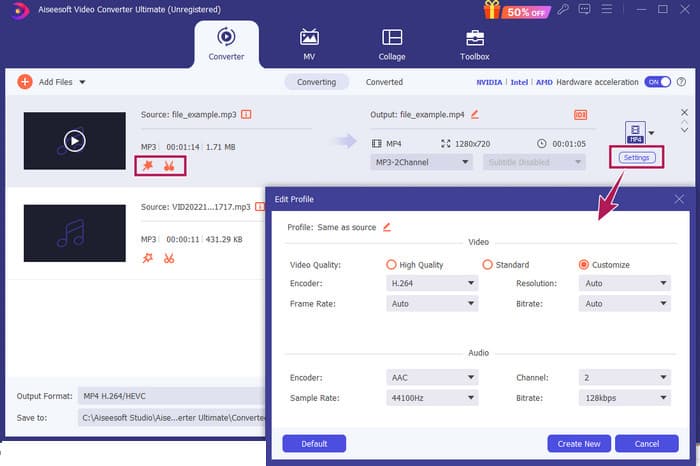
Langkah 2. Setelah fail dimuatkan, anda boleh mengakses tetapan volum dan kelewatan dengan mengklik butang Star pada lakaran kecil. Butang Scissors digunakan untuk mengakses fungsi gabung, pisah, dan potong. Dan sudah tentu, butang Settings untuk mengakses pengubah suai profil.
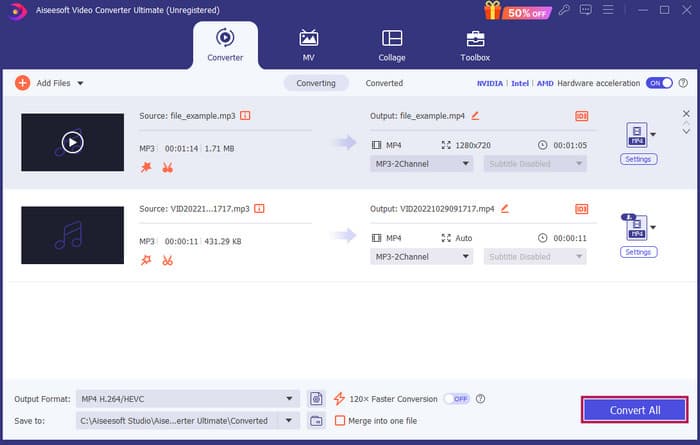
Langkah 3. Selepas mengedit fail, anda perlu klik butang Convert All. Begitulah cara edit MP3 pada Windows 10 dengan FVC.
Rumusan: FVC Video Converter Ultimate boleh menjadi penyelesaian utama anda bukan sahaja untuk menambah baik atau mengubah suai MP3, tetapi juga alat hebat untuk penukaran. Kami suka betapa ringkas dan pantasnya penyuntingan audio. Walaupun kebanyakan alat dalam kotak peralatan adalah untuk fail video, masih terdapat penyunting audio yang berkuasa di dalamnya. Justeru, ia adalah pilihan peribadi kami untuk penyuntingan fail yang berkesan dan mudah yang terbaik untuk pemula.
Bahagian 2. Edit MP3 dengan Adobe Audition pada Windows
Adobe Audition ialah salah satu pilihan terkenal untuk penyuntingan audio profesional, digunakan oleh pemuzik, podcaster dan jurutera bunyi. Ia dikenali sebagai program yang berkuasa tetapi mudah digunakan. Selain itu, ia didatangkan dengan ciri seperti rakaman dan penyuntingan berbilang trek bunyi serentak, menambah kesan khas yang boleh anda dengar serta-merta semasa anda menciptanya, dan turut menyertakan pustaka bunyi yang boleh anda gunakan dalam projek anda. Anda juga boleh menganggapnya sebagai naik taraf yang direka dengan baik bagi program lama bernama Cool Edit Pro. Selain itu, anda boleh mengedit MP3 dan menyesuaikan susun atur mengikut keutamaan anda, dan ia membolehkan anda bekerja dengan sehingga 40 trek bunyi berasingan pada masa yang sama. Terdapat juga alat penyuntingan papan adun serta alat untuk menambah instrumen muzik pada projek anda.
Ciri Utama:
• Edit sekumpulan fail audio dengan hanya satu klik.
• Tambahkan penapis dan kesan yang hebat untuk menjadikan audio anda berbunyi menakjubkan.
• Gabungkan trek audio yang berbeza untuk mencipta bunyi yang digilap.
• Betulkan dan tingkatkan vokal anda dengan alat yang berkuasa.
Cara Edit Fail Audio dengan Adobe Audition
Langkah 1. Buka program dan import fail MP3 dengan pergi ke File-Open.
Langkah 2. Untuk mengedit, anda boleh gunakan Waveform Editor bagi memperincikan satu trek. Untuk berbilang trek audio, gunakan Multitrack Editor.
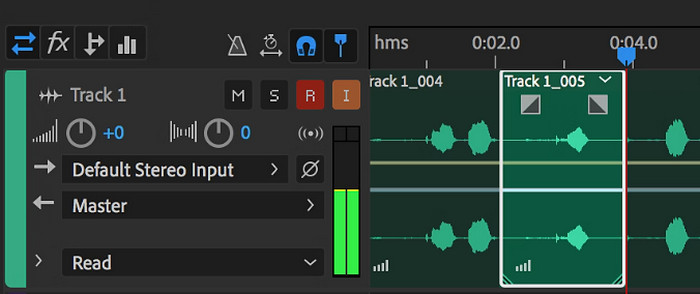
Langkah 3. Setelah selesai mengedit, anda boleh terokai alat lain dalam program, seperti kesan. Setelah semua yang perlu dilakukan siap, anda boleh terus menyimpan projek audio. Begitulah cara edit MP3 pada Windows dengan Adobe Audition.
Rumusan: Memang benar, Adobe Audition ialah penyunting audio yang hebat dan klasik. Tidak hairanlah ramai penyunting masih setia menggunakannya. Namun, bagi pemula yang tidak mahukan navigasi yang rumit, Adobe Audition mungkin bukan pilihan terbaik.
Bahagian 3. Edit MP3 dengan iTunes pada Mac
iTunes adalah seperti pengurus muzik anda, memastikan semua lagu kegemaran anda teratur pada komputer anda. Bayangkan ia sebagai kotak digital di mana anda boleh menyusun koleksi muzik anda dengan mudah mengikut artis, album atau pun genre. Ia juga membolehkan anda membetulkan sebarang maklumat yang hilang, seperti tajuk lagu atau nama artis, supaya anda sentiasa boleh mencari perkara yang anda cari. Dengan editor slash pemain media ini, anda boleh mencipta runut bunyi atau senarai main tersuai untuk mood atau aktiviti yang berbeza, seperti gabungan senaman atau senarai main untuk berehat.
Bahagian yang terbaik? iTunes sangat mesra pengguna. Walaupun anda tidak mahir teknologi, anda boleh menambahkan lagu ke pustaka anda dengan mudah dan cepat, menyusunnya dengan kemas dan memainkannya semula tanpa perlu bersusah payah. Walaupun ia tidak boleh melakukan penyuntingan mewah seperti program lain, ia adalah pilihan yang bagus untuk tugas asas seperti memotong kesunyian yang tidak diingini dari awal atau akhir fail MP3 anda. Kami akan meneroka cara mengedit MP3 pada Mac dan Windows dalam beberapa langkah mudah!
Ciri Utama:
• Mengurus dan mencipta perpustakaan digital fail audio.
• Selain MP3, ia juga menyokong pelbagai format audio, termasuk WAV, AIFF, Apple Lossless dan AAC.
• Ia membenarkan penyuntingan maklumat fail MP3 seperti artis, album, genre dan tahun keluaran.
Cara Edit Fail Audio dengan iTunes
Langkah 1. Lancarkan program dan muatkan fail MP3. Cari bahagian File dan pilih opsyen Add File to Library atau pilih opsyen yang seumpamanya. Kemudian, pilih MP3 yang anda ingin potong daripada peranti anda.
Langkah 2. Sekarang, pergi ke File sekali lagi dan pilih Library. Pastikan MP3 tersebut tersenarai di sana. Kemudian, klik kanan padanya dan pilih Get Info.
Langkah 3. Kini anda boleh menetapkan titik pemotongan. Untuk berbuat demikian, pergi ke tetingkap Get Info, cari Options, kemudian cari Start dan Stop time. Sekarang, tetapkan titik mula dan tamat bagi bahagian yang anda mahu kekalkan. Setelah selesai, anda boleh menyimpan perubahan dengan mengklik butang OK.
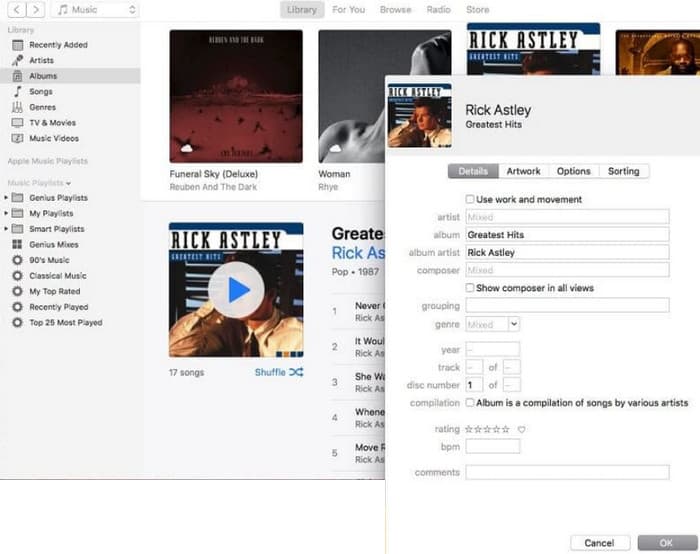
Rumusan: iTunes boleh menyediakan penyuntingan dan penambahbaikan MP3 asas mengikut keperluan. Namun, kerana ia bukan penyunting audio khusus yang boleh mengedit MP3 secara menyeluruh, anda mungkin kecewa dengan kekurangan fungsinya.
Bahagian 4. Edit MP3 dengan Editor MP3 Dalam Talian
Clideo ialah sebuah pemotong MP3 dan penyunting yang menjanjikan untuk mereka yang mahu menggunakan penyunting audio dalam talian bagi memotong fail MP3 mereka. Ia adalah alat web yang berfungsi pada mana-mana peranti, jadi anda tidak perlu memuat turun sebarang perisian. Clideo membolehkan anda memotong bahagian tertentu audio dengan menetapkan masa mula dan tamat yang tepat atau dengan hanya menyeret penanda pada skrin.
Tambahan pula, ia menyokong pelbagai jenis fail, jadi anda boleh mengedit hampir semua fail muzik yang anda miliki. Selain itu, Clideo membenarkan anda menambah kesan seperti fade-in dan fade-out untuk peralihan bunyi yang lebih lancar pada permulaan dan akhir klip anda. Secara keseluruhan, Clideo ialah alat yang mesra pengguna dan serba boleh yang menjadikan pengeditan fail audio anda mudah.
Ciri Utama:
• Potong bahagian fail audio anda yang tidak diingini dengan mudah.
• Tambah kesan fade-in dan fade-out.
• Ia menyokong pelbagai format audio.
Cara Edit Fail Audio dengan Clideo
Langkah 1. Setelah anda sampai ke laman rasmi Clideo, pergi ke bahagian audio cutter.
Langkah 2. Untuk memuat naik fail MP3, klik butang Choose File. Setelah fail berjaya diimport, anda boleh mula mengeditnya.
Langkah 3. Tetapkan penyeret kepada saiz yang anda kehendaki, kemudian klik Export untuk menyimpan perubahan.
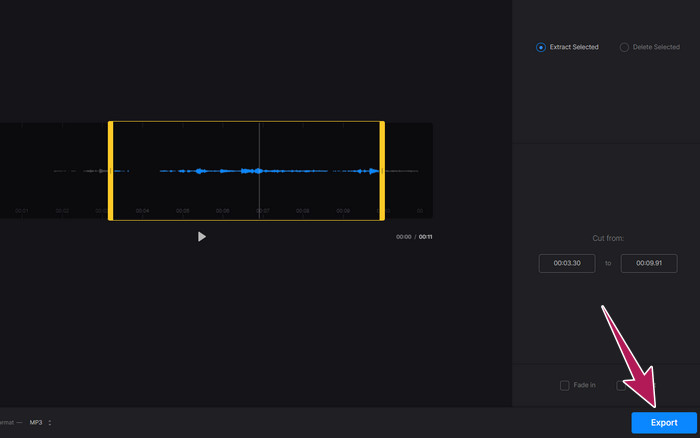
Rumusan: Clideo ialah alat dalam talian yang menawarkan beberapa alat untuk mengedit MP3 dan jenis fail lain, termasuk video. Namun, anda harus ingat bahawa alat dalam talian seperti Clideo mungkin memberikan keselamatan yang tidak menentu kerana ia lebih terdedah berbanding alat luar talian.
Bahagian 5. Edit MP3 dengan APP Mudah Alih pada iPhone/Android
Penyunting MP3 terakhir yang saya cadangkan ialah aplikasi yang boleh anda dapatkan di Android dan iOS. Ia dipanggil WavePad dan mempunyai banyak ciri, jadi ia mungkin kelihatan rumit pada mulanya. Dengan aplikasi ini, anda boleh memotong dan memangkas klip, menukar pic suara anda, malah membuang bunyi latar belakang. Selain itu, ia mengedit MP3 pada iPhone dan Android dengan pelbagai kesan bunyi dan muzik yang boleh anda tambah pada rakaman anda secara percuma. Ia mempunyai penyama (equalizer) terbina dalam, yang membantu anda menjadikan audio kedengaran sempurna. Selain MP3, WavePad juga berfungsi dengan kebanyakan jenis fail bunyi yang biasa.
Ciri Utama:
• Potong, salin, tampal dan tambah kesan pada bunyi.
• Sokongan untuk pelbagai format audio seperti MP3, WAV dan AIFF.
• Mempunyai tetapan kualiti bunyi yang berbeza.
Cara Edit Fail Audio dengan WavePad
Langkah 1. Lancarkan aplikasi, ketik tiga garis, dan pilih File-Import from the Audio tabs. Ini akan membolehkan anda memuat naik fail MP3 yang perlu anda edit.
Langkah 2. Akses alat penyuntingan dengan meleret ke kanan pada pilihan alat di bahagian atas skrin.
Langkah 3. Setelah anda lakukan ini, anda boleh ketik butang REC untuk merakam bahagian yang anda mahu kekalkan daripada fail. Kemudian, simpan dan eksport ke peranti anda.
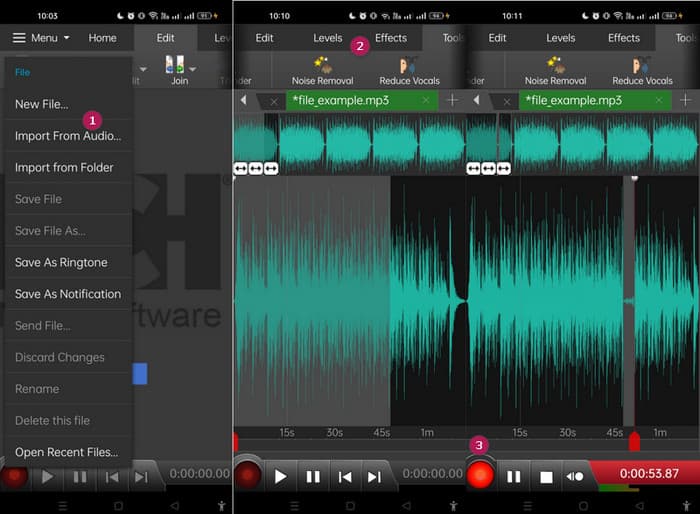
Rumusan: Versi percuma WavePad sudah mempunyai kebanyakan ciri, tetapi terdapat pilihan berbayar pada harga $3 sebulan yang juga menyingkirkan iklan untuk mendapatkan segala-galanya, seperti semua kesan bunyi dan keupayaan menyimpan fail anda dalam format berbeza. Ini akan membolehkan anda mengedit MP3 dengan lebih tahap lanjutan pada Android atau iPhone.
Bahagian 6. Soalan Lazim tentang Mengedit MP3
Bolehkah saya memangkas lagu dalam Apple Music?
Tidak. Malangnya, anda tidak boleh memangkas lagu secara langsung dalam Apple Music itu sendiri.
Adakah Microsoft mempunyai editor audio?
Terdapat banyak editor audio yang tersedia, seperti Audacity untuk mengedit MP3, yang boleh anda muat turun dari Microsoft Store.
Bagaimanakah cara saya memangkas fail MP3 dalam Windows Media Player?
Malangnya, Windows Media Player sendiri tidak mempunyai ciri penyuntingan terbina dalam untuk memotong fail MP3.
Kesimpulannya
Sekurang-kurangnya kini anda sudah tahu cara terbaik untuk edit MP3 seperti tidak pernah sebelum ini. Dengan penyunting audio terbaik yang kami sarankan di atas, anda pasti akan mencapai audio yang anda inginkan! Alat ini menyediakan penyelesaian menyeluruh untuk pelbagai platform, memastikan fleksibiliti dan kemudahan tanpa mengira peranti atau sistem operasi anda. Sama ada anda lebih gemar aplikasi desktop, alat dalam talian atau aplikasi mudah alih, anda boleh mendapatkan suntingan berkualiti profesional dengan mudah. Daripada pemotongan dan penggabungan asas kepada kesan dan penambahbaikan lanjutan, penyunting yang tepat boleh mengubah fail MP3 anda dengan cekap. Terokailah pilihan yang ada, dan mula perhalus trek audio anda ke tahap sempurna hari ini.
-
 10 Pemain FLV Terbaik untuk Windows, Mac, iOS dan Android pada tahun 2024
 Pemain FLV membantu anda mengakses fail FLV dengan mudah pada peranti Windows, Mac, Android, iOS anda. Lihat pemain fail FLV terbaik yang boleh anda muat turun sekarang.
-
 8 Pemain MOV Terbaik untuk Memainkan Fail MOV QuickTime dengan Kualiti Asal
 Ketahui lebih lanjut mengenai 8 pemain MOV terbaik yang tersedia untuk Windows dan Mac. Anda boleh memilih yang dikehendaki dan sesuai untuk memainkan fail MOV dengan kualiti yang asli.
-
 Dapatkan Pemain MP4 Terbaik Anda untuk Memainkan Fail MP4 dengan Kualiti Visual yang Tinggi
 Baca dan dapatkan pemain MP4 terbaik anda dari cadangan 10 perisian pemain video MP4 terbaru. Anda boleh memainkan fail video MP4 pada Windows dan Mac dengan lancar tanpa ketinggalan.
