


 Video Converter Ultimate
 Perakam Skrin
 Pembaikan Video
 Muat Turun Selamat
Cara Menukar Fail Video DAT Anda ke Format FLV Secara Percuma
Oleh kerana terdapat begitu banyak format video, anda mungkin perlu menukar satu format kepada format yang lain. Artikel ini memberi tumpuan kepada cara untuk menukar DAT kepada FLV di desktop dan dalam talian secara percuma. Fail dengan sambungan DAT bukanlah fail standard tetapi fail data yang menyimpan maklumat. Oleh itu, tiada program khusus yang bertanggungjawab untuk membuka fail DAT. Jika fail video disimpan dengan cara ini, penukar DAT ke FLV yang betul boleh membantu anda membukanya.

Bahagian 1: Cara Percuma Terbaik untuk Menukar DAT ke FLV
Cara 1: Tukar DAT ke FLV dengan Penukar FLV Percuma
FVC Free FLV Converter ialah penukar video yang berkuasa walaupun ia adalah perisian percuma. Ini bermakna anda boleh mendapatkan fungsi yang setanding dengan perisian profesional tanpa membayar walau satu sen.
Ciri-ciri Utama Penukar DAT ke FLV Percuma Terbaik
- 1. Batch menukar fail DAT ke format FLV dengan cepat.
- 2. Menghasilkan output berkualiti tinggi menggunakan teknologi canggih.
- 3. Sertakan pelbagai alat bonus, seperti penyuntingan video.
Muat Turun PercumaUntuk Windows 7 atau lebih baharuMuat Turun Selamat
Muat Turun PercumaUntuk MacOS 10.7 atau lebih baharuMuat Turun Selamat
Cara Menukar DAT kepada FLV Secara Percuma
Langkah 1: Buka fail DAT
Jalankan penukar DAT ke FLV percuma terbaik selepas anda memasangnya pada komputer anda. Untuk memastikan data anda selamat, sebaiknya muat turun daripada laman web rasmi. Klik butang besar Add File(s) pada antara muka utama, cari dan pilih fail video DAT dan bukanya. Kemudian ia akan muncul di kawasan pustaka.

Langkah 2: Tetapkan FLV sebagai format output
Pergi ke bahagian bawah, klik dan kembangkan pilihan Output format. Pergi ke tab General Video dalam senarai, tatal ke bawah dan pilih FLV atau format yang berkaitan. Anda juga boleh menetapkan semula kadar bingkai, resolusi dan parameter lain dengan menekan ikon Gear pada setiap tajuk.

Langkah 3: Tukarkan DAT ke FLV
Seterusnya, klik butang Open Folder dan tukar direktori destinasi mengikut keutamaan anda. Secara lalai, penukar DAT ke FLV akan menyimpan output ke pustaka video anda. Akhir sekali, klik butang Convert untuk mula menukar DAT kepada FLV pada desktop anda serta-merta. Ia hanya mengambil beberapa minit untuk menyelesaikan penukaran.

Cara 2: Cara Menukar DAT ke FLV dengan VLC
VLC adalah cara lain untuk menukar DAT ke FLV secara percuma. Pemain media sumber terbuka dapat membuka fail video dengan sambungan DAT dan menukarnya menjadi fail video standard. Memandangkan prosedur yang rumit, kami berkongsi langkah-langkah asas di bawah.
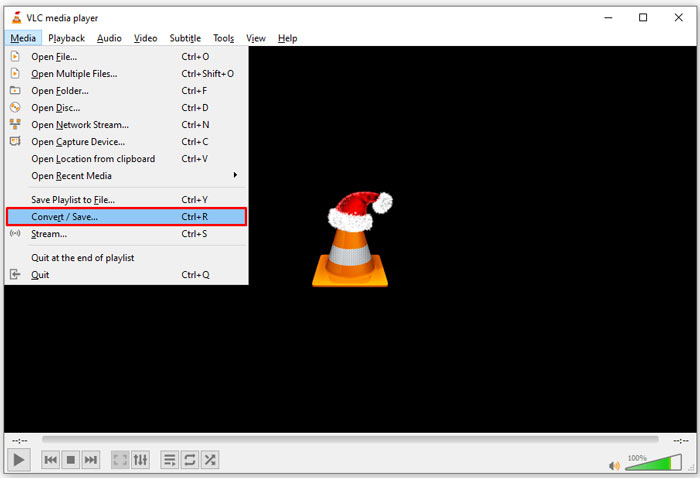
Langkah 1: Buka VLC dan klik Convert/Save dalam menu Media pada bahagian atas. Kemudian anda akan melihat dialog open-media.
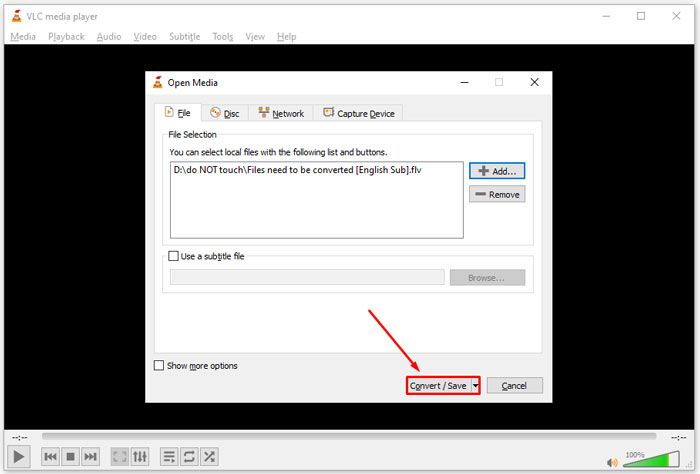
Langkah 2: Klik butang Add dan buka fail video DAT ke dalam VLC. Tekan butang Convert/Save untuk meneruskan.
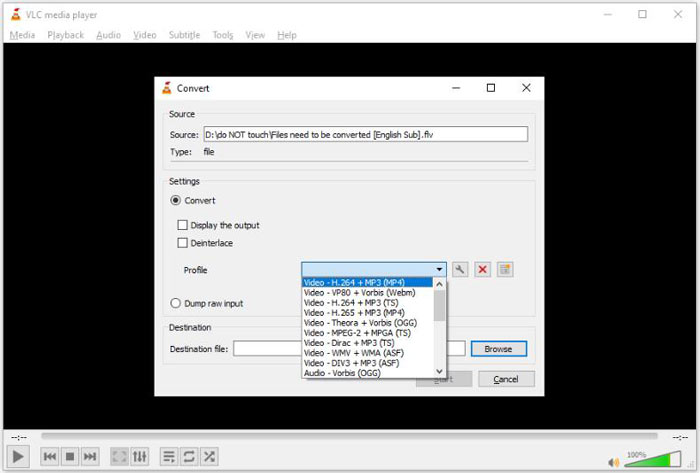
Langkah 3: Kembangkan senarai jatuh bawah Profile dan tetapkan FLV sebagai format output. Klik butang Browse untuk memilih folder output dalam bahagian Destination.
Langkah 4: Klik butang Start untuk memulakan penukaran DAT ke FLV. Tempoh penukaran dalam VLC adalah lebih kurang sama dengan panjang fail video anda.
Bahagian 2: Cara Menukar DAT ke FLV Dalam Talian
FVC Free Online Video Converter ialah cara yang mudah untuk menukar DAT kepada FLV secara dalam talian dan percuma. Berbanding penukar video web lain, ia membolehkan anda melakukan tugas ini tanpa sebarang had, seperti saiz fail, pendaftaran, tera air dan sebagainya.
Langkah 1: Buka pelayar dan layari https://www.free-videoconverter.net/free-online-video-converter/. Klik butang Add Files to Convert untuk memuat turun pelancar.

Langkah 2: Klik butang Add File pada pelancar dan muat naik fail video DAT dari komputer anda. Kemudian pergi ke bahagian format di bahagian bawah dan pilih FLV.

Langkah 3: Tekan butang Convert untuk memulakan penukaran DAT kepada FLV secara dalam talian. Apabila selesai, muat turun fail video ke pemacu keras anda.
Mungkin anda juga berminat:
Tukar Fail TS Anda ke Format FLV
Bahagian 3: Soalan Lazim mengenai DAT hingga FLV
Bolehkah saya menukar fail DAT ke FLV dari Internet Explorer?
Sekiranya fail DAT dari IE menyimpan kandungan video, anda boleh menukarnya menjadi video standard. Walau bagaimanapun, DAT tidak hanya menyimpan data video, tetapi juga maklumat lain. Untuk data lain, anda tidak boleh menukar ke video.
Bagaimana cara membuka fail DAT?
Fail DAT adalah fail data yang mengandungi maklumat mengenai program yang terkait dengannya. Anda boleh mencuba membuka fail DAT dengan mengklik dua kali. Sistem anda mungkin menyebarkan program yang betul.
Bolehkah saya menukar DAT ke QuickTime?
Itu bergantung pada keadaan anda. Pertama, fail DAT mesti menyimpan data video. Kemudian anda juga memerlukan penukar video yang menyokong DAT dan QuickTime.
Kesimpulannya
Panduan ini telah berkongsi tiga cara untuk menukar DAT anda ke FLV di desktop atau dalam talian anda. VLC adalah cara percuma untuk melakukan tugas pada Windows, Mac dan Linux. Walau bagaimanapun, FVC Free FLV Converter menawarkan lebih banyak ciri pro-level dengan meminta pembayaran. Sekiranya anda mempunyai soalan lain, sila tinggalkan mesej di bawah catatan ini.
-
 MP4 hingga FLV | 3 Penukar Percuma Teratas (Dalam Talian / Mac / Windows)
 Catatan ini adalah panduan terperinci untuk penukaran MP4 ke FLV. Anda boleh menggunakan 3 penukar percuma untuk menukar MP4 ke FLV dalam talian, pada komputer Windows atau Mac dengan mudah.
-
 3 Penyelesaian untuk Menukar MTS ke FLV Percuma & Dalam Talian
 Ingin menukar MTS ke FLV? Berikut adalah 3 perisian penukar MTS ke FLV percuma yang boleh anda cuba menukar MTS ke FLV pada Mac OS X dan Windows 10/8/7.
-
 4 Kaedah Percuma Teratas untuk Menukar Video FLV ke MP4 di Desktop dan Dalam Talian
 Panduan ini berkongsi empat kaedah percuma untuk menukar fail video FLV anda ke format MP4 pada Windows 10/8/7 / XP dan Mac OS X, sehingga anda dapat menikmati video di mana-mana peranti.
