


 Video Converter Ultimate
 Perakam Skrin
 Pembaikan Video
2 Penukar Disyorkan Digunakan untuk Menukar F4V kepada FLV dengan Tutorial
Adobe Flash Player menyokong F4V dan FLV sebagai bekas (container) untuk memainkan media penstriman daripada internet. Walaupun format ini berasaskan Adobe, kedua-duanya tetap berbeza dalam banyak aspek. Sebagai contoh, data yang dikodkan dalam FLV tidak sama dengan F4V kerana FLV mempunyai persamaan dengan SWF. Selain itu, jika anda mahu menukar F4V kepada FLV dan mendapatkan pengekod seperti SWF, baca artikel ini untuk mengetahui dengan lebih lanjut.

Bahagian 1. 2 daripada Penukar Pilihan Terbanyak untuk Menukar F4V kepada FLV
Pilihan Pertama. FVC Video Converter Ultimate
FVC Video Converter Ultimate ialah penukar F4V ke FLV yang sangat disyorkan untuk dimuat turun pada Windows atau Mac anda. Alat ini mempunyai proses penukaran paling pantas dan paling boleh dipercayai yang akan anda temui, dan ia sudah memuaskan berjuta-juta pengguna. Lebih daripada itu, menukar format bukan satu-satunya kelebihan alat ini. Anda tahu tak? Anda juga boleh menyunting di sini, seperti memotong video, menggabungkan, menguatkan audio, memotong (crop), dan banyak lagi. Jika anda mahu penukar yang unik dan dapat memenuhi keperluan anda, penukar ini adalah pilihan yang tepat. Perincian berikut ialah langkah-langkah menukar fail F4V anda kepada format FLV dalam beberapa minit sahaja.
Cara Menukar F4V kepada FLV dengan Bantuan FVC Video Converter Ultimate:
Langkah 1. Untuk memuat turun perisian ke cakera komputer anda, klik butang muat turun.
Muat Turun PercumaUntuk Windows 7 atau lebih baharuMuat Turun Selamat
Muat Turun PercumaUntuk MacOS 10.7 atau lebih baharuMuat Turun Selamat
Langkah 2. Klik perisian untuk membukanya, masukkan fail dengan mengklik Add Files di bahagian atas kanan antara muka, dan klik Open selepas anda memilih fail F4V yang ingin anda tukar.
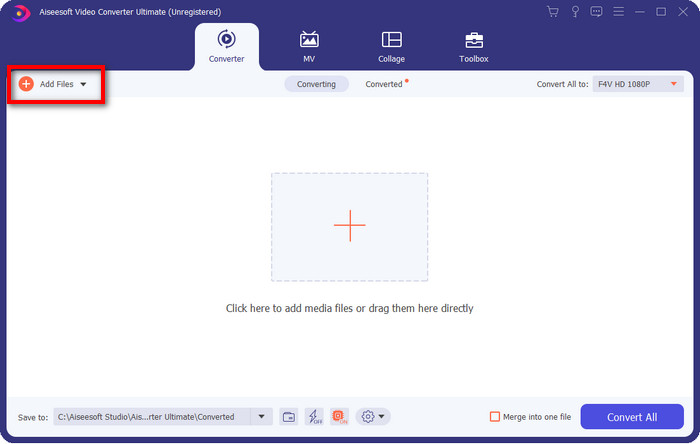
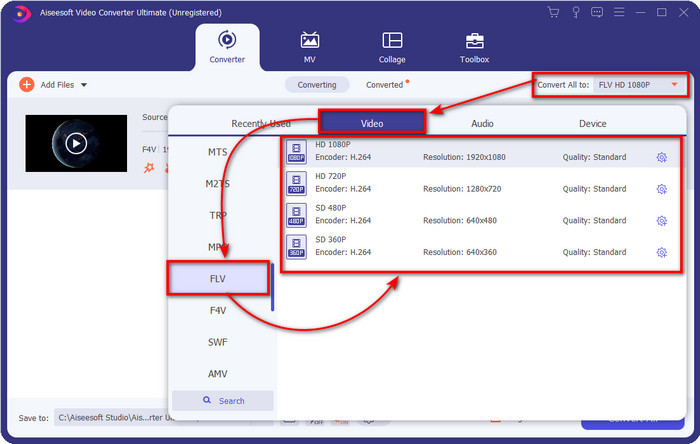
Langkah 3. Tekan butang Convert All to dan tukar format kepada FLV.
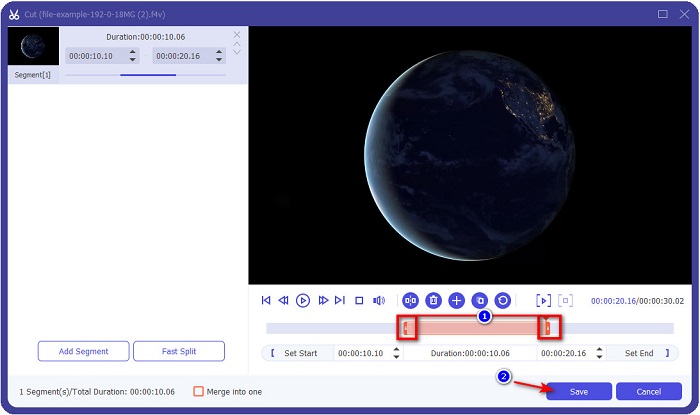
Mahukan video yang lebih pendek? Jika ya, klik ikon scissors. Laraskan handlebar mengikut panjang yang anda kehendaki, kemudian klik Save untuk menyimpan perubahan.
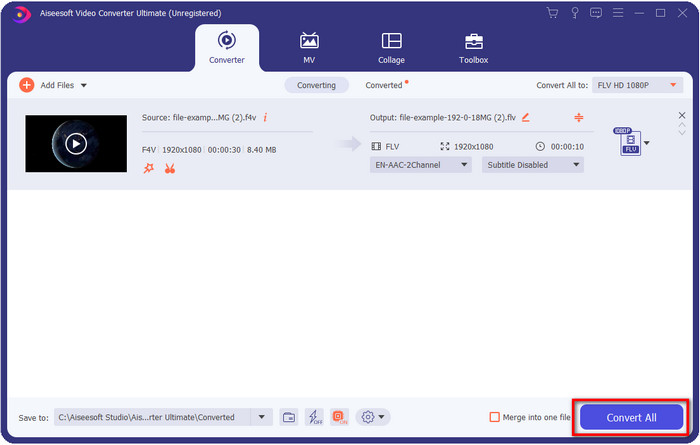
Langkah 4. Untuk menukar F4V kepada FLV, klik Convert All, dan proses akan bermula dengan pantas. Satu folder komputer akan muncul yang menunjukkan lokasi fail anda.
Kelebihan
- Ia dengan mudah menukar berbilang F4V kepada FLV, AVI, MOV, MKV dan 200+ lagi format.
- Pecutan perkakasan dan penukaran pantas tersedia di sini untuk menjadikan penukaran lebih cepat.
- Ia tersedia dalam semua Windows & macOS.
- Ciri penyuntingan video yang luar biasa untuk menjadikan video anda kelihatan fenomenal adalah di bawah Kotak Alat.
Keburukan
- Perlu dibeli sebelum anda boleh menggunakannya.
- Memuat turun penukar pada desktop anda adalah perlu.
Pilihan ke-2. Penukar Video Percuma FVC Dalam Talian
FVC Free Video Converter Online membantu anda menyelesaikan proses penukaran secara dalam talian. Alat ini tersedia pada semua pelayar untuk menukar F4V kepada FLV dalam talian tanpa had. Namun begitu, anda tidak boleh melakukan penukaran kelompok di sini kerana fungsi itu tidak disokong. Walau bagaimanapun, anda masih boleh mendapatkan format yang anda mahu tukar dengan penukar dalam talian ini. Mahu tahu caranya? Ikuti langkah-langkah di bawah.
Cara Menukar F4V kepada FLV dengan Bantuan FVC Free Video Converter Online:
Langkah 1. Untuk membuka alat web, anda perlu klik pautan ini.
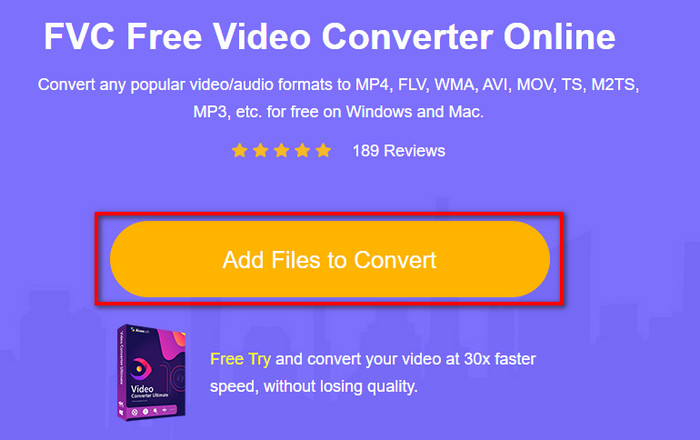
Langkah 2. Pada UI penukar web utama, klik butang Add Files to Convert. Cari fail F4V dalam folder yang akan dipaparkan dan tekan Open.
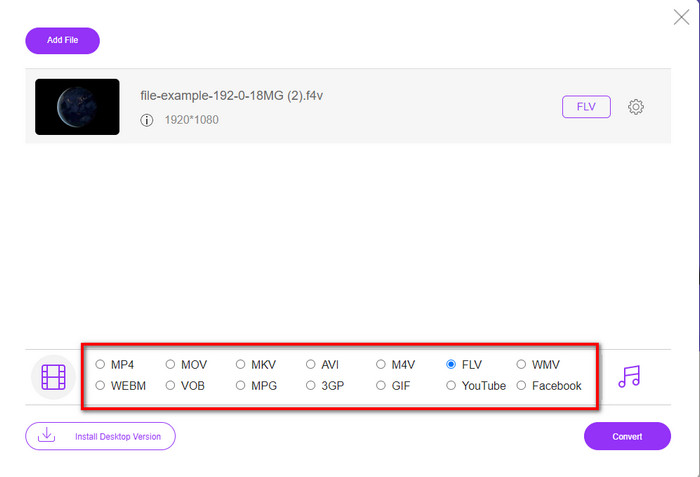
Langkah 3. Di bahagian bawah, terdapat banyak format yang boleh anda pilih; klik FLV.
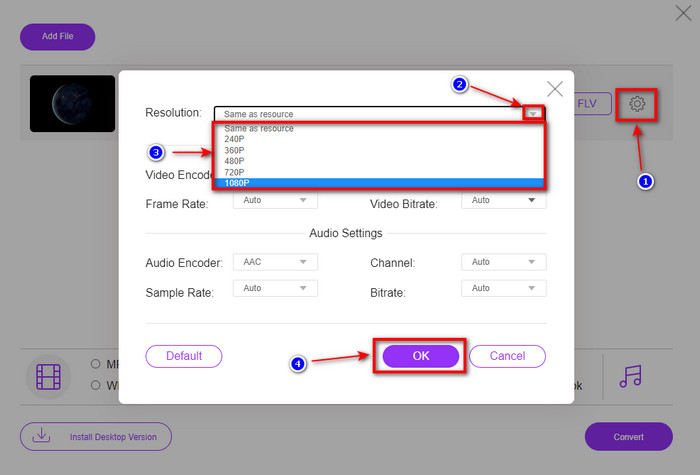
Mahu menukar resolusi video? Kemudian klik ikon cog, tekan drop-down, dan pilih kualiti video.
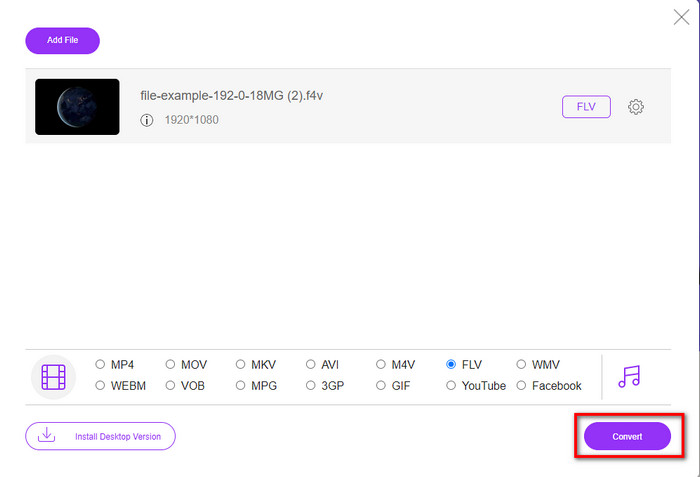
Langkah 4. Mulakan proses penukaran F4V kepada FLV dengan mengklik Convert.
Kelebihan
- Tersedia dalam semua pelayar web yang anda miliki.
- Penukar dalam talian percuma dan mudah digunakan.
- Bebas perisian hasad dan tiada iklan di tapak web utama.
Keburukan
- Sambungan Internet adalah satu kemestian.
- Ia tidak menyokong ciri penyuntingan video seperti FVC Video Converter Ultimate.
Bahagian 2. F4V lwn. FLV: Format Manakah yang Terbaik
Seperti yang dikatakan pada mulanya, kedua-dua format ini ialah bekas Adobe yang boleh anda gunakan untuk mengedarkannya di web. Tetapi sekarang, mari kita bandingkan perbezaan antara kedua-dua format dengan membaca butiran di bawah.
Format F4V ialah bekas Quicktime seperti format MP4. Ia ialah format fail media asas ISO untuk menstrim video melalui internet. Selain itu, format ini ialah versi FLV yang dinaik taraf. Namun begitu, terdapat banyak masalah dalam pengekodan video dan audio yang terdapat pada FLV. Selain itu, anda tidak boleh menjana halaman web HTML seperti yang FLV boleh lakukan untuk anda.
FLV ialah fail yang mempunyai struktur yang hampir sama dengan SWF. Format ini lebih disokong dalam Adobe Flash Player dan kebanyakan HTML 5. Ia menyokong pemampatan video dan audio seperti codec Sorenson Spark atau VP6. Selain itu, jika anda mempertimbangkan untuk memuat turun video di web, format ini ialah pilihan terbaik. Tidak seperti F4V, jika anda ingin menjana HTML pada halaman web anda, ini adalah format untuk anda.
Adalah lebih baik untuk menukar F4V kepada FLV kerana faedah yang anda akan perolehi pada FLV yang tidak tersedia pada F4V. Walaupun dikatakan F4V adalah versi baharu FLV, namun keunikan FLV adalah satu daripada jenis yang F4V tidak dapat menyalin dalam banyak aspek.
Bahagian 3. Soalan Lazim tentang Penukaran F4V ke FLV
Bagaimanakah saya boleh memainkan video F4V?
Dengan bantuan pemain media yang berkuasa, anda boleh melakukannya tanpa sebarang kesukaran, dan contoh terbaik ialah Aiseesoft Blu-ray Player. Ikuti langkah mudah ini untuk mengetahui cara memainkan fail F4V. Pertama, muat turun perisian pada desktop anda dan lancarkannya. Muat naik fail ke dalam alat dengan mengklik Open File. Selepas dimuatkan, fail akan dimainkan secara automatik.
Mana yang lebih baik? F4V atau MOV?
Ia bergantung pada tujuan anda menggunakannya. Sebagai contoh, F4V sangat baik untuk mengedarkan fail media di web tanpa kehilangan kualiti. Namun, jika anda mahu menyunting video pada Mac, gunakan MOV. Jadi, jika anda mahu menyunting video F4V anda pada Mac, anda mesti belajar cara menukar F4V kepada MOV.
Adakah F4V mengandungi output berkualiti tinggi?
Fail F4V boleh mengandungi 1080 atau 720 kualiti video, tetapi saiz fail akan kekal minimum.
Kesimpulannya
Sekarang bahawa kita telah belajar cara menukar F4V kepada FLV dengan bantuan penukar, kini masanya untuk memilih penukar yang boleh dipercayai berdasarkan ulasan. Jika anda mahu merasai proses penukaran dalam talian secara percuma, anda mesti menggunakan FVC Free Video Converter Online. Tetapi alat web ini tidak dapat menandingi penukar ultimate di atas. Tanpa perlu diperkenalkan lagi, kami lebih suka menggunakan FVC Video Converter Ultimate kerana ia memudahkan dan mempercepatkan kerja penukaran anda. Penukar hebat ini sungguh luar biasa dan mengagumkan ramai pengguna dengan ciri-cirinya yang unik. Jadi kini, boleh dikatakan kita selangkah lebih dekat kepada kejayaan dengan bantuan alat-alat ini.
-
 4 Penukar Dalam Talian dan Luar Talian Terbaru untuk Menukar F4V kepada Format AVI
 Tidakkah anda tahu penukar apa yang patut anda gunakan untuk menukar F4V kepada AVI atau mana-mana format video lain? Kemudian baca artikel ini sambil kita belajar cara menukar menggunakan alat yang tersedia.
-
 Bagaimana untuk Menukar F4V kepada MOV Tanpa Kehilangan Kualiti [Diselesaikan]
 Jika anda bergelut untuk mengakui beberapa format video seperti F4V. Baca artikel ini untuk mengetahui lebih lanjut tentang format video F4V dan MOV dan ketahui cara menukar F4V kepada MOV menggunakan kaedah yang berbeza.
-
 Tukar TRP kepada FLV dengan Kaedah Luar Talian dan Dalam Talian Paling Mudah
 Adakah anda ingin menukar fail video TRP anda kepada FLV dengan cepat dan tanpa sebarang kerumitan? Baca artikel ini untuk memberikan anda perisian terbaik dan perkhidmatan dalam talian yang paling sesuai dengan keadaan.
