


 Video Converter Ultimate
 Perakam Skrin
 Pembaikan Video
Panduan Panduan Anda Perlu Pertimbangkan dalam Menukar M2TS kepada FLV [Luar Talian & Dalam Talian]
Fail media seperti VOB, WMV dan MOV semuanya adalah contoh M2TS. Sebenarnya, apakah M2TS itu? M2TS ialah singkatan bagi MPEG-2 Transparent Stream. Video definisi tinggi pada cakera Blu-ray, AVCHD dan sebagainya boleh disimpan dalam format bekas ini. Manakala FLV ialah fail dengan sambungan .flv yang merupakan singkatan bagi Flash Video. Sambungan fail FLV merujuk kepada fail video atau audio yang dihantar melalui internet menggunakan Adobe Flash Player atau Adobe Air. Kedua-dua jenis fail video ini mungkin kedengaran asing bagi anda, tetapi untuk menukar M2TS kepada FLV, anda terlebih dahulu perlu mengetahui kegunaan kedua-dua format video ini dan semua pilihan yang perlu anda pertimbangkan dalam proses penukaran. Sediakan minda anda dan cerahkan pemahaman kepada setiap maklumat yang akan anda baca.

Bahagian 1. Bagaimana untuk Menukar M2TS ke FLV pada Windows dan Mac
Dengan Video Converter Ultimate, menukar M2TS kepada FLV pada kedua-dua Windows dan Mac adalah mudah. MP4/MOV/M4V/FLV/M4K/MTS/M2TS/ASF/MP3/VOB/AAC hanyalah beberapa daripada banyak format video dan format audio popular yang disokong oleh program berkuasa ini. Video definisi tinggi anda boleh ditukar kepada format popular seperti FLV dalam masa beberapa saat sambil mengekalkan kualiti asalnya. Ia mempunyai ciri penukaran kelompok yang membolehkan anda menukar banyak fail tanpa kehilangan kualiti. Dengan mengandaikan anda telah membiasakan diri dengan perisian, anda kini boleh mempelajari semua langkah yang diperlukan untuk berjaya menukar:
Langkah 1: Mula-mula, klik butang Muat Turun Percuma di bawah untuk memuat turun perisian ke komputer anda. Kemudian, selepas selesai memuat turun perisian, pasangkannya pada komputer anda, anda akan melihat satu tetingkap muncul pada skrin yang memaklumkan bahawa perisian sedia digunakan. Klik Mula Sekarang untuk menjalankan perisian.
Muat Turun PercumaUntuk Windows 7 atau lebih baharuMuat Turun Selamat
Muat Turun PercumaUntuk MacOS 10.7 atau lebih baharuMuat Turun Selamat
Langkah 2: Kedua, selepas anda menjalankan perisian, ia akan membawa anda ke antara muka utama perisian, menu Penukar.
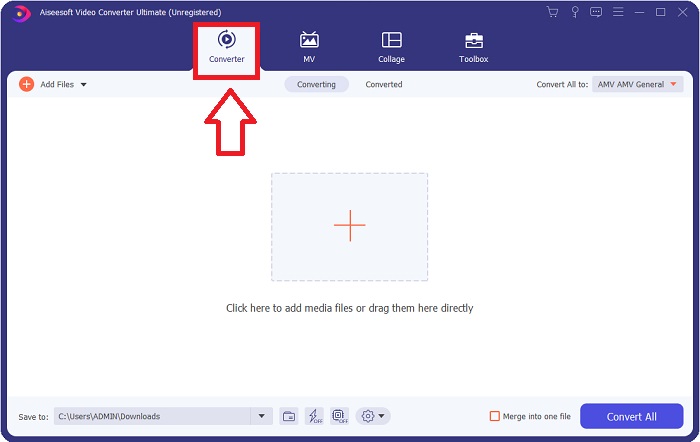
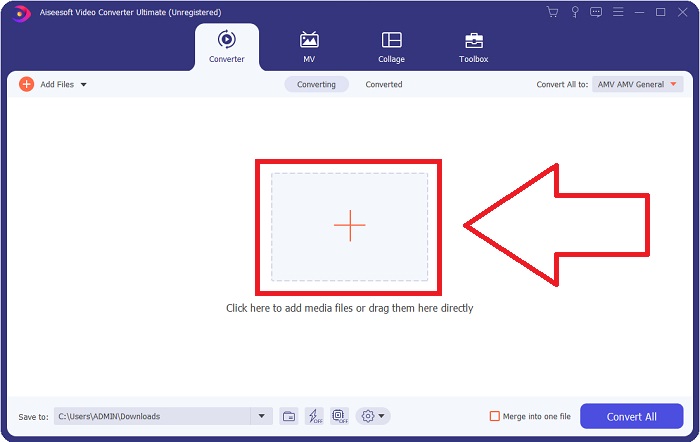
Langkah 3: Untuk memuat naik fail, klik ikon + di tengah antara muka, atau anda juga boleh seret video dari komputer anda.
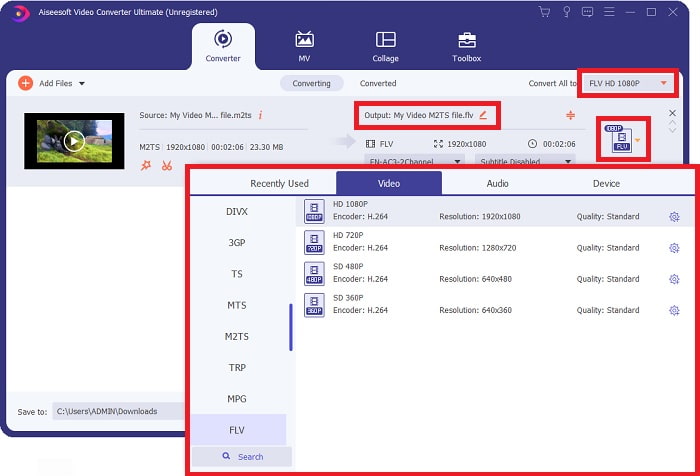
Langkah 4: Selepas memuat naik fail M2TS ke penukar, pergi ke menu Tukar Semua di penjuru kanan sebelah atas tetingkap dan klik padanya. Satu tetingkap baharu akan muncul yang memaparkan semua jenis format berbeza yang disokong oleh perisian, kemudian pilih format video FLV daripada senarai kategori Video.
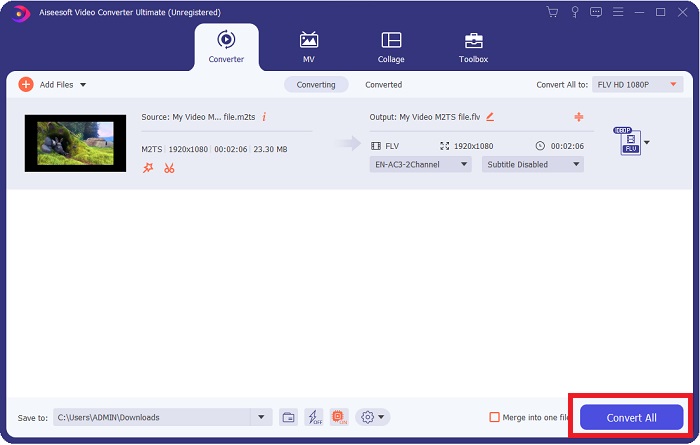
Langkah 5: Jika anda masih belum dapat memutuskan kualiti yang hendak digunakan kerana kualiti yang anda cari tidak tersedia dalam pilihan tersebut, anda boleh klik ikon gear dan ubah semua tetapan kadar bit, resolusi, kadar bingkai dan sebagainya. Apabila anda berpuas hati dengan semua perubahan, anda kini boleh klik Tukar Semua untuk mula menukar fail video anda.
Bahagian 2. Cara Percuma dan Berkesan Lain untuk Menukar M2TS kepada FLV Dalam Talian
Penukar Video Percuma Dalam Talian ialah alat dalam talian yang sesuai untuk menukar format video seperti FLV, MP4, MOV, MKV, MTS, ASF, VOB dan lain-lain dengan kelajuan yang lebih pantas berbanding platform penukaran yang lain. Walaupun proses penukarannya singkat, alat dalam talian ini mengeksport fail video tanpa sebarang masalah pada kualitinya. Tanpa penjelasan lanjut, mari kita teliti semua langkah yang perlu anda ikuti:
Langkah 1: Klik pautan ini untuk pergi ke laman utama Penukar Video Percuma Dalam Talian.
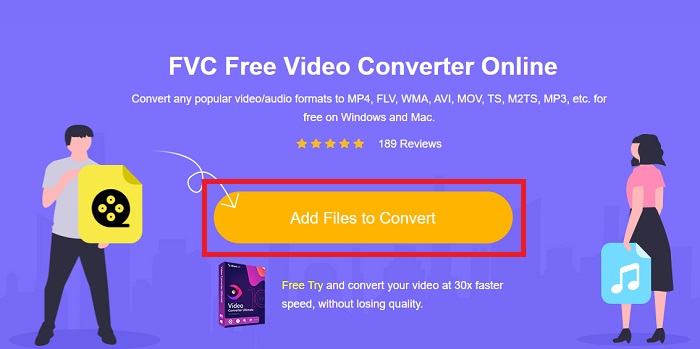
Langkah 2: Kemudian klik butang Tambah Fail untuk Tukar untuk memuat naik fail video M2TS yang ingin anda tukar kepada format video FLV.
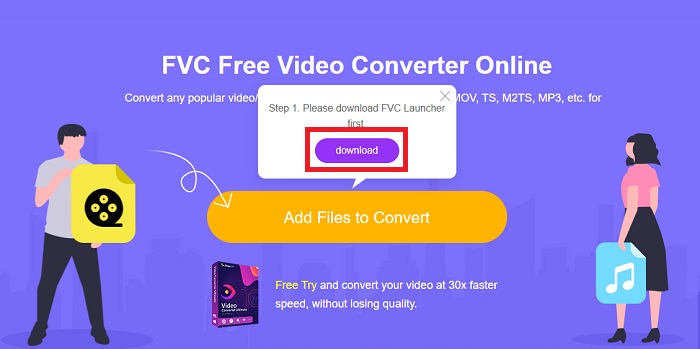
Langkah 3: Selepas anda memuat naik fail, anda akan melihat satu tetingkap timbul di atas skrin yang meminta kebenaran untuk memuat turun pelancar bagi membolehkan anda menggunakan alat dalam talian ini. Klik pelancar yang dimuat turun untuk memasangnya pada komputer anda dan mula menukar.
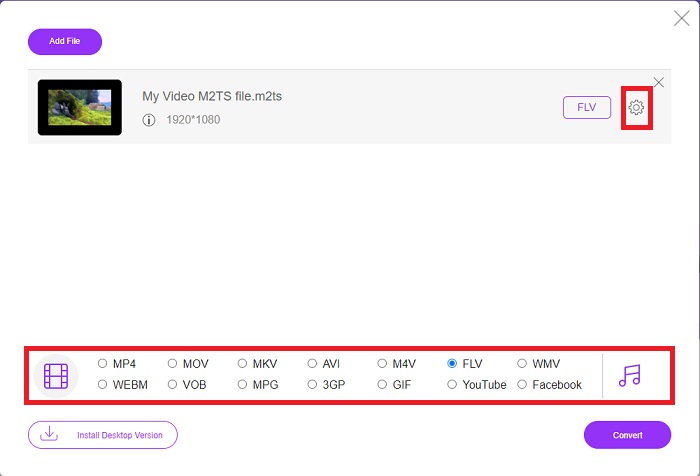
Langkah 4: Pilih format video FLV daripada pilihan format di bawah antara muka. Selain itu, anda boleh mengedit kualiti output video dengan mengklik ikon gear di sebelah format video yang anda pilih. Satu lagi tetingkap akan muncul yang mengandungi kadar bit, resolusi dan kadar bingkai. Mula laraskan tetapan tersebut dan sebaik sahaja anda selesai melaraskan, klik OK dan teruskan dengan proses penukaran.
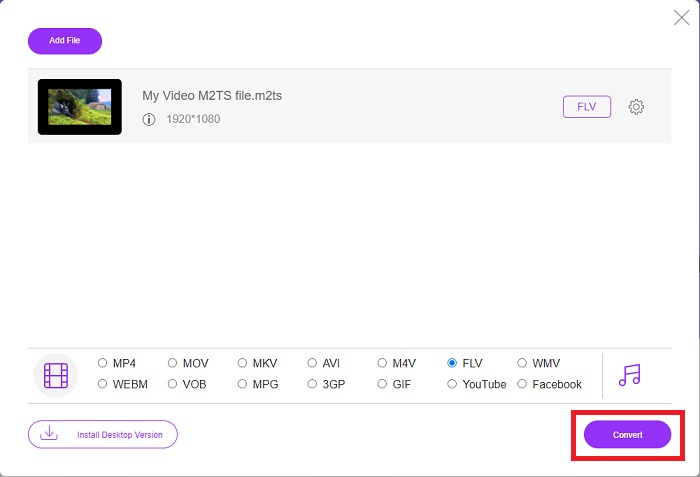
Langkah 5: Anda kini boleh menukar fail dengan mengklik butang Tukar di bahagian bawah kanan tetingkap.
Bahagian 3. Perbandingan Antara M2TS dan FLV
Format bekas video M2TS digunakan untuk menyimpan video definisi tinggi pada Cakera Blu-ray, AVCHD, cakera keras dan peranti lain yang menyokong aliran pengangkutan MPEG-2. Blu-ray Disc Audio-Video (BDAV) ialah nama yang diberikan kepada format ini kerana penggunaannya yang meluas dalam cakera Blu-ray. Demi mengurangkan saiz data. Daripada menggunakan aliran pengangkutan CBR, aliran pengangkutan VBR digunakan (kadar malar) kerana kandungan audio dan video berkualiti tinggi yang terkandung dalam fail M2TS; VideoStudio Pro ialah aplikasi yang sangat baik untuk mengedit fail M2TS.
| Sambungan fail | M2TS | FLV |
| Jenis fail | Blu-ray Disc Audio-Video MPEG-2 Pengangkutan Stream | Fail Video Flash |
| Dibangunkan Oleh | Persatuan Cakera Blu-ray | Sistem Adobe |
| Kelebihan | Fail video Blu-ray BDAV definisi tinggi berasaskan aliran pengangkutan MPEG-2; digunakan untuk menyimpan data video pada cakera Blu-ray; menyokong resolusi 720p/1080i. | Format video yang lazim, FLV digunakan oleh puluhan ribu tapak web, menawarkan pelbagai ciri tambahan dan menghasilkan saiz fail yang lebih kecil daripada kebanyakan format video lain. Fail FLV sangat baik untuk menyampaikan video berkualiti tinggi pada kadar yang pantas. |
| Keburukan | Fail m2ts tidak boleh mengandungi bab. Ia disimpan di tempat lain dalam struktur folder Bluray. | Pemalam kilat perlu dipasang untuk memainkan fail fail flash dalam talian. |
| Program membuka Format Video | ◆SEMUA Pemain ◆MPPlayer ◆VLC Media Player ◆PotPlayer | ◆VLC Media Player ◆Adobe Flash Player |
Bahagian 4. Soalan Lazim tentang Menukar M2TS kepada FLV
Bagaimanakah cara saya memainkan fail M2TS?
Windows Media Player, SMPlayer, 5KPlayer, Splash dan File Viewer Plus boleh memainkan fail M2TS. Sesetengah pemain M2TS serasi dengan pelbagai sistem pengendalian. Pemain media VideoLAN VLC, sebagai contoh, boleh memainkan fail M2TS pada Windows, Mac dan Linux.
Adakah FLV format rakaman yang sesuai?
Adobe Flash Player menggunakan format fail FLV. Salah satu format video yang paling popular dan serba boleh ini menyokong semua platform dan pelayar video. Platform penstriman video dalam talian seperti YouTube mendapat manfaat daripada penggunaan format FLV. Ia mudah dimuat turun, hasil daripada saiz failnya yang kecil. Klik di sini untuk mengetahui lebih lanjut tentang perakam FLV yang tersedia.
Adakah FLV masih digunakan?
Video, iklan sepanduk, animasi dan strim langsung adalah semua pilihan. Sudah lama sejak filem kilat, dan mereka menggunakan klip di internet. Walau bagaimanapun, walaupun format FLV sedang dalam perjalanan keluar, ia terus menjadi standard video untuk pengguna internet di seluruh dunia.
Kesimpulannya
Untuk mengakhiri perbincangan, kita semua berpendapat tiada jenis penukar tersedia untuk menukar M2TS kepada FLV. Namun, artikel ini akan membetulkan anda selepas semua dengan memperkenalkan dua penukar terbaik yang perlu anda pertimbangkan untuk menggunakan, Penukar Video Percuma Dalam Talian atau Penukar Video Ultimate. Kedua-dua penukar ini bukanlah apa-apa yang anda boleh minta kerana ia menawarkan kepada anda semua kemungkinan alat dan ciri profesional yang boleh membantu anda daripada menukar fail kepada menukar fail kepada rupa yang lebih baik.
-
 2 Cara termudah untuk menukar fail WMV ke FLV pada PC / Mac
 Bagaimana anda boleh menukar WMV ke FLV? Pertama, anda perlu membaca cadangan kami dan mencari kaedah kegemaran anda, dan kemudian ikuti panduan kami untuk melakukan tugas dengan cepat.
-
 3 Penyelesaian mengenai Cara Menukar FLV ke PSP Tanpa Kerugian
 Bagaimana cara menukar FLV ke PSP? Di sini anda akan mendapat panduan langkah demi langkah untuk menukar video Flash ke format yang disokong PSP (WMV, MP4, AVI, FLV, dll.) Pada Windows dan Mac.
-
 2 Kaedah untuk Menukar Audio FLV kepada WMA [Percuma & Dalam Talian]
 Ingin mengekstrak audio WMA dari video FLV? Berikut adalah 2 pengekstrak audio WMA percuma untuk menukar FLV (Flash Video) ke WMA (Windows Media Audio) dengan kelajuan penukaran pantas pada Mac OS X dan Windows 10/8/7.
