


 Video Converter Ultimate
 Perakam Skrin
 Pembaikan Video
5 Cara Pantas & Mudah untuk Mengubah MKV kepada FLV secara Percuma [Dalam Talian & Luar Talian]
Tak dapat berkongsi fail MKV anda di internet kerana saiz fail terlalu besar? Mengapa tidak menukar formatnya sahaja daripada memampatkan fail sehingga menjejaskan kualiti? Masalah ini dapat diselesaikan jika anda membaca perincian di bawah sebelum menghantarnya. Anda tidak perlu menghabiskan masa sejam membaca artikel ini, jadi tanpa melengahkan masa, mari ketahui enam penukar yang boleh anda gunakan untuk menukar MKV kepada FLV.

Bahagian 1. Atas Barisan Terbaik MKV to FLV Converter to Download
FVC Video Converter Ultimate boleh membantu anda menukar MKV kepada FLV dengan mudah dan berkesan tanpa sebarang kesulitan. Penukar hebat ini sangat berbeza daripada penukar lain dalam senarai ini atau penukar lain yang pernah atau belum anda gunakan. Ia ialah pengekod dan penyahkod bertaraf tinggi yang boleh anda muat turun pada PC atau Mac anda, dan ia berfungsi dengan sempurna secara luar talian walaupun tanpa komputer desktop spesifikasi tinggi.

FVC Video Converter Ultimate
4,987,355+ Muat Turun- Tukar MKV kepada FLV, AVI, MP4, MOV atau kepada 200+ format yang tersedia pada Windows & Mac.
- Jadikan format MKV anda serasi dengan semua desktop dan peranti.
- Ia boleh melakukan penukaran kelompok untuk format MKV anda atau format lain.
- Penukar kalis bodoh untuk digunakan oleh sesiapa sahaja.
- Menyokong output definisi tinggi dan malah sehingga 4k kualiti video.
Muat Turun PercumaUntuk Windows 7 atau lebih baharuMuat Turun Selamat
Muat Turun PercumaUntuk MacOS 10.7 atau lebih baharuMuat Turun Selamat
Langkah-langkah Menukar MKV kepada FLV dengan FVC Video Converter Ultimate
Langkah 1. Muat turun aplikasi ke pemacu anda, kemudian ikut proses pemasangan.
Muat Turun PercumaUntuk Windows 7 atau lebih baharuMuat Turun Selamat
Muat Turun PercumaUntuk MacOS 10.7 atau lebih baharuMuat Turun Selamat
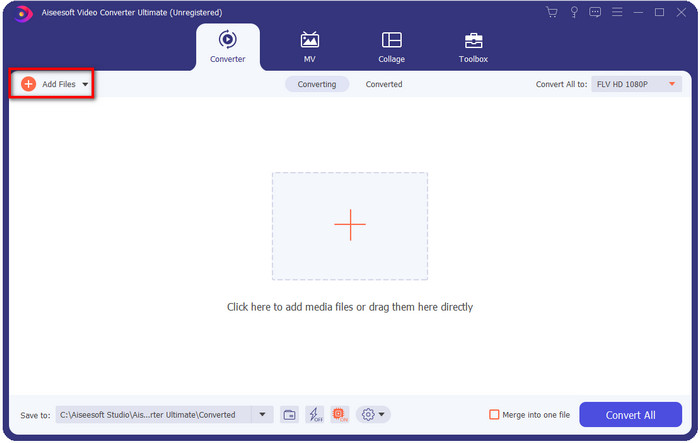
Langkah 2. Selepas pemasangan, buka aplikasi untuk menambah fail MKV; anda boleh seret-lepas fail ke antara muka atau klik butang Add Files.
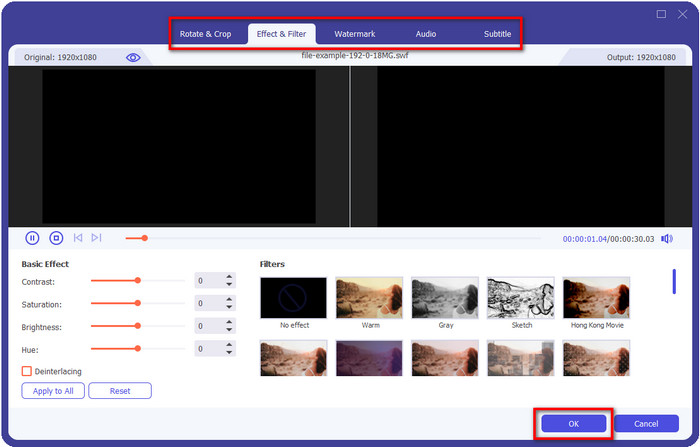
Jika anda ingin menyunting fail MKV sebelum menukarnya, anda boleh klik butang wand untuk menambah sentuhan magik pada output anda, seperti menambah Effects, Crop, menambah Subtitles dan banyak lagi. Untuk menyimpan kesan magik yang anda tambahkan pada video, klik OK.
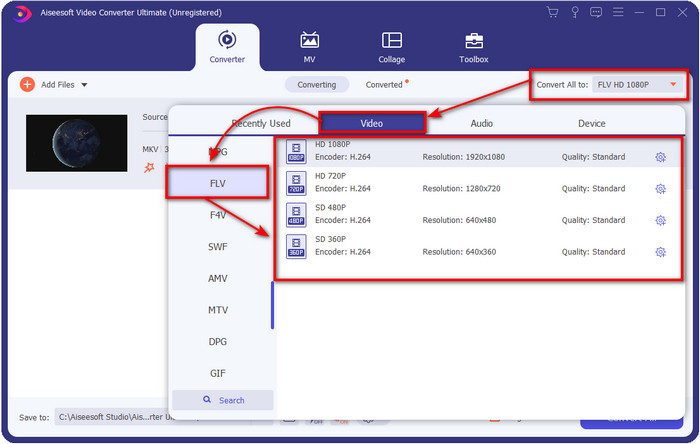
Langkah 3. Klik butang drop-down dan pilih format FLV pada senarai tetapan.
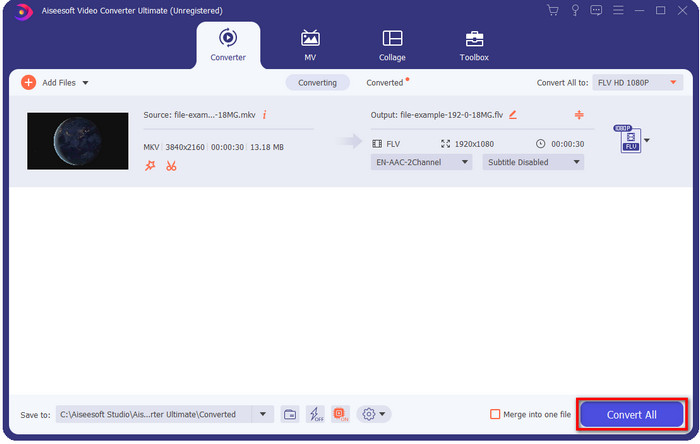
Langkah 4. Klik butang Convert All untuk mula menukar MKV kepada FLV secara percuma. Satu folder akan dipaparkan selepas proses selesai bersama fail FLV yang baharu.
Bahagian 2. 4 Best Web Based MKV to FLV Converter
1. Penukar Video Percuma FVC Dalam Talian
FVC Free Video Converter Online menampilkan penukar MKV ke FLV percuma dalam talian yang ringkas namun mengagumkan dan boleh diakses pada semua pelayar. Ia juga menyokong format berskala sederhana yang boleh anda pilih dan muat naik. Walaupun alat ini bergantung pada internet, proses menukar dan memuat naik fail di sini lebih mudah dan pantas. Mahu tahu cara menggunakannya? Ikuti langkah di bawah.
Kelebihan
- Ia tersedia untuk digunakan oleh sesiapa sahaja yang mempunyai internet.
- Antara muka yang mesra pengguna dan mudah difahami.
- Tiada had untuk saiz fail.
- Tetapan lanjutan untuk video dan audio.
Keburukan
- Format skala sederhana.
Langkah 1. Untuk membuka penukar dalam talian, klik pautan ini.
Langkah 2. Tekan butang Add Files to Convert untuk menambah fail daripada folder komputer anda, kemudian klik Open.
Muat turun Versi Desktop untuk menukar fail secara kelompok.
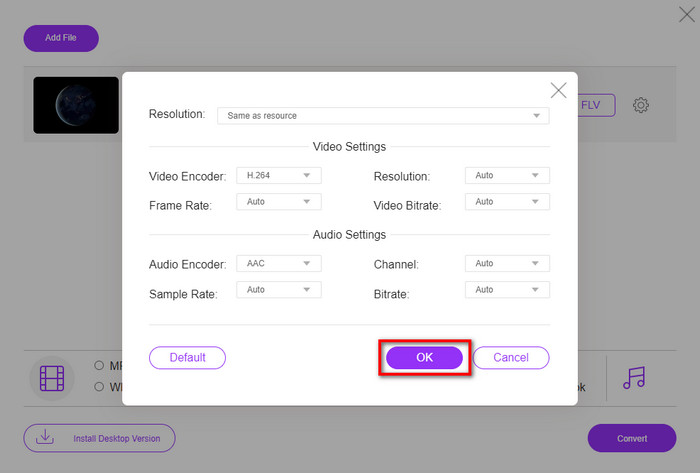
Walaupun anda tidak boleh menyunting video di sini, anda boleh menukar tetapan video dan audio dengan mengklik butang gear.
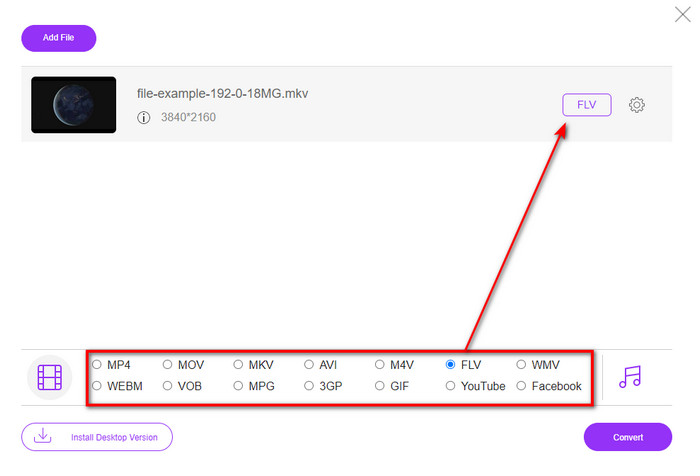
Langkah 3. Pilih format FLV di bawah senarai tetapan.
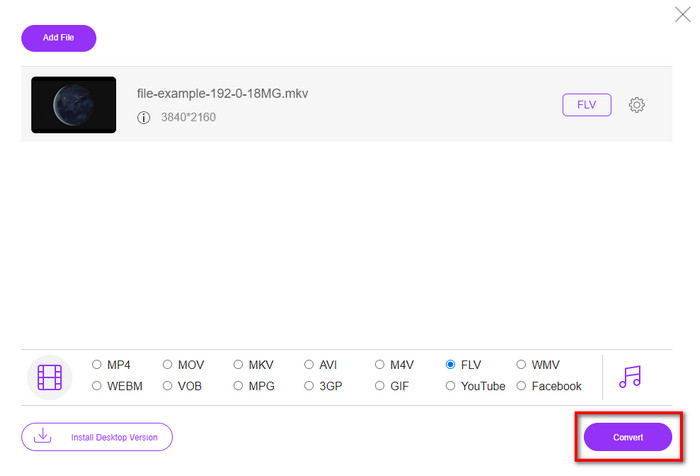
Langkah 4. Klik Convert untuk memulakan proses penukaran.
2. Mconverter
Salah satu penukar MKV ke FLV dalam talian yang paling selamat yang boleh anda gunakan ialah Mconverter. Selain menukar format video dan audio, anda juga boleh menukar imej, arkib, dokumen dan banyak lagi format media di sini. Walaupun penukar ini percuma digunakan, terdapat had untuk setiap fail yang boleh anda masukkan.
Kelebihan
- Tukar video, audio, dokumen dan banyak lagi dalam talian.
- Ia menyokong berbilang penukaran.
- Mudah untuk digunakan.
Keburukan
- Saiz fail tidak boleh melebihi 200MB.
- Beberapa iklan semasa menukar fail.
Langkah 1. Buka Mconverter pada pelayar anda, seret fail .mkv dan lepaskan ke dalam kotak.
Langkah 2. Klik format FLV, dan proses akan bermula secara automatik.
Langkah 3. Setelah selesai, fail akan dimuat turun secara automatik ke pemacu anda.
3. Freeconvert.com
Freeconvert.com akan membantu anda menukar MKV kepada FLV dalam talian secara percuma. Penukar web ini menyokong antara muka yang mudah difahami dan boleh digunakan oleh sesiapa sahaja. Namun, penukar dalam talian ini hanya menyokong format berskala kecil yang boleh anda pilih, dan terdapat banyak iklan pada antara muka laman web.
Langkah 1. Cari Freeconvert.com pada enjin carian anda.
Langkah 2. Klik Choose File untuk memuat naik fail .mkv daripada folder komputer anda, tekan butang drop-down dan pilih format FLV.
Langkah 3. Klik Convert FLV untuk mula menukar, dan untuk memuat turunnya, klik Download FLV.
Kelebihan
- Penukar dalam talian percuma yang boleh anda gunakan.
- Penukar web yang selamat dan mudah.
- Ia menyokong fail 1GB untuk ditukar.
Keburukan
- Ia menyokong format berskala kecil.
- Proses menukar dan memuat turun akan mengambil banyak masa anda.
4. Penukar Video Dalam Talian Movavi
Movavi Online Video Converter ialah salah satu penukar yang disyorkan untuk anda menukar MKV kepada FLV dalam talian. Ini ialah versi web percuma Movavi Video Converter yang digunakan oleh ramai pengguna di seluruh web kerana kecekapan alat ini dan rupa profesionalnya.
Langkah 1. Buka pelayar kegemaran anda dan cari laman web Movavi.
Langkah 2. Tekan +Add Your Media untuk menambah fail yang ingin anda tukar. Klik butang drop-down dan tekan Video; cari format FLV dan klik padanya.
Langkah 3. Tekan Convert untuk memulakan proses penukaran.
Kelebihan
- Tiada antara muka web iklan.
- Penukar lurus boleh digunakan oleh sesiapa sahaja.
- Ia menyokong format skala sederhana.
Keburukan
- Proses menukar format mengambil lebih banyak masa.
- Bergantung kepada Internet seperti penukar web yang lain.
Bahagian 3. Carta Perbandingan
| Ciri-ciri | FVC Video Converter Ultimate | FVC Penukar Video Percuma Dalam Talian | Mconverter | Freeconvert.com | Penukar Video Dalam Talian Movavi |
| Menukar Keupayaan Format |  | | | | |
| Bergantung kepada Internet |  | | | | |
| Penukaran Kumpulan | | | | | |
| Ciri Penyuntingan Lanjutan | | | | | |
| Platform yang ada | Alat Berasaskan Desktop | Alat Berasaskan Web | Alat Berasaskan Web | Alat Berasaskan Web | Alat Berasaskan Web |
MKV lwn. FLV
Format kontena multimedia Matroska, dikeluarkan pada tahun 2002, ialah format sumber terbuka yang boleh merangkumi beberapa lagu video, audio, imej dan sari kata. Jadi, anda boleh menggunakannya untuk menyimpan klip video pendek, rancangan TV dan filem dengan mudah. Ia agak popular untuk subbing peminat anime.
Adobe Flash Player menggunakan FLV untuk menyampaikan kandungan video seperti filem dan rancangan TV. Pada masa kini, Adobe tidak lagi membangunkan pemain dan mengesyorkan pengguna menyahpasangnya atas sebab keselamatan. Walau bagaimanapun, anda masih boleh menggunakan format FLV pada banyak program bukan Adobe/Macromedia.
Bahagian 4. Soalan Lazim tentang Penukaran MKV ke FLV
Mengapa fail MKV terlalu besar?
Terdapat dua sebab utama mengapa fail MKV terlalu besar. Sebab pertama ialah format ini boleh memuatkan kandungan dan unsur tanpa had untuk video, audio, metadata dalam satu fail. Sebab kedua ialah jika video anda panjang, maka saiz fail ini dijangka akan menjadi lebih besar. Walau bagaimanapun, anda boleh memampatkan fail MKV dengan bantuan pemampat MKV yang boleh anda gunakan. Tetapi jika anda mahukan cara yang lebih mudah, anda perlu mempertimbangkan untuk menukar fail MKV kepada MP4, AVI, MOV, FLV dan sebagainya.
Adakah MKV lebih baik daripada AVI?
MKV dan AVI hampir sama dari segi format kerana kedua-duanya boleh mengandungi video definisi tinggi dan saiz fail yang besar. Namun, bekas (container) ini mempunyai tujuan dan struktur yang berbeza yang menjadikannya unik. Sebagai contoh, format AVI ialah format tidak termampat yang boleh menyimpan kandungan video mentah dan paling sesuai untuk tujuan main balik. Ia juga menjadi asas kepada pembangunan fail MKV. Walaupun fail MKV mempunyai pemampat, kandungan dan unsurnya jauh lebih banyak daripada apa yang boleh ditampung oleh AVI. Jadi, jika anda mahu mengekalkan kualiti tinggi video anda, pilih format MKV. Tetapi jika anda mahu keserasian yang lebih baik, maka pilih AVI. Jika anda ingin tahu cara menukar MKV kepada AVI, klik pautan ini.
Adakah Handbrake mengendalikan penukaran MKV kepada FLV?
Brek tangan boleh mengendalikan tugas ini, tetapi penukar ini tidak menyokong program macOS dan Windows yang tidak melebihi 10.
Kesimpulannya
Sebagai penutup, kini anda sudah tahu cara menukar MKV kepada FLV secara dalam talian dan luar talian. Alat-alat di atas bukan dipilih secara rawak, sebaliknya kami memilihnya berdasarkan keutamaan pengguna. Hasil carian dan kajian kami mendapati enam alat ini menunjukkan prestasi terbaik sebagai penukar. Namun, FVC Video Converter Ultimate memberikan prestasi yang jauh melebihi jangkaan kami sebagai penukar. Mahu tahu keupayaan lain penukar hebat ini? Jadi tunggu apa lagi? Anda mesti memuat turunnya sekarang.
-
 MKV ke MOV - Cara Menukar MKV ke MOV
 Bagaimana cara menukar MKV ke MOV di Mac? Bolehkah iMovie membaca MKV? Apakah maksud format MOV? Catatan ini memberitahu 2 cara mudah untuk membantu anda menukar MKV ke MOV dengan penukar video dalam talian dan profesional percuma.
-
 Cara Menukar Video MKV ke GIF Animasi tanpa Photoshop / FFmpeg
 Setelah memuat turun dan menonton filem MKV di komputer anda, anda mungkin ingin berkongsi beberapa detik indah dengan rakan atau di Internet sebagai GIF. Dalam artikel ini, anda boleh mengetahui tentang 2 cara termudah untuk menukar MKV ke GIF.
-
 Petua dan Trik tentang Cara Menukar Fail MKV kepada MP3 [2025]
 Menghadapi masalah memilih penukar yang sesuai untuk MKV ke MP3? Kemudian teruskan membaca siaran ini sambil kami membentangkan penyelesaian yang berbeza pada satu masalah.

