


 Video Converter Ultimate
 Perakam Skrin
 Pembaikan Video
Cara Memangkas GIF dengan Pantas dengan 4 GIF Croppers
Menukar saiz GIF ialah tugas yang mudah jika anda menggunakan penyelesaian terbaik untuk memotong GIF. Namun, tidak semua penyunting GIF menyediakan penyelesaian pemotongan yang profesional dan praktikal. Semua perkara yang anda perlu tahu tentang pemotong untuk GIF ada dalam artikel ini. Untuk memberikan anda semua pilihan terbaik yang boleh digunakan, baca butiran di bawah dan lihat empat pemotong hebat yang boleh anda gunakan untuk menukar saiz GIF anda.

Bahagian 1. Cara Memangkas GIF pada Windows & Mac
Cara 1. Gunakan Video Converter Ultimate – Pemangkas GIF Terbaik
Ia ialah alat profesional yang hanya memberikan hasil cemerlang kepada pengguna tidak kira apa masalah mereka. FVC Video Converter Ultimate kini turut menyokong penyuntingan GIF dengan memotong, mengerat, memangkas, atau malah mencipta GIF peribadi. Alat ini bukan sahaja hebat untuk GIF, anda juga boleh menukar GIF kepada MOV, AVI, MP4, MKV, WMV, dan lebih 200 format lain. Selain itu, proses yang disediakan alat ini amat berbeza daripada alat lain kerana ia menyokong pemprosesan sepantas kilat untuk mengimport dan mengeksport fail dengan cepat. Tambahan pula, alat ini telah menyelesaikan banyak masalah berkaitan penyuntingan GIF. Jadi, adalah mudah untuk menugaskan alat ini bagi mengendalikan pemotongan. Mahu belajar cara memotong GIF? Jika begitu, butiran berikut akan menunjukkan tutorial ringkas untuk melakukannya dengan cepat.

FVC Video Converter Ultimate
5,689,200+ Muat Turun- Pemotong GIF yang profesional dan sangat boleh dipercayai tersedia pada Windows dan Mac.
- Ia menyokong penukaran GIF kepada format MP4, MOV, WMV, MKV, dan 200+.
- Ciri lanjutan tambahan tersedia untuk membantu anda membuat GIF, mempercepatkan atau memperlahankan, dsb.
- Ia selamat daripada sebarang jenis virus.
- Proses pengeksportan yang sangat pantas untuk membantu anda menyediakan GIF yang dipangkas dalam masa yang singkat.
Muat Turun PercumaUntuk Windows 7 atau lebih baharuMuat Turun Selamat
Muat Turun PercumaUntuk MacOS 10.7 atau lebih baharuMuat Turun Selamat
Langkah 1. Muat turun pemotong ke pemacu anda dengan mengklik butang muat turun yang disediakan di bawah. Selepas itu, pasang perisian dan tekan Start Now untuk pergi ke langkah seterusnya.
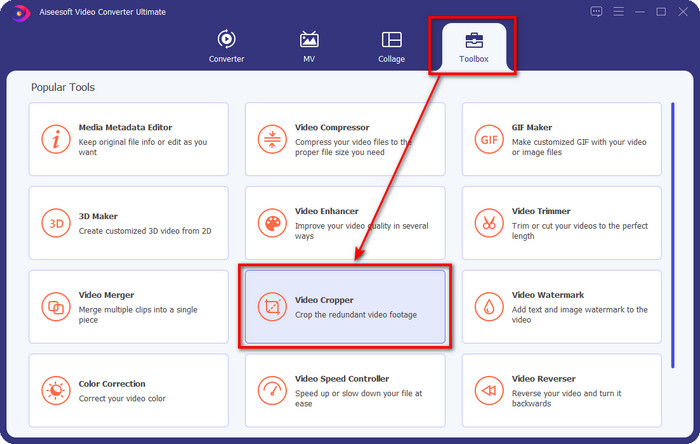
Langkah 2. Sebaik sahaja ia dibuka, klik Toolbox dan cari Video Cropper di bahagian atas antara muka.
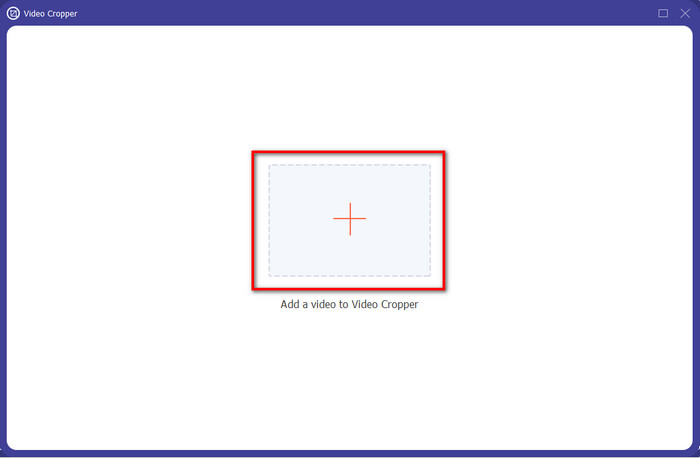
Langkah 3. Satu antara muka baharu akan muncul, klik butang +; satu folder akan dipaparkan di mana anda boleh mencari GIF anda, klik padanya dan tekan Open untuk meneruskan.
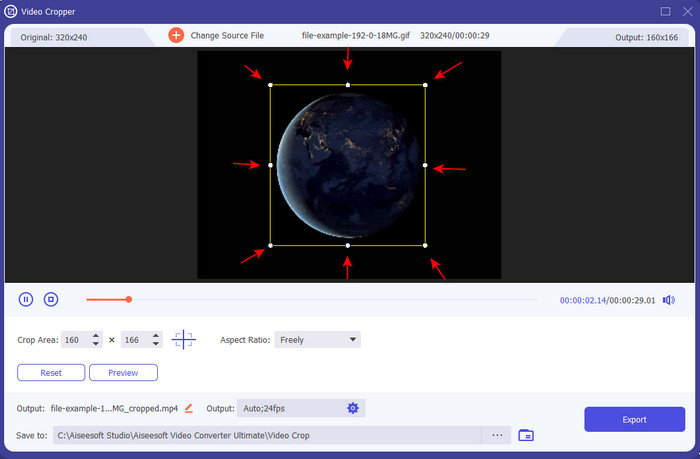
Langkah 4. Klik pilihan Cut (ikon gunting) dan kemudian satu antara muka baharu akan dipaparkan pada skrin, di mana anda boleh memotong GIF dan melaraskan nisbah bidang mengikut kehendak anda dengan menyeret titik-titik kecil dengan bebas.
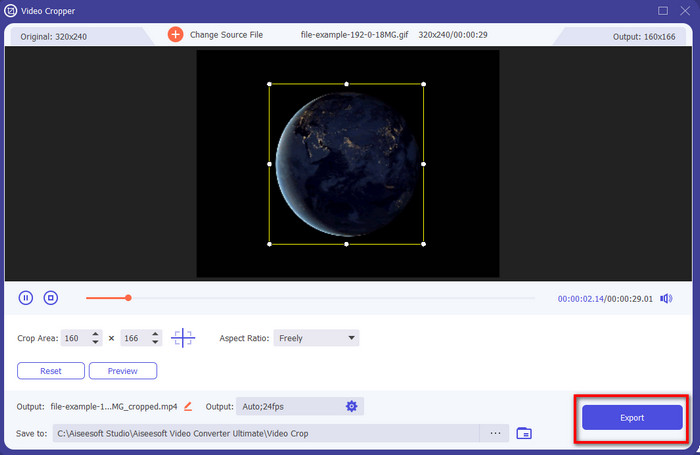
Langkah 5. Selepas pelarasan, anda boleh menekan Export untuk menyimpan dan memuat turun GIF yang telah dipotong ke pemacu anda; siap, semudah itu, kini anda telah memotong GIF anda.
Cara 2. Gunakan Photoshop
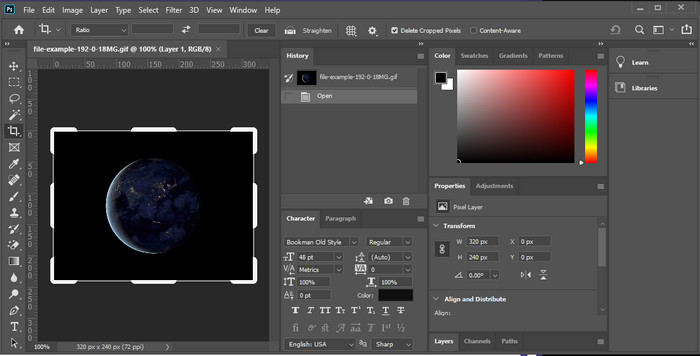
Photoshop ialah alat profesional yang menyokong suntingan berat pada setiap imej yang anda masukkan, seperti GIF. Alat ini telah membantu berjuta-juta pengguna berpengalaman melakukan suntingan rumit pada gambar mereka. Namun, disebabkan ciri penyuntingan berat yang disokongnya, alat ini menjadi teknikal untuk penyunting baharu memahami fungsinya, terutamanya jika anda tiada pengalaman menyunting. Walaupun ia boleh menjadi pemotong anda, ia masih terlalu berlebihan untuk melakukan kerja yang mudah. Tetapi jika anda mencari cara untuk memotong GIF dalam Photoshop, ikut butiran berikut untuk mengetahuinya.
Langkah 1. Muat turun dan lancarkan Photoshop pada desktop anda.
Langkah 2. Klik File, cari GIF, dan tekan Open. Tekan C pada papan kekunci anda, kemudian laraskan saiz, tekan Enter untuk meneruskan.
Langkah 3. Eksport output akhir dengan mengklik Save di bawah File.
Bahagian 2. Cara Memangkas GIF Dalam Talian
Cara 1. Gunakan Ezgif
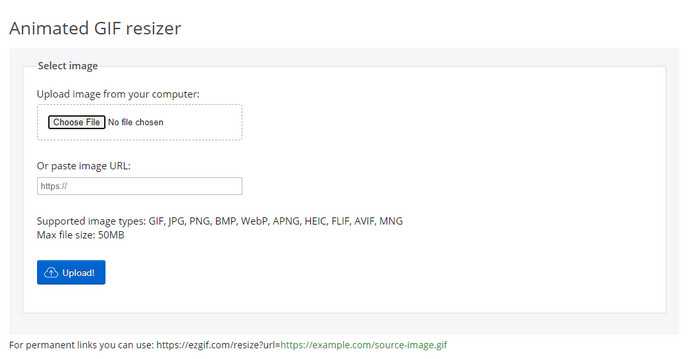
Jika anda perlukan pemotong GIF dalam talian, anda mungkin sudah tahu bahawa Ezgif ialah salah satu pilihan. Tidak menghairankan penyunting GIF dalam talian ini tersenarai kerana ia terkenal dengan keupayaan penyuntingannya. Berbeza dengan pemotong yang dinyatakan tadi, ia percuma digunakan dan anda tidak perlu memuat turunnya. Pengalaman keseluruhan agak baik, tetapi bukan yang terbaik yang kami temui kerana iklan menjadikan alat dalam talian ini kurang selesa digunakan. Selain itu, jika anda memotong GIF animasi di sini, bersedialah untuk bersabar kerana proses memuat naik dan memuat turun GIF akan mengambil sedikit masa.
Langkah 1. Buka pelayar anda dan cari Ezgif.
Langkah 2. Pergi ke Crop, tekan Choose File, cari fail dalam folder anda, dan tekan Upload.
Langkah 3. Seret titik bingkai mengikut kehendak anda dan tekan Crop Image untuk meneruskan.
Cara 2. iLoveIMG
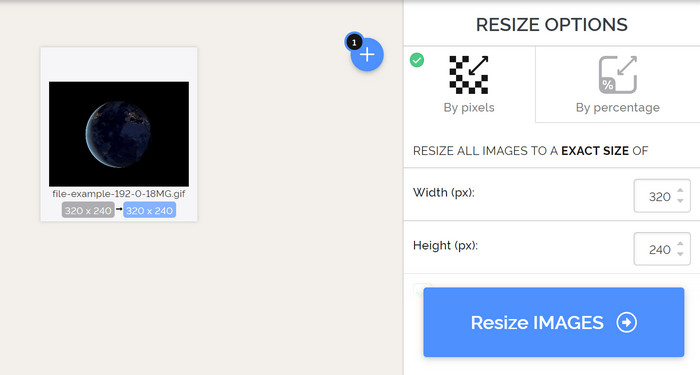
Pelajari cara memotong GIF dalam talian dengan iLoveIMG. Alat ini menyediakan ciri yang akan membantu anda memotong, mengubah saiz, memampatkan, dan banyak lagi pada imej anda. Selain itu, proses memuat naik dan memuat turun fail di sini lebih baik daripada Ezgif kerana ia tidak mengambil masa yang lama untuk dimuatkan. Jika anda tidak mahu memuat turun pemotong pada desktop, maka alat ini ialah satu pilihan seperti alat dalam talian pertama yang disebutkan. Tetapi jangkakan beberapa iklan pada antara muka yang boleh menjadi agak menjengkelkan.
Langkah 1. Buka enjin carian anda dan cari iLoveIMG dan klik Crop Image.
Langkah 2. Tekan Select Image dan cari fail GIF. Laraskan nisbah bingkai mengikut keperluan anda dan tekan Crop Image.
Langkah 3. Tunggu sehingga proses pemotongan selesai, kemudian muat turunnya.
Bahagian 3. Soalan Lazim tentang Pemotongan GIF
Apakah kelayakan yang perlu saya cari dalam pemangkas GIF?
Terdapat banyak kelayakan yang perlu anda pertimbangkan semasa memilih pemangkas GIF, dan yang pertama ialah keserasian alat pada platform anda. Pastikan anda membaca ulasan artikel tentang alat untuk mengetahui sama ada ia tersedia pada peranti anda. Seterusnya, ia adalah selamat perisian hasad, terutamanya dalam talian atau boleh dimuat turun; memangkas adalah tugas yang mudah, tetapi pastikan pemangkas anda boleh dipercayai. Akhir sekali, pemangkas harus mempunyai beberapa ciri yang anda perlukan untuk menentukan sama ada saiz yang dipangkas adalah saiz yang betul. Ini termasuk bingkai pemangkasan, pilihan pratonton, panjang dan tinggi, dan banyak lagi.
Adakah selamat untuk menggunakan pemangkas GIF dalam talian?
Kebanyakan pemotong GIF dalam talian adalah selamat, tetapi tidak semuanya. Jadi, sebelum anda mengaksesnya, pastikan alat dalam talian tersebut selamat digunakan untuk mengelakkan kerosakan tidak dapat dipulihkan pada peranti anda.
Bagaimana untuk menetapkan GIF sebagai latar belakang?
Terdapat banyak cara untuk menjadikan GIF sebagai latar belakang pada telefon mudah alih dan desktop anda. Kami juga menyediakan alat bonus di sini untuk membantu anda mencipta GIF melalui gabungan imej atau video. Apa yang anda tunggu lagi? Klik pautan ini untuk belajar cara menetapkan GIF sebagai kertas dinding pada peranti anda.
Kesimpulannya
Semua cara yang mungkin untuk memotong GIF secara dalam talian atau luar talian ada di sini. Alat yang kami sertakan dalam artikel ini telah pun membuktikan bahawa menukar saiz adalah mudah dengan bantuan mereka. Tetapi jika anda perlukan hasil profesional dan alat yang bebas masalah, maka FVC Video Converter Ultimate ialah pilihan yang sangat baik. Alat ini mewujudkan jurang antara pemotong yang baik dan yang terbaik. Jadi, jika anda mahu memotong seperti profesional, butang muat turun tersedia di bawah untuk memuat turun alat tersebut.
Muat Turun PercumaUntuk Windows 7 atau lebih baharuMuat Turun Selamat
Muat Turun PercumaUntuk MacOS 10.7 atau lebih baharuMuat Turun Selamat
-
 Cara Memangkas Fail MP4 Tanpa Kehilangan Sebarang Kualiti Video [2021]
 Ketahui cara Memangkas MP4 dengan langkah mudah yang disediakan hanya untuk anda. Jadi, teruskan langkah kerana kami mempersembahkan kepada anda alat pemangkasan terbaik yang boleh anda gunakan.
-
 Cipta GIF Animasi Terbaik Anda melalui Pembuat GIF Dalam Talian [2021]
 Tinjauan bermaklumat, mengenai cara membuat GIF menggunakan pembuat GIF dalam talian yang mudah ini yang sudah anda temui atau tidak melalui web.
-
 [2021 Dikemas kini] 9 Editor GIF Terbaik untuk PC, Mac, iOS dan Android
 Perlu menambahkan sentuhan peribadi pada GIF anda supaya dapat menjadi lebih ekspresif? Teruskan membaca artikel ini untuk mengetahui cara mengedit dan alat terbaik untuk pekerjaan itu.
