


 Video Converter Ultimate
 Perakam Skrin
 Pembaikan Video
9 Teratas: Perisian Penyuntingan GIF Animasi Terbaik untuk Pemula [Dalam Talian & Luar Talian]
Cara terbaik untuk meluahkan perasaan anda dengan lebih baik adalah dengan memasukkan GIF ke dalam mesej anda. Tujuan utamanya adalah untuk menyimpan dan menyokong imej animasi dan statik. Adalah diketahui bahawa GIF boleh memuatkan lebih baik daripada format lain yang tersedia di web dan ia jauh lebih kecil. Lebih mengujakan untuk melihat GIF dan bukannya imej sahaja. Tetapi tidak semua GIF yang anda cari melalui internet boleh memberikan anda emosi yang ingin anda sampaikan.
Jadi, daripada mencari GIF di seluruh internet, mereka menggunakan perisian penyunting GIF untuk mencipta GIF mereka sendiri. Mungkin anda tertanya-tanya alat apa yang patut anda gunakan untuk mencipta GIF hebat yang akan mengagumkan penerimanya. Berikut ialah beberapa senarai alat terbaik untuk mencipta GIF. Semua alat di bawah boleh digunakan untuk menukar, menyunting, membuat dan banyak lagi berkaitan GIF. Jadi, jika anda sedang mencari alat yang tepat untuk kerja yang tepat, teruskan membaca di bawah untuk mengetahui lebih lanjut tentang alat-alat ini.

Bahagian 1. Editor GIF Luar Talian Terbaik yang Berfungsi Berkesan untuk PC dan Mac
1. Video Percuma FVC kepada Pembuat GIF
Tukar video kegemaran anda kepada format GIF supaya anda boleh menghantarnya kepada rakan, keluarga dan sesiapa sahaja dengan mudah. Pembuat GIF Video ke GIF Percuma FVC ini memberi anda peluang untuk mencipta GIF anda sendiri. Tugas utamanya adalah untuk menukar sebarang format fail video sama ada MP4, MOV, AVI dan banyak lagi, kemudian mengubahnya menjadi format GIF. Ia turut menyediakan fungsi penyuntingan dan pemangkasan. Penyunting GIF ini tersedia dalam semua sistem. Untuk mengetahui cara menggunakan alat ini, berikut adalah beberapa prosedur langkah demi langkah yang disediakan untuk anda ikuti.
Langkah 1. Muat turun alat ke pemacu anda, pasang dan tetapkannya.
Muat Turun PercumaUntuk Windows 7 atau lebih baharuMuat Turun Selamat
Muat Turun PercumaUntuk MacOS 10.7 atau lebih baharuMuat Turun Selamat
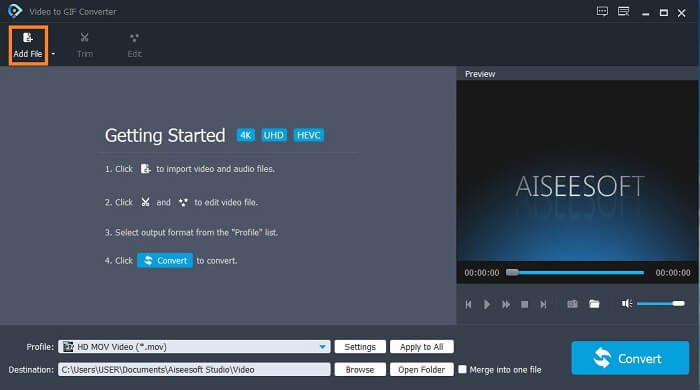
Langkah 2. Antara muka seperti ini akan muncul pada skrin anda. Klik Add File atau seret dan lepas (drag-and-drop) fail ke dalam penukar.
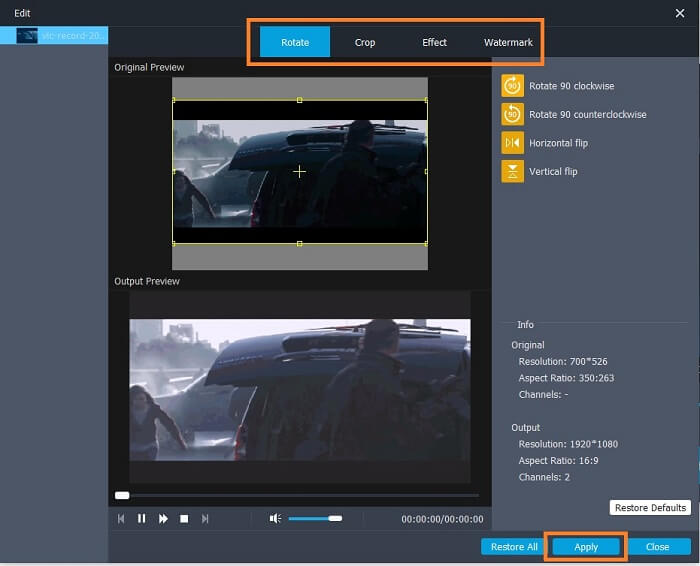
Langkah 3. Jika anda sudah menambah GIF, anda juga boleh Trim untuk memendekkannya dan klik OK untuk menyimpan perubahan. Anda juga boleh memutar (rotate), memangkas (crop), menambah kesan (add effects) dan watermark pada GIF anda di bahagian Edit dan simpan perubahan yang dibuat dengan mengklik Apply.
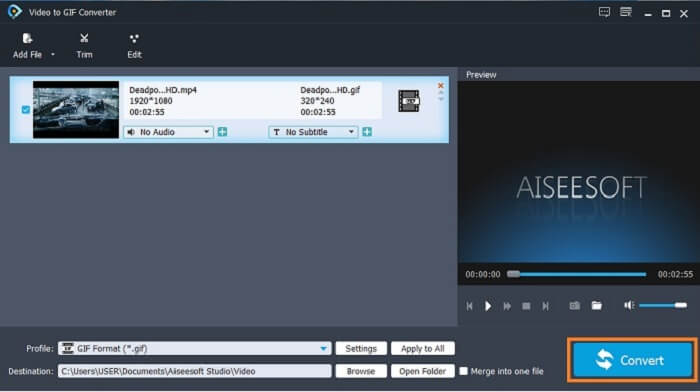
Langkah 4. Pilih destination untuk meletakkan output akhir anda. Untuk memulakan penukaran, klik Convert.
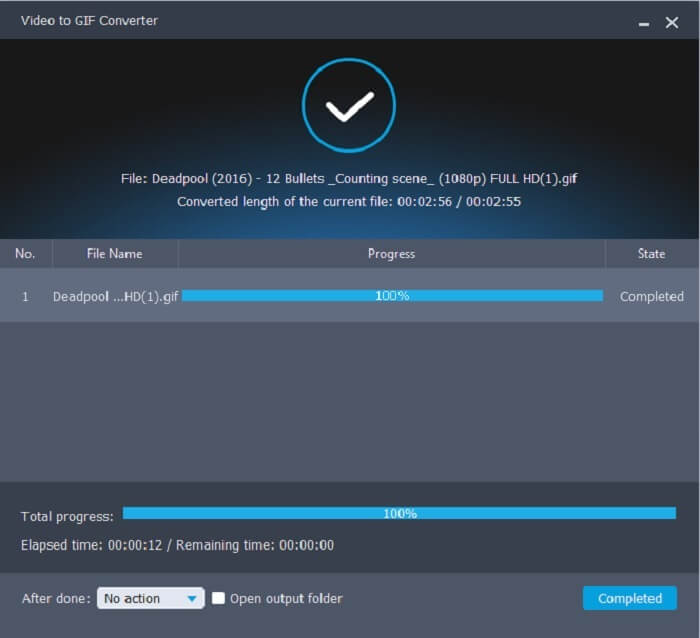
Langkah 5. Jika semuanya telah selesai, anda akan melihat ini pada paparan anda; ini bermakna penukaran telah selesai.
Kelebihan
- Alat percuma terbaik untuk menukar format video kepada GIF.
- Ia tersedia dalam semua platform yang diketahui dan sentiasa menghasilkan output yang luar biasa.
- Ia berfungsi walaupun internet tidak tersedia.
Keburukan
- Tidak semua ciri utama dibentangkan di sini.
- Ia adalah alat yang boleh dimuat turun juga seperti versi premium.
2. Video Converter Ultimate
Diketahui bahawa penyunting GIF di atas memberi anda kualiti kelas-A dalam membuat GIF. Namun tahukah anda bahawa ada satu lagi alat yang jauh lebih baik daripada alat di atas dan juga yang di bawah? Video Converter Ultimate menepati namanya sebagai pembuat GIF terunggul yang tersedia pada semua perisian. Ia bukan sahaja terbaik untuk membuat GIF, malah berfungsi juga sebagai penukar dan banyak lagi. Tambahkan kesan pada GIF anda supaya menonjol berbanding GIF lain. Jadi, jika anda sedang ‘berlawan’ membuat GIF terbaik dengan rakan-rakan dan mahu menang, inilah peluang anda untuk memberikan faktor wow kepada mereka. Selain itu, untuk mengetahui cara menggunakan alat ini anda perlu mengikut langkah-langkah berikut dengan betul bagi menghasilkan GIF yang berjaya.
Langkah 1. Klik butang muat turun dan pasang pada pemacu komputer anda. Ubah keutamaan (preference) dan klik finish untuk menyimpan serta melancarkan alat tersebut.
Muat Turun PercumaUntuk Windows 7 atau lebih baharuMuat Turun Selamat
Muat Turun PercumaUntuk MacOS 10.7 atau lebih baharuMuat Turun Selamat
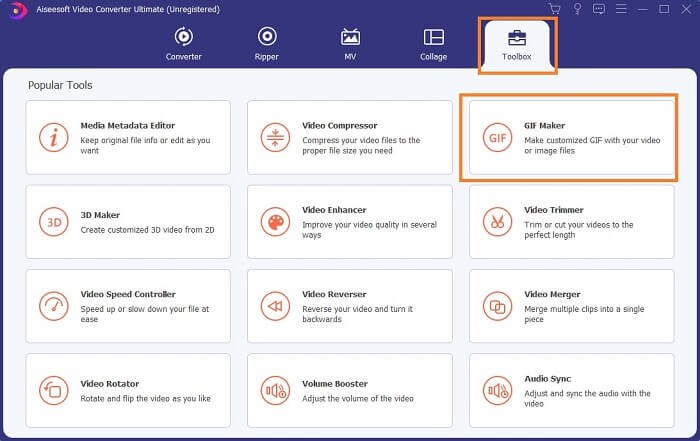
Langkah 2. Jika alat sudah berjalan dalam sistem anda, antara muka seperti ini akan muncul pada skrin. Pergi ke Toolbox dan GIF Maker untuk mula membuat GIF.
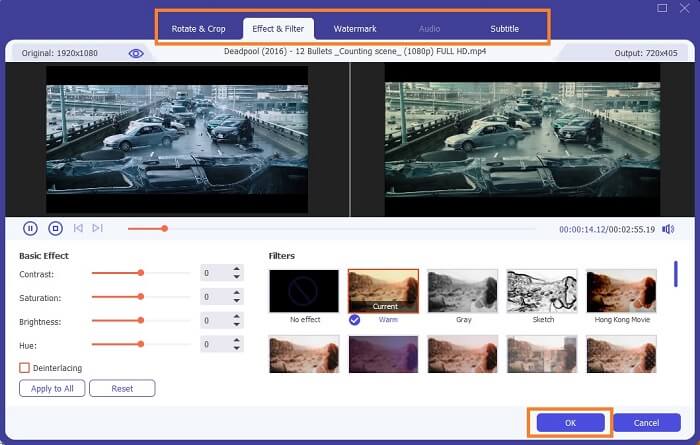
Langkah 3. Kemudian klik Video to GIF dan pilih video yang anda mahu tukar. Selepas memilih fail video, anda juga boleh menyunting (edit) video seperti putar dan pangkas (rotate and crop), penapis kesan (effect filter), watermark dan sari kata (subtitle). Klik OK untuk menyimpan pelarasan.
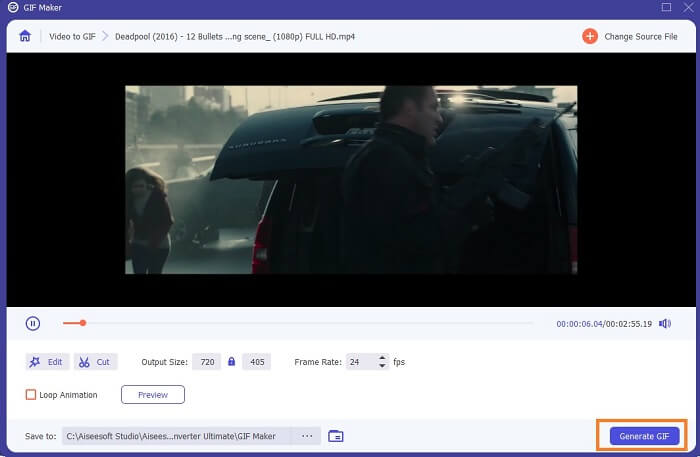
Langkah 4. Klik Preview untuk menonton 10 saat pertama video yang anda cipta. Tekan Generate GIF untuk memulakan penukaran.
Langkah 5. Jika semuanya telah selesai, cari fail tersebut dalam peneroka fail (file explorer) anda dan tonton atau hantarkan output akhir itu.
Kelebihan
- Penukar Video terbaik untuk GIF dengan alat muktamad untuk meningkatkan GIF.
- Ia menyokong semua format audio video yang diketahui dan tidak diketahui melalui web.
- Alat pelbagai guna dengan output akhir yang sangat baik.
Keburukan
- Ia adalah alat bayar untuk digunakan tetapi ia lebih murah.
- Perlu dimuat turun ke dalam storan anda sebelum anda boleh menggunakannya.
Bahagian 2. 3 Editor GIF Dalam Talian Terbaik
1. Ezgif
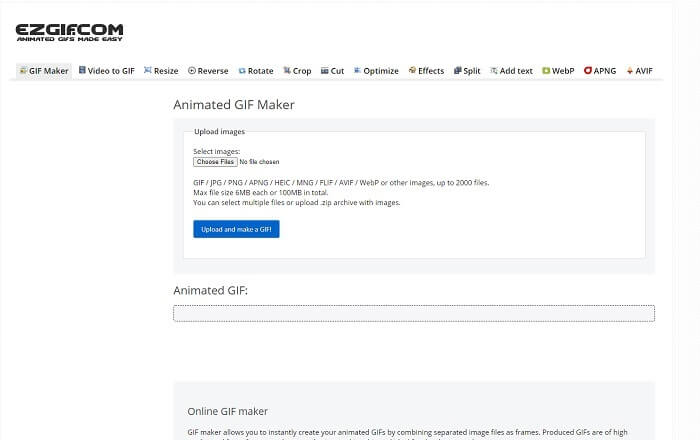
Salah satu penyunting GIF dalam talian yang mungkin sudah pernah anda temui di internet. Ezgif dikenali sebagai salah satu pembuat GIF terbaik. Walaupun alat ini menyediakan banyak fungsi seperti memutar video, memangkas video, membalikkan (reverse) dan sebagainya, semuanya dipisahkan antara satu sama lain. Jadi, bukannya fokus pada pembuatan dan penyuntingan GIF, anda perlu memindahkan fail ke alat penyuntingan yang anda mahu untuk menambah baiknya, yang agak menyusahkan. Selain itu, antara mukanya mempunyai latar belakang putih yang ringkas tetapi membosankan untuk dilihat. Nampaknya alat dalam talian ini tidak menerima kemas kini daripada segi antara muka.
Kelebihan
- Alat on-point dengan pilihan yang berbeza.
- Alat halaman web adalah mudah.
- Berkesan untuk membuat GIF.
Keburukan
- Ia terhad kepada 6mb setiap satu dan 100mb kesemuanya.
- Ia tidak mesra pengguna kerana semua ciri alat tersebut berada di seluruh tapak web. Dan ia agak membosankan untuk dilihat kerana latar belakangnya yang putih polos.
2. VEED.IO
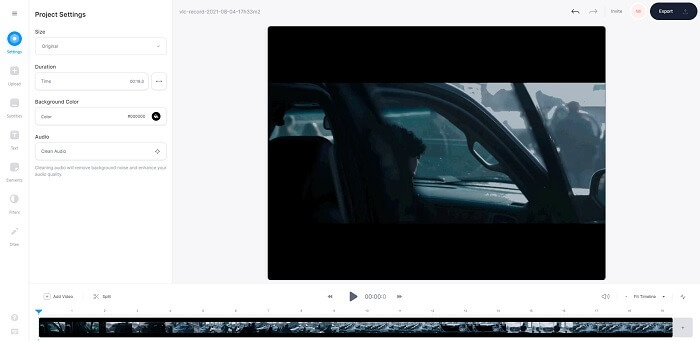
Satu lagi alat penyunting GIF dalam talian untuk membuat GIF ialah VEED.IO. Cipta, sunting dan tukar video anda kepada format GIF dengan alat ini. Laman utama alat ini agak sedap dipandang, tidak seperti Ezgif. Tetapi jika anda mula membuat GIF dalam talian, halaman web alat ini menjadi tidak responsif dan agak tidak selamat. Selain itu, jangan cuba memasukkan kata laluan atau kad kredit anda kerana ada kemungkinan ia boleh dicuri oleh penyerang.
Kelebihan
- Sokongan pelanggan yang lebih baik.
- Ia menyediakan alat versi pro.
- Mudah diakses melalui internet.
Keburukan
- Alat web tidak dilindungi. Jadi, lawati atas risiko anda sendiri.
- Tiada ciri Pengeditan 3D.
3. Giphy
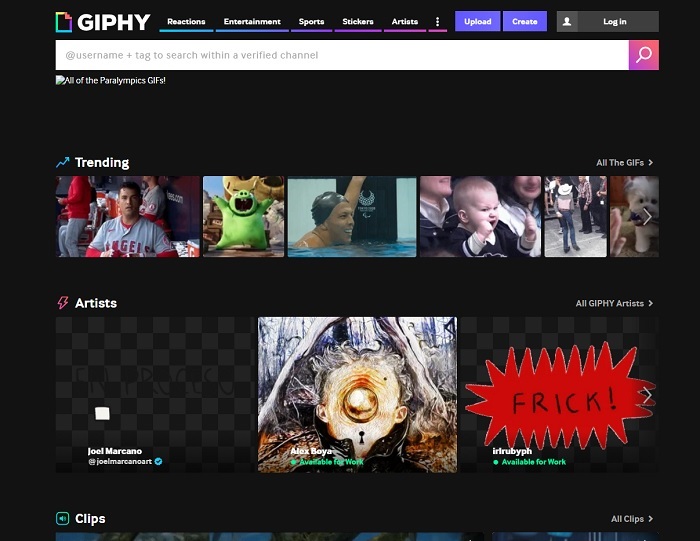
Giphy ialah penyunting GIF animasi dalam talian. Alat ini menyediakan contoh GIF seperti reaksi, hiburan, sukan dan pelekat (sticker). Walaupun ia merupakan salah satu pembuat GIF terbaik, alat ini memerlukan akaun anda sebelum anda boleh menggunakannya. Ini secara asasnya membenarkan laman web tersebut mengakses akaun anda. Jadi, perlu diingat bahawa kemas kini, ciri baharu atau GIF baharu daripada alat ini akan sentiasa muncul dalam mel anda.
Kelebihan
- Muat naik dan buat GIF dalam talian.
- Pustaka terbesar untuk GIF, Klip & Pelekat percuma di web.
- Antara muka adalah terkini dan ia kelihatan hebat.
Keburukan
- Anda perlu mendaftar sebelum menggunakan alat tersebut. Jadi, jika anda tidak mendaftar atau log masuk, alat itu tidak boleh diakses.
- Panjang maksimum untuk GIF ialah 30 saat sahaja.
Bahagian 3. Apl Editor GIF pada Android dan iOS
1. GIPHY: Papan Kekunci & Pembuat GIF & Pelekat
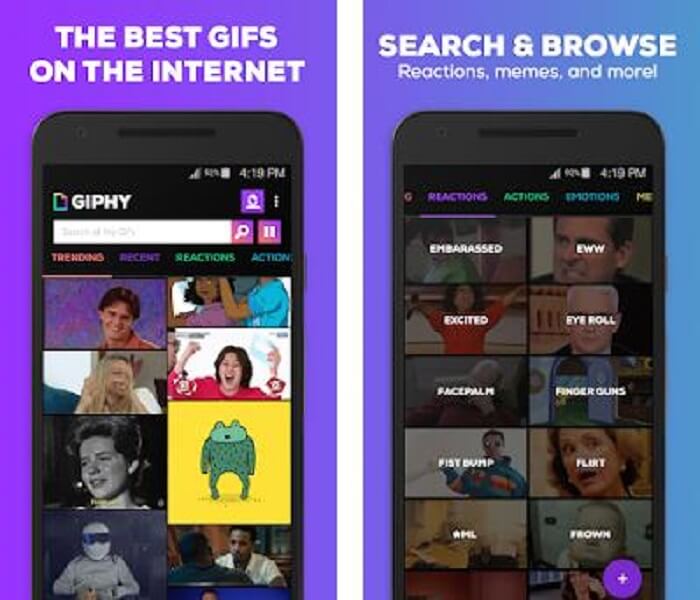
Satu lagi aplikasi penyunting GIF yang tersedia pada Android dan iOS ialah GIPHY: GIF & Sticker Keyboard & Maker. Ia dikenali sebagai salah satu storan GIF terbesar di seluruh Play Store dan App Store. Namun bukan itu sahaja, aplikasi ini boleh menyediakan GIF yang telah siap atau jika anda mahu, anda boleh mencipta GIF anda sendiri. Anda juga boleh berkongsi GIF anda sendiri dalam aplikasi ini. Dalam sesetengah kes, apabila anda memuat naik GIF yang berfungsi dengan baik semasa proses ciptaan atau yang sudah ada di telefon anda, aplikasi ini menjadikannya sedikit ‘buggy’ dan ada bahagian GIF yang bergerak lebih pantas dan ada yang perlahan.
Kelebihan
- GIF, pelekat dan klip video yang menakjubkan.
- Sedikit atau tiada iklan dalam aplikasi.
- Edit Gif anda dan tambahkan lebih banyak animasi estetik pada GIF.
Keburukan
- Pada sesetengah keadaan apabila anda memuat turun GIF daripada apl ini, anda akan mendapat imej pegun. Daripada memuat turunnya ke format .gif, ia menjadi .jpeg.
- Log masuk ke apl agak menjengkelkan kerana dalam beberapa kes anda tidak boleh log masuk dengan betul dan perlu melakukannya lebih banyak lagi.
2. ImgPlay–GIF Maker
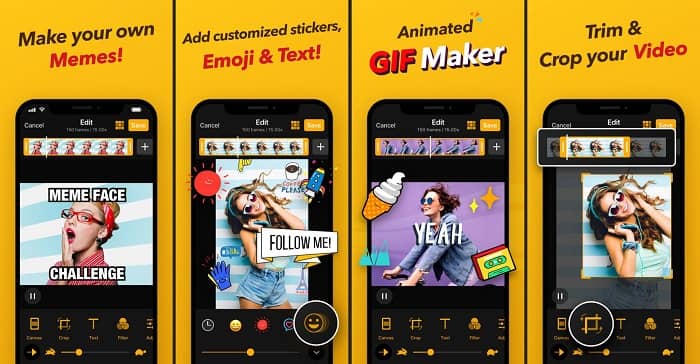
Cara paling mudah dan terbaik untuk mencipta GIF sama ada daripada video atau imej. Imgplay boleh menjadikan imej atau video anda sebagai GIF yang berfungsi sepenuhnya. Aplikasi ini memberikan anda ciri terbaik untuk menjadikan GIF anda se menonjol yang mungkin. Jika anda menyimpan output akhir GIF anda, akan ada watermark di bahagian bawah sebelah kanan GIF akhir tersebut. Untuk mengalih keluar watermark, anda perlu membayar versi premium alat ini.
Kelebihan
- Ia menyokong peranti Android dan iOS.
- Gunakan lebih daripada 30 penapis pada GIF anda untuk menjadikannya lebih baik, jika anda membeli versi premium alat tersebut.
- Cipta GIF daripada video dan imej anda dengan mudah.
Keburukan
- Ia berfungsi lebih baik pada iOS berbanding Android. Pada asasnya, anda tidak boleh melaraskan kecerahan, kontras, ketepuan dan kadar bingkai serta ciri utama lain pada Android.
- Selain itu, harapkan iklan pada apl ini juga. Untuk mengeluarkannya, anda perlu membeli versi premium. Fpsnya juga sangat rendah.
3. GIFX
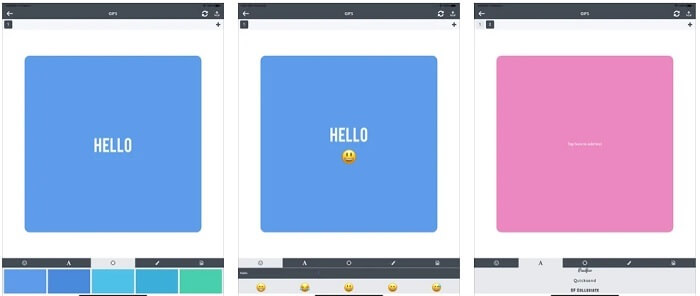
Penyunting GIF ini hanya tersedia pada iOS. GIFX boleh melakukan kerja menghasilkan GIF terbaik yang anda inginkan. Ia juga menyokong imej dan video untuk dijadikan format GIF. Anda juga boleh berkongsi melalui MMS dan emel anda. Selain itu, ia menyediakan fungsi menambah emoji pada GIF anda sendiri untuk menzahirkan emosi dengan lebih baik bersama teks.
Kelebihan
- Cipta GIF animasi anda sendiri dengan apl ini pada iOS.
- Ia menyokong produk Apple yang berbeza seperti iPad, iPhone, iPod touch dan Mac juga.
- Laraskan kelajuan GIF anda dengan alat ini.
Keburukan
- Alat itu mengatakan bahawa ia menyokong video tetapi ia tidak membenarkan anda menambah video ke dalam GIF anda.
- Penilaian apl hanya 1 bintang dan menerima 2 ulasan sahaja, yang sangat rendah untuk aplikasi.
4. Studio GIF
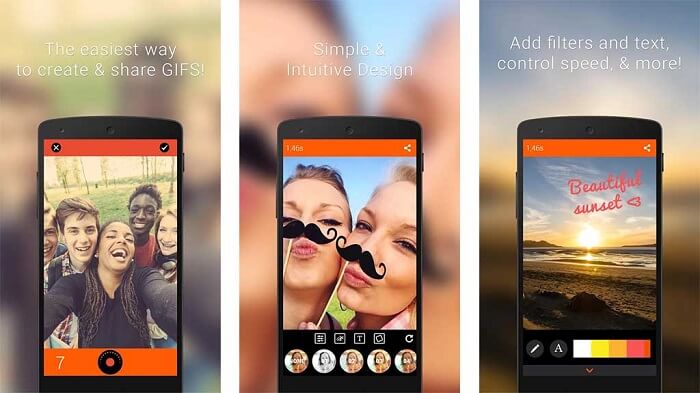
Jika anda sedang mencari aplikasi penyunting GIF terbaik maka GIF Studio ini mungkin jawapannya. Ia memberi anda peluang untuk membiarkan imaginasi anda bermain dalam GIF anda. Cipta, sunting dan mainkan GIF animasi dengan aplikasi ini. Selain itu, jika anda pengguna yang merasakan membuat GIF agak menyusahkan, alat ini memudahkan proses tersebut. Ia juga menyediakan lebih banyak ciri tambahan untuk menjadikannya lebih menakjubkan.
Kelebihan
- Gabungkan berbilang GIF kepada satu.
- Tambahkan teks pada GIF anda untuk membuat kad ucapan.
- Kongsi GIF anda dan simpan dengan mudah.
Keburukan
- Kerana pemaju menjadikannya mudah. Antara muka pengguna adalah mengerikan. Belajar menggunakan aplikasi ini akan menjadi agak kaku.
- Ia tidak menyokong GIF yang telah dibuat daripada pembuat Gif lain.
Bahagian 4. Soalan Lazim tentang Editor GIF
Adakah terdapat format lain yang boleh menyimpan imej bergerak seperti yang boleh disediakan oleh GIF?
Selepas 30 tahun menjadi salah satu format imej-video yang terkenal. Ia telah pun membuat pesaing: APNG, AVIF, MNG, WebP dan FLIF.
Apakah pemampatan data GIF?
Ia adalah pemampatan tanpa hilang (lossless compression), jadi apabila anda memampatkan data tidak akan berlaku sebarang kehilangan dan format ini mudah dipindahkan melalui internet. Jika GIF anda bersaiz besar, anda boleh rujuk Cara Memampatkan GIF Animasi kepada Saiz Fail yang Lebih Kecil
Apakah Perakam GIF yang boleh saya gunakan untuk merakam format GIF?
Anda boleh menggunakan Perakam Skrin FVC, Perakam GIF yang boleh dimuat turun tersedia pada semua platform berbeza, menyediakan format GIF dan banyak lagi. Dengan kualiti super tinggi dan banyak lagi pilihan juga. Muat turun Perakam Skrin Percuma FVC untuk Windows Muat turun Perakam Skrin Percuma FVC untuk Mac
Kesimpulannya
Dan sekarang bahawa sangat jelas bahawa cara terbaik untuk menyampaikan mesej yang hebat adalah dengan menggunakan GIF. Walaupun menggunakan mesej mentah adalah baik, menambah GIF adalah lebih baik. Oleh itu, memilih editor GIF terbaik adalah satu kemestian untuk menyampaikan nada mesej yang betul yang anda ingin kongsi dan mempunyai pernyataan yang jelas atau untuk menambah nada lucu. Pilih alat muktamad untuk mencipta GIF muktamad untuk membuat kesan terbaik yang ingin anda kongsikan.
-
 Cara Menukar Video AVI ke Fail GIF Animasi pada Windows / Mac
 Ingin memilih segmen AVI yang menarik untuk membuat meme GIF? Artikel ini akan memberitahu anda 2 kaedah terbaik untuk klip video AVI dan menukar AVI menjadi fail GIF animasi secara percuma.
-
 [Diselesaikan] Cara Menukar Video FLV kepada Fail GIF Beranimasi secara Percuma
 Sekiranya anda ingin membuat GIF dari segmen video FLV untuk pengiriman yang lebih baik, anda boleh mengetahui lebih lanjut mengenai cara menukar video FLV ke fail GIF dengan mudah dari artikel ini.
-
 [2 Penyelesaian] Cara Menukar Fail SWF ke GIF dengan Mudah secara Percuma
 Apabila anda gagal mengeksport format GIF melalui perisian Flash, anda boleh mencuba menyimpan fail dalam format SWF pada mulanya. Kemudian anda dapat mempelajari 2 cara mudah untuk menukar fail SWF ke GIF dari artikel ini.
