


 Video Converter Ultimate
 Perakam Skrin
 Pembaikan Video
Penukar TS Terbaik ke GIF untuk Menukar TS menjadi GIF Dalam Talian & Luar Talian
Fail TS dikenali sebagai aliran pengangkutan MPEG atau ringkasnya aliran pengangkutan (transport stream). Jenis fail ini paling kerap dilihat pada DVD kerana ia menyegerakkan berbilang main balik. Walaupun fail TS ini merupakan storan digital piawai untuk MPEG, TS masih lebih ringkas berbanding format lain. Kebanyakan klip pada DVD disimpan dalam format bernama .ts supaya ia mudah dipindahkan di seluruh dunia. Namun sesetengah pemain media tidak dapat memainkan fail .ts kerana penggandaan (multiplex) video, audio dan aliran main balik lain dan selalunya saiz fail juga sangat besar. Jadi, untuk menyelesaikan masalah ini dan juga menjimatkan storan supaya boleh disimpan pada pemacu anda, caranya ialah dengan menukarnya. Mari pelajari cara menukar TS kepada GIF supaya boleh dimainkan dengan bantuan alat ini dan fahami perbezaan antara kedua-duanya.

Bahagian 1. TS vs GIF
TS dan GIF kedua-duanya merupakan wadah fail media tetapi mereka mempunyai perbezaan besar terutamanya format fail yang terdapat di dalamnya.
Sebagai contoh, fail TS sering terdapat pada DVD, Blu-ray, dan penyiaran dan penstriman lain dalam talian. Tetapi data aliran pengangkutan mempunyai elemen berbeza yang telah disatukan untuk menjadi salah satu format yang efisien dalam pemutaran.
Elemen-elemen ini ialah
● VIDEO_TS.VOB - bekas data untuk audio dan video.
● VIDEO_TS.BUP - bekas data untuk menyandarkan maklumat.
● VIDEO_TS.ISO - data seperti menu, kapsyen, sari kata dan banyak lagi terdapat di sini.
● AUDIO_TS - data kosong yang paling biasa.
Tetapi GIF tidak mempunyai unsur seperti fail TS. Tetapi GIF lebih mudah diakses daripada fail ini dan ukurannya jauh lebih kecil daripada format lain juga. Tetapi kelemahan fail GIF ialah anda tidak boleh memuat fail audio di sini. Kerana GIF tidak mengandungi fail audio dan kurang pada palet warna dengan fps yang lebih rendah.
Bahagian 2. Cara Menukar TS ke GIF pada PC dan Mac [Program dan Alat Berasaskan Web]
1. Video Percuma FVC kepada Pembuat GIF
Buat dan ubah GIF dalam Video Percuma FVC ke GIF Maker. Alat ini jauh lebih baik daripada penukar dalam talian yang pernah anda temui di web. Walaupun alat ini menyokong format terhad, ia adalah salah satu penukar terbaik yang disenaraikan di sini, di sebelah penukar utama. Proses penukaran yang dibawa kepada anda oleh alat ini jauh lebih pantas dan lebih selamat daripada CloudConvert dan Convertio tetapi jika anda mahukan lebih cepat, teruskan ke alat seterusnya di bawah. Kerana ia 30x lebih cepat dari alat ini dan 100x daripada mana-mana web atau alat berasaskan program. Jadi, untuk menguji penukaran penukar TS ke GIF ini, anda mesti mengikuti langkah-langkah berikut.
Langkah 1. Muat turun alat ini ke pemacu anda dan pasangkannya.
Muat Turun PercumaUntuk Windows 7 atau lebih baharuMuat Turun Selamat
Muat Turun PercumaUntuk MacOS 10.7 atau lebih baharuMuat Turun Selamat
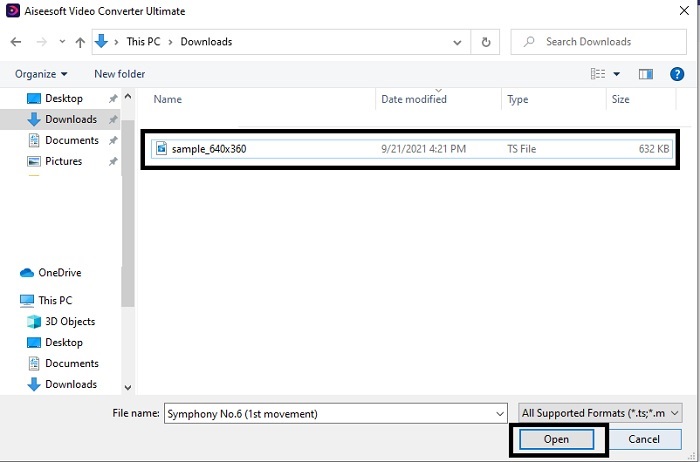
Langkah 2. Selepas mengubah suai tetapan pemasangan dan melancarkannya, klik butang Add File di bahagian kiri atas antara muka dan klik open untuk memasukkan fail GIF.
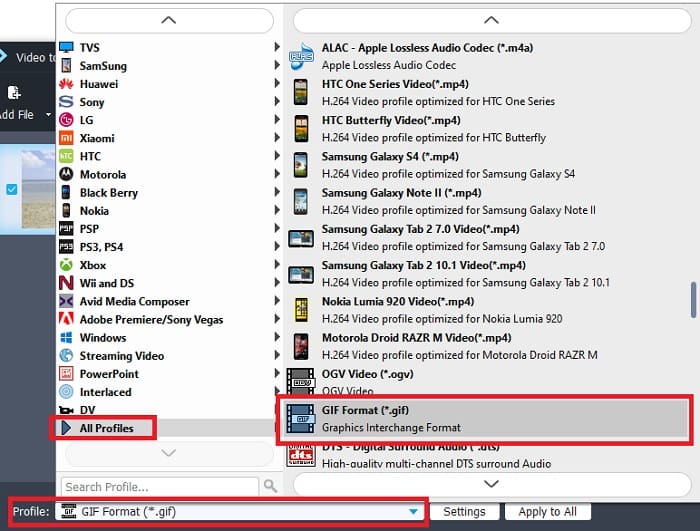
Langkah 3. Dalam antara muka utama anda akan melihat di bahagian bawah terdapat Profile, kemudian klik padanya. Kini anda boleh menukar fail .ts kepada format yang anda inginkan.
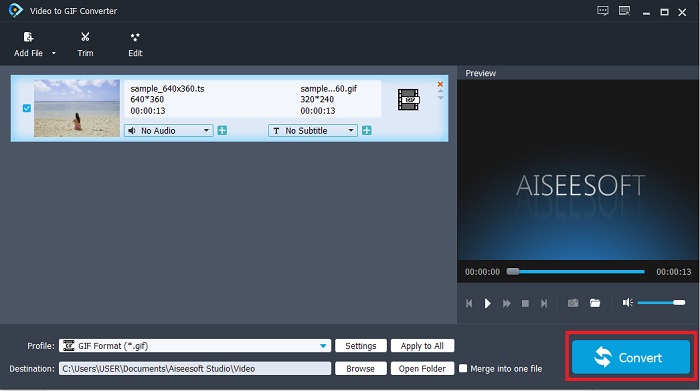
Langkah 4. Untuk mula menukar fail .ts klik butang Convert dan teruskan.
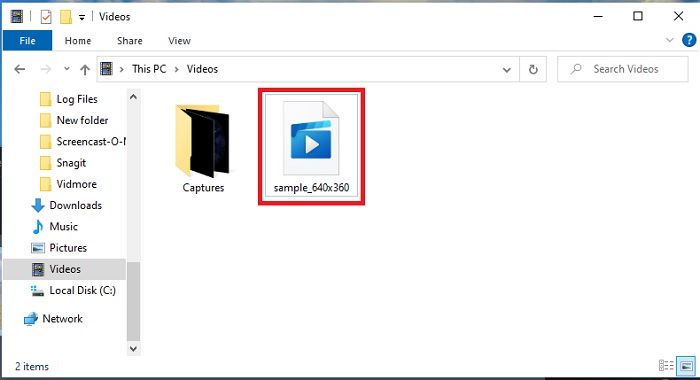
Langkah 5. Tunggu beberapa minit dan biarkan penukaran selesai. Kemudian cari fail .gif tersebut dalam penjelajah fail dan nikmatinya.
2. FVC Video Converter Ultimate
Jika penukaran yang menjadi masalah, maka FVC Video Converter Ultimate ialah penyelesaian terbaik. Ia sentiasa menyelesaikan pelbagai masalah penukaran yang mungkin anda hadapi. Memandangkan alat ini boleh mengubah format yang tidak boleh dimainkan kepada boleh dimainkan dan kemudian menambah baiknya. Penukar ultimate ini telah digunakan oleh lebih sejuta pengguna dalam talian dan mereka sudah menyukainya. Tetapi setiap alat yang berfungsi sebegini adalah berbayar, namun jika anda bukan jenis yang sukakan benda mahal maka inilah pilihannya. Selain harganya yang berpatutan, alat ini juga boleh menjadikan video sebagai GIF terbaik yang pernah anda lihat. Jadi, tanpa berlengah lagi, mari teruskan kepada langkah terperinci tentang cara menukar format TS kepada GIF dengan mengikuti langkah-langkah yang disediakan khas untuk anda.
Langkah 1. Langkah pertama untuk mendapatkan penukar ultimate ialah memuat turunnya ke pemacu PC atau Mac anda. Pasang dan ubah suai tetapan jika mahu dan klik finish untuk menyimpan perubahan.
Muat Turun PercumaUntuk Windows 7 atau lebih baharuMuat Turun Selamat
Muat Turun PercumaUntuk MacOS 10.7 atau lebih baharuMuat Turun Selamat
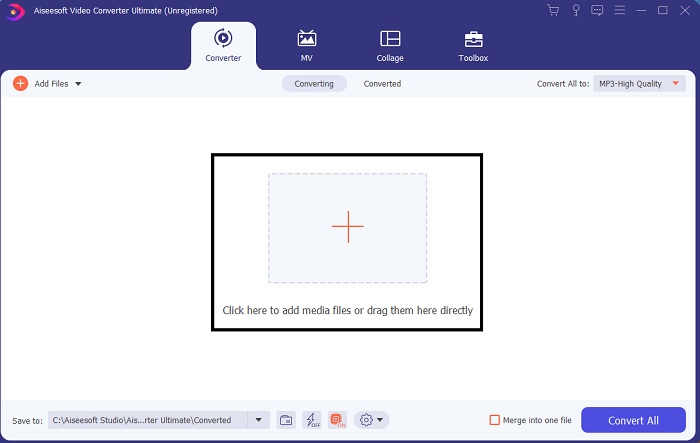
Langkah 2. Klik tanda tambah di tengah antara muka. Cari fail .ts yang anda mahu tukarkan kepada GIF dan klik open untuk menampalnya pada antara muka alat. Maklumat tambahan, anda boleh menambah banyak fail .ts atau lain-lain pada masa yang sama. Anda juga boleh menukarnya kepada format yang sama atau menukarnya satu per satu.
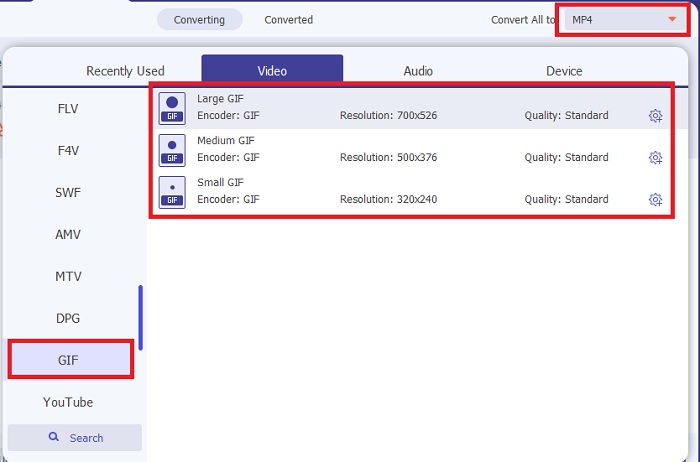
Langkah 3. Pada antara muka utama, klik butang drop-down di sebelah kiri. Pilih format GIF atau format lain yang anda mahukan.
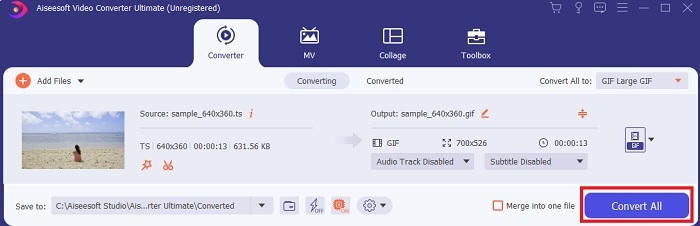
Langkah 4. Selepas memilih format GIF, klik butang Convert All untuk memulakan penukaran fail TS.
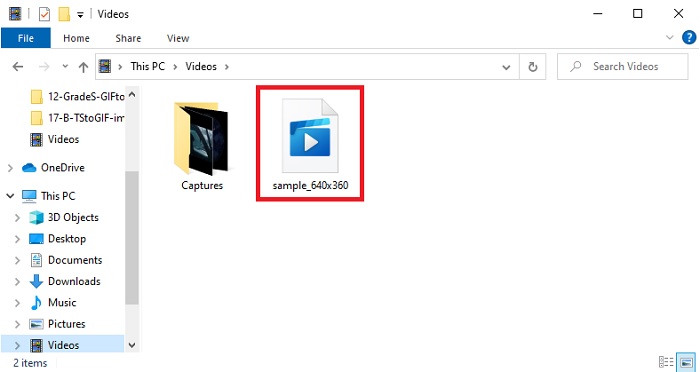
Langkah 5. Setelah penukaran selesai, satu folder akan muncul pada skrin anda. Klik fail yang baru anda tukar dan tonton sekarang.
3. CloudConvert
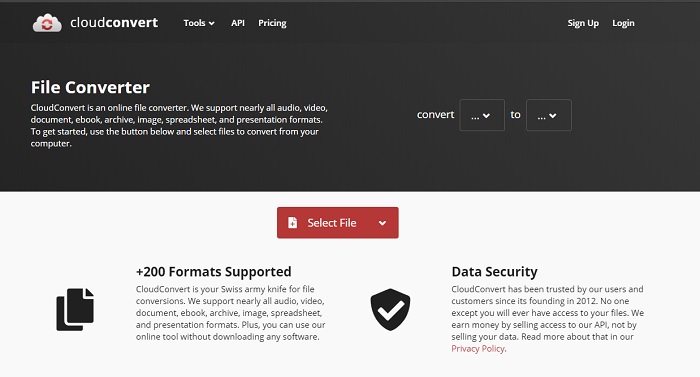
Jika anda tidak mahu memuat turun perisian di atas anda boleh gunakan CloudConvert ini. Tidak seperti dua penukar pertama, alat web ini bergantung kepada internet. Jadi, jika anda menukar di sini, anda mesti mempunyai sambungan internet yang stabil untuk mengelakkan gangguan atau kehilangan data seperti alat seterusnya. Tetapi CloudConvert menyokong penukaran asas dan juga format asas. Ia tidak mempunyai ciri penyuntingan seperti dua alat di atas. Namun kelebihannya ialah anda tidak perlu memuat turunnya ke storan anda.
4. Convertio
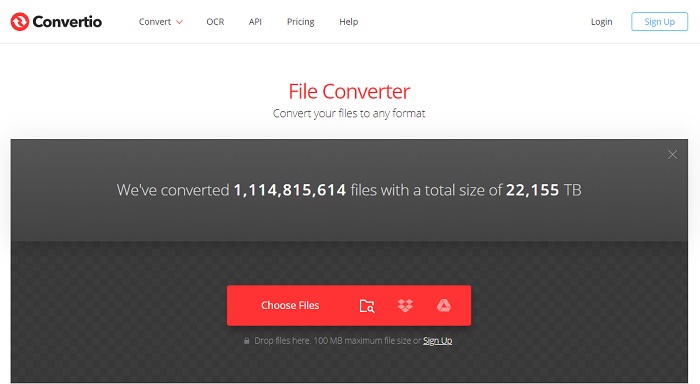
Dengan alat ini anda boleh melakukan penukaran TS kepada GIF berbilang jika mahu tetapi anda perlu mendaftar dahulu. Ini kerana had yang dibenarkan oleh Convertio untuk ditukar pada masa yang sama hanyalah dua. Tetapi ingat bahawa jika anda mendaftar ke alat ini, anda sudah pun mendedahkan data peribadi anda. Walaupun tiada berita tentang kebocoran data yang berlaku dalam alat ini, namun lebih baik berjaga-jaga sebelum terkena. Selain itu, alat web ini menyediakan pemampatan dan penukaran yang baik tetapi menyokong format yang lebih sedikit berbanding alat ultimate.
Bahagian 3. Soalan Lazim mengenai TS hingga GIF
Adakah fail TS dimampatkan?
Ya, itu adalah data video yang dimampatkan kerana menggunakan pemampatan .mpeg untuk melindungi dan mempunyai pemindahan yang selamat jika anda mahu ia dipindahkan kemudian.
Di mana saya boleh memainkan fail .ts?
Kebanyakan masa, anda tidak boleh memainkan fail .ts dalam pemain media terbina dalam anda dan juga sesetengah alat pihak ketiga. Tetapi ada pemain media yang boleh anda gunakan untuk memainkan fail .ts seolah-olah menonton filem di pawagam. Blu-ray Player ialah salah satu pemain media yang direvolusikan yang menyokong semua format dan memainkan semula kandungannya. Muat turun alat ini dengan mengklik pautan di bawah dan tonton fail .ts tersebut. Muat turun Blu-ray Player pada PC Muat turun Blu-ray Player pada Mac
Format mana yang terbaik untuk ditukar ke fail TS?
Berdasarkan penyelidikan kami, fail TS menyegerakkan main balik audio dan video sama seperti MP4. Walaupun MP4 tidak menyimpan fail yang disegerakkan, ini masih format terbaik yang boleh anda gunakan untuk menukar .ts. Selepas menukar fail TS kepada MP4, fail tersebut boleh dimainkan pada semua platform dan juga semua pemain media.
Kesimpulannya
Untuk menutup perbincangan, keputusan yang dijangka ialah FVC Video Converter Ultimate menjadi pemenang dalam pertarungan penukaran ini. Walaupun semua alat yang disenaraikan di sini boleh menukar TS kepada GIF, penukar ultimate masih merupakan penukar yang paling hebat antara semua penukar. Jadi, jika anda mahu penukaran yang sempurna maka muat turun alat ini dan nikmati proses penukaran.
-
 [Panduan] Cara Menukar Video M4V ke GIF Animasi pada Windows / Mac
 Sekiranya anda ingin membuat fail GIF animasi dari video M4V kegemaran anda, anda dapat mempelajari 2 cara mudah dan efisien untuk menukar video M4V ke GIF dengan tetapan yang disesuaikan.
-
 WebM ke GIF - 3 Penukar WebM ke GIF Percuma untuk Membuat GIF Anda Sendiri
 Adakah WebM adalah GIF? Bagaimana mengubah video menjadi GIF? Adakah terdapat penukar WebM ke GIF percuma? Catatan ini berkongsi 3 cara percuma untuk membantu anda menukar WebM ke GIF.
-
 Cara Menukar Video MKV ke GIF Animasi tanpa Photoshop / FFmpeg
 Setelah memuat turun dan menonton filem MKV di komputer anda, anda mungkin ingin berkongsi beberapa detik indah dengan rakan atau di Internet sebagai GIF. Dalam artikel ini, anda boleh mengetahui tentang 2 cara termudah untuk menukar MKV ke GIF.
