


 Video Converter Ultimate
 Perakam Skrin
 Pembaikan Video
 Muat Turun Selamat
7 Cara Mudah untuk Menukar HEIC kepada PNG dalam Beberapa Saat
Want to make your HEIC file widely compatible with other devices? We have what you are looking for! This article shows you the best ways to convert your HEIC file to PNG without having a hard time. So buckle up as we indulge in knowing the best ways to convert HEIC to PNG effortlessly.

Bahagian 1. Mengapa Menukar Format HEIC kepada PNG
Format fail HEIC ialah format imej yang dicipta oleh Apple. Ia ialah format imej yang biasa digunakan oleh peranti Apple. Walaupun ia mempunyai resolusi berkualiti tinggi, ia tidak mengambil terlalu banyak ruang pada peranti anda. Walau bagaimanapun, fail HEIC tidak serasi dengan peranti bukan Apple. Sebaliknya, PNG, yang bermaksud Format Grafik Mudah Alih, ialah format fail imej yang dicipta untuk menggantikan format GIF.
Ia adalah format imej yang paling banyak digunakan yang tidak dimampatkan, yang bermaksud ia mempunyai saiz fail yang besar. Namun begitu, hampir semua peranti menyokong format fail imej ini. Jadi jika anda ingin membuka imej HEIC anda pada peranti lain selain daripada Apple, lebih baik tukarkannya kepada format fail PNG.
Bahagian 2. 5 Cara Mudah untuk Menukar Fail HEIC Anda kepada Fail PNG Dalam Talian
Mencari cara terbaik untuk menukar HEIC kepada PNG agak sukar. Walau bagaimanapun, kami mencari kaedah terbaik dan paling mudah untuk anda menukar HEIC kepada format fail PNG.
Gunakan FVC Percuma HEIC ke PNG Converter
The most excellent way to convert HEIC to PNG is to use a converter tool. And The best tool that we found on the internet is FVC Free HEIC to PNG Converter. This converter is an online tool that conveniently converts your HEIC file to PNG file format. In addition, if you want to batch convert your HEIC file to PNG, this tool has that feature for you.
Ia juga boleh diakses dalam hampir semua pelayar biasa menjadikannya alat tanpa had pelayar. Tambahan pula, ia mempunyai antara muka perisian yang mudah dan tidak mempunyai had saiz fail, jadi anda boleh menukar fail HEIC tanpa memikirkan saiz fail. Oleh itu, ikuti panduan mudah di bawah jika anda berminat untuk menggunakan penukar HEIC ke PNG dalam talian ini.
Step 1. On your browser, search FVC Free HEIC to PNG Converter. You can also click this link to go directly to their webpage. This is what the first interface looks like:

Step 2. Next, click the Add HEIC/HEIF File(s) button. Your computer folders will appear, where you will select your HEIC file.
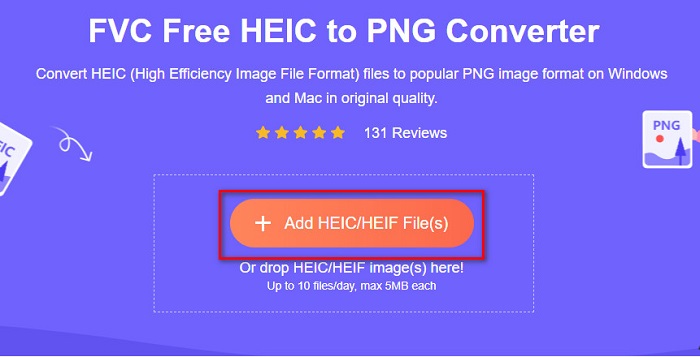
Step 3. Then, your computer folders will appear, where you will select your HEIC file. Press Open. Then your HEIC to PNG conversion will start.

Step 4. Lastly, the software’s interface, click the Download button, to download your PNG file.

Mudah, bukan? Anda boleh menukar fail HEIC anda kepada fail PNG dengan mengikuti langkah mudah ini.
Gunakan Xconvert.com
Xconvert is a free online HEIC to PNG Converter that easily converts HEIC files to PNG files. This online converter has an easy-to-use software interface beneficial for beginner users. Moreover, you can change the image resolution of your image when using this online converter. However, since it is an internet-dependent tool, you may experience a slow conversion process when the internet is slow. It also contains ads that might be disturbing for you.
Step 1. Search Xconvert.com in your browser. On their website, click the Add Files button, then your computer files will appear, and then select your HEIC file.

Step 2. Your image will be uploaded to the software’s interface. After uploading, click the Convert button located at the bottom right corner of the software interface. And then wait for your file to be ready to download, then proceed to the next step.
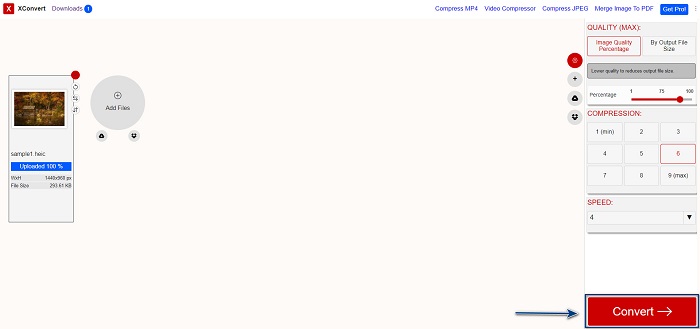
Step 3. When your file is ready, click the Download button to download your PNG file; above the download button, you will also see the output size and how long it took to convert.

Gunakan Zamzar
Another way to convert HEIC to PNG online is using Zamzar online converter. You probably have seen this converter when searching for a HEIC to PNG converter. This converter is accessible in almost all browsers available. In addition, it has a simple user interface making it a user-friendly tool. However, your file may be corrupted when the internet is interrupted during your conversion process. Nevertheless, many users use this converter to change HEIC to a PNG file.
Step 1. On the browser that you use, search Zamzar. On their website, click the Add Files button. Your computer files will appear, then upload your HEIC image.

Step 2. After uploading your HEIC file, click the drop-down button, then select PNG as your file output format.

Step 3. Finally, click the Convert Now button to convert your HEIC file to PNG file format. Then download your PNG file. Just wait for a couple of seconds, and that’s it!

Gunakan Alat Penukaran.io
Conversion Tool is an online HEIC to PNG converter with a simple user interface. It can convert your HEIC file to PNG at high speed. Furthermore, it does not contain many ads, unlike other online converters. But the downside of it is that you can only convert ten files a day, and it has a file size limit. But if you are converting a small file, then this tool may be suited for you.
Step 1. Search Conversion Tools.io in your browser. Then, click the Browse button on the software’s main interface, or drag and drop your HEIC file on the Browse button.

Step 2. After, click the Run Conversion button to begin converting your HEIC file to a PNG file. And then wait for your image file to load, then proceed to the next step.

Step 3. To end, click the Download button to download your PNG file.

Gunakan CDKM
One last tool that we will present to you is CDKM. This tool allows you to convert HEIC files to PNG with just a few clicks. However, using this online converter may take a few seconds to convert, depending on your internet speed. It also contains ads that may be irritating for you. Nonetheless, it does not have any file size limit, so it is worth trying.
Step 1. On your browser, search CDKM online converter. On the software’s main interface, click the Choose Files button. Your computer folders will appear, then select your HEIC file to upload.

Step 2. Next, click the Start Conversion button to start the conversion process.

Step 3. Lastly, scroll down a little and see the Download button. Click the Download button to download your PNG file.

Bahagian 3. Tukar HEIC kepada PNG pada Mac
Peranti Apple menyokong format fail HEIC dan dengan menggunakan Mac, anda boleh membuka fail HEIC secara asli. Tetapi jika anda ingin menukar fail HEIC anda kepada PNG, anda boleh menukarnya menggunakan Apl Foto dalam Mac. Sehubungan itu, jika anda seorang pengguna Mac, lebih baik baca bahagian ini.
Step 1. First, drag and drop your HEIC file to the Photo App. Then, preview your HEIC photo and click the File > Export button > Export 1 Photo.

Step 2. After, on the Photo Kind, click the output format that you want. Select PNG file format.

Step 3. And then, click the Export button, then select the destination of your file output. You will see that your HEIC file is changed to PNG file format.

Bahagian 4. Tukar Fail HEIC kepada PNG pada iPhone
Jika anda menggunakan iPhone, anda boleh membuka fail HEIC pada peranti anda. Tetapi jika anda ingin menukar fail HEIC anda kepada PNG menggunakan peranti iPhone, maka kami ada cara untuk anda. Dengan mengikuti langkah mudah dan mudah di bawah ini, anda boleh menukar HEIC kepada PNG dengan mudah.
Step 1. On the Photo App on your iPhone, tap the Select button located at the top of your screen. And then, select your HEIC file, then click the Share icon.
Step 2. Slide up your screen; you will see the Copy Photo option, then click it.
Step 3. Finally, go to the Files app, tap the browse button and select your desired output location (click iCloud Drive or On my iPhone). Then paste your HEIC file there.

Selepas anda menampal fail anda, anda akan melihat bahawa fail anda akan ditukar secara automatik kepada fail PNG.
Bahagian 5. Pengetahuan Lanjutan tentang Fail HEIC dan Fail PNG
Jika anda masih ragu-ragu jika anda ingin menukar fail HEIC anda kepada PNG, kami menyediakan anda carta perbandingan untuk membantu anda membezakan perbezaan antara kedua-dua fail ini. Selain itu, ia memberi anda gambaran keseluruhan yang jelas tentang ciri HEIC dan PNG. Baca dengan teliti untuk mengetahui perbezaan antara fail HEIC dan fail PNG.
| HEIC | PNG | |
| Keserasian | Hanya peranti Apple yang menyokong format fail ini. | Hampir semua peranti menyokong fail ini, termasuk Apple, peranti. |
| Saiz fail | Saiz fail kecil. | Boleh mencapai saiz fail yang besar. |
| Kualiti gambar | Kualiti imej yang tinggi. | Mempunyai kualiti yang baik, tetapi tidak lebih baik daripada fail HEIC. |
| Mampat/Tidak Mampat | Termampat | Tidak dimampatkan |
| Penyuntingan | Mengekalkan kualiti imej semasa mengedit. | Kualiti mungkin merosot apabila mengedit. |
Bahagian 6. Soalan Lazim tentang Menukar HEIC kepada PNG
Adakah penukaran HEIC kepada PNG menjejaskan saiz fail?
ya. Apabila anda menukar HEIC kepada PNG, ia akan meningkatkan saiz fail, walaupun ia tidak akan tinggi.
Bolehkah anda membuka fail PNG pada Adobe Photoshop?
Sudah tentu. Anda boleh membuka fail PNG pada Adobe Photoshop kerana Adobe Photoshop menyokong format fail PNG.
Bolehkah anda membuka format fail PNG pada peranti Apple secara asli?
ya. Apabila anda mengambil tangkapan skrin daripada iPhone anda, ia akan disimpan secara automatik pada Camera Roll anda sebagai fail PNG.
Kesimpulannya
At last! We are now to the end of our adventure. This article gives you the best solutions to convert your HEIC file to PNG file format. And all the online HEIC to PNG converters that are shown above can effectively convert your file effortlessly. Moreover, there are also other options that you can use if you are a Mac or iPhone user. But if you are looking for the best HEIC to PNG converter with the outstanding features to use, then FVC Free HEIC to PNG converter is the best choice for you.
-
 Cara Membuka Fail HEIC pada Windows, Mac dan Dalam Talian
 Adakah anda sedang mencari cara bagaimana untuk membuka fail HEIC? Artikel ini memberikan anda penyelesaian terbaik untuk membuka fail HEIC pada Windows, Mac dan Dalam Talian.
-
 JPG VS GIF: 3 Cara Mudah untuk Menukar JPG kepada GIF
 Adakah anda ingin tahu perbezaan antara JPG dan GIF? Atau adakah anda ingin menukar JPG kepada format animasi GIF? Kemudian baca artikel ini untuk mendapatkan idea.
-
 5 Cara Terbaik untuk Menukar Imej kepada GIF Beranimasi [Dikemas kini 2022]
 Perlukan imej penukar kepada GIF? Artikel ini akan menyediakan lima penukar terbaik yang boleh kami temui di pasaran. Jadi, mari's mengetahui alatan ini dengan membaca artikel ini.
