


 Video Converter Ultimate
 Perakam Skrin
 Pembaikan Video
 Muat Turun Selamat
Tingkatkan Kualiti Imej Menggunakan Kaedah Pantas dan Mudah Ini
Do you have an image that is blurry or has a low quality? The best solution that you must do is to increase the quality of your image. Luckily, numerous tools can help you improve your image’s quality. However, not all applications or tools on a computer have the best features. That’s why we searched for the most popular photo enhancers online, offline, and on iPhone. To learn how to improve image quality, read this post.

Bahagian 1. Cara Meningkatkan Kualiti Imej Dalam Talian
Menggunakan penambah imej dalam talian adalah lebih mudah daripada memuat turun aplikasi perisian pada komputer anda. Kelebihan menggunakan alat dalam talian ialah anda boleh mengaksesnya secara bebas di web anda. Bahagian ini akan menunjukkan kepada anda cara meningkatkan kualiti imej anda menggunakan penambah foto dalam talian yang paling menakjubkan.
FVC Free Image Upscaler is an online, free-to-use image enhancer popular with many. This online application can set the magnification to 2x, 4x, 6x, and 8x. In addition to that, it supports the most standard image formats, including PNG, JPG, JPEG, and BMP. You can also access it on all web browsers, including Google, Firefox, and Safari. Also, you do not need to worry about the safety of your data because this tool is safe to use.
Selain itu, ia mempunyai teknologi AI berkuasa yang secara automatik mengecam bahagian kabur imej anda. Selain itu, FVC Free Image Upscaler boleh membetulkan piksel yang hilang, tekstur warna dan butiran lanjut. Jika anda ingin menggunakan penaik imej yang sangat baik ini, ikuti panduan mudah di bawah.
Bagaimana untuk meningkatkan kualiti imej dalam talian menggunakan FVC Free Image Upscaler:
Step 1. Open your browser and search FVC Free Image Upscaler on the search box. You can go directly to their main page by clicking the link provided.
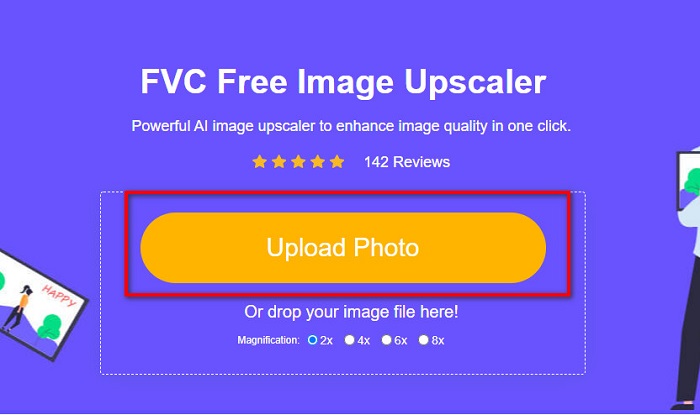
Step 2. Next, click the Upload Photo button on the main interface to upload the image you want to upscale. Wait for your image to upload, then proceed to the next step.
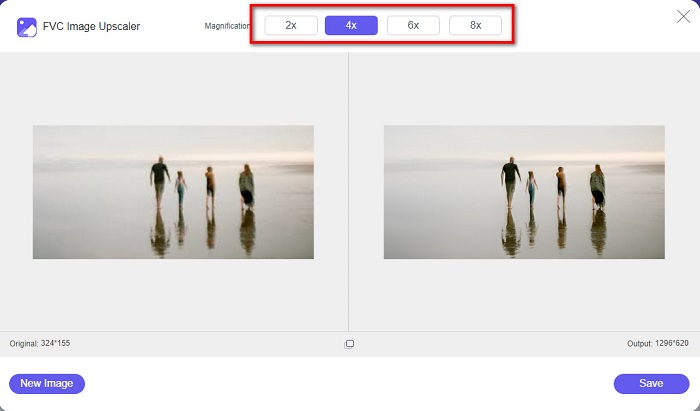
Step 3. And then, choose the Magnification that you want for your image. You can choose between 2x, 4x, 6x, and 8x.
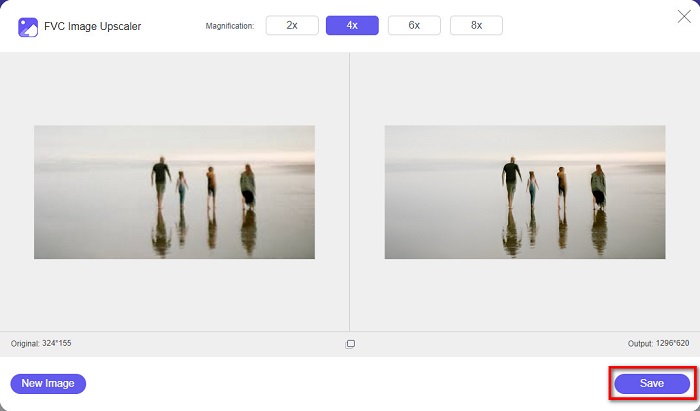
Step 4. You can see the preview of your image, and if you are content with it, click the Save button to save your upscaled image on your device.
Dan itu sahaja! Anda kini boleh melihat imej anda pada komputer anda dengan paparan berkualiti tinggi.
Bahagian 2. Bagaimana Meningkatkan Kualiti Imej dalam Photoshop
Kami mempunyai perkara yang anda mahukan jika anda suka menggunakan alat profesional untuk meningkatkan kualiti imej anda. Bahagian ini akan mengajar anda bagaimana untuk meningkatkan kualiti foto menggunakan Adobe Photoshop.
Adobe Photoshop is a professional editing app that you can use to enhance the quality of your image. Adobe Photoshop has many editing tools that you can use to edit images. Additionally, many professionals use this tool because it has many functions. Also, this application produces high-quality outputs that you can share on other social media platforms or websites. Moreover, Adobe Photoshop is one of the best creations of Adobe Company which you can download on almost all media platforms. By using this editing application, you can design logos, banners, brochures, and more. But many users do not know that it can also enhance an image. However, many users have difficulty using this tool because it has a hard-to-operate software interface and is a bit costly to download.
Langkah-langkah bagaimana untuk meningkatkan kualiti imej dalam Photoshop:
Step 1. First, download Adobe Photoshop on your computer. Follow the installation process, then open the app.
Step 2. Go to File > Open on the main interface and select the image you want to improve.
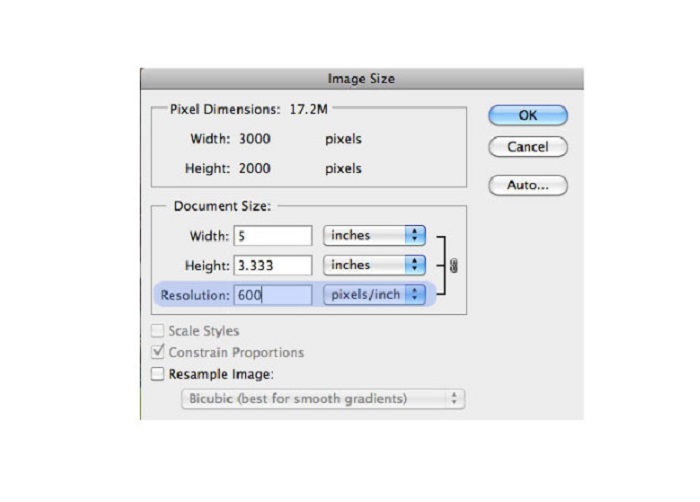
Step 3. And then, go to Image > Image Size. Then a dialog box will prompt where you will uncheck the Resample Image box so that it will only change the resolution of your image. And on the resolution option, type in the resolution that you want for your image.
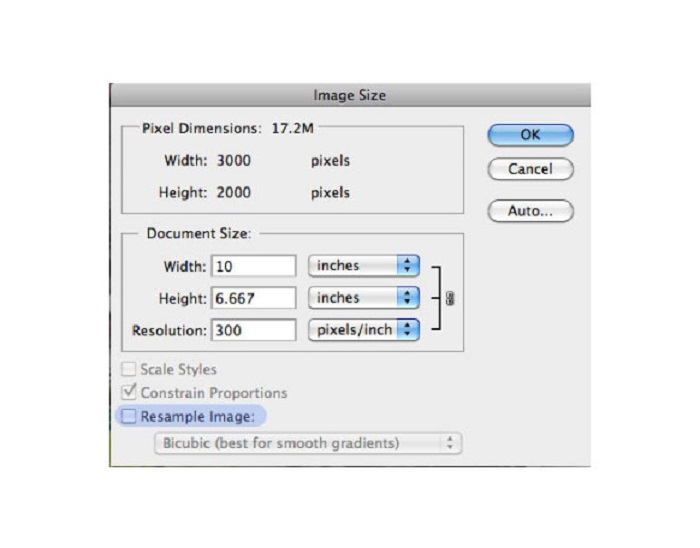
Step 4. Once you change the Resolution, the Width and Height of your image will also change. Then, click the OK button to save the change you made to your image. With this way, you can convert low resolution images to high.
Bahagian 3. Bagaimana untuk Meningkatkan Kualiti Foto pada iPhone
Sesetengah apl boleh meningkatkan imej berkualiti rendah anda jika anda seorang pengguna iPhone. Walaupun banyak apl penambah foto tersedia di AppStore, kami memilih yang paling terkenal di kalangan mereka. Baca bahagian ini untuk mengetahui cara meningkatkan kualiti foto pada iPhone.
Remini is one of the best apps that you can use to enhance your low-quality image. This amazing app has a simple interface, making it a user-friendly app. Furthermore, it also uses AI technology that automatically detects the blurred parts of your image. It is also a safe-to-use app, so your files are safe when using this app. The downside of this app is that you need to watch an ad to view and download the result, or you can purchase its full version to download the results without watching an ad.
Cara meningkatkan kualiti gambar pada iPhone menggunakan aplikasi Remini:
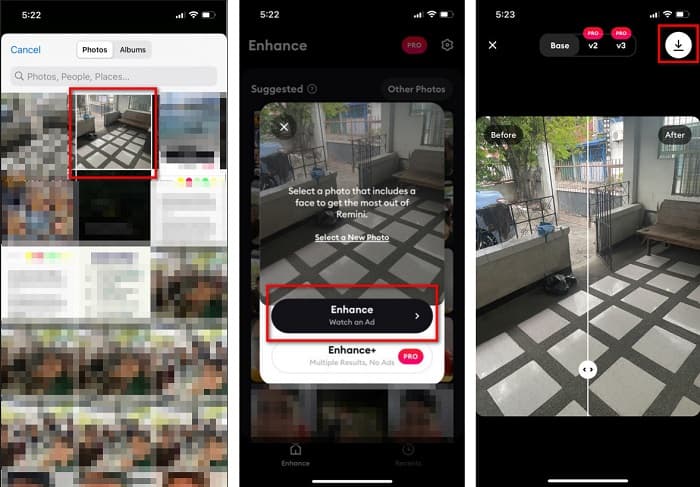
Step 1. Download the Remini app on AppStore. After downloading it, open the app on your phone.
Step 2. And then, on the main app’s interface, select the image you want to upscale.
Step 3. Next, tap the Enhance button to improve the quality of your image. If you avail of the pro version of the app, you do not need to watch an ad. But if not, it will require you to watch an ad to see and save the result.
Step 4. Now, you can view your improved image. Then, tap the Download icon in your screen's top-right corner. And voila! With those easy steps, you can improve the quality of your image.
Bahagian 4. Soalan Lazim tentang Cara Meningkatkan Kualiti Foto
Adakah terdapat aplikasi yang boleh meningkatkan kualiti imej pada Android?
Alat Pertingkat kualiti foto ialah salah satu apl penambah kualiti imej terbaik untuk meningkatkan kualiti imej anda. Menggunakan gambar Kesan Mencantikkan akan memberikan imej anda rupa profesional.
Bagaimana untuk meningkatkan kualiti foto dalam Lightroom?
Adobe Lightroom is another Adobe product that you can use to enhance the resolution of your image. Read the simple steps below to learn how to improve photo quality in Lightroom. 1. Download Adobe Lightroom on your computer. 2. Then, open your image in Lightroom. 3. Click Choose Photo > Enhance. 4. Next, select the Super Resolution, then click Enhance. 5. And then, you will see that Lightroom will increase the resolution of your image and save it as a DNG file.
Adakah ia akan menjejaskan saiz fail jika anda mempertingkatkan imej anda?
Menukar resolusi cetakan tidak akan mengubah bilangan piksel imej anda dan tidak akan menjejaskan saiz imej anda.
Kesimpulannya
It is easy to improve image quality, especially now that you have a guide to follow. Also, many apps on a computer or iPhone can help you upscale your image. However, if you want to use a free image upscaler that automatically upscales your blurred image, use FVC Free Image Upscaler now.
-
 5 Cara Cara Menghilangkan Tera Air B612 Menggunakan Alat Terbaik
 Ingin tahu cara membuang tera air B612 daripada foto anda? Anda boleh mengalih keluar tera air B612 daripada imej anda dengan mudah menggunakan alat yang luar biasa ini.
-
 Langkah Mudah tentang Cara Mengalih Keluar Tera Air Slider WOW [Diselesaikan]
 WOW Slider ialah aplikasi untuk mencipta tayangan slaid yang hebat. Walau bagaimanapun, ia membenamkan tera air pada outputnya. Baca di bawah untuk mengetahui cara mengalih keluar tera air Slider WOW.
-
 Kaedah Mudah Cara Membuang Tera Air Kalis Pucuk
 Alih keluar tera air kalis pucuk dengan mengikuti kaedah mudah ini. Gunakan penanggal tera air yang menakjubkan ini untuk mengalih keluar tera air Kalis Pucuk daripada imej anda dengan mudah.
