


 Video Converter Ultimate
 Perakam Skrin
 Pembaikan Video
 Muat Turun Selamat
Cara Menyahpiksel Imej dengan Pantas dengan 3 Penyelesaian Terbaik untuk Digunakan
Nyahpiksel imej ialah penyelesaian yang anda perlukan untuk memberikan perubahan pada imej yang menjadi berpiksel atau jika imej anda telah dibitkan dengan petak-petak kecil. Ramai pengguna beranggapan menyunting, melaras, mengubah dan menambah baik imej itu leceh; sebenarnya memang begitu, tetapi itu dahulu. Dengan teknologi canggih yang boleh kita capai sekarang, tugas ini menjadi sangat mudah diselesaikan apabila anda menggunakan alat yang betul.
Tidak mempunyai alat yang sesuai untuk mengalih keluar pikselasi pada foto anda? Nasib baik, artikel ini akan membawakan anda tiga perisian terbaik yang kami temui yang boleh membantu anda mengedit pikselasi foto dan tutorial pada setiap satu untuk menyelesaikan masalah.

Bahagian 1. Cara Menyahpiksel Imej Dalam Talian dengan Editor Foto Pilihan Terbaik [Disyorkan]
FVC Free Image Upscaler ialah alat dalam talian automatik sepenuhnya yang boleh anda gunakan untuk menyahpiksel imej dalam talian secara percuma. Anda boleh membukanya pada mana-mana pelayar web yang anda ada – tidak perlu memuat turun pelancar untuk menjalankannya, jadi anda boleh terus menggunakan alat ini sebaik sahaja anda mengaksesnya. Walaupun perisian ini tersedia di web, kuasa dan prestasinya dalam menyahpiksel imej setanding dengan penyunting imej profesional yang boleh anda gunakan, sama ada dalam talian atau luar talian. Mungkin anda fikir anda akan menghadapi kesukaran menggunakan alat ini, tetapi sebenarnya tidak. Masih belum yakin? Jika begitu, anda boleh membaca atau mengikuti tutorial yang dinyatakan di bawah untuk memberi anda panduan langkah demi langkah tentang cara menggunakan alat ini dengan mudah.
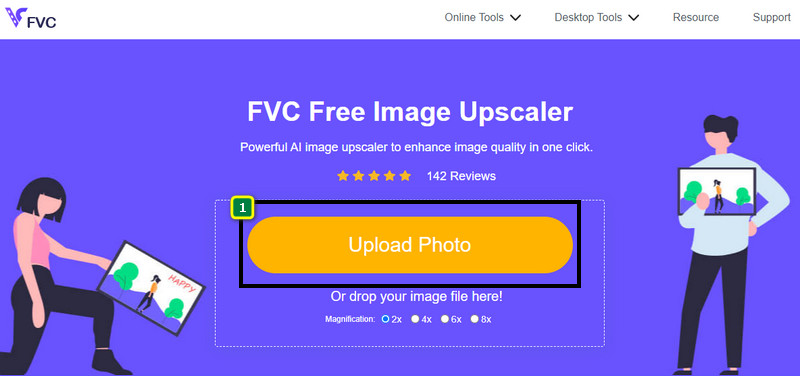
Langkah 1. Anda boleh mengakses alat web ini pada mana-mana pelayar web yang ada pada peranti anda dengan mencari namanya atau mengklik pautan ini untuk membuka laman web utamanya.
Langkah 2. Sebaik sahaja berada pada alat web, klik Add Image untuk memuat naik imej yang berpiksel. Folder fail akan muncul pada skrin anda; anda boleh mula mencari imej yang disimpan pada pemacu tempatan anda, kemudian tekan Open untuk memuat naiknya.
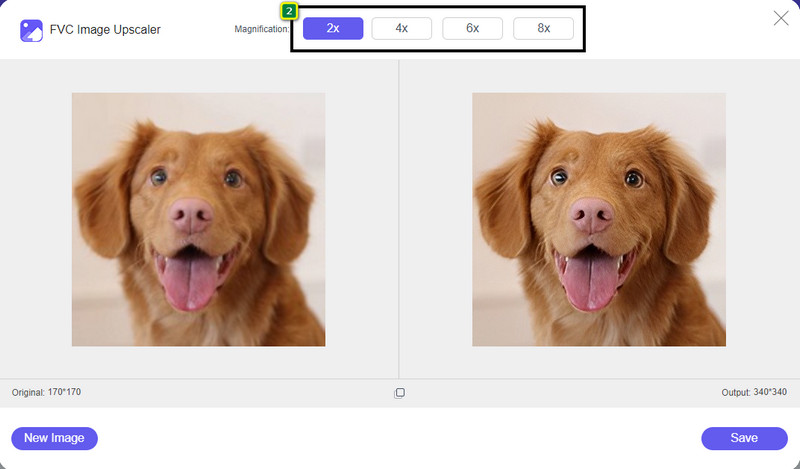
Langkah 3. Seterusnya, pilih pilihan pembesaran yang anda mahu terapkan pada imej anda untuk melicinkan rupanya supaya ia tidak lagi kelihatan seperti bitmaps dengan petak-petak kecil.
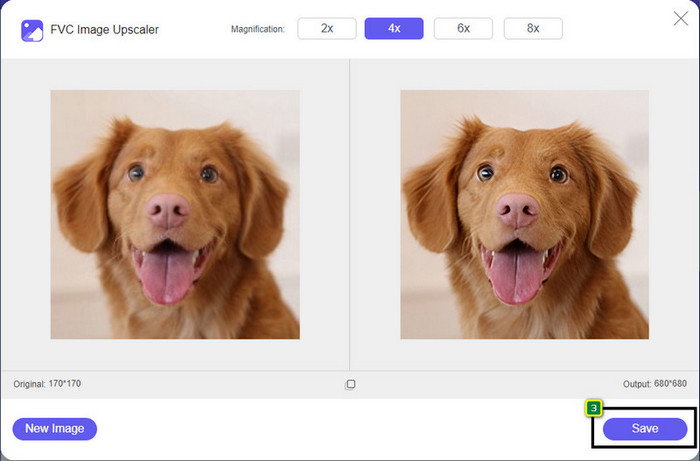
Langkah 4. Semudah itu, klik Save untuk memuat turun versi yang telah dinyahpiksel ke dalam pemacu tempatan anda.
Bahagian 2. Cara Menyahpiksel Imej Luar Talian Menggunakan 2 Cara pada Windows & Mac [Mudah]
Pixbim - Nyahpixel Foto pada Windows
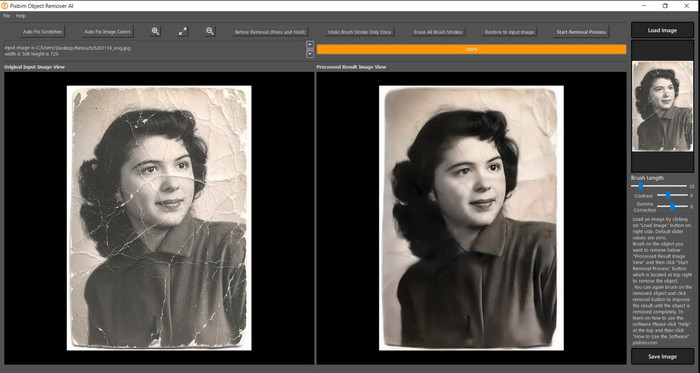
Pixbim ialah salah satu perisian nyahpiksel imej paling berkuasa dan disokong AI yang boleh anda muat turun pada Windows anda untuk menyelesaikan masalah ini. Penyunting ini wajar disebut dalam artikel ini kerana ia menyelesaikan imej berpiksel dengan cepat dan cekap. Dengannya, AI melaras parameter untuk anda supaya anda tidak menghadapi komplikasi menggunakan perisian ini. Disebabkan ciri dan fungsinya, anda perlu membeli kunci lesen untuk terus menggunakannya selepas tempoh percubaan percuma. Ia mungkin mahal bagi ramai pengguna yang mahu memasangnya pada PC mereka.
Langkah 1. Setelah anda memuat turun perisian tersebut, anda perlu melancarkannya supaya kita boleh meneruskan ke langkah seterusnya.
Langkah 2. Tekan Load Image untuk menambah imej berpiksel yang anda mahu tingkatkan di sini.
Langkah 3. Selepas itu, laraskan parameter dengan menggerakkan sliders mengikut nilai yang ingin anda capai.
Langkah 4. Setelah anda selesai melaras imej, simpan hasilnya sekarang untuk mengeksportnya.
Editor Foto Movavi [Windows & Mac]
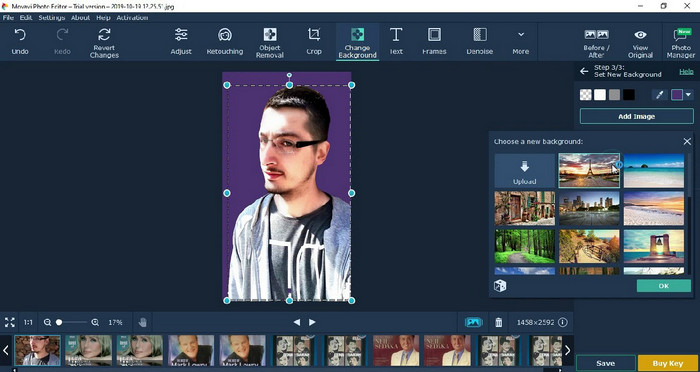
Ramai pengguna telah pun mencuba menggunakan Movavi Photo Editor kerana kepelbagaian fungsinya dalam menyunting imej. Seperti Pixbim, ia boleh memulihkan piksel imej yang hilang dengan sokongan rangkaian neural AI-nya. Dengan penyunting ini di tangan anda, anda boleh melakukan suntingan asas dan lanjutan pada rupa imej, seperti memotong (crop), memusing (rotate), menambah penapis, membetulkan piksel, dan banyak lagi. Namun, anda tidak akan mendapat semua fungsi ini jika anda tidak membeli versi premium pada desktop anda.
Ia mempunyai harga yang hampir serupa dengan Pixbim, yang agak mahal bagi kebanyakan orang. Tetapi jika anda mempunyai belanjawan untuk membeli editor, ini mungkin yang anda perlukan. Ketahui cara menyahpiksel imej dengan apl ini dengan mengikut langkah-langkah.
Langkah 1. Muat turun aplikasi pada Windows atau Mac OS anda.
Langkah 2. Lancarkan perisian, kemudian muat naik foto yang anda mahu nyahpiksel di sini.
Langkah 3. Setelah anda memuat naik imej, klik Magic Enhance untuk mengubah suai imej secara automatik dengan AI.
Langkah 4. Eksport imej tersebut dan nikmati hasilnya.
Bahagian 3. Soalan Lazim tentang Cara Meningkatkan Imej
Mengapakah terdapat tera air pada imej unpixelate yang dieksport?
Apabila anda menggunakan versi percubaan percuma aplikasi, terdapat kemungkinan ia meninggalkan tera air apabila dieksport. Jadi, jika anda ingin mengeksport imej tanpa tera air, anda boleh membeli lesen aplikasi atau menggunakan FVC Free Image Upscaler, kerana ia tidak akan meninggalkan tera air pada imej yang dieksport.
Apakah perbezaan antara kabur dan piksel?
Banyak artikel telah membuktikan bahawa kabur dan piksel adalah tidak sama kerana beberapa faktor. Imej kabur adalah sebab anda menangkap gerakan berkelajuan tinggi atau mengambil gambar dengan kamera goyah. Semasa piksel, apabila anda membesarkan syot kilat, ia akan memulakan pikselasi, dan anda akan melihat peta bit dengan segi empat sama kecil.
Apakah faktor yang menjadikan imej berpiksel?
Beberapa sebab menukar imej kepada piksel; punca biasa ialah apabila anda membesarkan imej raster. Format raster, seperti PNG, JPG, GIF dan banyak lagi, terdiri daripada petak kecil yang membina rupa objek yang disimpan dalam bekas ini. Biasanya, apabila anda membesarkan imej, anda akan melihat bahawa terdapat segi empat sama, dikenali sebagai piksel, yang mengandungi data warna yang dipersembahkan secara visual. Ia boleh menjadi masalah kepada banyak editor, terutamanya apabila pikselasi berlaku.
Bagaimanakah saya boleh membetulkan hingar imej?
Ini adalah satu lagi masalah biasa yang mungkin anda hadapi pada imej yang anda ambil, dan penyelesaian yang anda perlukan mungkin ada dalam artikel ini. Klik pautan ini untuk membaca, menyelesaikan dan mempelajari dengan mudah cara menghapuskan hingar imej.
Kesimpulannya
Semudah itu, kini anda boleh menyahpiksel imej dengan mudah dengan bantuan penyunting imej terbaik yang boleh anda muat turun atau gunakan di web. Masalah ini telah selesai! Jadi, jika anda menghadapi masalah pemikselan, anda boleh bergantung pada artikel ini untuk membantu anda. Alat terbaik yang anda perlukan ada di sini dan sedia membantu anda, seperti FVC Free Image Upscaler. Adalah terbaik untuk melaras dengan membetulkan pemikselan pada rupanya supaya ia tidak ditonjolkan secara visual pada pandangan semua orang. Ucapkan selamat tinggal kepada pemikselan apabila anda menggunakan penyunting imej dalam talian ini.
-
 7 Penskala Imej yang Boleh Anda Gunakan untuk Meningkatkan & Memperbaik Setiap Imej [2022]
 Adakah anda memerlukan penaik imej? Nasib baik, artikel ini merangkumi perisian terbaik yang boleh anda akses dan muat turun pada desktop anda.
-
 5 Penambah Resolusi Imej Anda Mesti Gunakan 2022 Ini [Pilihan Terkini]
 Tidak tahu penambah resolusi imej apa yang patut anda gunakan? Baca artikel ini sambil kami menyemak lima alatan untuk menggunakan dan meningkatkan peleraian imej.
-
 4 Apl untuk Meningkatkan Resolusi Gambar pada Peranti Mudah Alih Anda [Pilihan Terbaik]
 Anda memerlukan apl untuk meningkatkan peleraian foto anda jika anda ingin mencapai 1080p, 4k atau sebagainya. Dengan senarai di bawah anda boleh melakukannya dengan mudah!
